This thread has been locked.

If you have a related question, please click the "Ask a related question" button in the top right corner. The newly created question will be automatically linked to this question.

boot dsp in lcdk

Other Parts Discussed in Thread: OMAPL138, OMAP-L138, SYSBIOS, TVP5147M1

From the document, http://processors.wiki.ti.com/index.php/Boot_Images_for_OMAP-L138#Booting_DSP_Binaries

i find
"This section provides information on how to boot a DSP executable on ARM-boot devices. An ARM user boot loader (UBL) will run first and is required to wake up the DSP, which will begin execution of the DSP application. The ARM and DSP programs are combined into a single AIS image which can be flashed and booted directly."

(1) Do ti provide arm ubl project for lcdk?

(2) arm ubl and arm bootloader(starterware),is the same?
    if yes,how to use the bootloader project in starterware?

(3) if ti does not provide the arm ubl for lcdk, i want to modify the evm demo(include ubl). What do I need to be careful of?

thanks.

  • Hi Hui,

    Hui says said:
    (1) Do ti provide arm ubl project for lcdk?

    yes, The ARM UBL is provided for OMAPL138 LCDK as a part of OMAPL138 Starterware Code in the path: C:\ti\OMAPL138_StarterWare_1_10_03_03\bootloader\src

    Hui says said:
    (2) arm ubl and arm bootloader(starterware),is the same?
     if yes,how to use the bootloader project in starterware?

    yes, the ARM UBL is nothing but the ARM bootloader code given in the starterware. Using CCS, you can use this example code like any other starterware examples by importing it's project files into CCS.

    You can follow this link for importing sample projects into CCS: http://processors.wiki.ti.com/index.php/Importing_Projects_into_CCS


    Hui says said:
    (3) if ti does not provide the arm ubl for lcdk, i want to modify the evm demo(include ubl). What do I need to be careful of?

    This is not needed as TI provides the ARM UBL for LCDK.

    Regards,

    Shankari

    -------------------------------------------------------------------------------------------------------

    Please click the Verify Answer button on this post if it answers your question.
    --------------------------------------------------------------------------------------------------------

  • Thanks for your reply.

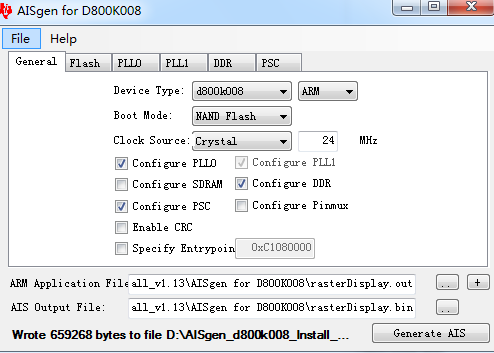
    (1) Open the AISgen tool and select File,Load the lcdk .cfg 

    (2) Fill in the "ARM Application File" field with both the ARM UBL and the DSP program. When given two source application files, the AISgen tool will combine them into a single image, in the order that they are listed.

    First, click the "..." button and provide the path to boot.out file

    Next, click the "+" button and choose the rasterDisplay.out file for dsp

    (3)Generate AIS

    when i flash the AIS image, the lcdk is not work.why? 

    when i do not use boot.out and use the raster for arm, all things are ok.

  • Hi Hui,

    Did you mention the "specific entry point" field either in the AIS gen tool or in the UBL source code, bl_main.c?

    That is the entry point needed to jump into the DSP application after running the ARM UBL code.

    That entry point can also be feed through the *.cfg file through "Specify Entrypoint=<address in hex>".

    When you build the raster display.out, one more file *.map file will also get generated from which you can take the entry point and give it in bl_main.c 

    Regards,

    Shankari

    -------------------------------------------------------------------------------------------------------

    Please click the Verify Answer button on this post if it answers your question.
    --------------------------------------------------------------------------------------------------------

  • In the beginning, i want to set the entry point, but "cannot specify an entrypoint without at least one binary file" is displaying.

    When i dont set entry point for arm rasterdiaplay.out file, the lcdk is ok. So i ignore it.

    how to set the entry point value for booting dsp? if not set, the default value is what?

    OUTPUT FILE NAME:   <rasterDisplay.out>
    ENTRY POINT SYMBOL: "_c_int00"  address: c009b800

  • Hi Hui,

    yes, you are right.

    In the bl_main.c, set the entry point as below and try combining both the .outs and create a .ais file. Hopefully it should work.

    /******************************************************************************
    **                     Global Variable Definitions
    *******************************************************************************/
    
    unsigned int entryPoint = 0;
    unsigned int DspEntryPoint =0xc009b800; // This is the sample entry point address of DSP app which is 1KB aligned.


    Regards,

    Shankari

    -------------------------------------------------------------------------------------------------------

    Please click the Verify Answer button on this post if it answers your question.
    --------------------------------------------------------------------------------------------------------

  • I set the bootloader dspentrypoint, the same mistake appear

    unsigned int entryPoint = 0;
    unsigned int DspEntryPoint = 0xc009b800;

    sorry, my  answer is slow, so i dont see your last answer.

  • when i follow your idea to set the entry point, the same mistake appear.

    i dont know why. the aisgen and bootloader are ok?


  • the uart display

    "starterware omapl138 boot loader

    invaild magic number in boot image "

    can you give me some advices to solve it?

    thanks

  • Hi Hui,

    Let me check and get back to you.


    Regards,

    Shankari

  • Hi Hui,

    1. convert boot.out into boot.ais

    2. convert rasterDisplay.out into rasterDisplay.bin using out2rprc

    3. Using sfh utility, using the below command, flash both the binaries and boot the DSP binary app, rasterDisplay.bin.

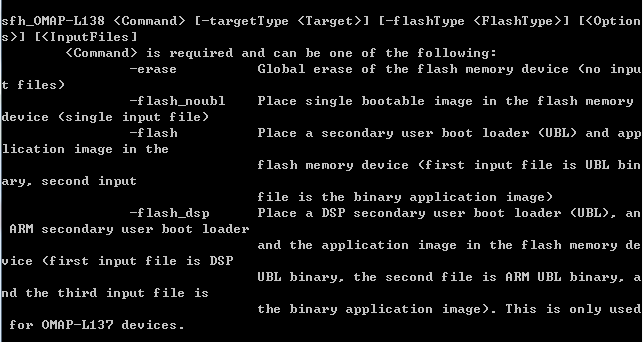
    sfh_OMAP-L138.exe -flash boot.ais rasterDisplay.bin -targetType OMAPL138_LCDK -flashType NAND -p COM3

    I have tested this method and it works for me.

    For more info, please refer to

    Regards,

    Shankari

    -------------------------------------------------------------------------------------------------------

    Please click the Verify Answer button on this post if it answers your question.
    -------------------------------------------------------------------------------------------------------

  • Thanks.

    I am sorry to bother you. Because i dont pay much attention on the document which you recommend.

    I always think the lcdk is similar to evm, so my tests are based on http://processors.wiki.ti.com/index.php/Boot_Images_for_OMAP-L138#Booting_DSP_Binaries.

     I want to use both arm and dsp and do not use the linux,   Can you give me some ideas or documents?

  • Hi Hui,

     I want to use both arm and dsp and do not use the linux,   Can you give me some ideas or documents?


    She gave good docs already to run ARM + DSP codes.

    Is there any problem ?

    Why do you mentioning about linux here when she doesn't discuss about linux ?

    Could you please elaborate your requirements to support better on this ?

  • Sorry, it is my problem. I don't stated clearly.
    Because of your help, i can boot dsp from arm. This problem is solved.

    Now,I want to use the arm to capture video and the dsp for image processing. I dont want to use linux and sysbios. I  want to use bare-metal.

    there are some doubts.
    (1) If i use the arm project in starterware(e.g. vpif),what should i do to boot dsp from the arm in flash?

    From the document, I know the arm will run the arm bootloader, so the bootloader project and the vpif project can be combined in one project, is it okay?

  • Hi Hui,

    This is what we need.

    Thanks for your clear information.

    Surely, We will address this soon.

  • Hi Hui,

    Hui says said:
    there are some doubts. (1) If i use the arm project in starterware(e.g. vpif),what should i do to boot dsp from the arm in flash?

    From the document, I know the arm will run the arm bootloader, so the bootloader project and the vpif project can be combined in one project, is it okay?

    Yes, Using the ARM bootloader given in the OMAPL138 starterware you must be able to boot the VPIF sample program. Convert the ARM bootloader code from boot.out into boot.ais and the vpif*.out into vpif.bin using out2rprc.

    As mentioned above, use the sfh utility and the command mentioned to flash the executable into NAND flash and run combinedly.

    Follow the below procedure.

    1. Look into the debug folder of VPIF example and check the content of vpif_lcd_loopback_c674x_omapl138_lcdkOMAPL138.map

    OUTPUT FILE NAME:   <vpif_lcd_loopback.out>

    ENTRY POINT SYMBOL: "_c_int00"  address:c009d000

    2. In bl_main.c of bootloader_armv5_omapl138_lcdkOMAPL138, change the below two lines as


    /******************************************************************************
    **                     Global Variable Definitions
    *******************************************************************************/
    unsigned int entryPoint = 0;
    unsigned int DspEntryPoint = 0xc009d000; // This is the entry point address of VPIF example project


    3. Build the bootloader and generate boot.out

    4. convert the boot.out into boot.ais using AISgen with loading the OMAPL138_LCDK_AISGen_Config.cfg file.

    5. Build the VPIF example and generate the vpif_lcd_loopback.out file; convert this out file into vpif_lcd_loopback.bin

    6. Using sfh utility, use the below command to flash both the binaries and boot the DSP binary app, Vpif.bin

    sfh_OMAP-L138.exe -flash boot.ais vpif_lcd_loopback.out.bin -targetType OMAPL138_LCDK -flashType NAND -p COM3

    Change the boot switch settings to NAND boot mode and now observe the VPIF DSP app running on your OMAPL138 LCDK.


    Regards,

    Shankari


    -------------------------------------------------------------------------------------------------------

    Please click the Verify Answer button on this post if it answers your question.
    --------------------------------------------------------------------------------------------------------

  • I'm afraid you have misunderstood what I said. 

    I want to run the bootloader and vpif in arm at the same time, and the dsp will run some image processing  algorithms.

    not bootloader in arm and vpif in dsp.

  • Hi Hui,

    OK, Sounds good.

    1. If you want to run the vpif in arm, then assign the entry point address of ARM side - VPIF project in the variable, "entryPoint" and the DSP app address in  "DspEntryPoint" in bl_main.c of ARM bootloader code.


    Regards,

    Shankari.


    -------------------------------------------------------------------------------------------------------

    Please click the Verify Answer button on this post if it answers your question.
    --------------------------------------------------------------------------------------------------------

  • Thanks for your reply.

    Could you recommend some documents for me about the communication between ARM and DSP?

    For example, the arm vpif will get the image data from the tvp5147m1, and  the data will stored in the ddr sdram.

    (1)how should i to  transmit image data from arm to the dsp core?


  • Hi Hui,

    Shankari point is correct.

    Now, I'm able to run the below combinations.

    1) ARM starterware bootloader + ARM app

    2) ARM starterware bootloader + DSP app

    3) ARM starterware bootloader + ARMapp + DSP app (Need to enter "entryPoint" from ARM app *.map file and "DspEntryPoint" from DSP app *.map file)

    Thanks Shankari.

  • Hi Hui,

    Just curious whether you first succeeded in booting the DSP app, ARM app with ARM bootloader? My suggestion for you is to go one by one.  

    Hui says said:
    Could you recommend some documents for me about the communication between ARM and

    DSP?

    yes, there is an IPC lite starterware example existing for communication between ARM and DSP cores.

    You will find lot of documents when you search "IPC" with no quotes on TI wiki page.

    http://processors.wiki.ti.com/index.php/Category:IPC


    Regards,

    Shankari

    -------------------------------------------------------------------------------------------------------

    Please click the Verify Answer button on this post if it answers your question.
    --------------------------------------------------------------------------------------------------------

  • All things is ok. The lcdk can run both the arm gpioled.bin and the dsp rasterDisplay.bin.

    the gpio6_12 led is blinking and the vga displays the "starterware" logo.

    Only one point surprised me.

    sfh_OMAP-L138.exe -flash boot.ais gpioled.bin rasterDisplay.bin -targetType OMAPL138_LCDK -flashType NAND -p COM3

    will cause

    but  when i use the two commands, all things is ok.

    sfh_OMAP-L138.exe -flash boot.ais gpioled.bin -targetType OMAPL138_LCDK -flashType NAND -p COM3

    After flash competely, use the follwing command to flash.

    sfh_OMAP-L138.exe -flash boot.ais rasterDisplay.bin -targetType OMAPL138_LCDK -flashType NAND -p COM3

  • HI,

    You have to combine your two the binaries ( gpioled.out and rasterDisplay.out ) into single binary file as gpioraster.bin

    using out2rprc.

    >out2rprc.exe <app 1 (*.out)> <app 2 (*.out)> <output file name (*.bin)>

    and then use as below, it will work. ( Please go through the readme.txt file of out2rprc.)

    sfh_OMAP-L138.exe -flash boot.ais <output file name (*.bin)> -targetType OMAPL138_LCDK -flashType NAND -p COM3


    Regards,

    Shankari

    -------------------------------------------------------------------------------------------------------

    Please click the Verify Answer button on this post if it answers your question.
    --------------------------------------------------------------------------------------------------------

  • Thank you for your help. All things are ok.

    I find 

    out2rprc.exe [ARM application].out [DSP application].out [application].bin
    in
    http://processors.wiki.ti.com/index.php/OMAPL138_StarterWare_Booting_And_Flashing,

    I'm embarrassed for my Carelessness. Next, i will pay much attention on IPC.
    Thank you again.

      Regards,

      Hui

  • Hi Hui,

    Sounds good.

    We are glad that you got fixed.

    If you have any further follow up or any questions, please create new thread.

    Thanks for your update.

  • hi,
    In this link processors.wiki.ti.com/.../Boot_Images_for_OMAP-L138 is a demo provided called OMAPL138-DSP-LED-v4.zip, I downloaded and extracted it. But when I try to import and build the project in the CCS as told in the link,there is no project can be imported...where did I do wrong ? thanks..
  • Could you please tell me which location you given to import.
    FYI;
    Its a CCSv3.3 project example so you may have to give "Import legacy CCSv3.3 project" option while import.
  • Thanks a lot, that'll solve my problem. I'm using ccs5.5,thanks for quick reply!
  • Sounds good.
    Thanks for your update.