This thread has been locked.

If you have a related question, please click the "Ask a related question" button in the top right corner. The newly created question will be automatically linked to this question.

unable to boot kernel using u-boot AM1808

Other Parts Discussed in Thread: AM1808, OMAP-L138, DA8XX, PMP, OMAPL138

Hi All

I have a Logic PD AM1808 Experiment kit and the I have successfully rebuilt the u-boot and the ubl. kernel image and file system is on sdcard. The default settings of u-boot is to load the kernel from the sdcard. I wanted to learn how to modify this as later I will be working on a custom board with no sdcard.

I am getting help from this wiki:
http://processors.wiki.ti.com/index.php/Booting_Linux_kernel_using_U-Boot

I have successfully set up the tftpd-hpa server (atleast I think I did) using the wiki:
http://processors.wiki.ti.com/index.php/Setting_Up_a_TFTP_Server

Right now I am trying to load the kernel and file system directly to the SDRAM from tftp server

this is what I did after setting up the tftpd-hpa server

contents of my /etc/default/tftpd-hpa file are

# /etc/default/tftpd-hpa

TFTP_USERNAME="tftp"
RUN_DAEMON="yes"
TFTP_DIRECTORY="/tftpboot"
TFTP_ADDRESS="0.0.0.0:69"
TFTP_OPTIONS="--secure"

copied the uImage to /tftpboot (same which i placed in the sdcard)

copied the file system to /tftpboot (same which i placed in the sdcard)
name is "tisdk-rootfs-am180x-evm.tar.gz" and i did not extract it

next i used dhcp to set the ipaddr

U-Boot > dhcp
BOOTP broadcast 1
DHCP client bound to address 192.168.1.40

next i chkd my serveripaddress usin /sbin/ifconfig command and this is what i got

then i set the serverip from this result

U-Boot > setenv serverip 192.168.248.129  

note: I am using vmware on windows 7 and its ip address is different from my windows

then I Set the name of the image to be downloaded:

U-Boot > setenv bootfile uImage

i set the ethaddr to 11:22:33:44:55:66

then i set bootargs using the command given in the guide (please tell me If i need to change things)

U-Boot> setenv bootargs mem=32M console=ttyS2,115200n8 root=/dev/ram0 rw initrd=0xc1180000,4M ip=dhcp eth=${ethaddr}

then the final command. only change i made in this was to give name to the <ram disk file name>

U-Boot> setenv bootcmd 'tftp 0xc0700000 uImage; tftp 0xc1180000 tisdk-rootfs-am180x-evm.tar.gz; bootm 0xc0700000'

then i used the command "saveenv"

Saving Environment to SPI Flash...
SF: Detected M25P64 with page size 256, total 8 MiB
Erasing SPI flash...Writing to SPI flash...done

after that I rebooted the device

and this is what is happening:

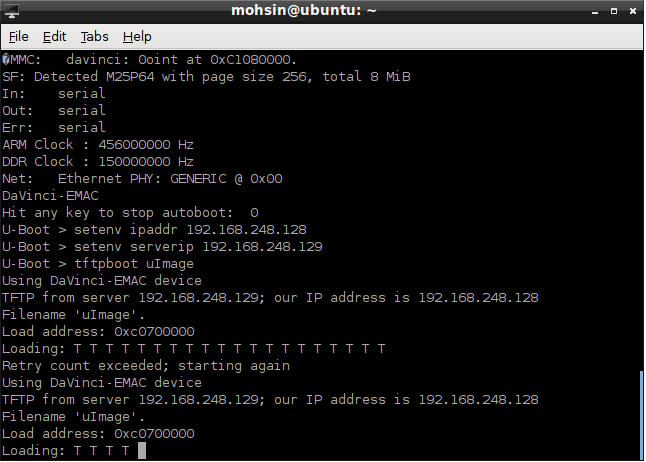
T ## Warning: gatewayip needed but not set 

and the same thing repeats itself forever and ever

please help me out

i also should mention that i am new at all this so I might be making some stupid mistakes

  • Hi Moshin,

    We have 2 ways to load kernel image to RAM.

    1) Through DHCP

    setenv serverip 192.168.248.129

    dhcp

    tftpboot uImage (Ensure you have copied kernel image (uImage) into tftp directory on host PC)

    2) Through tftpboot

    setenv ipaddr 192.168.248.128 (Ensure you dont have a IP addr 192.168.248.128 in your LAN)

    setenv serverip 192.168.248.129

    tftpboot uImage (Ensure you have copied kernel image (uImage) into tftp directory on host PC)

    Note:

    You can use "ping < IP addr>" to check your LAN connectivity.

    note: I am using vmware on windows 7 and its ip address is different from my windows

    May be it could cause this problem if above steps not worked. Try with any separate ubuntu host PC.

    then i set bootargs using the command given in the guide (please tell me If i need to change things)

    U-Boot> setenv bootargs mem=32M console=ttyS2,115200n8 root=/dev/ram0 rw initrd=0xc1180000,4M ip=dhcp eth=${ethaddr}

    then the final command. only change i made in this was to give name to the <ram disk file name>

    U-Boot> setenv bootcmd 'tftp 0xc0700000 uImage; tftp 0xc1180000 tisdk-rootfs-am180x-evm.tar.gz; bootm 0xc0700000'

    then i used the command "saveenv"

    Before trying these commands, try the above step to load kernel image to RAM properly, If get succeed then only you able to proceed these auto commands while we issue a "boot" u-boot command.

  • I tried both methods

    1) gave the exact response which i told earlier

    2) gave a different response but still not working

    it gets stuck while loading

    also while booting i tried this command:

    U-Boot > ping 192.168.248.129

    and the response was this :


    Using DaVinci-EMAC device
    ## Warning: gatewayip needed but not set
    ## Warning: gatewayip needed but not set
    ping failed; host 192.168.248.129 is not alive

  • Hi,

    1) Restart your tftp service in host (windows or ubuntu linux)

    2) Disable the firewall while you running tftp service.

    Ex: In ubuntu linux,

    sudo ufw disable

  • Ensure that your tftp server is working and accessible first before pulling in your board into the situation.

    A TFTP or any network server running on vmware need particular network bridge settting. See here:

    http://e2e.ti.com/support/dsp/omap_applications_processors/f/42/t/277632.aspx


    Otherwise, the virtual machine cannot see the actual network. I would guess that your ubuntu within vmware is not getting an address from the real DHCP server. It's ip address is 192.168.248.129 and your board got 192.168.1.40 from the real DHCP server. The netmask is 255.255.255.0 on ubuntu and I assume the same was on the board. They are on separate subnets. They can never talk to each other without a gateway. I think u-boot is complaining about that. The key is to get your ubuntu under vmware on the same subnet as everybody else. Google around, there are lots of webpages on this.

    Check the setup by using some other PC on the network to tftp a file. Once that is done, then start testing the board. Make sure that that u-boot env var autoload is set to no. This will stop dhcp and tftp commands from trying to load an boot. After dhcp, check the serverip, ipaddr, gateway and netmask.

  • Hi 

    I have tried changing the setting and closed the firewall.

    now my windows 7 ip addr is 192.168.1.47

    my vmware ubunto ip addr is 192.168.1.56

    my dhcp / evm ipaddr is 192.168.1.40

    I can now ping 192.168.1.56 which is my serverip from my u-boot

    U-Boot > ping 192.168.1.56
    Using DaVinci-EMAC device
    host 192.168.1.56 is alive

    but still now when I try

    tftpboot uImage

    the u-boot get stuck at loading as before.

    "Check the setup by using some other PC on the network to tftp a file. Once that is done, then start testing the board. Make sure that that u-boot env var autoload is set to no"

    env variable autoload is set to no. I can also ping successfully on my server ip using any other pc on the network but cannot ping the EVM i.e. 192.168.1.40

    I am also not able to ping from my ternimal to the ipaddr i.e. 192.168.1.40 but I can ping server ip from the u-boot>

    please help me out I am new to all this and only need directions. I will be thankful if you assist me through out the problem troubleshooting step

  • Norman Wong said:

    Ensure that your tftp server is working and accessible first before pulling in your board into the situation.

    A TFTP or any network server running on vmware need particular network bridge settting. See here:

    http://e2e.ti.com/support/dsp/omap_applications_processors/f/42/t/277632.aspx

    Hi Wong

    I have change all the setting as mentioned on this page:

    I have set my vmware ipv4 setting to 

    IPv4: Method: manual

    Address 192.18.1.56 Netmask 255.255.255.0 Gateway 192.168.1.1

    on my windows 7 I have ipv4 settings:

    IPv4 Address: 192.168.1.57

    IPv4 Subnet Mask: 255.255.255.0

    and uboot env variable to 

    ipaddr=192.168.1.58

    serverip=192.168.1.57 // ip of my windows 7 I also tried ip of vmware but problem remain the same

    netmask=255.255.255.0

    gatewayip=192.168.1.1

    after setting all this I again tried tftpboot uImage and still get stuck

    1 difference is that both server and IP are connected via network switch and not directly. can this be the issue?

    no i can ping my evm from my server terminal and windows 7 cmd prmpt and i can ping my server from uboot

  • Hi Moshin,

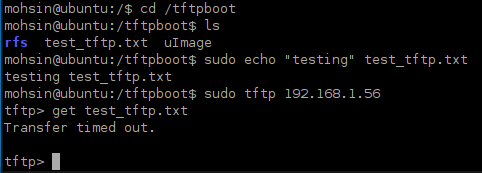
    Could you please try to test your tftp service at your Vmware linux machine like below.

    titus@Titus:~$
    titus@Titus:~$ touch /tftpboot/test_tftp.txt
    titus@Titus:~$
    titus@Titus:~$
    titus@Titus:~$ echo "Testing" > /tftpboot/test_tftp.txt
    titus@Titus:~$
    titus@Titus:~$ ifconfig
    eth0      Link encap:Ethernet  HWaddr 00:24:7e:0e:f1:5d  
              inet addr:10.100.1.94  Bcast:10.100.1.255  Mask:255.255.255.0
              inet6 addr: fe80::224:7eff:fe0e:f15d/64 Scope:Link
              UP BROADCAST RUNNING MULTICAST  MTU:1500  Metric:1
              RX packets:393873 errors:0 dropped:0 overruns:0 frame:0
              TX packets:234360 errors:0 dropped:0 overruns:0 carrier:0
              collisions:0 txqueuelen:1000
              RX bytes:83781278 (83.7 MB)  TX bytes:215482192 (215.4 MB)
              Interrupt:20 Memory:fe400000-fe420000

    lo        Link encap:Local Loopback  
              inet addr:127.0.0.1  Mask:255.0.0.0
              inet6 addr: ::1/128 Scope:Host
              UP LOOPBACK RUNNING  MTU:16436  Metric:1
              RX packets:43080 errors:0 dropped:0 overruns:0 frame:0
              TX packets:43080 errors:0 dropped:0 overruns:0 carrier:0
              collisions:0 txqueuelen:0
              RX bytes:11144885 (11.1 MB)  TX bytes:11144885 (11.1 MB)

    titus@Titus:~$ tftp 10.100.1.94
    tftp>
    tftp> get test_tftp.txt
    Received 9 bytes in 0.0 seconds
    tftp>  
    tftp>
    tftp> quit
    titus@Titus:~$
    titus@Titus:~$
    titus@Titus:~$ cat test_tftp.txt
    Testing
    titus@Titus:~$
    titus@Titus:~$
    titus@Titus:~$
    Testing

  • Titusrathinaraj Stalin said:
    Could you please try to test your tftp service at your Vmware linux machine like below.

    I tried it and I think that is the problem !! It is not working

    how can i solve this issue ? I did perform all the steps in 

    http://processors.wiki.ti.com/index.php/Setting_Up_a_TFTP_Server

  • Hi Moshin,

    Good improvement.

    I think you have configured the default tftp directory in "/usr/lib/tftpboot", Please check it.

    1) Install tftpd "sudo apt-get install tftpd-hpa"

    2) Edit "/etc/default/tftpd-hpa"

    3) Restart the tftpd service.

    Log:

    titus@Titus:~$
    titus@Titus:~$ cat /etc/default/tftpd-hpa
    # /etc/default/tftpd-hpa

    TFTP_USERNAME="tftp"
    TFTP_DIRECTORY="/tftpboot"
    TFTP_ADDRESS="0.0.0.0:69"
    TFTP_OPTIONS="--secure"
    titus@Titus:~$
    titus@Titus:~$ sudo service tftpd-hpa restart
    tftpd-hpa stop/waiting
    tftpd-hpa start/running, process 19626
    titus@Titus:~$
    titus@Titus:~$
    titus@Titus:~$

  • HI

    No sir i have configured the default tftp directory as "/tftpboot"

    mohsin@ubuntu:/$ cat /etc/default/tftpd-hpa
    # /etc/default/tftpd-hpa

    TFTP_USERNAME="tftp"
    RUN_DAEMON="yes"
    TFTP_DIRECTORY="/tftpboot"
    TFTP_ADDRESS="0.0.0.0:69"
    TFTP_OPTIONS="--secure --create"
    mohsin@ubuntu:/$ sudo service tftpd-hpa restart
    tftpd-hpa stop/waiting
    tftpd-hpa start/running
    mohsin@ubuntu:/$
    mohsin@ubuntu:/$ sudo tftp 192.168.1.56
    tftp> get uImage
    Transfer timed out.

    tftp>

  • Hi Moshin,

    Please use this configuration in /etc/default/tftpd-hpa and reboot your machine then try.

    TFTP_USERNAME="tftp"
    TFTP_DIRECTORY="/tftpboot"
    TFTP_ADDRESS="0.0.0.0:69"
    TFTP_OPTIONS="--secure"
  • Hi

    I also googled the problem and 1 thing I found was the chmod command to give access to the /tftpboot

    I also tried that. I cannot find anyother issue and I am totally stuck

    please help me out

  • I changed the tftpd-hpa file exactly as you mentioned. rebooted the ubunto virtual machine

    now I am trying the steps again now there is no response message in the terminal

    mohsin@ubuntu:/etc/default$ gedit tftpd-hpa
    mohsin@ubuntu:/etc/default$ sudo service tftpd-hpa restart
    [sudo] password for mohsin:
    tftpd-hpa stop/waiting
    tftpd-hpa start/running, process 2774
    mohsin@ubuntu:/etc/default$ sudo tftp 192.168.1.56
    tftp> get uImage
    tftp> get uImage
    tftp> quit
    mohsin@ubuntu:/etc/default$ sudo tftp localhost
    tftp> get uImage
    tftp> quit

  • I think now it is working. I tried tftpboot uImage now and now it is giving output 

    U-Boot > tftpboot uImage
    Using DaVinci-EMAC device
    TFTP from server 192.168.1.56; our IP address is 192.168.1.58
    Filename 'uImage'.
    Load address: 0xc0700000
    Loading: #
    done
    U-Boot >

    does this mean that I have loaded the kernel image in the device ?

  • Progress update !!


    now I am able to load the kernel image and root fs to the sdram. after copying both uImage and file system into the tftpboot directory, I gave the following commands to u boot

    U-Boot> setenv bootargs mem=32M console=ttyS2,115200n8 root=/dev/ram0 rw initrd=0xc1180000,4M ip=dhcp eth=${ethaddr}

    I made no changes from the wiki http://processors.wiki.ti.com/index.php/Booting_Linux_kernel_using_U-Boot
    please tell me If i need to make some changes for am1808 experiment kit. only change I made was to change the console = ttyS2 to ttyS1 as this is the port name of my UART port and i am using this in minicom settings

    after that I gave following commands

    tftp 0xc0700000 uImage  (this was successfull)

    U-Boot > tftp 0xc0700000 uImage
    Using DaVinci-EMAC device
    TFTP from server 192.168.1.56; our IP address is 192.168.1.58
    Filename 'uImage'.
    Load address: 0xc0700000
    Loading: #
    done

    after that I gave the command: 

    U-Boot > tftp 0xc1180000 tisdk-rootfs-am180x-evm.tar.gz
    Using DaVinci-EMAC device
    TFTP from server 192.168.1.56; our IP address is 192.168.1.58
    Filename 'tisdk-rootfs-am180x-evm.tar.gz'.
    Load address: 0xc1180000
    Loading: #################################################################
    #################################################################

    done
    Bytes transferred = 92195325 (57ec9fd hex)

    then I gave the final command which is giving the error:

    U-Boot > bootm 0xc0700000
    Wrong Image Format for bootm command
    ERROR: can't get kernel image!

    Now I must mention that this is exactly the same uImage that I was copying in the SDCARD and I have not built the image. will I have to make some changes to the kernel image?

    Please help me out. I think this is the last step before the completion of my task

  • Hi Mohsin,

    I think, the kernel image was transfered partially.

    Please check your kernel uImage size in /tftpboot directory.

    After loading kernel image into RAM "U-Boot > tftp 0xc0700000 uImage" try to boot the board through "bootm" without doing rootfs copy to RAM.

  • Hi,

    Wow thanks Stalin. You are spot on !!

    there was some problem with the uImage. I copied it again and then I tried running the commands.

    the LCD now turned blue but nothing else !! 

    now tell me what should be my next step. I have done everything now !! 

  • Hi Mohsin,

    Sounds good.

    Thanks for your update.

    I think the u-boot issue had been closed so, could you please close the current thread and open new thread for your issue.

  • Progress update: 

    Now I am able to move forward from the last issue. I did not do anything new but only repeated the process. now it does move forward but can not load it completely.

    Questions here are:

    1) If I am using the same image which I was using while booting from SDCARD, will I have to make some changes

    2) the root file system is not extracted and I am copying it as it is !! do i need to uncompress it before using tftp c1180000 ?

    3) what are the changes I should make in the bootargs as right now I have not made any change

    4) suggest any other change that I must do. 

    note: I am using the same root file system and uImage that I was copying in SD CARD now I am trying to boot from SDRAM.

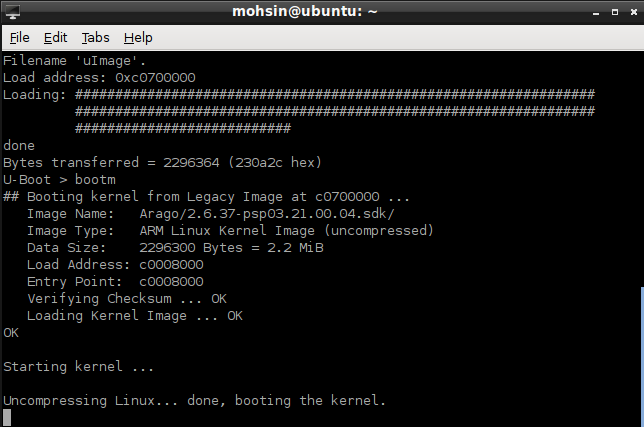
    this is what I am getting when I run the bootm 0xc0700000 command

    U-Boot > bootm 0xc0700000
    ## Booting kernel from Legacy Image at c0700000 ...
    Image Name: Arago/2.6.37-psp03.21.00.04.sdk/
    Image Type: ARM Linux Kernel Image (uncompressed)
    Data Size: 2296300 Bytes = 2.2 MiB
    Load Address: c0008000
    Entry Point: c0008000
    Verifying Checksum ... OK
    Loading Kernel Image ... OK
    OK

    Starting kernel ...

    Uncompressing Linux... done, booting the kernel.
    Linux version 2.6.37 (jenkins@sdit-build01) (gcc version 4.5.3 20110311 (prerel2
    CPU: ARM926EJ-S [41069265] revision 5 (ARMv5TEJ), cr=00053177
    CPU: VIVT data cache, VIVT instruction cache
    Machine: DaVinci DA850/OMAP-L138/AM18x EVM
    Memory policy: ECC disabled, Data cache writeback
    DaVinci da850/omap-l138/am18x variant 0x1
    Built 1 zonelists in Zone order, mobility grouping on. Total pages: 32512
    Kernel command line: console=ttyS2,115200n8 root=/dev/mmcblk0p2 rw rootwait ip=f
    PID hash table entries: 512 (order: -1, 2048 bytes)
    Dentry cache hash table entries: 16384 (order: 4, 65536 bytes)
    Inode-cache hash table entries: 8192 (order: 3, 32768 bytes)
    Memory: 128MB = 128MB total
    Memory: 125056k/125056k available, 6016k reserved, 0K highmem
    Virtual kernel memory layout:
    vector : 0xffff0000 - 0xffff1000 ( 4 kB)
    fixmap : 0xfff00000 - 0xfffe0000 ( 896 kB)
    DMA : 0xff000000 - 0xffe00000 ( 14 MB)
    vmalloc : 0xc8800000 - 0xfea00000 ( 866 MB)
    lowmem : 0xc0000000 - 0xc8000000 ( 128 MB)
    modules : 0xbf000000 - 0xc0000000 ( 16 MB)
    .init : 0xc0008000 - 0xc002d000 ( 148 kB)
    .text : 0xc002d000 - 0xc046d000 (4352 kB)
    .data : 0xc046e000 - 0xc049b300 ( 181 kB)
    SLUB: Genslabs=13, HWalign=32, Order=0-3, MinObjects=0, CPUs=1, Nodes=1
    Preemptable hierarchical RCU implementation.
    RCU-based detection of stalled CPUs is disabled.
    Verbose stalled-CPUs detection is disabled.
    NR_IRQS:245
    Console: colour dummy device 80x30
    Calibrating delay loop... 226.91 BogoMIPS (lpj=1134592)
    pid_max: default: 32768 minimum: 301
    Security Framework initialized
    Mount-cache hash table entries: 512
    CPU: Testing write buffer coherency: ok
    devtmpfs: initialized
    DaVinci: 144 gpio irqs
    regulator: core version 0.5
    regulator: dummy:
    NET: Registered protocol family 16
    WARNING: both McASP and McBSP are enabled, but they share pins.
    Only McASP will work. If you want McBSP support, disable McASP.
    WARNING: both McASP and UART1_AFE are enabled, but they share pins.
    Disable one of them.
    da850_evm_init: eHRPWM module 0 cannot be used since it is being used by MII ine
    da850_evm_init: eHRPWM module1 outputA cannot be used since it is being used byD
    da850_evm_init: eHRPWM module1 outputB cannot be used since it is being used by1
    bio: create slab <bio-0> at 0
    SCSI subsystem initialized
    usbcore: registered new interface driver usbfs
    usbcore: registered new interface driver hub
    usbcore: registered new device driver usb
    pca953x 1-0020: failed reading register
    pca953x 1-0021: interrupt support not compiled in
    regulator: VDCDC1: 3200 <--> 3300 mV at 3300 mV
    regulator: VDCDC2: 1750 <--> 3300 mV at 3300 mV
    regulator: VDCDC3: 950 <--> 1350 mV at 1200 mV
    regulator: LDO1: 1800 mV
    regulator: LDO2: 1150 <--> 1300 mV at 1200 mV
    i2c-gpio i2c-gpio.1: using pins 20 (SDA) and 21 (SCL)
    Advanced Linux Sound Architecture Driver Version 1.0.23.
    Switching to clocksource timer0_1
    musb-hdrc: version 6.0, host, debug=0
    musb-hdrc musb-hdrc: dma type: pio
    Waiting for USB PHY clock good...
    musb-hdrc musb-hdrc: MUSB HDRC host driver
    musb-hdrc musb-hdrc: new USB bus registered, assigned bus number 1
    hub 1-0:1.0: USB hub found
    hub 1-0:1.0: 1 port detected
    musb-hdrc musb-hdrc: USB Host mode controller at fee00000 using PIO, IRQ 58
    NET: Registered protocol family 2
    IP route cache hash table entries: 1024 (order: 0, 4096 bytes)
    TCP established hash table entries: 4096 (order: 3, 32768 bytes)
    TCP bind hash table entries: 4096 (order: 2, 16384 bytes)
    TCP: Hash tables configured (established 4096 bind 4096)
    TCP reno registered
    UDP hash table entries: 256 (order: 0, 4096 bytes)
    UDP-Lite hash table entries: 256 (order: 0, 4096 bytes)
    NET: Registered protocol family 1
    RPC: Registered udp transport module.
    RPC: Registered tcp transport module.
    RPC: Registered tcp NFSv4.1 backchannel transport module.
    EMAC: MII PHY configured, RMII PHY will not be functional
    McBSP:Probed McBSP1
    JFFS2 version 2.2. (NAND) �© 2001-2006 Red Hat, Inc.
    msgmni has been set to 244
    Block layer SCSI generic (bsg) driver version 0.4 loaded (major 253)
    io scheduler noop registered (default)
    da8xx_lcdc da8xx_lcdc.0: GLCD: Found Sharp_LK043T1DG01 panel
    Console: switching to colour frame buffer device 60x34
    Serial: 8250/16550 driver, 3 ports, IRQ sharing disabled
    serial8250.0: ttyS0 at MMIO 0x1c42000 (irq = 25) is a AR7
    serial8250.0: ttyS1 at MMIO 0x1d0c000 (irq = 53) is a AR7
    serial8250.0: ttyS2 at MMIO 0x1d0d000 (irq = 61) is a AR7
    console [ttyS2] enabled
    brd: module loaded
    at24 1-0050: 32768 byte 24c256 EEPROM (writable)
    ahci ahci: forcing PORTS_IMPL to 0x1
    ahci ahci: AHCI 0001.0100 32 slots 1 ports 3 Gbps 0x1 impl platform mode
    ahci ahci: flags: ncq sntf pm led clo only pmp pio slum part ccc
    scsi0 : ahci_platform
    ata1: SATA max UDMA/133 mmio [mem 0x01e18000-0x01e19fff] port 0x100 irq 67
    spi_davinci spi_davinci.1: DMA: supported
    spi_davinci spi_davinci.1: DMA: RX channel: 18, TX channel: 19, event queue: 0
    m25p80 spi1.0: m25p64 (8192 Kbytes)
    Creating 6 MTD partitions on "m25p80":
    0x000000000000-0x000000010000 : "UBL"
    0x000000010000-0x000000090000 : "U-Boot"
    0x000000090000-0x0000000a0000 : "U-Boot-Env"
    0x0000000a0000-0x000000320000 : "Kernel"
    0x000000320000-0x000000720000 : "Filesystem"
    0x0000007f0000-0x000000800000 : "MAC-Address"
    Read MAC addr from SPI Flash: ff:ff:ff:ff:ff:ff
    spi_davinci spi_davinci.1: Controller at 0xfef0e000
    davinci_mdio davinci_mdio.0: davinci mdio revision 1.5
    davinci_mdio davinci_mdio.0: detected phy mask fffffffe
    davinci_mdio.0: probed
    davinci_mdio davinci_mdio.0: phy[0]: device 0:00, driver SMSC LAN8710/LAN8720
    console [netcon0] enabled
    netconsole: network logging started
    ohci_hcd: USB 1.1 'Open' Host Controller (OHCI) Driver
    ohci ohci.0: DA8xx OHCI
    ohci ohci.0: new USB bus registered, assigned bus number 2
    Waiting for USB PHY clock good...
    ohci ohci.0: irq 59, io mem 0x01e25000
    hub 2-0:1.0: USB hub found
    hub 2-0:1.0: 1 port detected
    Initializing USB Mass Storage driver...
    usbcore: registered new interface driver usb-storage
    USB Mass Storage support registered.
    mice: PS/2 mouse device common for all mice
    input: gpio-keys-polled as /devices/platform/gpio-keys-polled.1/input/input0
    input: TPS6507x Touchscreen as /devices/platform/i2c-gpio.1/i2c-1/1-0048/input/1
    omap_rtc omap_rtc: rtc core: registered omap_rtc as rtc0
    omap_rtc: RTC power up reset detected
    i2c /dev entries driver
    watchdog watchdog: heartbeat 60 sec
    cpuidle: using governor ladder
    cpuidle: using governor menu
    davinci_mmc davinci_mmc.0: Using DMA, 4-bit mode
    davinci_mmc davinci_mmc.1: Using DMA, 4-bit mode
    usbcore: registered new interface driver usbhid
    usbhid: USB HID core driver
    ata1: SATA link down (SStatus 0 SControl 300)
    usbcore: registered new interface driver snd-usb-audio
    1-0018 supply IOVDD not found, using dummy regulator
    1-0018 supply DVDD not found, using dummy regulator
    1-0018 supply AVDD not found, using dummy regulator
    1-0018 supply DRVDD not found, using dummy regulator
    asoc: tlv320aic3x-hifi <-> davinci-mcasp.0 mapping ok
    ALSA device list:
    #0: DA850/OMAP-L138 EVM
    oprofile: hardware counters not available
    oprofile: using timer interrupt.
    nf_conntrack version 0.5.0 (1954 buckets, 7816 max)
    ip_tables: (C) 2000-2006 Netfilter Core Team
    TCP cubic registered
    NET: Registered protocol family 17
    regulator_init_complete: incomplete constraints, leaving LDO2 on
    regulator_init_complete: incomplete constraints, leaving LDO1 on
    regulator_init_complete: incomplete constraints, leaving VDCDC3 on
    regulator_init_complete: incomplete constraints, leaving VDCDC2 on
    regulator_init_complete: incomplete constraints, leaving VDCDC1 on
    davinci_emac_probe: using random MAC addr: 32:e4:f4:f6:85:b2
    omap_rtc omap_rtc: setting system clock to 2000-01-01 00:00:00 UTC (946684800)
    Waiting for root device /dev/mmcblk0p2...

    any idea ??

  • Hi,

    Are you using custom board or EVM ?

    Could you please tel us what are you trying to do ?

    RAM FS booting ?

    Enable RAMDISK support in kernel and change the bootargs for RAM boot and refer the follwing TI wikis.

    How about size of RAM FS ?

    U-Boot> setenv bootargs mem=32M console=ttyS2,115200n8 root=/dev/ram0 rw initrd=0xc1180000,4M ip=dhcp eth=${ethaddr}

    You have mentioned that size was 4M; Is it correct?

    http://processors.wiki.ti.com/index.php/Creating_a_Root_File_System_for_Linux_on_OMAP35x#Configure_the_Linux_Kernel_for_RAMDISK_support

    http://processors.wiki.ti.com/index.php/Initrd

  • Hi,

    Sir I am using Logic PD AM1808 Experimenter Kit

    Titusrathinaraj Stalin said:
    Could you please tel us what are you trying to do ?

    The EVM by default boot the kernel from the SDCARD. What I am trying to do is to write the root file system as well as the kernel image onto the SDRAM. i am using the following wiki:

    http://processors.wiki.ti.com/index.php/Booting_Linux_kernel_using_U-Boot#SDRAM

    I did not know what changes to make in the bootargs so I gave the exact command as shown in wiki

    setenv bootargs mem=32M console=ttyS2,115200n8 root=/dev/ram0 rw initrd=0xc1180000,4M ip=dhcp eth=${ethaddr}

    I have mentioned before that I am new to all this and want to get the understanding of how things work.

    please guide me about how to change uboot bootargs.

    Titusrathinaraj Stalin said:
    You have mentioned that size was 4M; Is it correct?


    No I have not. the only information I have is that size of my SDRAM is 128MB
    the port I use for serial communication is ttyS1

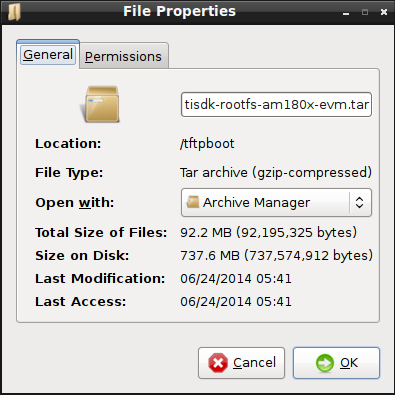
    this is what I get when I check the size of root fs file


  • Will the same kernel image and root file system work while booting from SDRAM, which were working perfectly fine on the SDCARD or will I have to modify them to make them work.

  • Hi,

    No, you are using only 128MB RAM

    You have mentioned "mem=32M" and rootfs size is around ~95MB, So you have to reduce the size of rootfs and try to  load into RAM.

  • Hi,

    You also mentioned in a previous post

    Titusrathinaraj Stalin said:

    After loading kernel image into RAM "U-Boot > tftp 0xc0700000 uImage" try to boot the board through "bootm" without doing rootfs copy to RAM

    Here we don't even use the rootfs so how does this work ? I am getting the same problem both ways.

    can you please refer me some wikis on how to move forward with this task ?

  • Hi,

    Oh sorry, This is I have told you to figure out the "start kernel" hang problem,

    Now, You can load your ramdisk or small rootfs (~15MB) into RAM 0xC1180000 and try it to boot RAMFS.

    I hope I have shared all the TI wikis related to ramfs boot already.

    I will also try and let me update.

  • Sir

    there is clearly some problem with the bootargs set.

    by default they are 

    bootargs=console=ttyS2,115200n8 root=/dev/mmcblk0p2 rw rootwait ip=off 

    and this is why I get the error 

    Waiting for root device /dev/mmcblk0p2...

    if I change the root to /anyother/directory

    then the error becomes:  

    Waiting for root device /anyother/directory...

    please can you tell me what should I put in root ? root = ????

  • Hi,

    bootargs=console=ttyS2,115200n8 root=/dev/mmcblk0p2 rw rootwait ip=off

    This arguments is used for mounting rootfs on 2nd partition of MMC/SDcard (by default)

    If you have SD card, create 2 partitions then format the 2nd partition in ext2 or ext3 or ext4 format and untar the rootfs there , finally connect the SD card into board to mount  the rootfs on 2nd partition of SD/MMC

  • Sir 

    I already told you that I dont want to boot from SDCARD. i want to boot from SDRAM

    i am only telling you that by default the uboot has settings to boot from sdcard

    now I want to change those settings so that I can successfully boot from SDRAM

    for that I need to set the environment variable "bootargs" properly

    when I set the bootarg exactly as 

    U-Boot> setenv bootargs mem=32M console=ttyS2,115200n8 root=/dev/ram0 rw initrd=0xc1180000,4M ip=dhcp eth=${ethaddr}

    which is mentioned in: http://processors.wiki.ti.com/index.php/Booting_Linux_kernel_using_U-Boot#SDRAM

    I get this result:

    U-Boot > bootm 0xc0700000
    ## Booting kernel from Legacy Image at c0700000 ...
    Image Name: Arago/2.6.37-psp03.21.00.04.sdk/
    Image Type: ARM Linux Kernel Image (uncompressed)
    Data Size: 2296300 Bytes = 2.2 MiB
    Load Address: c0008000
    Entry Point: c0008000
    Verifying Checksum ... OK
    Loading Kernel Image ... OK
    OK

    Starting kernel ...

    Uncompressing Linux... done, booting the kernel.
    Linux version 2.6.37 (jenkins@sdit-build01) (gcc version 4.5.3 20110311 (prerel2
    CPU: ARM926EJ-S [41069265] revision 5 (ARMv5TEJ), cr=00053177
    CPU: VIVT data cache, VIVT instruction cache
    Machine: DaVinci DA850/OMAP-L138/AM18x EVM
    Memory policy: ECC disabled, Data cache writeback
    DaVinci da850/omap-l138/am18x variant 0x1
    Built 1 zonelists in Zone order, mobility grouping on. Total pages: 8128
    Kernel command line: mem=32M console=ttyS2,115200n8 root=/dev/ram0 rw initrd=0x6
    PID hash table entries: 128 (order: -3, 512 bytes)
    Dentry cache hash table entries: 4096 (order: 2, 16384 bytes)
    Inode-cache hash table entries: 2048 (order: 1, 8192 bytes)
    Memory: 32MB = 32MB total
    Memory: 23496k/23496k available, 9272k reserved, 0K highmem
    Virtual kernel memory layout:
    vector : 0xffff0000 - 0xffff1000 ( 4 kB)
    fixmap : 0xfff00000 - 0xfffe0000 ( 896 kB)
    DMA : 0xff000000 - 0xffe00000 ( 14 MB)
    vmalloc : 0xc2800000 - 0xfea00000 ( 962 MB)
    lowmem : 0xc0000000 - 0xc2000000 ( 32 MB)
    modules : 0xbf000000 - 0xc0000000 ( 16 MB)
    .init : 0xc0008000 - 0xc002d000 ( 148 kB)
    .text : 0xc002d000 - 0xc046d000 (4352 kB)
    .data : 0xc046e000 - 0xc049b300 ( 181 kB)
    SLUB: Genslabs=13, HWalign=32, Order=0-3, MinObjects=0, CPUs=1, Nodes=1
    Preemptable hierarchical RCU implementation.
    RCU-based detection of stalled CPUs is disabled.
    Verbose stalled-CPUs detection is disabled.
    NR_IRQS:245
    Console: colour dummy device 80x30
    Calibrating delay loop... 226.91 BogoMIPS (lpj=1134592)
    pid_max: default: 32768 minimum: 301
    Security Framework initialized
    Mount-cache hash table entries: 512
    CPU: Testing write buffer coherency: ok
    devtmpfs: initialized
    DaVinci: 144 gpio irqs
    regulator: core version 0.5
    regulator: dummy:
    NET: Registered protocol family 16
    WARNING: both McASP and McBSP are enabled, but they share pins.
    Only McASP will work. If you want McBSP support, disable McASP.
    WARNING: both McASP and UART1_AFE are enabled, but they share pins.
    Disable one of them.
    da850_evm_init: eHRPWM module 0 cannot be used since it is being used by MII ine
    da850_evm_init: eHRPWM module1 outputA cannot be used since it is being used byD
    da850_evm_init: eHRPWM module1 outputB cannot be used since it is being used by1
    bio: create slab <bio-0> at 0
    SCSI subsystem initialized
    usbcore: registered new interface driver usbfs
    usbcore: registered new interface driver hub
    usbcore: registered new device driver usb
    pca953x 1-0020: failed reading register
    pca953x 1-0021: interrupt support not compiled in
    regulator: VDCDC1: 3200 <--> 3300 mV at 3300 mV
    regulator: VDCDC2: 1750 <--> 3300 mV at 3300 mV
    regulator: VDCDC3: 950 <--> 1350 mV at 1200 mV
    regulator: LDO1: 1800 mV
    regulator: LDO2: 1150 <--> 1300 mV at 1200 mV
    i2c-gpio i2c-gpio.1: using pins 20 (SDA) and 21 (SCL)
    Advanced Linux Sound Architecture Driver Version 1.0.23.
    Switching to clocksource timer0_1
    musb-hdrc: version 6.0, host, debug=0
    musb-hdrc musb-hdrc: dma type: pio
    Waiting for USB PHY clock good...
    musb-hdrc musb-hdrc: MUSB HDRC host driver
    musb-hdrc musb-hdrc: new USB bus registered, assigned bus number 1
    hub 1-0:1.0: USB hub found
    hub 1-0:1.0: 1 port detected
    musb-hdrc musb-hdrc: USB Host mode controller at fee00000 using PIO, IRQ 58
    NET: Registered protocol family 2
    IP route cache hash table entries: 1024 (order: 0, 4096 bytes)
    TCP established hash table entries: 1024 (order: 1, 8192 bytes)
    TCP bind hash table entries: 1024 (order: 0, 4096 bytes)
    TCP: Hash tables configured (established 1024 bind 1024)
    TCP reno registered
    UDP hash table entries: 256 (order: 0, 4096 bytes)
    UDP-Lite hash table entries: 256 (order: 0, 4096 bytes)
    NET: Registered protocol family 1
    RPC: Registered udp transport module.
    RPC: Registered tcp transport module.
    RPC: Registered tcp NFSv4.1 backchannel transport module.
    Trying to unpack rootfs image as initramfs...
    rootfs image is not initramfs (no cpio magic); looks like an initrd
    Freeing initrd memory: 4096K
    EMAC: MII PHY configured, RMII PHY will not be functional
    McBSP:Probed McBSP1
    JFFS2 version 2.2. (NAND) �© 2001-2006 Red Hat, Inc.
    msgmni has been set to 53
    Block layer SCSI generic (bsg) driver version 0.4 loaded (major 253)
    io scheduler noop registered (default)
    da8xx_lcdc da8xx_lcdc.0: GLCD: Found Sharp_LK043T1DG01 panel
    Console: switching to colour frame buffer device 60x34
    Serial: 8250/16550 driver, 3 ports, IRQ sharing disabled
    serial8250.0: ttyS0 at MMIO 0x1c42000 (irq = 25) is a AR7
    serial8250.0: ttyS1 at MMIO 0x1d0c000 (irq = 53) is a AR7
    serial8250.0: ttyS2 at MMIO 0x1d0d000 (irq = 61) is a AR7
    console [ttyS2] enabled
    brd: module loaded
    at24 1-0050: 32768 byte 24c256 EEPROM (writable)
    ahci ahci: forcing PORTS_IMPL to 0x1
    ahci ahci: AHCI 0001.0100 32 slots 1 ports 3 Gbps 0x1 impl platform mode
    ahci ahci: flags: ncq sntf pm led clo only pmp pio slum part ccc
    scsi0 : ahci_platform
    ata1: SATA max UDMA/133 mmio [mem 0x01e18000-0x01e19fff] port 0x100 irq 67
    spi_davinci spi_davinci.1: DMA: supported
    spi_davinci spi_davinci.1: DMA: RX channel: 18, TX channel: 19, event queue: 0
    m25p80 spi1.0: m25p64 (8192 Kbytes)
    Creating 6 MTD partitions on "m25p80":
    0x000000000000-0x000000010000 : "UBL"
    0x000000010000-0x000000090000 : "U-Boot"
    0x000000090000-0x0000000a0000 : "U-Boot-Env"
    0x0000000a0000-0x000000320000 : "Kernel"
    0x000000320000-0x000000720000 : "Filesystem"
    0x0000007f0000-0x000000800000 : "MAC-Address"
    Read MAC addr from SPI Flash: ff:ff:ff:ff:ff:ff
    spi_davinci spi_davinci.1: Controller at 0xfef0e000
    davinci_mdio davinci_mdio.0: davinci mdio revision 1.5
    davinci_mdio davinci_mdio.0: detected phy mask fffffffe
    davinci_mdio.0: probed
    davinci_mdio davinci_mdio.0: phy[0]: device 0:00, driver SMSC LAN8710/LAN8720
    console [netcon0] enabled
    netconsole: network logging started
    ohci_hcd: USB 1.1 'Open' Host Controller (OHCI) Driver
    ohci ohci.0: DA8xx OHCI
    ohci ohci.0: new USB bus registered, assigned bus number 2
    Waiting for USB PHY clock good...
    ohci ohci.0: irq 59, io mem 0x01e25000
    hub 2-0:1.0: USB hub found
    hub 2-0:1.0: 1 port detected
    Initializing USB Mass Storage driver...
    usbcore: registered new interface driver usb-storage
    USB Mass Storage support registered.
    mice: PS/2 mouse device common for all mice
    input: gpio-keys-polled as /devices/platform/gpio-keys-polled.1/input/input0
    input: TPS6507x Touchscreen as /devices/platform/i2c-gpio.1/i2c-1/1-0048/input/1
    omap_rtc omap_rtc: rtc core: registered omap_rtc as rtc0
    omap_rtc: RTC power up reset detected
    i2c /dev entries driver
    watchdog watchdog: heartbeat 60 sec
    cpuidle: using governor ladder
    cpuidle: using governor menu
    davinci_mmc davinci_mmc.0: Using DMA, 4-bit mode
    davinci_mmc davinci_mmc.1: Using DMA, 4-bit mode
    usbcore: registered new interface driver usbhid
    usbhid: USB HID core driver
    ata1: SATA link down (SStatus 0 SControl 300)
    usbcore: registered new interface driver snd-usb-audio
    1-0018 supply IOVDD not found, using dummy regulator
    1-0018 supply DVDD not found, using dummy regulator
    1-0018 supply AVDD not found, using dummy regulator
    1-0018 supply DRVDD not found, using dummy regulator
    asoc: tlv320aic3x-hifi <-> davinci-mcasp.0 mapping ok
    ALSA device list:
    #0: DA850/OMAP-L138 EVM
    oprofile: hardware counters not available
    oprofile: using timer interrupt.
    nf_conntrack version 0.5.0 (431 buckets, 1724 max)
    ip_tables: (C) 2000-2006 Netfilter Core Team
    TCP cubic registered
    NET: Registered protocol family 17
    regulator_init_complete: incomplete constraints, leaving LDO2 on
    regulator_init_complete: incomplete constraints, leaving LDO1 on
    regulator_init_complete: incomplete constraints, leaving VDCDC3 on
    regulator_init_complete: incomplete constraints, leaving VDCDC2 on
    regulator_init_complete: incomplete constraints, leaving VDCDC1 on
    davinci_emac_probe: using random MAC addr: d2:86:60:0f:3c:81
    omap_rtc omap_rtc: setting system clock to 2000-01-01 00:00:00 UTC (946684800)
    davinci_mdio davinci_mdio.0: resetting idled controller
    net eth0: attached PHY driver [SMSC LAN8710/LAN8720] (mii_bus:phy_addr=0:00, id)
    Sending DHCP requests .
    PHY: 0:00 - Link is Up - 100/Full
    ..... timed out!
    IP-Config: Reopening network devices...
    davinci_mdio davinci_mdio.0: resetting idled controller
    net eth0: attached PHY driver [SMSC LAN8710/LAN8720] (mii_bus:phy_addr=0:00, id)
    Sending DHCP requests .
    PHY: 0:00 - Link is Up - 100/Full
    ...
    DHCP/BOOTP: Reply not for us, op[2] xid[6f732dd1]
    DHCP/BOOTP: Reply not for us, op[2] xid[6f732dd1]
    ..
    DHCP/BOOTP: Reply not for us, op[2] xid[dc3c3842]
    timed out!
    IP-Config: Auto-configuration of network failed.
    RAMDISK: gzip image found at block 0
    RAMDISK: EOF while reading compressed data
    uncompression error
    List of all partitions:
    1f00 64 mtdblock0 (driver?)
    1f01 512 mtdblock1 (driver?)
    1f02 64 mtdblock2 (driver?)
    1f03 2560 mtdblock3 (driver?)
    1f04 4096 mtdblock4 (driver?)
    1f05 64 mtdblock5 (driver?)
    No filesystem could mount root, tried: ext3 ext2 cramfs vfat msdos iso9660
    Kernel panic - not syncing: VFS: Unable to mount root fs on unknown-block(1,0)
    Backtrace:
    [<c00314e4>] (dump_backtrace+0x0/0x110) from [<c035c3e0>] (dump_stack+0x18/0x1c)
    r6:00008000 r5:c1813024 r4:c049b8d8 r3:00000000
    [<c035c3c8>] (dump_stack+0x0/0x1c) from [<c035c458>] (panic+0x74/0x198)
    [<c035c3e4>] (panic+0x0/0x198) from [<c0008eac>] (mount_block_root+0x1c4/0x204)
    r3:00000000 r2:00000020 r1:c1825f58 r0:c0408705
    r7:c0408769
    [<c0008ce8>] (mount_block_root+0x0/0x204) from [<c0009090>] (mount_root+0xac/0x)
    [<c0008fe4>] (mount_root+0x0/0xd0) from [<c0009220>] (prepare_namespace+0x16c/0)
    r4:c049b364
    [<c00090b4>] (prepare_namespace+0x0/0x1cc) from [<c0008a98>] (kernel_init+0x114)
    r5:c0027090 r4:c0027090
    [<c0008984>] (kernel_init+0x0/0x154) from [<c0045888>] (do_exit+0x0/0x6d0)
    r5:c0008984 r4:00000000

  • Hi,

    apparently my board does not have enough memory.

    is it possible for me to boot directly using the tftp?

    I mean can I write only the uImage onto the SDRAM and set bootargs such that It reads the root file system from the tftp server ?

  • Hi,

    For this question, I will post my answer on  below forum.

    http://e2e.ti.com/support/dsp/omap_applications_processors/f/42/t/350705.aspx

    Once I have done RAMDISK from my side, I will post results and logs here.

  • Hi Mohsin,

    Now, I'm able to boot my board OMAPL138 board through RAMDISK (RAM booting)

    arago-base-image-da850-omapl138-evm.ext2.gz ---> 8MB small filesystem

    If you want this small filesystem for testing, Please share your email ID to me, I will send it to you.

    tftp 0xC0700000 uImage

    tftpboot 0xC1180000 arago-base-image-da850-omapl138-evm.ext2.gz

    setenv bootargs mem=32M console=ttyS2,115200 root=/dev/ram0 rw initrd=0xC1180000,8M

    saveenv

    bootm 0xC0700000

    PFA of logs of the same.

    NAND:  512 MiB
    MMC:   davinci: 0
    Bad block table found at page 262080, version 0x01
    Bad block table found at page 262016, version 0x01
    In:    serial
    Out:   serial
    Err:   serial
    ARM Clock : 456000000 Hz
    DDR Clock : 150000000 Hz
    Net:   Ethernet PHY: GENERIC @ 0x07
    DaVinci-EMAC
    Hit any key to stop autoboot:  0 
    U-Boot > 
    U-Boot > 
    U-Boot > 
    U-Boot > tftp 0xC0700000 uImage
    Using DaVinci-EMAC device
    TFTP from server 172.29.75.21; our IP address is 10.100.1.61; sending through gateway 10.100.1.1
    Filename 'uImage'.
    Load address: 0xc0700000
    Loading: #################################################################
             #################################################################
             #################################################################
             #################################################################
             #################################################################
             #################################################################
             #############################
    done
    Bytes transferred = 2141960 (20af08 hex)
    U-Boot > <INTERRUPT>
    U-Boot > 
    U-Boot > tftpboot 0xC1180000 arago-base-image-da850-omapl138-evm.ext2.gz
    Using DaVinci-EMAC device
    TFTP from server 172.29.75.21; our IP address is 10.100.1.61; sending through gateway 10.100.1.1
    Filename 'arago-base-image-da850-omapl138-evm.ext2.gz'.
    Load address: 0xc1180000
    Loading: #################################################################
             #################################################################
             #################################################################
             #################################################################
             #################################################################
             #################################################################
             #################################################################
             #################################################################
             #################################################################
             #################################################################
             ############################################
    done
    Bytes transferred = 3552908 (36368c hex)
    U-Boot > <INTERRUPT>
    U-Boot > 
    U-Boot > 
    U-Boot > setenv bootargs mem=32M console=ttyS2,115200 root=/dev/ram0 rw initrd=0xC1180000,8M
    U-Boot > 
    U-Boot > 
    U-Boot > saveenv
    Saving Environment to NAND...
    Erasing Nand...
    Erasing at 0x0 -- 100% complete.
    Writing to Nand... done
    U-Boot > 
    U-Boot > 
    U-Boot > bootm 0xC0700000
    ## Booting kernel from Legacy Image at c0700000 ...
       Image Name:   Linux-3.1.10
       Image Type:   ARM Linux Kernel Image (uncompressed)
       Data Size:    2141896 Bytes = 2 MiB
       Load Address: c0008000
       Entry Point:  c0008000
       Verifying Checksum ... OK
       Loading Kernel Image ... OK
    OK
    
    Starting kernel ...
    
    Uncompressing Linux... done, booting the kernel.
    Linux version 3.1.10 (root@titus) (gcc version 4.3.3 (GCC) ) #19 PREEMPT Fri May 30 18:36:31 IST 2014
    CPU: ARM926EJ-S [41069265] revision 5 (ARMv5TEJ), cr=00053177
    CPU: VIVT data cache, VIVT instruction cache
    Machine: AM18x/OMAP-L138 LCDK
    Memory policy: ECC disabled, Data cache writeback
    DaVinci da850/omap-l138/am18x variant 0x1
    Built 1 zonelists in Zone order, mobility grouping on.  Total pages: 8128
    Kernel command line: mem=32M console=ttyS2,115200 root=/dev/ram0 rw initrd=0xC1180000,8M
    PID hash table entries: 128 (order: -3, 512 bytes)
    Dentry cache hash table entries: 4096 (order: 2, 16384 bytes)
    Inode-cache hash table entries: 2048 (order: 1, 8192 bytes)
    Memory: 32MB = 32MB total
    Memory: 19944k/19944k available, 12824k reserved, 0K highmem
    Virtual kernel memory layout:
        vector  : 0xffff0000 - 0xffff1000   (   4 kB)
        fixmap  : 0xfff00000 - 0xfffe0000   ( 896 kB)
        DMA     : 0xff000000 - 0xffe00000   (  14 MB)
        vmalloc : 0xc2800000 - 0xfea00000   ( 962 MB)
        lowmem  : 0xc0000000 - 0xc2000000   (  32 MB)
        modules : 0xbf000000 - 0xc0000000   (  16 MB)
          .text : 0xc0008000 - 0xc03cd864   (3863 kB)
          .init : 0xc03ce000 - 0xc03f6000   ( 160 kB)
          .data : 0xc03f6000 - 0xc041a6c0   ( 146 kB)
           .bss : 0xc041a6e4 - 0xc04347fc   ( 105 kB)
    SLUB: Genslabs=13, HWalign=32, Order=0-3, MinObjects=0, CPUs=1, Nodes=1
    Preemptible hierarchical RCU implementation.
    NR_IRQS:245
    Console: colour dummy device 80x30
    Calibrating delay loop... 227.32 BogoMIPS (lpj=1136640)
    pid_max: default: 32768 minimum: 301
    Mount-cache hash table entries: 512
    CPU: Testing write buffer coherency: ok
    DaVinci: 144 gpio irqs
    NET: Registered protocol family 16
    EMAC: MII PHY configured
    bio: create slab <bio-0> at 0
    SCSI subsystem initialized
    usbcore: registered new interface driver usbfs
    usbcore: registered new interface driver hub
    usbcore: registered new device driver usb
    Advanced Linux Sound Architecture Driver Version 1.0.24.
    Switching to clocksource timer0_1
    Switched to NOHz mode on CPU #0
    musb-hdrc: version 6.0, ?dma?, otg (peripheral+host)
    Waiting for USB PHY clock good...
    musb-hdrc musb-hdrc: MUSB HDRC host driver
    musb-hdrc musb-hdrc: new USB bus registered, assigned bus number 1
    usb usb1: New USB device found, idVendor=1d6b, idProduct=0002
    usb usb1: New USB device strings: Mfr=3, Product=2, SerialNumber=1
    usb usb1: Product: MUSB HDRC host driver
    usb usb1: Manufacturer: Linux 3.1.10 musb-hcd
    usb usb1: SerialNumber: musb-hdrc
    hub 1-0:1.0: USB hub found
    hub 1-0:1.0: 1 port detected
    musb-hdrc musb-hdrc: USB OTG mode controller at fee00000 using PIO, IRQ 58
    NET: Registered protocol family 2
    IP route cache hash table entries: 1024 (order: 0, 4096 bytes)
    TCP established hash table entries: 1024 (order: 1, 8192 bytes)
    TCP bind hash table entries: 1024 (order: 0, 4096 bytes)
    TCP: Hash tables configured (established 1024 bind 1024)
    TCP reno registered
    UDP hash table entries: 256 (order: 0, 4096 bytes)
    UDP-Lite hash table entries: 256 (order: 0, 4096 bytes)
    NET: Registered protocol family 1
    RPC: Registered named UNIX socket transport module.
    RPC: Registered udp transport module.
    RPC: Registered tcp transport module.
    RPC: Registered tcp NFSv4.1 backchannel transport module.
    Trying to unpack rootfs image as initramfs...
    rootfs image is not initramfs (no cpio magic); looks like an initrd
    Freeing initrd memory: 8192K
    msgmni has been set to 54
    io scheduler noop registered (default)
    da8xx_lcdc da8xx_lcdc.0: GLCD: Found VGA_Monitor panel
    Serial: 8250/16550 driver, 3 ports, IRQ sharing disabled
    serial8250.0: ttyS0 at MMIO 0x1c42000 (irq = 25) is a 16550A
    serial8250.0: ttyS1 at MMIO 0x1d0c000 (irq = 53) is a 16550A
    serial8250.0: ttyS2 at MMIO 0x1d0d000 (irq = 61) is a 16550A
    console [ttyS2] enabled
    brd: module loaded
    ahci ahci: forcing PORTS_IMPL to 0x1
    ahci ahci: AHCI 0001.0100 32 slots 1 ports 3 Gbps 0x1 impl platform mode
    ahci ahci: flags: ncq sntf pm led clo only pmp pio slum part ccc 
    scsi0 : ahci_platform
    ata1: SATA max UDMA/133 mmio [mem 0x01e18000-0x01e19fff] port 0x100 irq 67
    davinci_mdio davinci_mdio.0: davinci mdio revision 1.5
    davinci_mdio davinci_mdio.0: detected phy mask ffffff7f
    davinci_mdio.0: probed
    davinci_mdio davinci_mdio.0: phy[7]: device 0:07, driver unknown
    usbcore: registered new interface driver cdc_acm
    cdc_acm: USB Abstract Control Model driver for USB modems and ISDN adapters
    usbcore: registered new interface driver uas
    Initializing USB Mass Storage driver...
    usbcore: registered new interface driver usb-storage
    USB Mass Storage support registered.
    omap_rtc omap_rtc: rtc core: registered omap_rtc as rtc0
    omap_rtc: RTC power up reset detected
    omap_rtc: already running
    i2c /dev entries driver
    davinci_mmc davinci_mmc.0: Using DMA, 4-bit mode
    soc-audio soc-audio.0: ASoC: Failed to create codec debugfs directory
    asoc: tlv320aic3x-hifi <-> davinci-mcasp.0 mapping ok
    ALSA device list:
      #0: DA850/OMAP-L138 EVM
    TCP cubic registered
    NET: Registered protocol family 17
    davinci_emac davinci_emac.1: using random MAC addr: 36:44:9c:f0:d1:e9
    console [netcon0] enabled
    netconsole: network logging started
    omap_rtc omap_rtc: setting system clock to 2014-06-26 20:49:56 UTC (1403815796)
    ata1: SATA link down (SStatus 0 SControl 300)
    RAMDISK: gzip image found at block 0
    VFS: Mounted root (ext2 filesystem) on device 1:0.
    Freeing init memory: 160K
    INIT: version 2.86 booting
    Please wait: booting...
    Starting udev
    WARNING: -e needs -E or -F
    udevd (942): /proc/942/oom_adj is deprecated, please use /proc/942/oom_score_adj instead.
    Remounting root file system...
    Caching udev devnodes
    Populating dev cachetar: short write
    
    root: mount: mounting rootfs on / failed: No such file or directory
    Collected errors:
     * opkg_conf_load: Creating temp dir /var/lib/opkg/tmp/opkg-ArMowN failed: No space left on device.
    Configuring network interfaces... davinci_mdio davinci_mdio.0: resetting idled controller
    net eth0: attached PHY driver [Generic PHY] (mii_bus:phy_addr=0:07, id=7c0f1)
    udhcpc (v1.13.2) started
    Sending discover...
    PHY: 0:07 - Link is Up - 100/Full
    Sending discover...
    Sending select for 10.100.1.144...
    Lease of 10.100.1.144 obtained, lease time 691200
    adding dns 172.29.16.38
    adding dns 172.25.8.25
    done.
    Setting up IP spoofing protection: rp_filter.
    INIT: Entering runlevel: 5
    Starting telnet daemon.
    Starting syslogd/klogd: done
    
     _____                    _____           _         _   
    |  _  |___ ___ ___ ___   |  _  |___ ___  |_|___ ___| |_ 
    |     |  _| .'| . | . |  |   __|  _| . | | | -_|  _|  _|
    |__|__|_| |__,|_  |___|  |__|  |_| |___|_| |___|___|_|  
                  |___|                    |___|            
    
    Arago Project http://arago-project.org arago ttyS2
    
    Arago 2011.09 arago ttyS2
    
    arago login: root
    root@arago:~# cd .
    root@arago:~# cd .
    root@arago:~# cd /
    root@arago:/# ls
    bin         etc         linuxrc     mnt         sys         var
    boot        home        lost+found  proc        tmp
    dev         lib         media       sbin        usr
    root@arago:/#
    

  • my email address is = mohsinshafiq87@gmail.com

  • Hi,

    I have sent to your email ID and let us know the results.

    I'm attaching the same for other community members too.

    2727.arago-base-image-da850-omapl138-evm.ext2.gz

  • Yes It works !!

    thanks a lot you were absolutely right. issue is with the size of root fs.

    now I am looking into how to bulid kernel image and root file system

    thanks alot once again

  • Hi,

    Sounds good.

    I'm glad that you able to boot.

    Thanks for your update.

  • Hi Titus,

    I found this post very interesting and also relevant to my situation. I have a custom OMAPL138-base board for which I have ported u-boot and the kernel for. To do this, I used the OMAPL138 LCDK MCSDK build configurations and as baseline. Like the original post, I too am having issues with the ramdisk size.

    The file system provided, arago-base-tisdk-image-omapl138-lcdk.tar.gz, is specifically for the LCDK eval board. This compressed file system is way too big for my board: 17MB. 

    Instead, I used a legacy agago ramdisk, which http://arago-project.org/files/releases/2009.11/images/arago/arago-base-image-arago.ext2.gz.  This file is only 4MB, and runs fine on my custom board.

    How do I rebuild the arago distribution such that it is optimized for my custom OMAPL138 board? Is there some examples you can refer me to? My goal is to use the latest distribution to produce an SDK for my custom board. The ultimate goal is to produce a ramdisk filesystem that is as small as possible in size. 

    The problem with the LCDK arago filesystem is that it is way too large for our use. Our custom board does not have sound or display capabilities, which I'm assuming would reduce the size of the ramdisk filesystem off the bat.

    Any help in explaining the specific steps of creating this custom kernel/filesystem from the Arago distribution would be helpful. If I'm missing any concepts, please let me know as well.

    I did try the ext2.gz you provided. It hung the kernel shortly after boot. This is different from when I use the 2009 Arago base filesystem, which works just fine. Below if the printout of the mounting of the filesystem that you provided in this post.

    Thanks In Advance,

    Matt

    VFS: Mounted root (ext2 filesystem) on device 1:0.
    Freeing init memory: 136K
    INIT: version 2.86 booting
    Please wait: booting...
    Starting udev
    WARNING: -e needs -E or -F
    udevd (380): /proc/380/oom_adj is deprecated, please use /proc/380/oom_score_adj instead.
    Remounting root file system...
    Caching udev devnodes
    Populating dev cache
    root: mount: mounting rootfs on / failed: No such file or directory
    root: mount: mounting usbfs on /proc/bus/usb failed: No such file or directory
    Configuring network interfaces... ifconfig: SIOCGIFFLAGS: No such device
    done.
    Setting up IP spoofing protection: rp_filter.
    hwclock: can't open '/dev/misc/rtc': No such file or directory
    Thu Jun 26 20:49:00 UTC 2014
    hwclock: can't open '/dev/misc/rtc': No such file or directory
    INIT: Entering runlevel: 5
    Starting telnet daemon.
    Starting syslogd/klogd: done

  • Hi Titus,

    Another interesting thing to know is what steps you took to build the ext2.gz file you provided.

    Thanks Again,

    Matt