This thread has been locked.

If you have a related question, please click the "Ask a related question" button in the top right corner. The newly created question will be automatically linked to this question.

lcd display 8168

Other Parts Discussed in Thread: TFP401, SN65LVDS93

Hello

We are having some issues on lcd display it is displaying 94 to 95 percent. 5 to 6 percent is black screen.

we are using dm8168 processor

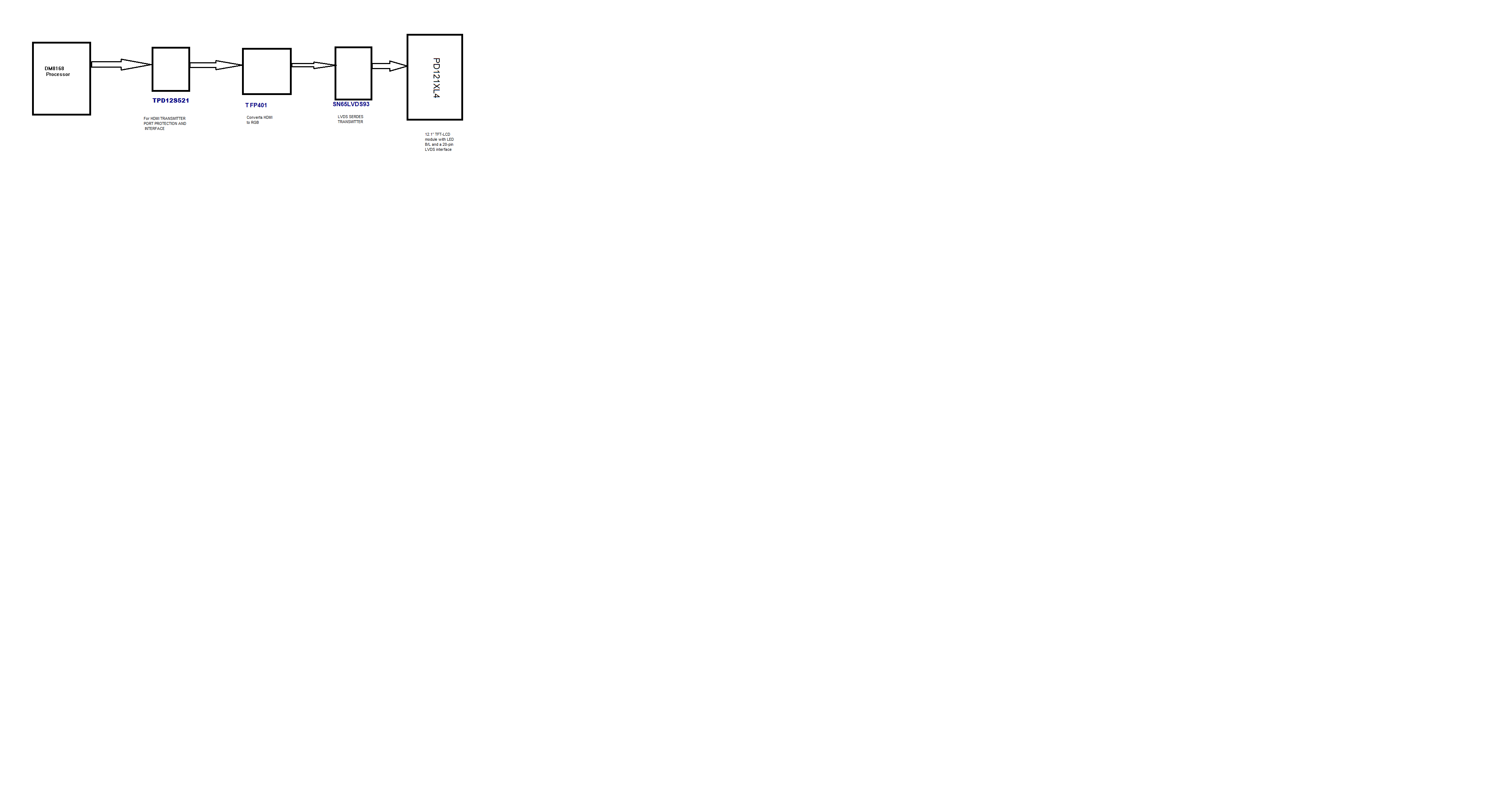
connected  :-  HDMI == LVDS  == LCD

LVDS transmitter IC-->  THC63LVDM83A
lcd pannel  --> PD121XL4

This LCD module supports 1024 x 768 XGA mode displays 262,144 colors.

At present we are using clock 75 Mhz.

linux kernel version 2.6.37.
DM8168 DVRRDK release version:-  DM8168_DVRRDK_V03.00.00.


Regards
Asif

  • How are you converting from HDMI to LVDS transmitter input?

    Does your LCD panel use DE only or does it use H & V for timing reference?

    Can you send a block diagram of your signal chain which includes devices used?

    Can you also send the datasheet for the LCD?

    BR,

    Steve

  • Hi Steve,

      We used TIs TFP401 which will convert HDMI to RGB and for RGB to LVDS we hace SN65LVDS93.


    for more information  enclosing block diagram and datasheet for lcd.


        8463.PD121XL4-V0.1.pdf

    Regards

    Asif

  • OK, simple enough :)

    First, make sure that the HDMI output is configured in DVI mode and not HDMI mode. HDMI mode adds additional data island periods which can mess things up for DVI.

    Try enabling the color bar test mode of the HDMI transmitter module. This is enabled by setting bit 15 of register 0x48106000. If the color bar fills the entire LCD (take into account that the right edge will be a black bar though) then the issue is in the frame buffer configuration.

    Next, check the output timings are correct. You can use the sysfs entries described here for full details. Make sure that the active widths are correct and that the blanking periods align with your LCD requirements. Search for 'timings'

    http://processors.wiki.ti.com/index.php/DM816X_AM389X_VPSS_Video_Driver_User_Guide

    BR,

    Steve

  • Hello  Steve

    Thanks for your input. i am able to display colour bar and i am able to play the video.

    but i am not able to play live camera.

    when i am using colour bar and video play it is taking as 75 Mhz as clock but when i am playing camera it is talking as 150 Mhz.

    we are using the customer design (from udworks design).

    Regards

    Asif

  • This does not make sense. The output pixel rate will not change unless you explicitly change it.

    The source of the frame buffer data ('play video' or 'play live camera') makes no difference.

    What I think you really mean is that when you run one application (play video) then the results are OK but when you run a different application (play live camera) that you get a different results.

    This means that somewhere in the "play live camera" application it is changing the display resolution.

    You need to modify the application so that it sets the display resolution as you really need it.

    BR,

    Steve

  • Steve

    we are  able to fixed this  issues.    The problem was clock timming  and resoulation issues.

    Regards

    Asif

  • Excellent. Glad your issues are fixed.

    BR,

    Steve

  • Thanks to you steve

    Your inputs  was very helpfull.  for fixing the problem

    Regards

    Asif