This thread has been locked.

If you have a related question, please click the "Ask a related question" button in the top right corner. The newly created question will be automatically linked to this question.

5509a usb boot loader


We have a custom board using the DSP 5509a.

By now we boot the dsp using parallel EMIF (16-bit asynchronous memory - flash).

We also can communicate between pc - dsp through a USB with no problem.

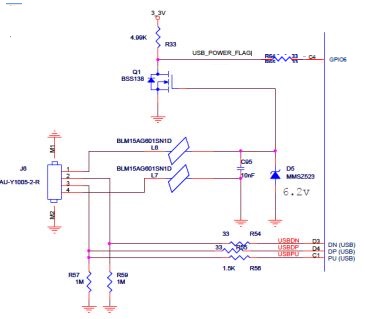
Here is the usb and boot schema:
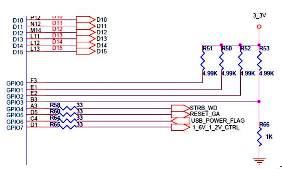


Now we are trying to boot from a pc using the usb as described in the doc. SPRA375F/SPRA840C.

We changed the boot to the following schema :
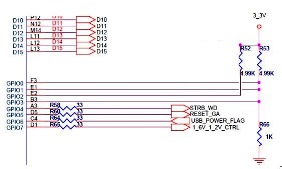


However the pc does not seem to recognize the dsp nor through windows nor through unix.
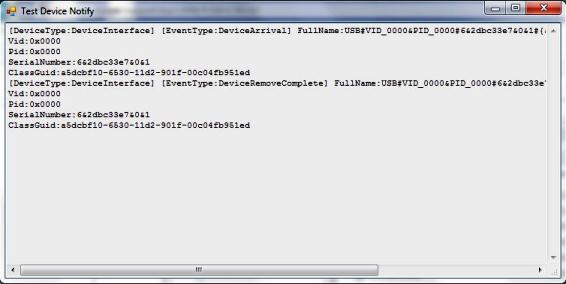
The dsp is detected with vid/pid 0000.
by using windows libusb for example, I receive the following message:
what I'm missing ?

Thanks,

ami

  • I can not read the pictures. Can you re-post it?
  • Have you read through SPRA840C?

    Are you using the sample PC-side USB driver (demo version) and demo application is available from Thesycon or writing your own driver?

    Hopefully the VID/PID isnt actually 0000/0000:

    The bootloader uses vendor identification (VID) 0x0451 and product identification (PID) 0x9001 during enumeration with the host operating system. The host operating system needs the VID and PID to load the appropriate driver, which is essential to establish communication between the host application and the bootloader.

    Hope this helps,
    Mark
  • Yes I read through the SPRA840C doc.
    We don't have the Thesycon driver or demo application.
    But as I mentioned we already have a full program running through usb.
    We are using the LibUsbDotNet driver.
    I thought that booting from a usb will be as similar to what we are doing by now.
    or at least a good starting point.
    Thanks,
    Ami
  • You should be able to write your own driver that follows the C5509A USB boot protocol:

    The USB bootloader configures Endpoint 6 Out as a bulk endpoint. The host should send the boot table to this endpoint. The bootloader uses vendor identification (VID) 0x0451 and product identification (PID) 0x9001 during enumeration with the host operating system. The host operating system needs the VID and PID to load the appropriate driver, which is essential to establish communication between the host application and the bootloader.

    You still need good VID/PID from the device - any progress here or is it still 0x0 for both?

    2. Set up the DSP to select the USB-boot mode (BOOTM[3:0] pins = 0010b).
    3. Power up and reset the DSP, and connect the USB cable to the host PC.

    I wonder if you power up, then reset the DSP, then connect the USB cable, will it enumerate correctly with 0x0451/0x9001?

    It might be worthwhile to contact Thesycon to evaluate their Universal USB Device Driver boot tool for C5509A: http://www.thesycon.com/eng/usbio_win_select.php

    Hope this helps,
    Mark
  • Thank You Mark,
    We had a hardware problem and now it is fixed.
    In order to progress I downloaded the Thesycon driver or demo application.
    However when we upload the bin file we receive a stall pid error.

    Here is the output we received when using the Thesycon application :

    Scanning for attached USB devices:

    USBIO Device0: VendorID:0x0451 ProductID:0x9001
    Device0 successfully opened.
    OpenPath with success.
    Get current device parameters was successful.
    Parent Hub ID:USB\VID_8087&PID_0024\5&2B6D435D&0&1
    The configuration has been successfully set.
    Pipe06: Error code 0xE0000004: HC Error: stall PID.
    Worker-thread terminated.
    OnDeviceChange message: 00000007 (DBT_DEVNODES_CHANGED)
    OnDeviceChange message: 00008004 (DBT_DEVICEREMOVECOMPLETE)
    The USB device \\?\USB#VID_0451&PID_9001#6&2dbc33e7&0&4#{325ddf96-938c-11d3-9e34-0080c82727f4} has been removed.
    Closing driver interface

    Thank you,
    Ami