This thread has been locked.

If you have a related question, please click the "Ask a related question" button in the top right corner. The newly created question will be automatically linked to this question.

Question about image processing project in tms320c6678

Hi

When i want to run the image processing project in 6678 evaluation board, i have problem with the following error in my console window

==================================================================

[C66xx_0]

MCSDK IMAGE PROCESSING DEMONSTRATION

EVM in StaticIP mode at 192.168.2.100
Set IP address of PC to 192.168.2.101
QMSS successfully initialized
CPPI successfully initialized
PASS successfully initialized
Ethernet subsystem successfully initialized
eventId : 48 and vectId : 7
Timeout waiting for reply from PA to Pa_addMac command
00000.000 mmBulkFree: Corrupted mem or bad ptr (80009748)
Add_MACAddress failed
Error: Unable to register the EMAC
Service Status: HTTP : Enabled : : 000
Service Status: HTTP : Disabled : : 000
Shutting things down

11:48 ( 17%) 6:96 ( 18%) 5:128 ( 20%) 2:256 ( 16%)
1:512 ( 16%) 0:1536 0:3072
(15360/49152 mmAlloc: 25/0/24, mmBulk: 23/0/2)

1 blocks alloced in 96 byte page
(0103)

=====================================================

do you know what is it? and how can i solve it?

Note that i use XDS100V1 emulator instead of XDS560V2.

  • Hi Armin,
    Please ensure that the gel file is selected to initialize the DDR and "No boot" mode selected on the bootmode switch settings.

    Thank you.
  • Hi Armin neamati,

    If we follow the right steps on running the image processing demo, it is very easy to run the demo.

    Please follow the steps below and let me know how it goes.

    Hardware connection details:

    1. Connect USB emulator, ethernet cable and power cord.

    Steps to run the Image processing demo:

    1. Import the master and slave project of image processing located at

        "..\ti\mcsdk_2_01_02_06\demos\image_processing\ipc\evmc6678l\master"

        "..:\ti\mcsdk_2_01_02_06\demos\image_processing\ipc\evmc6678l\slave"

    2. Create a target configuration file for C6678 and give the appropriate for the gel file located at "..\..\..\..\mcsdk_2_01_02_06\tools\program_evm\gel\evmc6678l.gel"

    3. open the target configuration file and select the "Blackhawk XDS560v2-USB Mezzanine Emulator" and "TMS3206678".

    4. Launch the target configuration file.

    5. Group the cores from 1 - 7 and leave the core 0 without grouping.

    6. Use "Connect target" option for core 0 and core 1 -7

    7. Load the master program at core 0 and load the slave program for core 1 - 7.

    8. Run core 0 and then the group of cores 1 - 7.

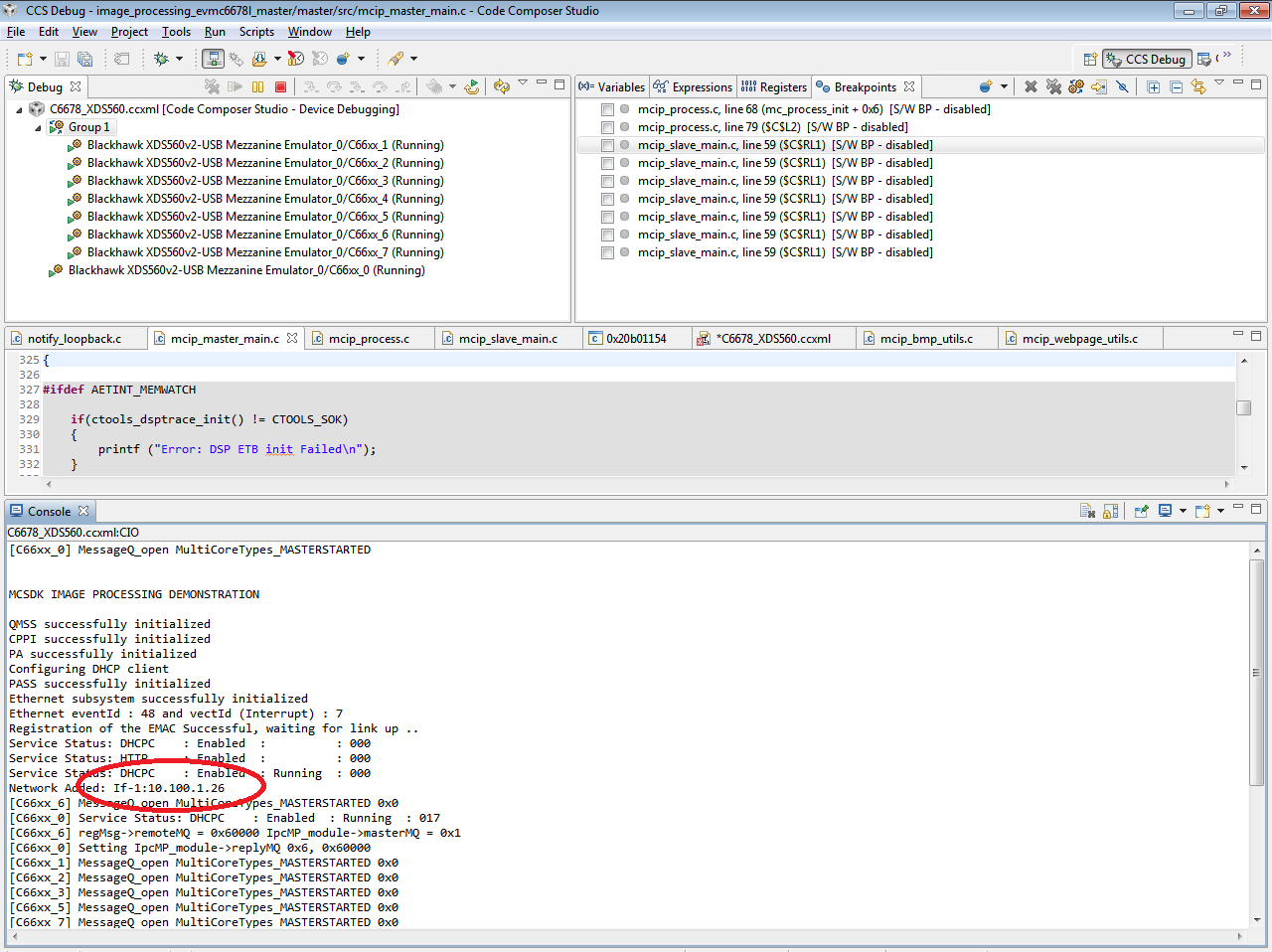
    9. You will get the console messages with one IP address like below.

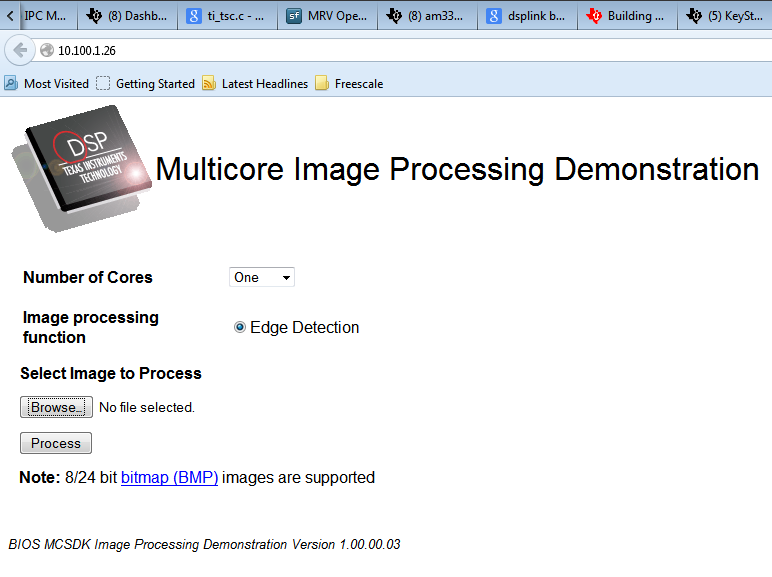
    10. open up the browser and type the ip address.... You will get it now.

    Regards,

    Shankari

    -------------------------------------------------------------------------------------------------------

    Please click the Verify Answer button on this post if it answers your question.
    --------------------------------------------------------------------------------------------------------


  • Thank you Rajasekaran and Shankari
    My previous problem solved. Know i see IP=192.168.2.100 in console window as a static IP. Do you know how can i use dynamic IP instead of static IP?
  • Hi Armin,

    It is decided by boot mode switch settings,

    5. Set User Switch for the demo application

    The application needs an IP address. It can use either a static IP address (pre-configured) or it can request one using DHCP. This is controlled by setting dip switch 2 of SW9.

    User Switch 2 ON : DHCP
    User Switch 2 OFF: Static IP

    processors.wiki.ti.com/.../TMDXEVM6678L_EVM_Hardware_Setup

    Thank you.
  • Please check the source which is reads the switch and sets the ip.

    \ti\mcsdk_2_01_02_06\demos\image_processing\ipc\master\src\mcip_master_main.c

    #ifndef TCI6614
        /*
         ** Read User SW 1
         ** If user SW 1 = OFF position: static IP mode (default), SW 1 = ON: client mode
         */
        if (!platform_get_switch_state(1)) {
            CI_IPNET NA;
            CI_ROUTE RT;
            IPN      IPTmp;
    
            /* Setup an IP address to this EVM */
            bzero( &NA, sizeof(NA) );
            NA.IPAddr  = inet_addr(EVMStaticIP);
            NA.IPMask  = inet_addr(LocalIPMask);
            strcpy( NA.Domain, DomainName );
    
            /* Add the address to interface 1 */
            CfgAddEntry( hCfg, CFGTAG_IPNET, 1, 0, sizeof(CI_IPNET), (UINT8 *)&NA, 0 );
    
            /* Add the default gateway (back to user PC) */
            bzero( &RT, sizeof(RT) );
            RT.IPDestAddr = inet_addr(PCStaticIP);
            RT.IPDestMask = inet_addr(LocalIPMask);
            RT.IPGateAddr = inet_addr(GatewayIP);
    
            /* Add the route */
            CfgAddEntry( hCfg, CFGTAG_ROUTE, 0, 0, sizeof(CI_ROUTE), (UINT8 *)&RT, 0 );
    
            /* Manually add the DNS server when specified */
            IPTmp = inet_addr(DNSServer);
            if( IPTmp )
                CfgAddEntry( hCfg, CFGTAG_SYSINFO, CFGITEM_DHCP_DOMAINNAMESERVER,
                        0, sizeof(IPTmp), (UINT8 *)&IPTmp, 0 );
    
            platform_write("EVM in StaticIP mode at %s\n", EVMStaticIP);
            platform_write("Set IP address of PC to %s\n", PCStaticIP);
        }
        else
    #endif
        {
            platform_write("Configuring DHCP client\n");
    
            bzero( &dhcpservice, sizeof(dhcpservice) );
            dhcpservice.cisargs.Mode   = CIS_FLG_IFIDXVALID;
            dhcpservice.cisargs.IfIdx  = 1;
            dhcpservice.cisargs.pCbSrv = &ServiceReport;
            dhcpservice.param.pOptions = dhcp_options;
            dhcpservice.param.len = 2;
            CfgAddEntry( hCfg, CFGTAG_SERVICE, CFGITEM_SERVICE_DHCPCLIENT, 0,
                    sizeof(dhcpservice), (UINT8 *)&dhcpservice, &(dhcpservice.cisargs.hService) );
        }

    Thank you.

  • Hi Armin,
    Please help us to close this thread.