This thread has been locked.

If you have a related question, please click the "Ask a related question" button in the top right corner. The newly created question will be automatically linked to this question.

Keystone2 EVMK2H NDK does not work

Other Parts Discussed in Thread: TCI6638K2K

Hi Expert,

I got an EVMK2H12 board with Rev 3.0 . The linux runs well and network is fine. However when I switch to baremetal mode with swich "off off off on" and try to run an NDK example (client_evmk2h), I can't ping it nor can I send udp packet to it (no echo back).

here're all I got:

  •  mcsdk_bios_3_01_03_06
  •  pdk_keystone2_3_01_03_06
  •  ndk_2_24_01_18
  • only changes to the code:

char *HostName = "tidsp";
char *LocalIPAddr = "10.204.6.49";
char *LocalIPMask = "255.0.0.0"; // Not used when using DHCP
char *GatewayIP = "10.204.6.1"; // Not used when using DHCP
char *DomainName = "demo.net"; // Not used when using DHCP
char *DNSServer = "0.0.0.0"; // Used when set to anything but zero


// If the IP address is specified, manually configure IP and Gateway
#if defined(_SCBP6618X_) || defined(_EVMTCI6614_) || defined(DEVICE_K2H) || defined(DEVICE_K2K) || defined(DEVICE_K2E) || defined(DEVICE_K2L)
/* SCBP6618x, EVMTCI6614, EVMK2H, EVMK2K always uses DHCP */
if (1) // to make it with static ip
#else

...

  • console output , seems pretty good:

[C66xx_0] QMSS successfully initialized
CPPI successfully initialized
PA successfully initialized

TCP/IP Stack Example Client
PASS successfully initialized
Ethernet subsystem successfully initialized
Ethernet eventId : 48 and vectId (Interrupt) : 7
Registration of the EMAC Successful, waiting for link up ..
Network Added: If-1:10.204.6.49
Service Status: Telnet : Enabled : : 000
Service Status: HTTP : Enabled : : 000

  I don't think there's anything wrong with my ip configuration because my hostip is exactly in that network segment. Besides I got a evm6678 board too which works well with that ip configuration .

A demo project with a demo board should not be that hard , right ? Am I doing anything wrong ?

Thanks,

Striker


  • Hi,

    For K2X boards, always DHCP setup has been used for NDK examples.

    You have to connect PC to EVM board suppose if you try static IP configuration by modifying the code.

    Which mode are you running and how did you connect your board ?

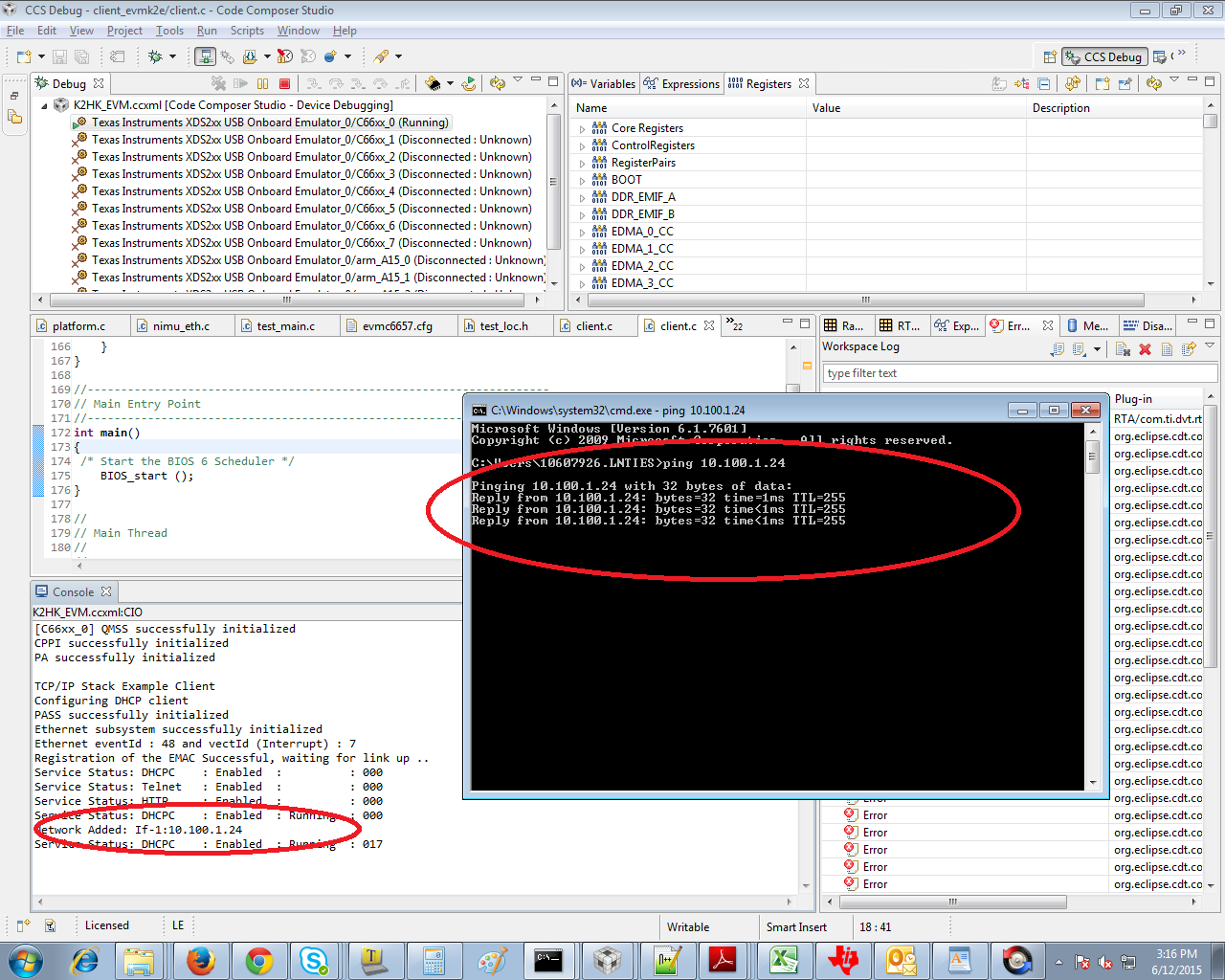
    In my setup, I've connected my K2H EVM board to LAN so I would get IP address from DHCP server and running the NDK client example without any code modification.

    Here is the screen shot.

  • Stalin ,

    Thanks for your quick reply, what is bothering me is DHCP does'nt work either , it hangs here:

    [C66xx_0] QMSS successfully initialized
    CPPI successfully initialized
    PA successfully initialized

    TCP/IP Stack Example Client
    Configuring DHCP client
    PASS successfully initialized
    Ethernet subsystem successfully initialized
    Ethernet eventId : 48 and vectId (Interrupt) : 7
    Registration of the EMAC Successful, waiting for link up ..
    Service Status: DHCPC : Enabled : : 000
    Service Status: Telnet : Enabled : : 000
    Service Status: HTTP : Enabled : : 000
    Service Status: DHCPC : Enabled : Running : 000

    And I'm pretty sure the eithernet has connected to LAN with DHCP server because with the same cable my 6678 board configed as DHCP worked really good showing network added.

    Network Added: If-1:10.204.7.176
    Service Status: DHCPC : Enabled : Running : 017


    Any ideas that I how I can debug this issue?

    Thanks,

    striker

  • Hi,

    I've tried newer MCSDK NDK examples too which you used and got the good results.

    Did you change the code ?

    1) Set boot mode to "DSP no-boot mode"

    2) Connect DSP core0 and gel file get initialized.

    3) Select DSP core0 and load the attached .out

    4) Run.

    If you get again the same problem, then we will try to change to the "static mode".

    https://e2e.ti.com/cfs-file/__key/communityserver-discussions-components-files/791/client_5F00_evmk2h.out

  • Stalin,

    Thank you for your .out file. It doen't work either which at least verifiers that my project envionment is ok.

    The only thing that may be the problem is the gel file init, I didn't do it because I can't find a proper gel file , am I suppose to use

    ccsv6\ccs_base\emulation\boards\xtcievmk2x\gel\xtcievmk2x.gel ?

    It is said "Utility GEL for use with the TCI6638K2K EVM." I guess K2K and K2H are almost the same , right?

    When implementing that gel file I met with the error logs from gel :

    C66xx_0: GEL Output: Set_PSC_State... Timeout Error #03 pd=2, md=9!
    C66xx_0: GEL Output: Set_PSC_State... Timeout Error #03 pd=17, md=25!
    C66xx_0: GEL Output: Set_PSC_State... Timeout Error #03 pd=17, md=26!
    C66xx_0: GEL Output: Set_PSC_State... Timeout Error #03 pd=18, md=27!
    C66xx_0: GEL Output: Set_PSC_State... Timeout Error #03 pd=19, md=28!
    C66xx_0: GEL Output: Set_PSC_State... Timeout Error #03 pd=21, md=34!
    C66xx_0: GEL Output: Set_PSC_State... Timeout Error #03 pd=22, md=35!
    C66xx_0: GEL Output: Set_PSC_State... Timeout Error #03 pd=23, md=37!
    C66xx_0: GEL Output: Set_PSC_State... Timeout Error #03 pd=24, md=39!
    C66xx_0: GEL Output: Set_PSC_State... Timeout Error #03 pd=24, md=40!
    C66xx_0: GEL Output: Set_PSC_State... Timeout Error #03 pd=24, md=41!
    C66xx_0: GEL Output: Set_PSC_State... Timeout Error #03 pd=24, md=42!
    C66xx_0: GEL Output: Set_PSC_State... Timeout Error #03 pd=26, md=47!
    C66xx_0: GEL Output: Set_PSC_State... Timeout Error #03 pd=27, md=48!

    Attached file is client example from my build.client_evmk2h_striker.zip

    Thanks,

    striker

  • Hi,
    Yes, K2H and K2K is almost same.
    I'm using the gel file from the following location.
    C:\ti\mcsdk_bios_3_01_03_06\tools\program_evm\gel\xtcievmk2x.gel

    I'm not able to run your .out and its going "running" state directly without halting at "main()"
    Also some file size difference is there between your code and my code, you might have changed code.
    What is your board ? custom or EVM ?
  • Stalin,

    It's an EVM K2H Rev3.0 board . And I'm familiar with TI keystone boards as CCS v5 so I don't think I could make simple mistakes.

    I followed  the steps as you said - set the board to no-boot , feed the board with gel and then run with the binary you gave to me . The result is still bad.

    what might be the issue:

    • I installed the CCSv6  to D:\ti_v6.it is ok , right ?
    • there are cygwin warnings during my building process like 

      cygwin warning:
      MS-DOS style path detected: D:/ti_v6/xdctools_3_30_05_60/bin/pwd,

      from my knowledge it is not an issue

      What is strange , I reinstalled the mcsdk and build the binary without changing anything - the size of .out file is 6.93MB not 6.11MB you gave me last time. Just try the binary I build this time , hopefully it will not hang your board...7026.client_evmk2h_striker.zip

  • Hi,

    Yes, it worked flawlessly.

    Now the difference is CCSv6 and I'm using CCSv5,your local LAN setup(as you said, it worked for C6678 shannon EVM),

    Let us try the staic mode now.

    I will try that first and give you the *.out.

  • Hi,

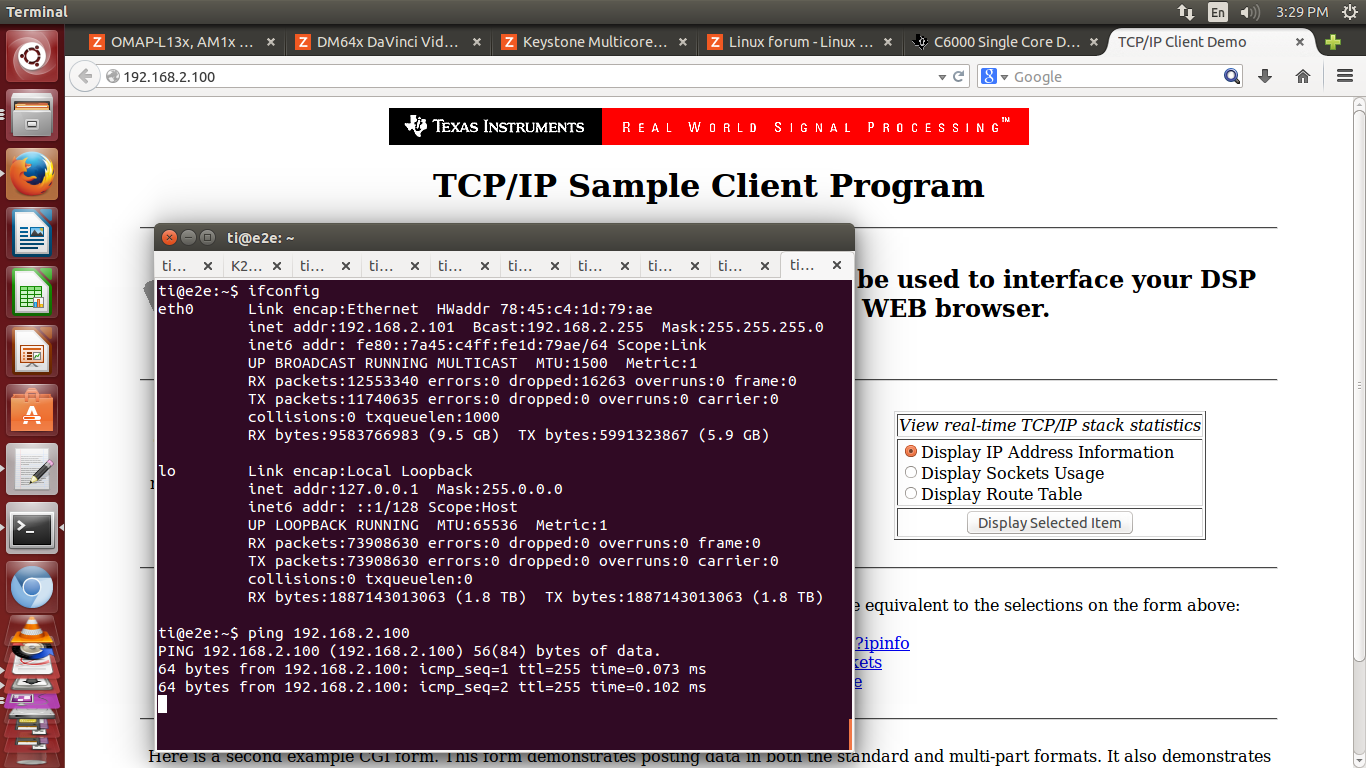
    As I told you, now I've done static mode too with just bit changes.

    I've attached the code and check the screen shots.

    Setup:

    I've connected ethernet cable between Windows 7 PC where I'm running code on K2H EVM (192.168.2.100) through CCS and Linux machine (192.168.2.101).

    We have to setup the ethernet address (192.168.2.101) at other end i.e, Linux with the same subnet address of K2H's IP address (192.168.2.100)

    https://e2e.ti.com/cfs-file/__key/communityserver-discussions-components-files/791/1323.client_5F00_evmk2h.out

    Even we can do the same on the same Windows 7 PC setup where we are running the CCS with LAN settings option and "static IP mode" configuration.

    If you face any issues with this, kindly let me know, I will do the same for windows 7 PC also.