This thread has been locked.

If you have a related question, please click the "Ask a related question" button in the top right corner. The newly created question will be automatically linked to this question.

Linking error when building IPC SRIO example project

Other Parts Discussed in Thread: SYSBIOS

Hi,

I'm testing the ipc example using SRIO ports. I use the example project in the following folder:

C:\ti\pdk_C6678_1_1_2_6\packages\ti\transport\ipc\examples\srioIpcChipToChipExample\producer

I imported this project into CCS, cleaned and rebuilt the project as instructed, but it gave me some linker errors like:

undefined first referenced

symbol in file

--------- ----------------

Osal_cppiBeginMemAccess C:\ti\pdk_C6678_1_1_2_6\packages\ti\drv\cppi\lib\ti.drv.cppi.ae66<cppi_drv.oe66>

Osal_cppiCsEnter C:\ti\pdk_C6678_1_1_2_6\packages\ti\drv\cppi\lib\ti.drv.cppi.ae66<cppi_drv.oe66>

Osal_cppiCsExit C:\ti\pdk_C6678_1_1_2_6\packages\ti\drv\cppi\lib\ti.drv.cppi.ae66<cppi_drv.oe66>

Osal_cppiEndMemAccess C:\ti\pdk_C6678_1_1_2_6\packages\ti\drv\cppi\lib\ti.drv.cppi.ae66<cppi_drv.oe66>

Osal_cppiFree C:\ti\pdk_C6678_1_1_2_6\packages\ti\drv\cppi\lib\ti.drv.cppi.ae66<cppi_heap.oe66>

Osal_cppiMalloc C:\ti\pdk_C6678_1_1_2_6\packages\ti\drv\cppi\lib\ti.drv.cppi.ae66<cppi_heap.oe66>

Osal_platformFree C:\ti\pdk_C6678_1_1_2_6\packages\ti\platform\evmc6678l\platform_lib\lib\debug\ti.platform.evm6678l.ae66<platform.obj>

Osal_platformMalloc C:\ti\pdk_C6678_1_1_2_6\packages\ti\platform\evmc6678l\platform_lib\lib\debug\ti.platform.evm6678l.ae66<platform.obj>

Osal_platformSpiCsEnter C:\ti\pdk_C6678_1_1_2_6\packages\ti\platform\evmc6678l\platform_lib\lib\debug\ti.platform.evm6678l.ae66<evmc66x_spi.obj>

Osal_platformSpiCsExit C:\ti\pdk_C6678_1_1_2_6\packages\ti\platform\evmc6678l\platform_lib\lib\debug\ti.platform.evm6678l.ae66<evmc66x_spi.obj>

Osal_qmssBeginMemAccess C:\ti\pdk_C6678_1_1_2_6\packages\ti\drv\qmss\lib\ti.drv.qmss.ae66<qmss_drv.oe66>

Osal_qmssCsEnter C:\ti\pdk_C6678_1_1_2_6\packages\ti\drv\qmss\lib\ti.drv.qmss.ae66<qmss_drv.oe66>

Osal_qmssCsExit C:\ti\pdk_C6678_1_1_2_6\packages\ti\drv\qmss\lib\ti.drv.qmss.ae66<qmss_drv.oe66>

Osal_qmssEndMemAccess C:\ti\pdk_C6678_1_1_2_6\packages\ti\drv\qmss\lib\ti.drv.qmss.ae66<qmss_drv.oe66>

Osal_srioBeginDescriptorAccess C:\ti\pdk_C6678_1_1_2_6\packages\ti\drv\srio\lib\ti.drv.srio.ae66<srio_drv.oe66>

Osal_srioBeginMemAccess C:\ti\pdk_C6678_1_1_2_6\packages\ti\drv\srio\lib\ti.drv.srio.ae66<srio_drv.oe66>

Osal_srioCreateSem C:\ti\pdk_C6678_1_1_2_6\packages\ti\drv\srio\lib\ti.drv.srio.ae66<srio_drv.oe66>

Osal_srioDataBufferFree C:\ti\pdk_C6678_1_1_2_6\packages\ti\drv\srio\lib\ti.drv.srio.ae66<srio_drv.oe66>

Osal_srioDataBufferMalloc C:\ti\pdk_C6678_1_1_2_6\packages\ti\drv\srio\lib\ti.drv.srio.ae66<srio_drv.oe66>

Osal_srioDeleteSem C:\ti\pdk_C6678_1_1_2_6\packages\ti\drv\srio\lib\ti.drv.srio.ae66<srio_drv.oe66>

Osal_srioEndDescriptorAccess C:\ti\pdk_C6678_1_1_2_6\packages\ti\drv\srio\lib\ti.drv.srio.ae66<srio_drv.oe66>

Osal_srioEndMemAccess C:\ti\pdk_C6678_1_1_2_6\packages\ti\drv\srio\lib\ti.drv.srio.ae66<srio_drv.oe66>

Osal_srioEnterMultipleCoreCriticalSection C:\ti\pdk_C6678_1_1_2_6\packages\ti\drv\srio\lib\ti.drv.srio.ae66<srio_drv.oe66>

Osal_srioEnterSingleCoreCriticalSection C:\ti\pdk_C6678_1_1_2_6\packages\ti\drv\srio\lib\ti.drv.srio.ae66<srio_drv.oe66>

Osal_srioExitMultipleCoreCriticalSection C:\ti\pdk_C6678_1_1_2_6\packages\ti\drv\srio\lib\ti.drv.srio.ae66<srio_drv.oe66>

Osal_srioExitSingleCoreCriticalSection C:\ti\pdk_C6678_1_1_2_6\packages\ti\drv\srio\lib\ti.drv.srio.ae66<srio_drv.oe66>

Osal_srioFree C:\ti\pdk_C6678_1_1_2_6\packages\ti\drv\srio\lib\ti.drv.srio.ae66<srio_drv.oe66>

Osal_srioLog C:\ti\pdk_C6678_1_1_2_6\packages\ti\drv\srio\lib\ti.drv.srio.ae66<srio_drv.oe66>

Osal_srioMalloc C:\ti\pdk_C6678_1_1_2_6\packages\ti\drv\srio\lib\ti.drv.srio.ae66<srio_drv.oe66>

Osal_srioPendSem C:\ti\pdk_C6678_1_1_2_6\packages\ti\drv\srio\lib\ti.drv.srio.ae66<srio_drv.oe66>

Osal_srioPostSem C:\ti\pdk_C6678_1_1_2_6\packages\ti\drv\srio\lib\ti.drv.srio.ae66<srio_drv.oe66>

attachAll ./producer_srio.obj

detachAll ./producer_srio.obj

error #10234-D: unresolved symbols remain

error #10010: errors encountered during linking;

I've attached my project file here (I actually didn't modify anything) in case you need it.

srioChipToChipProducer_c6678.zip

Thanks,

Shang

  • Hi,

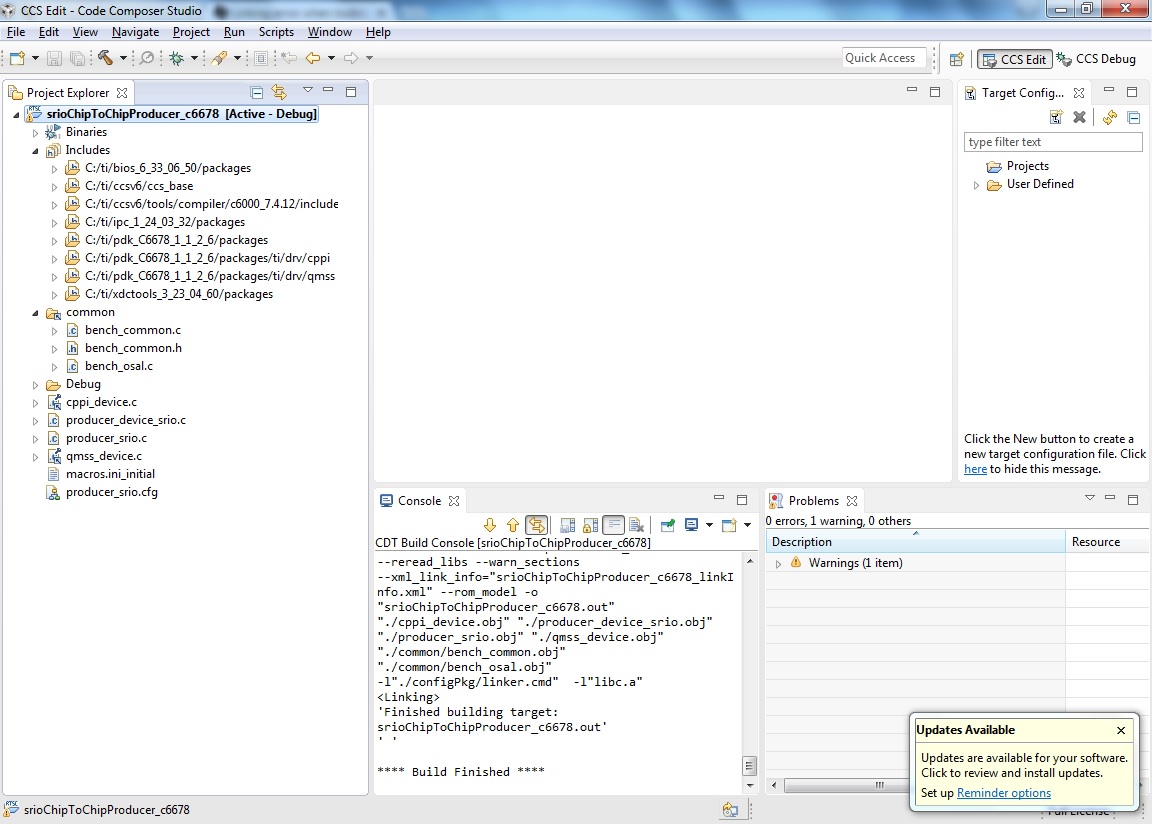
    I have successfully import and build the project. See my screen below:

    I try to build your attached project, but srioChipToChipProducer_c6678\common folder is empty on your zip file.

    Have you copy the MCSDK example to your work space? Better to import the example project from default MCSDK path, don't copy to your work space.

    Thanks,

  • Hi,

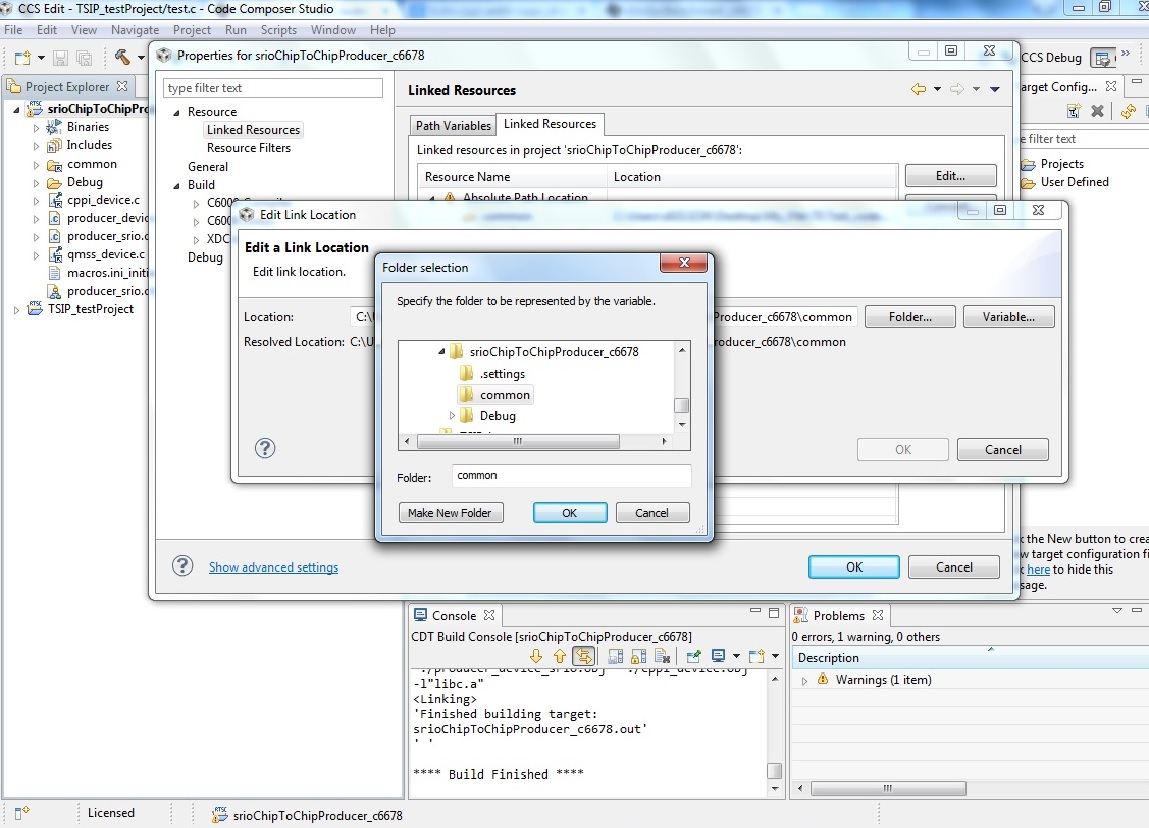
    It looks like you are selecting the option, "Copy projects into work-space", when you are importing. The linking error you see in the first case is caused by this because CCS could not copy the 'common' folder due to it being defined with a variable in its path (if you right click on it and select properties, you can see it defined as ${PARENT-1-PROJECT_LOC}\common).

    Follow the below two ways you may try to solve this error:

    1) Import without copying to your work-space and work directly on the directory

    2) Hard copy the "common" folder into your current project location and change the common folder path in project properties. see below image, after this changes i able to built your attached project.

    Thanks,

  • Hi Ganapathi,

    Thanks it works, I don't know why the consumer project imports those files but the producer doesn't...

    I just built the 2 projects and use the ci2evmboc breakout board to connect the 2 boards and ran the 2 applications on both sides.

    On the producer side, it prints out:

    [C66xx_0] Local Core ("CORE0") starting
    Local Core ID: 0
    Global Core ID: 0
    -----------------------Initializing---------------------------
    Core 0 : L1D cache size 4. L2 cache size 0.
    Core 0 : Memory region 0 inserted
    [C66xx_1] Local Core ("CORE1") starting
    Local Core ID: 1
    Global Core ID: 1
    Core 1: Waiting for SRIO to be initialized.
    [C66xx_0] Port 0 did not initialize
    Port 1 did not initialize
    Port 2 did not initialize
    Port 3 did not initialize
    Core 0: SRIO Driver has been initialized
    [C66xx_1] Core 1: SRIO can now be used.
    localQueueName=CORE1
    remoteQueueName=CORE3
    Core 1: tsk0 starting
    [C66xx_0] localQueueName=CORE0
    remoteQueueName=CORE2
    Core 0: tsk0 starting
    Global Core 0: Sending packets to an off-chip core.
    Global Core 0 attempting to open remote board Queue CORE2
    [C66xx_1] Global Core 1: Sending packets to an off-chip core.
    Global Core 1 attempting to open remote board Queue CORE3
    [C66xx_0] ti.sdo.ipc.heaps.HeapBufMP: line 622: E_noBlocksLeft: No more blocks left in buffer (handle = 0x846fb8, requested size = 112)
    ti.sdo.ipc.nsremote.NameServerMessageQ: line 227: E_outOfMemory: MessageQ_alloc faild from heap: 0
    [C66xx_1] ti.sdo.ipc.heaps.HeapBufMP: line 622: E_noBlocksLeft: No more blocks left in buffer (handle = 0x846fb8, requested size = 112)
    ti.sdo.ipc.nsremote.NameServerMessageQ: line 227: E_outOfMemory: MessageQ_alloc faild from heap: 0
    same thing keeps going after this..
    --------------------------------------------------------------
    on the consumer side:

    -----------------------Initializing---------------------------

    Core 2 : L1D cache size 4. L2 cache size 0.

    Core 2 : Memory region 0 inserted

    [C66xx_1] Local Core ("CORE1") starting

    Local Core ID: 1

    Global Core ID: 3

    Core 3: Waiting for SRIO to be initialized.

    [C66xx_0] Port 0 did not initialize

    Port 1 did not initialize

    Port 2 did not initialize

    Port 3 did not initialize

    Core 2: SRIO Driver has been initialized

    [C66xx_1] Core 3: SRIO can now be used.

    localQueueName=CORE3

    Core 3: tsk0 starting

    [C66xx_0] localQueueName=CORE2

    Core 2: tsk0 starting

    Global Core 2: Receiving packets from an off-chip core.

    [C66xx_1] Global Core 3: Receiving packets from an off-chip core.

    and it stuck there.

    Would you please show me some pointers where it goes wrong or what configurations do I need to modify?

    Thanks,

    Shang

  • Hi,

    Have you try to run the default consumer and producer example on both EVMs?

    Have you followed the below steps to build/run the example:

    1. Import the srioChipToChipProducer_c66xx CCS project from transport\ipc\examples\srioIpcChipToChipExample\producer
    directory. (in CCSv5, Project->Import Existing CCS/CCE Eclipse Projects)

    2. Clean the srioChipToChipProducer_c66xx project, delete the Debug and Release directories, and re-build the project.
    After the build is complete, srioChipToChipProducer_c66xx.out and srioChipToChipProducer_c66xx.map will be generated under
    transport\ipc\examples\srioIpcChipToChipExample\producer\Debug (or \Release depending on the build configuration) directory.

    3. Import the srioChipToChipConsumer_c66xx CCS project from transport\ipc\examples\srioIpcChipToChipExample\consumer
    directory. (in CCSv5, Project->Import Existing CCS/CCE Eclipse Projects)

    4. Clean the srioChipToChipConsumer_c66xx project, delete the Debug and Release directories, and re-build the project.
    After the build is complete, srioChipToChipConsumer_c66xx.out and srioChipToChipConsumer_c66xx.map will be generated under
    transport\ipc\examples\srioIpcChipToChipExample\consumer\Debug (or \Release depending on the build configuration) directory.

    Steps to run SRIO Chip-to-Chip example in CCSv5:

    1. Two EVMs, connected to one another over all four SRIO lanes via breakout boards is required for this example.

    2. Be sure to set the boot mode dip switch to no boot/EMIF16 boot mode on each EVM.

    3. Open two instances of CCSv5 to connect to both boards.

    4. On each board group Core 0 and Core 1 in CCS.

    4. Connect to both cores via the group.

    5. Load the evmc66xxl.gel to initialize the DDR. The GEL can be found in the
    "CCS install dir"\ccsv5\ccs_base_x.x.x.xxxxx\emulation\boards\evmc66xxl\gel directory. Once loaded execute
    the default setup script on each core. In the CCS menu go to Scripts->EVMC6678L Init Functions->Global_Default_Setup.

    6. Highlighting the Group in the CCS Debug window, load
    transport\ipc\examples\srioIpcChipToChipExample\producer\Debug\srioChipToChipProducer_c66xx.out on each core of board 1 simultaneously

    7. Highlighting the Group in the CCS Debug window, load
    transport\ipc\examples\srioIpcChipToChipExample\consumer\Debug\srioChipToChipConsumer_c66xx.out on each core of board 2 simultaneously

    8. Highlighting the Group in CCS Debug window for board 1, run the program in CCS on both cores simultaneously, srioChipToChipProducer_c66xx will run until the SRIO hardware tries to sync up with board 2. At this point it will wait until the consumer images on board 2 are executed.

    9. Highlighting the Group in CCS Debug window for board 2, run the program in CCS on both cores simultaneously, srioChipToChipConsumer_c66xx will run until the SRIO hardware tries to sync up with board 1.

    10. After both images have been started and the SRIO hardware on each board sync's with one another the programs on each
    core will continue execution. The Producer core's will send four messageQ messages each to the consumer cores. Producer
    core 0 will send four messages to Consumer core 1. Producer core 1 will send four messages to Consumer core 0. When
    the test completes the consumer cores should print out that they successfully received four messages.

    Thanks,
  • Hi Ganapathi,

    Yes that's exactly what I followed from the readme file. And the result was as I posted. I noticed on both producer and consumer side, it prints out :

    [C66xx_0] Port 0 did not initialize

    Port 1 did not initialize

    Port 2 did not initialize

    Port 3 did not initialize

    Could it be the reason that the example fails?

    Thanks,
    Shang

  • Hi,

    I have followed the same steps to tested the example on C6678 EVM. it is working fine, see the attached test log file.

    [C66xx_0] Local Core ("CORE0") starting
    Local Core ID: 0
    Global Core ID: 0
    
    -----------------------Initializing---------------------------
    Core 0 : L1D cache size 4. L2 cache size 0.
    Core 0 : Memory region 0 inserted
    [C66xx_1] Local Core ("CORE1") starting
    Local Core ID: 1
    Global Core ID: 1
    Core 1: Waiting for SRIO to be initialized.
    [C66xx_0] Port 0 did not initialize
    Local Core ("CORE0") starting
    Local Core ID: 0
    Global Core ID: 2
    
    -----------------------Initializing---------------------------
    Core 2 : L1D cache size 4. L2 cache size 0.
    Core 2 : Memory region 0 inserted
    Port 0 is okay
    [C66xx_1] Local Core ("CORE1") starting
    Local Core ID: 1
    Global Core ID: 3
    Core 3: Waiting for SRIO to be initialized.
    [C66xx_0] Port 1 did not initialize
    Port 2 is okay
    Port 3 is okay
    Core 0: SRIO Driver has been initialized
    Port 1 is okay
    Port 2 is okay
    Port 3 is okay
    Core 2: SRIO Driver has been initialized
    [C66xx_1] Core 1: SRIO can now be used.
    Core 3: SRIO can now be used.
    localQueueName=CORE1
    localQueueName=CORE3
    remoteQueueName=CORE3
    Core 3: tsk0 starting
    Core 1: tsk0 starting
    [C66xx_0] localQueueName=CORE0
    localQueueName=CORE2
    remoteQueueName=CORE2
    Core 2: tsk0 starting
    Core 0: tsk0 starting
    Global Core 2: Receiving packets from an off-chip core.
    Global Core 0: Sending packets to an off-chip core.
    Global Core 0 attempting to open remote board Queue CORE2
    [C66xx_1] Global Core 1: Sending packets to an off-chip core.
    Global Core 3: Receiving packets from an off-chip core.
    Global Core 1 attempting to open remote board Queue CORE3
    Global Core 1 opened messageQ with name CORE3 and ID 30001
    Core 1: Sent 4 messages.
    [C66xx_0] Global Core 0 opened messageQ with name CORE2 and ID 20001
    [C66xx_1] Core 3: received 4 messages from core 1
    [C66xx_0] Core 0: Sent 4 messages.
    [C66xx_1] Chip to chip message transfer passed!
    [C66xx_0] Core 2: received 4 messages from core 0
    Chip to chip message transfer passed!
    

    I think board connection issue on your test setup. Please see the below wiki link to confirm your connection setup

    Thanks,

  • Hi Ganapathi,

    Would you please upload the .out files (or better, the project) that you successfully run? So that I can locate where the problem is.

    Thanks,
    Shang

  • Also I've made some progresses on initializing SRIO ports. Now I can get messages like Port x is okay on both boards. But it seems to stuck at

    Global Core 3: Receiving packets from an off-chip core.
    Global Core 1 attempting to open remote board Queue CORE3

    So maybe it's a connection problem? But when I look at the the breakout boards schematic, the SRIO ports are directly connected and the connection between my EVM boards and breakout board are solid. So I'll probably wait for your executables to decide whether it's a HW problem or SW problem.

    Thanks,
    Shang
  • Hi,

    Please find my attached .out file.SRIO_binary.zip

    Thanks,

  • Hi Ganapathi,

    I just tried your binary files and here is the log from producer side:

    [C66xx_0] Local Core ("CORE0") starting

    Local Core ID: 0

    Global Core ID: 0

    -----------------------Initializing---------------------------

    Core 0 : L1D cache size 4. L2 cache size 0.

    Core 0 : Memory region 0 inserted

    Port 0 is okay

    [C66xx_1] Local Core ("CORE1") starting

    Local Core ID: 1

    Global Core ID: 1

    Core 1: Waiting for SRIO to be initialized.

    [C66xx_0] Port 1 is okay

    Port 2 is okay

    Port 3 is okay

    Core 0: SRIO Driver has been initialized

    [C66xx_1] Core 1: SRIO can now be used.

    localQueueName=CORE1

    remoteQueueName=CORE3

    Core 1: tsk0 starting

    [C66xx_0] localQueueName=CORE0

    remoteQueueName=CORE2

    Core 0: tsk0 starting

    Global Core 0: Sending packets to an off-chip core.

    Global Core 0 attempting to open remote board Queue CORE2

    [C66xx_1] Global Core 1: Sending packets to an off-chip core.

    Global Core 1 attempting to open remote board Queue CORE3

    [C66xx_0] ti.sdo.ipc.MessageQ: line 441: assertion failure: A_invalidQueueId: Invalid queueId is used

    xdc.runtime.Error.raise: terminating execution


    There is an error message and then that core just stops running. The consumer side is basically still  waiting for packets. I've looked into invalidID issues on the website and most of them are software config issues. Given that I'm using your compiled binaries, I really couldn't figure out where the problem is.. 

    Thanks,

    Shang

  • Hi,

    I think consumer and producer SRIO sequence is mismatch on your test environment.
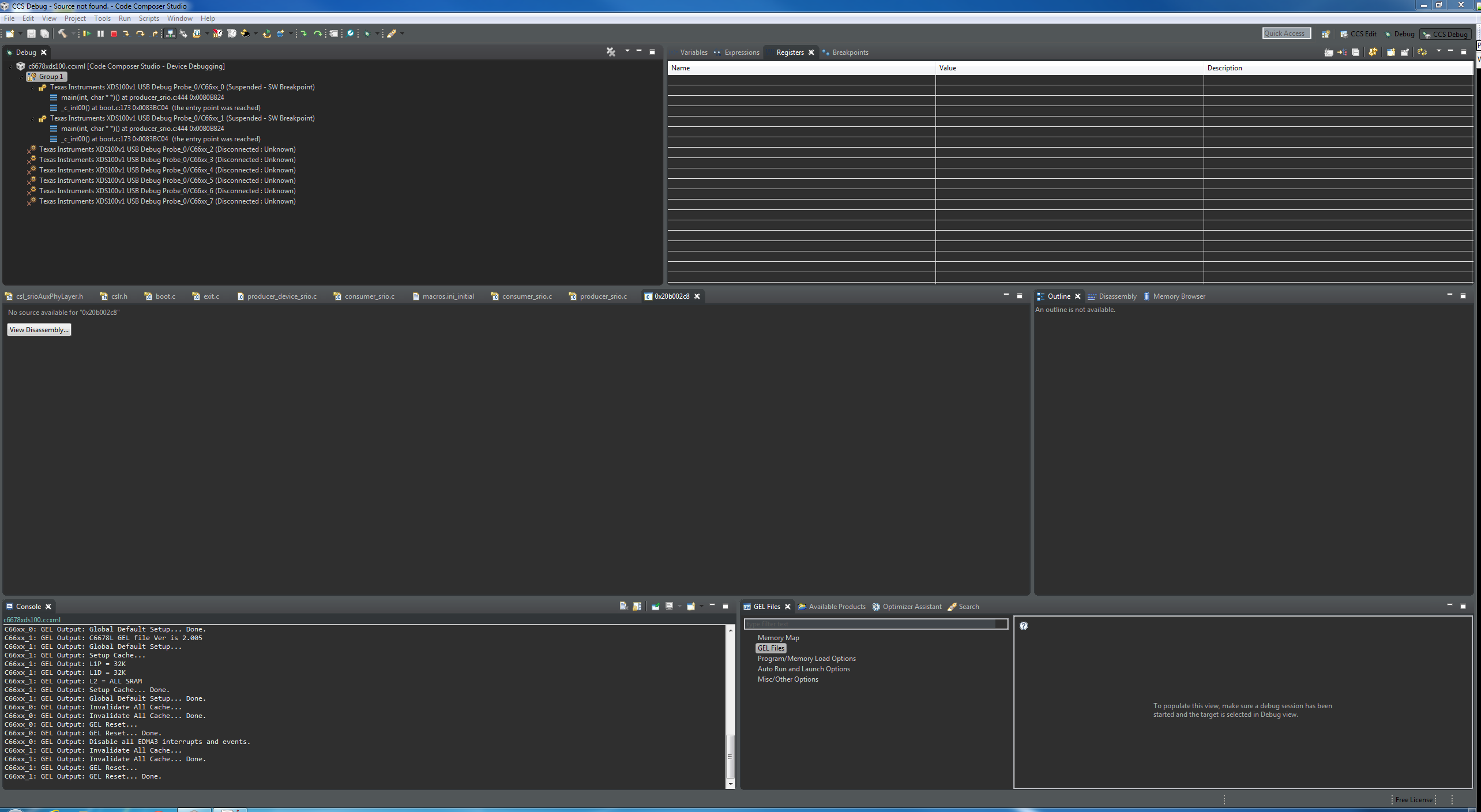
    Have you configure the two EVM emulators in single target configuration file and run the example? Please share your CCS debug window screen shot.

    Thanks,
  • Hi Ganapathi,

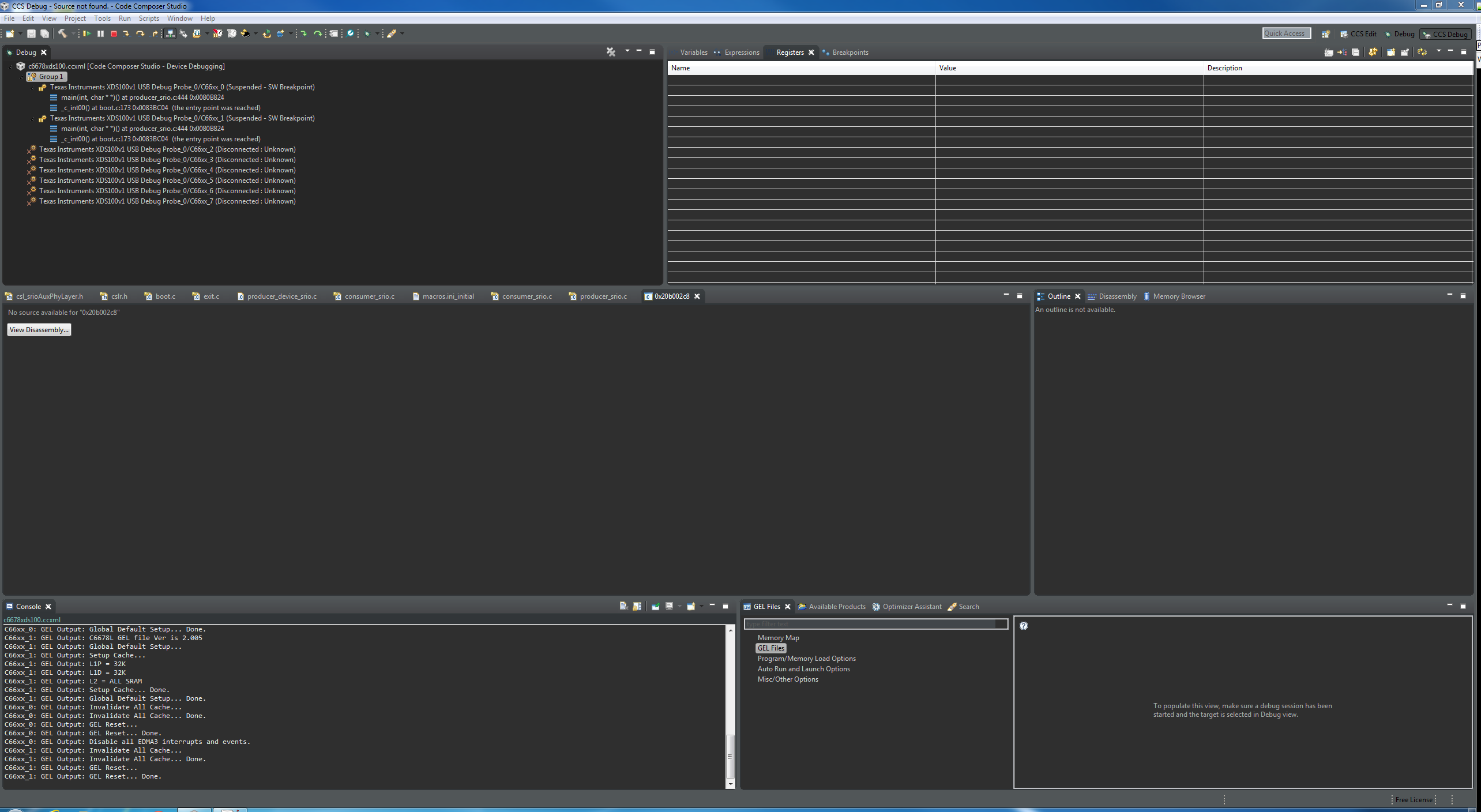
    So I'm using 2 computers to launch 2 separate sessions on 2 boards respectively. Here are the screenshots right before I click "run" button. Gel files are loaded to each core and global setups have been done.

    Thanks,

    Shang

  • Hi,

    Refer below wiki link to configure two emulator on single target configuration file and load/run the both EVM binaries in single computer CCS.

    See below my CCS target configuration file screen shot for your reference:

    Thanks,

  • Hi,

    I've read the link you posted, and it's said "having two XDS100v1 emulators are not supported". But I also noticed that you're using 2 xds100v1 emulators, so how did you make it work? Also when I run xds100serial.exe only 1 serial # is printed.

    Thanks,
    Shang
  • Hi,

    i shared the the above screen shot only for your reference.

    In my setup, one EVM have Blackhawk XDS560v2 Mezzanine Card. I configured one on-board xds100v1 emulator and Blackhawk XDS560v2 emulator on my target configuration file. I used this .ccxml file for testing. Refer my .ccxml file. https://e2e.ti.com/cfs-file/__key/communityserver-discussions-components-files/791/Two_5F00_C6678.ccxml

    Thanks,

  • Hi Ganapathi,

    I've tried your config file, along with your binary files. But still get the same error.

    [C66xx_0] ti.sdo.ipc.MessageQ: line 441: assertion failure: A_invalidQueueId: Invalid queueId is used
    xdc.runtime.Error.raise: terminating execution


    I don't understand, maybe I should try some other examples to test whether the SRIO works?

    Thanks,
    Shang
  • Hi,

    Yes, Please try to run MCSDK SRIO Throughput test code to validate the SRIO transfer works on your setup. It support internal loop-back mode, external loop-back mode, board to board mode(via BOC), and SRIO switch mode.

    MCSDK Path: C:\ti\pdk_C6678_x_x_x_x\packages\ti\drv\exampleProjects\SRIO_TputBenchmarkingTestProject

    Refer SRIO_Benchmarking_Example_Code_Guide document, it will help you to run the example with multiple mode.

    Doc Path: \ti\pdk_C6678_x_x_x_x\packages\ti\drv\srio\test\tput_benchmarking\docs\SRIO_Benchmarking_Example_Code_Guide.

    Thanks,
  • I've tried it a couple of times, and some times I get the error like:

    ti.sysbios.gates.GateSwi: line 68: assertion failure: A_badContext: bad calling context. May not be entered from a hardware interrupt thread.
    xdc.runtime.Error.raise: terminating execution

    instead of invalidQueueId error.
  • Hi,

    Have you using default MCSDK example code for your testing?

    I have tested this SRIO example between two EVM's with multiple time and measure the SRIO throughput performance. I did not get any error at run time.

    I observed some problem for re-run the same SIRO example with out power reset of EVM boards, some SRIO registers are not properly cleared and re-initialized.

    Thanks,
  • Hey I tried it again and the throughput test works! So I guess it's not a hardware connection problem.