This thread has been locked.

If you have a related question, please click the "Ask a related question" button in the top right corner. The newly created question will be automatically linked to this question.

Serial flash utility is not working for davinci evm dm6446

Hi,

I have my previous discussions on the same topic in below link and could not get much suggestion: 

e2e.ti.com/.../428607

further I have tried serial flash utility for Davinci evm DM6446 demo board(spectrum digital DVEVMDM6446) and I struck after "magic number found" message.

below is my experiment: 

followed: 

 and  

with UART mode, command typed in terminal: 


C:\DM644x_FlashAndBootUtils_2_00\DM644x\GNU>sfh_DM644x -flash -flashType NOR -targetType DM6446 -appStartAddr 0x80008674 -appLoadAddr 0x80000000 ubl_DM6446_NOR.bin led.bin 

here led.bin is my led blinking code for test, .bin file has been generated and used this file.

-----------------------------------------------------
TI Serial Flasher Host Program for DM644x
(C) 2010, Texas Instruments, Inc.
Ver. 1.67
-----------------------------------------------------


Platform is Windows.
Flashing UBL and application image: ubl_DM6446_NOR.bin and led.bin. the NOR flas
h device on the DM6446

Attempting to connect to device COM1...
Press any key to end this program at any time.


Waiting for the DM644x...
BOOTME commmand received. Returning ACK and header...
ACK command sent. Waiting for BEGIN command...
Target: BEGIN
BEGIN commmand received. Sending CRC table...
100% [ ¦¦¦¦¦¦¦¦¦¦¦¦¦¦¦¦¦¦¦¦¦¦¦¦¦¦¦¦¦¦¦¦¦¦¦¦¦¦¦¦¦¦¦¦¦¦¦¦¦¦¦¦¦¦¦¦¦¦¦¦ ]
CRC table sent.

Waiting for DONE...
DONE received. Sending the UBL...
100% [ ¦¦¦¦¦¦¦¦¦¦¦¦¦¦¦¦¦¦¦¦¦¦¦¦¦¦¦¦¦¦¦¦¦¦¦¦¦¦¦¦¦¦¦¦¦¦¦¦¦¦¦¦¦¦¦¦¦¦¦¦ ]
UBL sent.

DONE received. UBL was accepted.

Waiting for SFT on the DM644x...
Target: BOOTUBL
BOOTUBL commmand received. Returning CMD and command...
CMD value sent. Waiting for DONE...
Target: DONE
DONE received. Command was accepted.
Sending the UBL image
Waiting for SENDIMG sequence...
ACK command sent. Waiting for BEGIN command...
BEGIN commmand received.
100% [ ¦¦¦¦¦¦¦¦¦¦¦¦¦¦¦¦¦¦¦¦¦¦¦¦¦¦¦¦¦¦¦¦¦¦¦¦¦¦¦¦¦¦¦¦¦¦¦¦¦¦¦¦¦¦¦¦¦¦¦¦ ]
Image data transmitted over UART.

Waiting for DONE...
DONE received. All bytes of image data received...
Target: Erasing the NOR Flash
Target: Erased through 0x02020000
Target: Erase Completed
Target: Writing the NOR Flash
Target: NOR Write OK through 0x02001000.
Target: SENDING
Target: Writing the NOR Flash
Target: NOR Write OK through 0x02002000.
Target: SENDING
Target: Writing the NOR Flash
Target: NOR Write OK through 0x02003000.
Target: SENDING
Target: Writing the NOR Flash
Target: NOR Write OK through 0x02003800.
Target: SENDING
Target: DONE
Sending the Application image
Waiting for SENDIMG sequence...
ACK command sent. Waiting for BEGIN command...
BEGIN commmand received.
100% [ ¦¦¦¦¦¦¦¦¦¦¦¦¦¦¦¦¦¦¦¦¦¦¦¦¦¦¦¦¦¦¦¦¦¦¦¦¦¦¦¦¦¦¦¦¦¦¦¦¦¦¦¦¦¦¦¦¦¦¦¦ ]
Image data transmitted over UART.

Waiting for DONE...
DONE received. All bytes of image data received...
Target: Erasing the NOR Flash
Target: Erased through 0x02040000
Target: Erase Completed
Target: Writing APP to NOR flash
Target: Writing the NOR Flash
Target: NOR Write OK through 0x02020010.
Target: Writing the NOR Flash
Target: NOR Write OK through 0x02021010.
Target: SENDING
Target: Writing the NOR Flash
Target: NOR Write OK through 0x02022010.
Target: SENDING
Target: Writing the NOR Flash
Target: NOR Write OK through 0x02023010.
Target: SENDING
Target: Writing the NOR Flash
Target: NOR Write OK through 0x02024010.
Target: SENDING
Target: Writing the NOR Flash
Target: NOR Write OK through 0x02025010.
Target: SENDING
Target: Writing the NOR Flash
Target: NOR Write OK through 0x02026010.
Target: SENDING
Target: Writing the NOR Flash
Target: NOR Write OK through 0x02027010.
Target: SENDING
Target: Writing the NOR Flash
Target: NOR Write OK through 0x02028000.
Target: NOR Write OK through 0x02028010.
Target: SENDING
Target: Writing the NOR Flash
Target: NOR Write OK through 0x02029010.
Target: SENDING
Target: Writing the NOR Flash
Target: NOR Write OK through 0x0202A010.
Target: SENDING
Target: Writing the NOR Flash
Target: NOR Write OK through 0x0202A650.
Target: SENDING
Target: DONE

Operation completed successfully.

------------------------------------------------

later i changed UART mode to NOR mode and checked. log is as below, it stops after "magic number found..."

DM6446 initialization passed!
Booting TI User Boot Loader
UBL Version: 1.65
UBL Flashtype: NOR
Starting NOR Copy...
CFI Query...passed.
NOR Initialization:
Command Set: Intel
Manufacturer: INTEL
Size: 0x00000010 MB
Valid magicnum, 0x55424CBB, found..  

whats wrong? suggest me please.

regards,

Azhagiri 

  • also check the below link : I have tried these steps too -->
    e2e.ti.com/.../426842
  • Hi,
    Apologize for your issue got solved yet.
    Could you please tell which application are you flashing ?
    Simple LED flashing on NOR flash ?

    If yes, which core are you using ?
    If ARM, then why you need UBL code stuff here ?

    Please answer to the above questions to proceed further.

    Surely we will solve your problem.
  • Hi,

    1) I am using arm core also I want to use DSP too since I have to use this for video application. I am trying on spectrum digital EVM DM6446. DSP Part no.: TMS320DM6446AZWT (its a dual core right?)

    2)I am trying to flash a sample LED code with a UART message , my application is as below:

    I tx a message from target immediately it enters to main, and then I set LEDs, I want to flash these codes to my NOR flash so that this code should run automatically when I power up the board.
    (I wrote this to ensure the UART and board working).

    main()

    {
    UART_PUTCHAR("HELLO");
    SetLEDs();

    }

    So I tried generating a bin file of my application and flashing it with serial utility.
    (in UART mode:
    erase flash
    flash the code

    in NOR mode:
    check the console in terminal also see the LEDs.LEDs are not glowing and also console is as in the previous message)

    correct me if I am wrong in this procedure. guide me the right way to do this.


    Regards,

    Azhagiri
  • Hi Azhagiri,


    I tx a message from target immediately it enters to main, and then I set LEDs, I want to flash these codes to my NOR flash so that this code should run automatically when I power up the board.
    (I wrote this to ensure the UART and board working).


    Did you use JTAG for running this LED code ?

    Could you please attach the complete project (library and include files) that worked with DM6446 EVM through JTAG mode.
  • LED_UART Test_Azhagiri.rarHi,

    Yes, I download the code/ run on DDR using JTAG Emulator (Spectrum Digital XDS560 v2 LC traveller ) to run the LED code. please find my sample code also refer the note included with it, ignore the function names here, I have attached the workspace and project name led.

    Regards,

    Azhagiri

  • Hi Azhagiri,
    Thanks.

    Could you please try the following method.

    I) Debug the UBL and LED code through CCSAzhagiri

    1) Try to change the "entry point" address (0x81080000) to your actual binary "entry point" as per your *.map file.
    Ex:
    If your LED binary entry point is "0x80007490" then use this entry point address in UBL code to jump and waiting to execute.

    2) Firstly, write some value at DDR address (Ex: 0x88000000) in LED code plus LED blinking stuff.

    3) Build the code and convert into binary (.bin)

    4) Load this binary to DDR memory using "Load memory" option in CCS (Ex: "0x80000000") as per your *.map file.

    5) Now, load UBL ( entry point "0x80007490") code in CCS and run.

    6) Check now, LED is blinking and check DDR address (0x88000000).

    I don't have debugger for DM6446 EVM board to check this.

    Please let me know if stuck with any step and for any understanding.
  • Hi, thank You I will try these steps and will update you. I have a small doubt in

    " 1) Try to change the "entry point" address (0x81080000) to your actual binary "entry point" as per your *.map file.

    Ex:

    If your LED binary entry point is "0x80007490" then use this entry point address in UBL code to jump and waiting to execute."

    Where exactly, In which file should I change the entry point? I have downloaded Utility source code "DM644x_FlashAndBootUtils_2_00" from link :  

    DM644x_FlashAndBootUtils_2_00.tar.gz

    is that fine?

    I could not find the line where to change the entry point. can you plese explain?

    Regards,

    Azhagiri

  • Hi Azhagiri,

    I think, it will be from "norboot.c"

    gEntryPoint = hNorHeader->entryPoint;

    I would like you to debug the UBL code and find where "entry point" get set and define then ensure this change in "norboot.c" is okay.
  • Thank You,
    That's correct, I got "gEntryPoint = hNorHeader->entryPoint; " in 'norboot.c ' but I was not getting the step from where it gets the address.
    I will check that in debugging and get back to you.

    -Azhagiri
  • I have tried to debug, by loading ubl_nor.out file. and also giving following error in ubl.c file and I am not sure about changing these address can you please help me?

    Settings/venkatraman/Desktop/DM644x_FlashAndBootUtils_2_00/DM644x/CCS/UBL/NOR/async_mem.obj" "../DM6446.cmd" "C:/Documents and Settings/venkatraman/Desktop/DM644x_FlashAndBootUtils_2_00/DM644x/CCS/UBL/UBL.cmd"

    "C:/Documents and Settings/venkatraman/Desktop/DM644x_FlashAndBootUtils_2_00/DM644x/CCS/UBL/UBL.cmd", line 20: error #10264:

      ARM_I_IVT memory range overlaps existing memory range ARM_IRAM

    "C:/Documents and Settings/venkatraman/Desktop/DM644x_FlashAndBootUtils_2_00/DM644x/CCS/UBL/UBL.cmd", line 22: error #10264:

      UBL_I_SELFCOPY memory range overlaps existing memory range ARM_IRAM

    "C:/Documents and Settings/venkatraman/Desktop/DM644x_FlashAndBootUtils_2_00/DM644x/CCS/UBL/UBL.cmd", line 23: error #10264:

      UBL_I_TEXT memory range overlaps existing memory range ARM_IRAM

    "C:/Documents and Settings/venkatraman/Desktop/DM644x_FlashAndBootUtils_2_00/DM644x/CCS/UBL/UBL.cmd", line 25: error #10264:

      UBL_D_SELFCOPY memory range overlaps existing memory range ARM_DRAM

    "C:/Documents and Settings/venkatraman/Desktop/DM644x_FlashAndBootUtils_2_00/DM644x/CCS/UBL/UBL.cmd", line 26: error #10264:

      UBL_D_TEXT memory range overlaps existing memory range ARM_DRAM

    "C:/Documents and Settings/venkatraman/Desktop/DM644x_FlashAndBootUtils_2_00/DM644x/CCS/UBL/UBL.cmd", line 27: error #10264:

      UBL_D_DATA memory range overlaps existing memory range ARM_DRAM

    "C:/Documents and Settings/venkatraman/Desktop/DM644x_FlashAndBootUtils_2_00/DM644x/CCS/UBL/UBL.cmd", line 29: error #10264:

      UBL_F_SELFCOPY memory range overlaps existing memory range EMIFA

    "C:/Documents and Settings/venkatraman/Desktop/DM644x_FlashAndBootUtils_2_00/DM644x/CCS/UBL/UBL.cmd", line 30: error #10264:

      UBL_F_TEXT memory range overlaps existing memory range EMIFA

    "C:/Documents and Settings/venkatraman/Desktop/DM644x_FlashAndBootUtils_2_00/DM644x/CCS/UBL/UBL.cmd", line 31: error #10264:

      UBL_F_DATA memory range overlaps existing memory range EMIFA

    "C:/Documents and Settings/venkatraman/Desktop/DM644x_FlashAndBootUtils_2_00/DM644x/CCS/UBL/UBL.cmd", line 33: error #10264:

      UBL_BSS memory range overlaps existing memory range ARM_DRAM

    "C:/Documents and Settings/venkatraman/Desktop/DM644x_FlashAndBootUtils_2_00/DM644x/CCS/UBL/UBL.cmd", line 34: error #10264:

      UBL_STACK memory range overlaps existing memory range ARM_DRAM

    "C:/Documents and Settings/venkatraman/Desktop/DM644x_FlashAndBootUtils_2_00/DM644x/CCS/UBL/UBL.cmd", line 35: error #10264:

      UBL_DRAM memory range overlaps existing memory range DDR2

    error #10010: errors encountered during linking; "C:/Documents and Settings/venkatraman/Desktop/DM644x_FlashAndBootUtils_2_00/DM644x/CCS/UBL/UBL_NOR/../../../../DM644x/CCS/UBL/NOR/UBL_NOR.out" not built

    gmake: *** [C:/Documents and Settings/venkatraman/Desktop/DM644x_FlashAndBootUtils_2_00/DM644x/CCS/UBL/UBL_NOR/../../../../DM644x/CCS/UBL/NOR/UBL_NOR.out] Error 1

    Console:

    -------------------------------------------------------------

    Description Resource Path Location Type
    #10264 ubl.cmd /UBL_NOR line 35 C/C++ Problem
    #10010 errors encountered during linking; "C:/Documents and Settings/venkatraman/Desktop/DM644x_FlashAndBootUtils_2_00/DM644x/CCS/UBL/UBL_NOR/../../../../DM644x/CCS/UBL/NOR/UBL_NOR.out" not built UBL_NOR C/C++ Problem
    #10264 ubl.cmd /UBL_NOR line 30 C/C++ Problem
    #10264 ubl.cmd /UBL_NOR line 31 C/C++ Problem
    #10264 ubl.cmd /UBL_NOR line 33 C/C++ Problem
    #10264 ubl.cmd /UBL_NOR line 34 C/C++ Problem
    #10264 ubl.cmd /UBL_NOR line 29 C/C++ Problem
    #10264 ubl.cmd /UBL_NOR line 27 C/C++ Problem
    #10264 ubl.cmd /UBL_NOR line 26 C/C++ Problem
    #10264 ubl.cmd /UBL_NOR line 25 C/C++ Problem
    #10264 ubl.cmd /UBL_NOR line 23 C/C++ Problem
    #10264 ubl.cmd /UBL_NOR line 22 C/C++ Problem
    #10264 ubl.cmd /UBL_NOR line 20 C/C++ Problem


    gmake: Target `all' not remade because of errors.

    <Linking>

    >> Compilation failure

    **** Build Finished ****

  • Ok, I have removed another NOR.cmd file which was included in the folder, hope this solve my issue
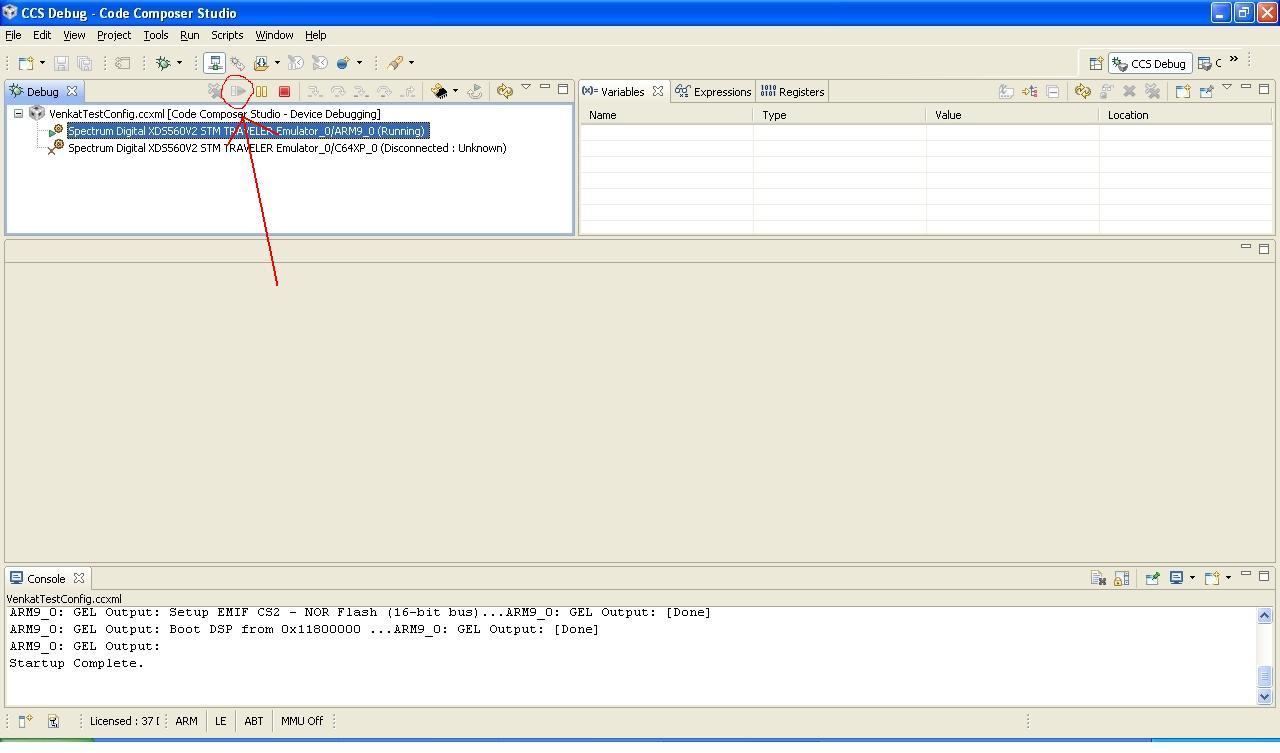
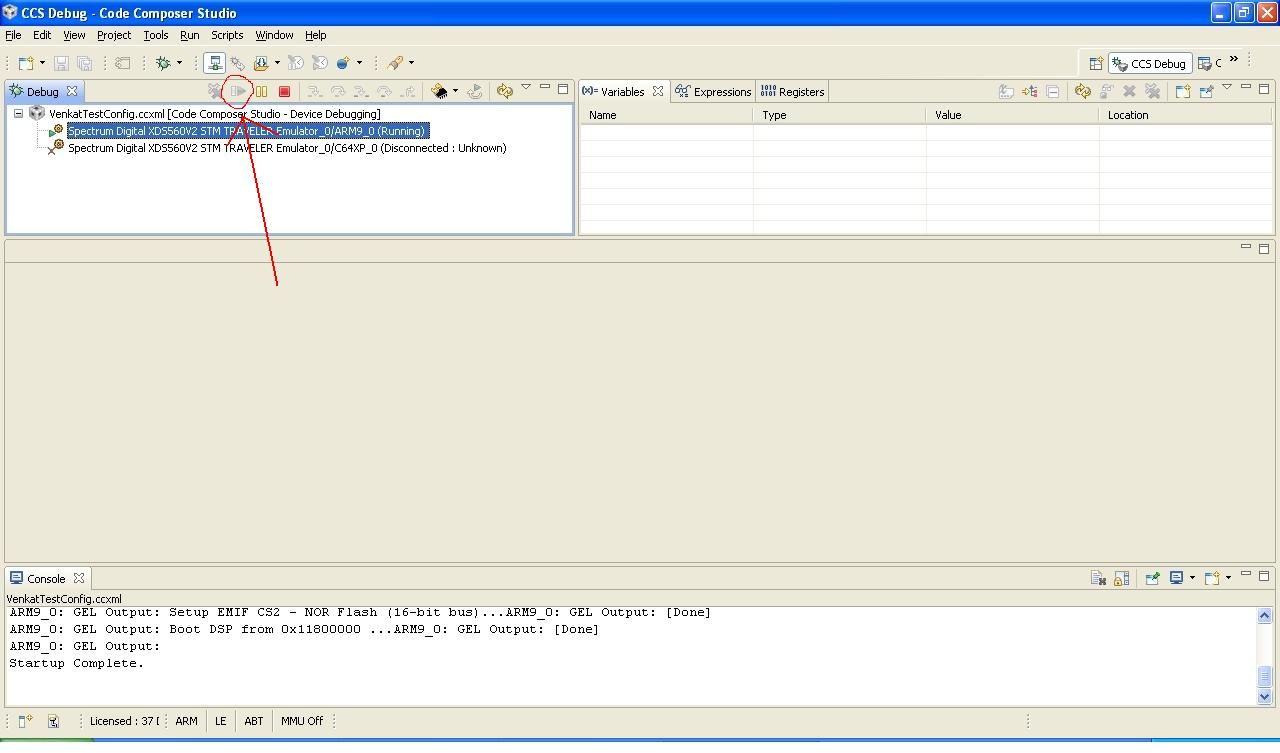
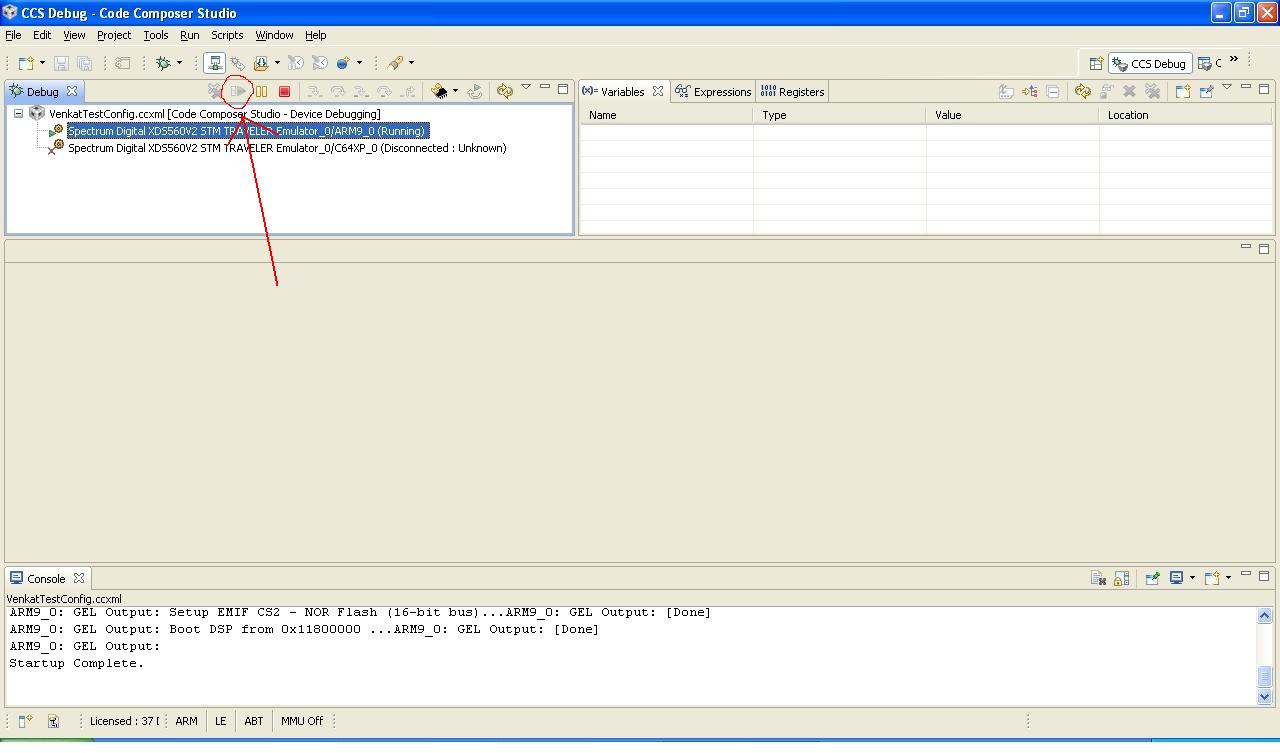
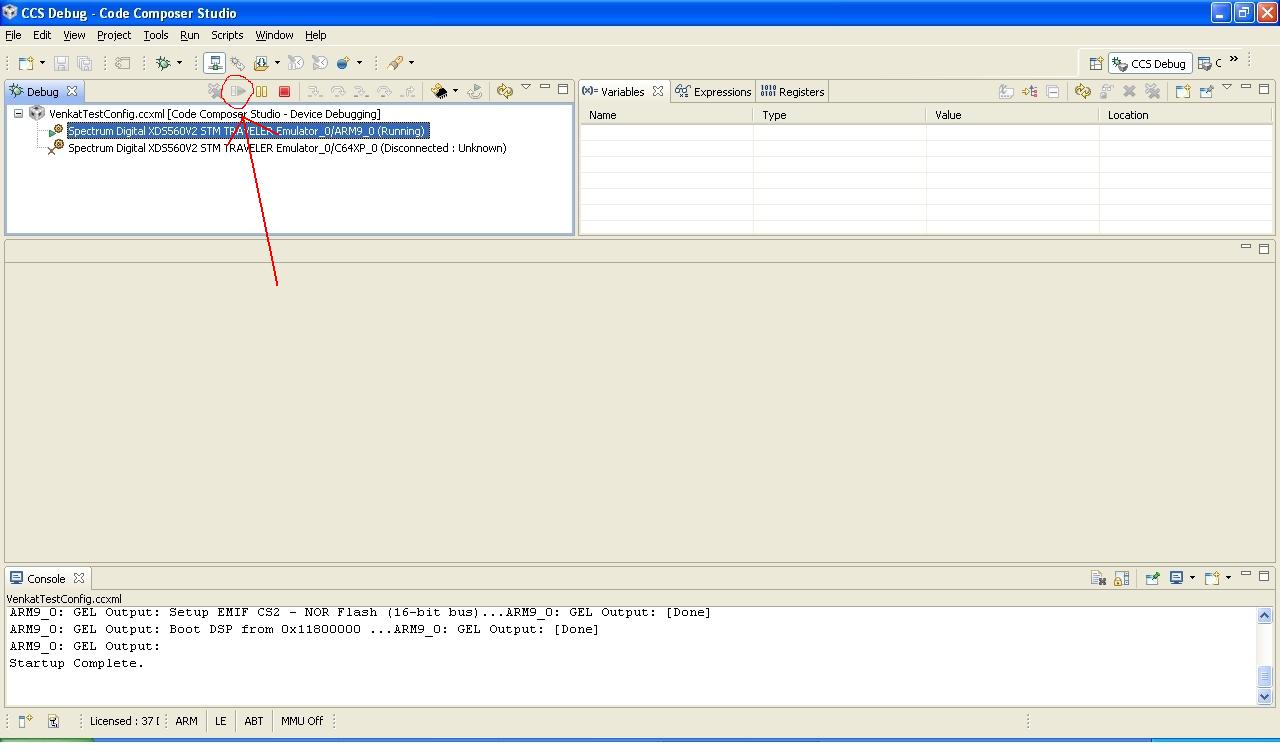
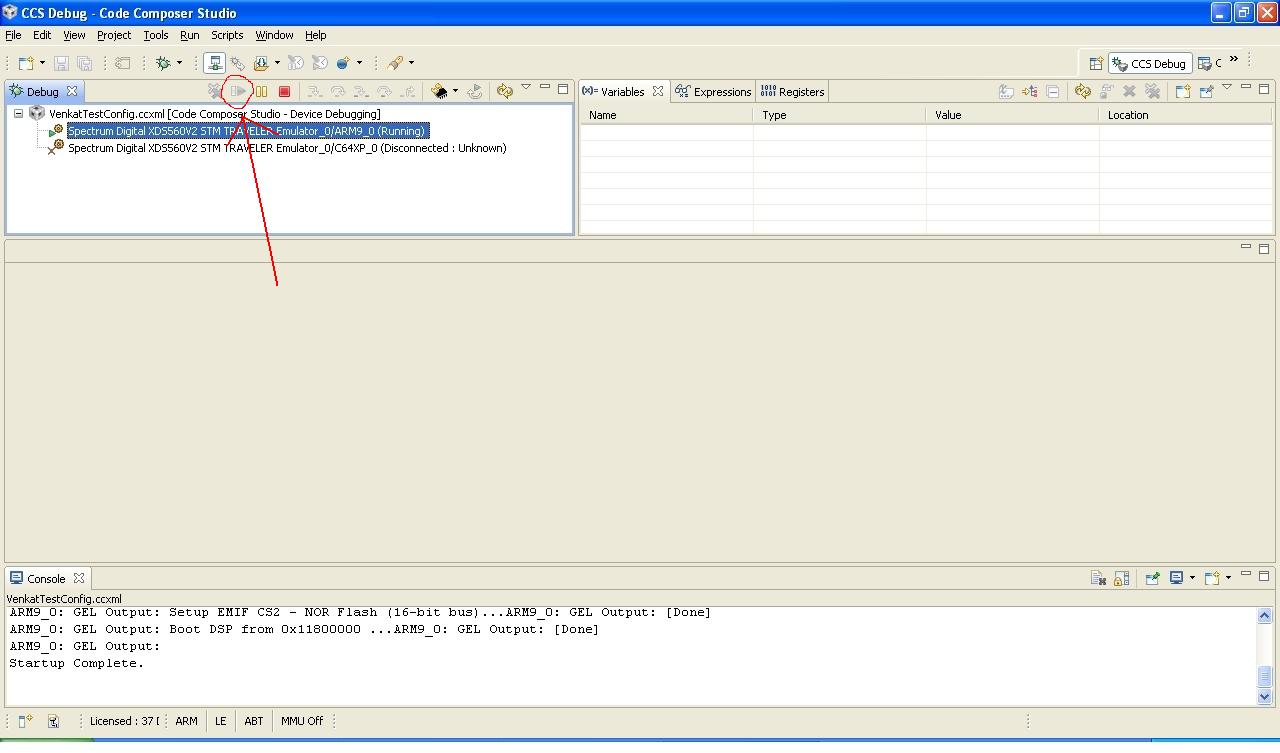
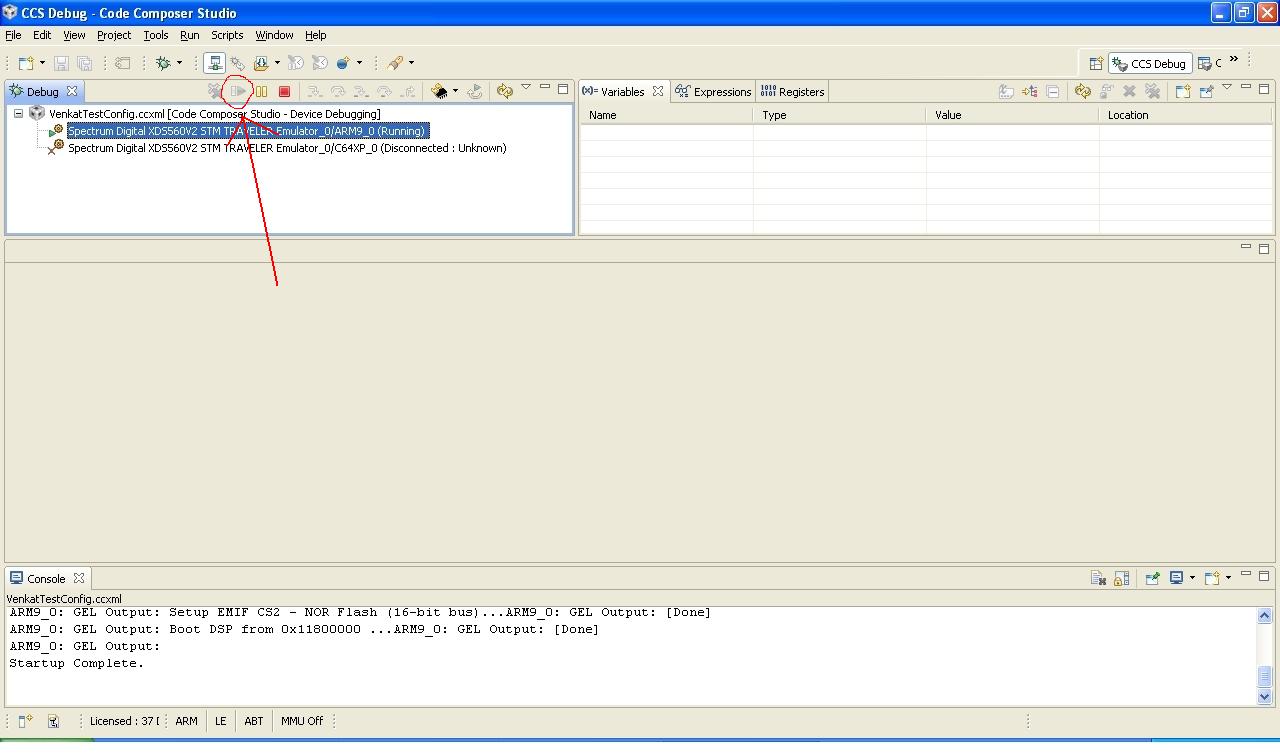
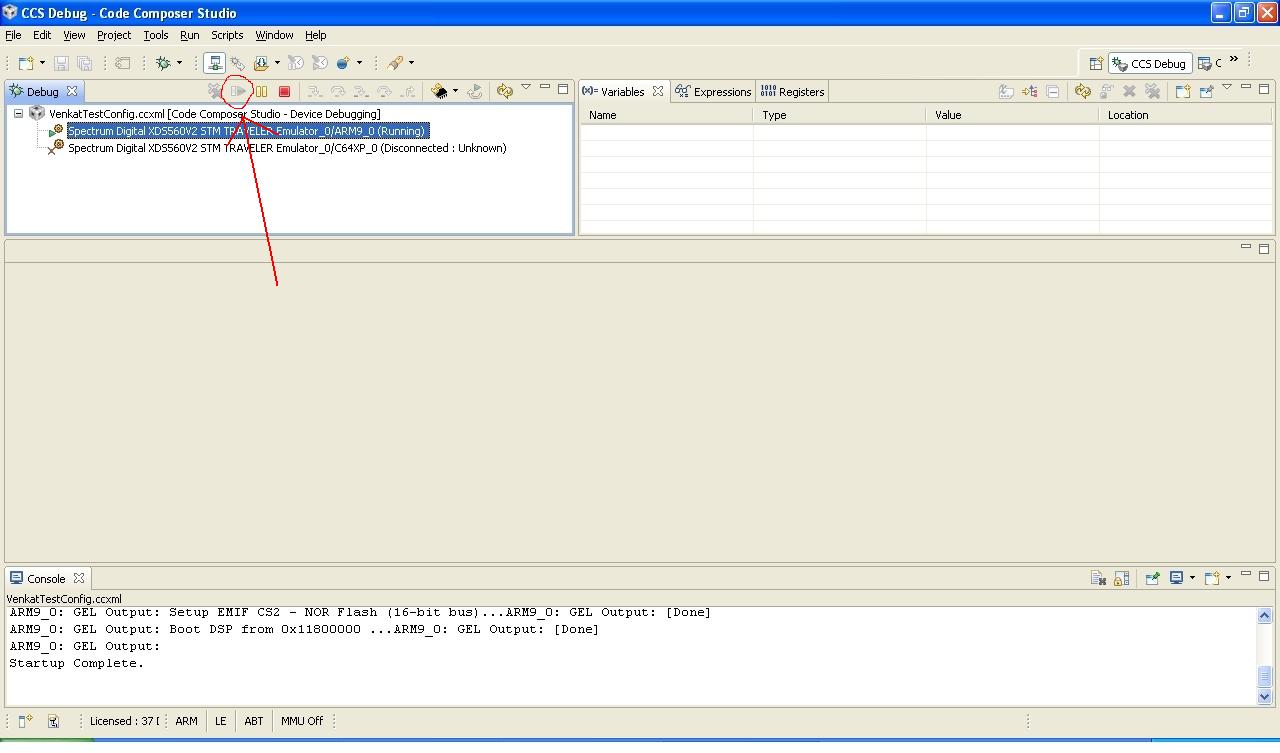
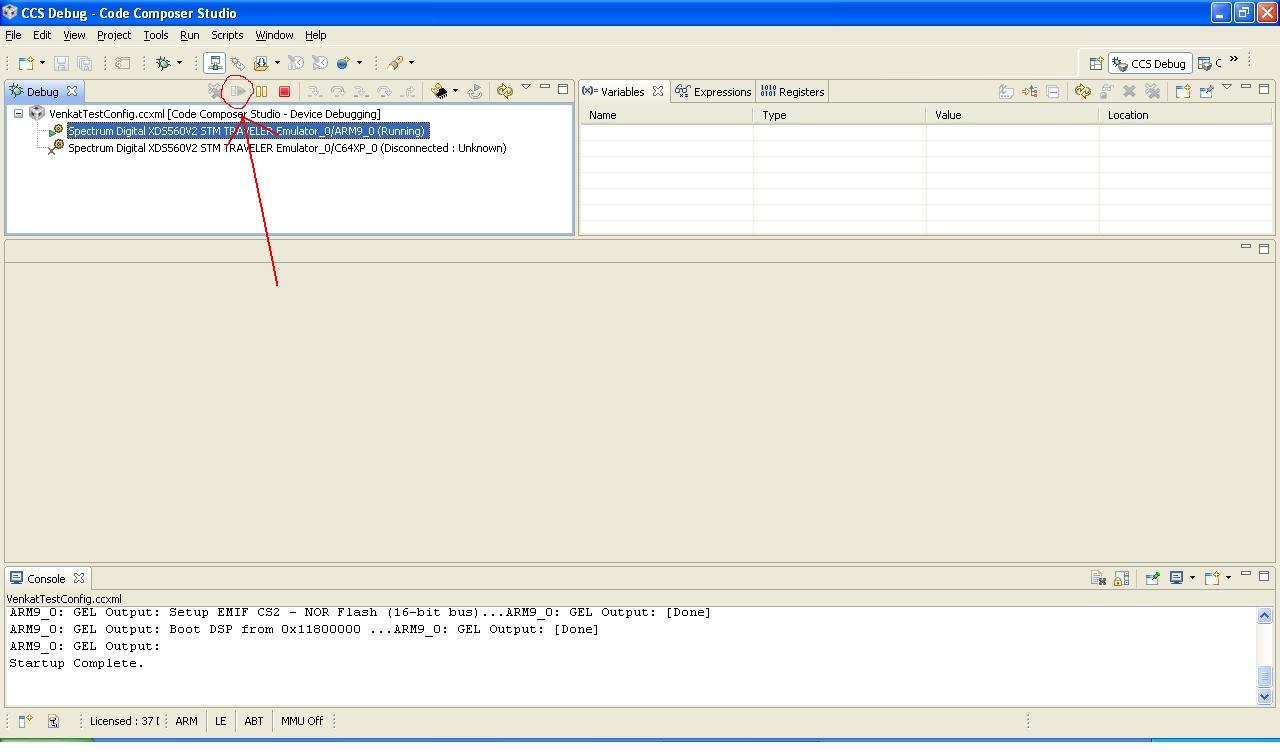
  • I have complied the code and tried to run but it is not allowing me to run or debug, the run icon goes hidden as soon as I load the UBL_NOR.out file plese refer the screenshot attached.

    1) I have made "DM644x_FlashAndBootUtils_2_00" folder itself as my Workspace folder

    2) Imported UBL_NOR.pjt to CCS v 5 by "File->Import->legacy ccs 3.3 projects"

    3) added a target configuration file testconfig.ccxml

    4) It has automatically linked all the library files and source files excluding DM644x/CCS/Ubl/include folder  which is missing and could not find but there was no error for that, I assumed it is not needed

    5) compiled the project

    6) started debug option and loaded UBL_NOR.out and run option has gone hide, also could not set any breakpoints and could not debug it

    (usually pointer goes to main()  and allows me to debug or run)

    Whats wrong here? need to take other project ?

    regards,

    Azhagiri

  • Hi,
    To confirm, could you try to flash this UBL.bin which is converted from UBL.out to DM6446EVM board.
  • Yes I could able to flash but I get below message on terminal after flashing this,

    BOOTME BOOTME BOOTME BOOTME BOOTME BOOTME BOOTME BOOTME BOOTME BOOTME BOOTME BO
    OTME BOOTME BOOTME BOOTME BOOTME BOOTMEDM6446 initialization passed!
    Booting TI User Boot Loader
    UBL Version: 1.65
    UBL Flashtype: NOR
    Starting NOR Copy...
    CFI Query...passed.
    NOR Initialization:
    Command Set: Intel
    Manufacturer: INTEL
    Size: 0x00000010 MB
    Bad magic number, read as 0xA1ACED66
    NOR Boot failed.
    Aborting...
  • I'm able to flash and boot with my new entry address without any problem (but not able to make LED blink).
    What are all other changes you made ?
  • USED Flash Utility version: DM644x_FlashAndBootUtils_2_00

    1)

    C:\DM644x_FlashAndBootUtils_2_00\DM644x\GNU>sfh_DM644x.exe -h
    -----------------------------------------------------
    TI Serial Flasher Host Program for DM644x
    (C) 2010, Texas Instruments, Inc.
    Ver. 1.67
    -----------------------------------------------------


    1)Erase flash: in UART Boot mode ( 1110 )
    C:\DM644x_FlashAndBootUtils_2_00\DM644x\GNU>sfh_DM644x.exe -erase -flashType NOR -targetType DM6446


    2)Flash the NOR flash: 

    C:\DM644x_FlashAndBootUtils_2_00\DM644x\GNU>sfh_DM644x -flash -flashType NOR -targetType DM6446 -appStartAddr 0x80008674 -appLoadAddr 0x80000000 ubl_DM6446_NOR.bin led.bin


    Here I have changed only  ppStartAddr 0x80008674 . Which was taken from the map file of my compiled led code :


    OUTPUT FILE NAME: <led.out>
    ENTRY POINT SYMBOL: "_c_int00" address: 80008674

    Regards,

    Azhagiri


  • Hi,
    Use the following commands alone since we have modified the "entry point address" in UBL code itself, so we are expecting "led.bin" should get loaded on address which we used as "entry point"

    sfh_DM644x.exe -erase -flashType NOR -targetType DM6446
    sfh_DM644x -flash -flashType NOR -targetType DM6446 ubl_DM6446_NOR.bin led.bin
  • Hi,

    I am still not able to modify the entry point in the UBL code as explained in my arlier code.. I am not able to debug the code shall I assign the entrypoint value manually and try?

    Regards,

    Azhagiri