This thread has been locked.

If you have a related question, please click the "Ask a related question" button in the top right corner. The newly created question will be automatically linked to this question.

AM437x IDK (Industrial Development Kit) example_utils and boot problem

Other Parts Discussed in Thread: SYSBIOS

Now I'm handling to AM437x IDK and I want to run 'C:\ti\sysbios_ind_sdk_2.1.0.1\sdk\examples\example_utils'. --- windows 7 OS

I'm following 'SYSBIOS Industiral SDK Getting Started Guide.pdf'.

i) I couldn't find 'Run' button at CCS6.1 - step 9 at page 9.


ii) I don't know how to solve upper problem 'no symbols are defined for 0x800000A4'

c.f) my message is below: main() at example_utils.c:231 0x800003510

gne_targets_arm_rtsv7A_startupC() at startup.c:82 0x8000C74C

0x800000A4 (no symbols are defined for 0x800000A4)

well... is it finished?


iii) Without SD Card, my IDK tells my PC no message to hyperterminal. Is it common?(Two LEDs are ON)

But with SD Card, log message is below:

StarterWare Boot Loader

BOARDInit status [0x0]

SoC : [AM43XX]

Core : [A9]

Board Detected : [IDKEVM]

Base Board Revision : [UNKNOWN]

Daughter Card Revision: [UNKNOWN]

Copying application image from MMC/SD card to RAM

Jumping to StarterWare Application...


TI Industrial SDK Version : IASDK 2.0.0.1

Device name : AM43XX

Chip Revision : AM437x [PG1.1]

ARM Clock rate : 600 MHz

Device Type : EtherCAT Device


TI EtherCAT Demo Application Build - 3.5.0 - running on IDKEVM
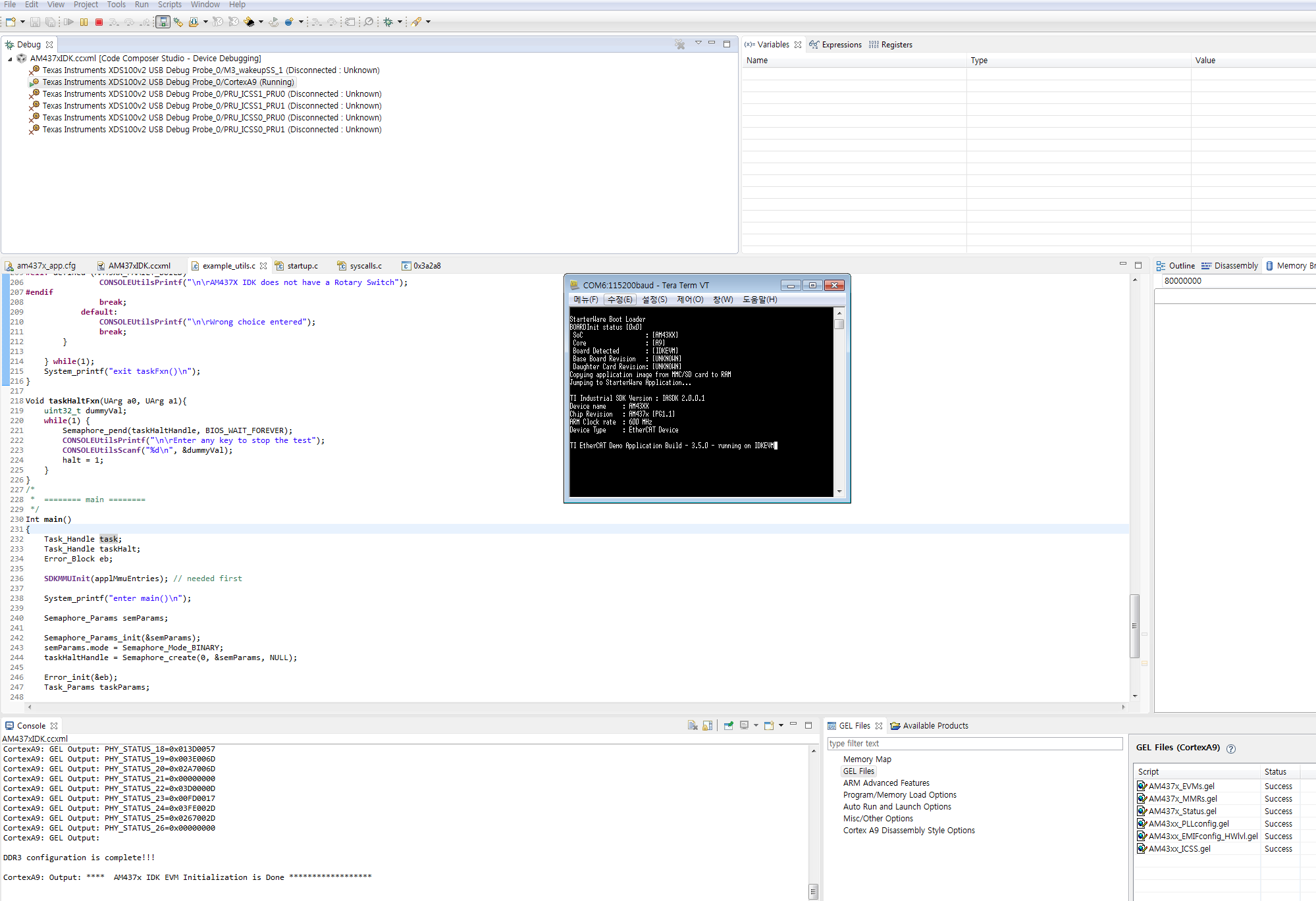
 

 and Stop....

  • I will forward this to the ISDK team.
  • Hello,

    (i) To start running the program, please use 'Menu->Run->Resume' as described at processors.wiki.ti.com/.../SYSBIOS_Industrial_SDK_Getting_Started_Guide

    (ii) From the screenshot, it seems that the program (example_utils.out in your case) is not loaded correctly to AM437X IDK. As mentioned in Point 8, we should see Cortex A8/A9 in suspended state with program counter pointing to main() function after a successful program load. Please recheck the steps. Also make sure that the build configuration is selected correctly before building the application (Project properties->Build Configurations->Set Active->am437_debug or am437x_release in your case.)

    (iii) Your SD card contains EtherCAT application image from ISDK 2.0.0.1 which is being executed. When there is no SD card, there will not be any message from EVM to PC via UART console (provided there is no application flashed to QSPI also) . Obviously SD card is not needed if you are loading the *.out from CCS via USB JTAG.

    Please let us know if the problem persists.

    Regards,
    Nijin