This thread has been locked.

If you have a related question, please click the "Ask a related question" button in the top right corner. The newly created question will be automatically linked to this question.

MMC wont respond in u-boot

Other Parts Discussed in Thread: SYSCONFIG

Hi All.

We are working on DM8148 ARM+DSP custom board. We currently have a major problem in loading U-boot from MLO.
First i would like to mention, that this problem reproduces rarely but constantly and it happens on one of our devices (different device each time), about once or twice in six months period. For that reason it is very important for us to solve it.
Our board has no MMC, but 2 SD card slots (connected to SD0 and SD1). SD1 contains an SD card with the operating system on it (MLO,u-boot,kernel and FS), and the GPMC is configured to boot from SD1. So far so good all works.
When the problem occurs, The MLO is succesfully loaded, MLO command line is:

mmc rescan 0; fatload mmc 0:2 0x80800000 u-boot.bin; go 0x80800000


upon the fatload mmc 0:2 command i get the error message 

** Can't read from device 0 **

** Unable to use mmc 0:2 for fatload **

When i issue:

mmc write 0:2 0x80800000 0x1 0x10

I get the response:

MMC write: dev # 0, block # 1, count 16 ... set write bl len failed. err -19

And reads also fail.

output of mmcinfo command:

Device: OMAP SD/MMC
Manufacturer ID: 3
OEM: 5344
Name: SS32G 
Tran Speed: 25000000
Rd Block Len: 512
SD version 2.0
High Capacity: Yes
Capacity: 31914983424
Bus Width: 4-bit

The thing i don't understand is how come the MLO is loaded from the SD card, but then it doesn't manage to communicate with the card anymore, so how come it manages to get the MLO?? I checked the Errata and didn't seem to find anything related. When i check MMCHS_CSRE it's all zeroed which means no errors occured?

One more thing. If i will take the SD card out and then insert it back, the problem will be gone for about 6 months, but i'd like to solve the problem permanently ;)

I've tried changing and checking my pinmux settings, as well as increasing timeouts on mmc and also applying patch from here but none of it seem to make a difference.

What could be the cause of the behavior? 

Please Help :)

  • Hi MoonDrop,

    Are you using EZSDK 5.05.02.00?

    Can you reproduce this issue on the DM814x TI EVM? Can you reproduce this issue with other SD card from the same vendor? Can you reproduce this issue with other SD card from different vendor?

    MoonDrop said:
    the GPMC is configured to boot from SD1

    GPMC peripheral module to boot from SD1, this looks strange. Do you mean Cortex-A8 ARM boot from SD1?

    Regards,
    Pavel

  • Hi.

    No, i cannot reproduce on evm, as i mentioned, it happens once it a while (between month to 6 months), on a random card, on a random device.
    When it happens, if i'll take the SD out and reinsert it, it wont happen for about 1-6 months time.

    So, i cannot reproduce on EVM, i cannot reproduce on different SD, and i cannot even reproduce on the same SD (please read carefully my original message). But it still happens constantly (just that it doesnt tell me when :).

    Please Help

    Kind Regards

  • Are you using EZSDK 5.05.02.00?

    Can you provide the full u-boot console log output? Do you enable SD0 in u-boot and use SD1 for boot?

    "fatload mmc 0:2 0x80800000 u-boot.bin"
    Why you use mmc 0:2 format? In u-boot user guide, mmc 0 format is used:
    processors.wiki.ti.com/.../TI81XX_PSP_UBOOT_User_Guide

    Booting application (ex. u-boot.bin)image from the SD card

    TI8168_EVM# mmc rescan 0
    TI8168_EVM# fatload mmc 0 0x81000000 u-boot.bin
    TI8168_EVM# go 0x81000000

    And if you place u-boot.bin in the FAT (first) partition of the SD card, you can also try with:
    processors.wiki.ti.com/.../Using_SD_card_as_redundant_Storage_device

    U-Boot > fatload mmc 0:1 <addr> u-boot.bin

    So try to resolve with using the below:

    fatload mmc 0 0x80800000 u-boot.bin

    fatload mmc 0:1 0x80800000 u-boot.bin

    See also if the below pointer will help:

    e2e.ti.com/.../1598913

    Regards,
    Pavel
  • Hi Pavel.

    Thanks for quick reply.

    None of the above commands work (fatload, fatls, mmc write/read are all not working) except mmcinfo, which displays correct info.
    Something weird is that i have added the lines:

    omap_mmc_init(1);
    omap_mmc_init(2);

    to board_mmc_init() in evm.c

    But when issue 'mmc rescan X' (when X is 0, 1 or 2) and then 'fatls mmc X:2', i always see the files on the SD card in slot 0.
    Which means i am always pointing to this bus. how is is possible? and what could be a cause for such strange behavior?

    UPDATE: 

    Taken from omap_hsmmc.c:

    #if !defined(CONFIG_TI81XX)
            switch (dev_index) {
            case 0:
                    mmc->priv = (hsmmc_t *)OMAP_HSMMC1_BASE;
                    break;
            case 1:
                    mmc->priv = (hsmmc_t *)OMAP_HSMMC2_BASE;
                    break;
            case 2:
                    mmc->priv = (hsmmc_t *)OMAP_HSMMC3_BASE;
                    break;
            default:
                    mmc->priv = (hsmmc_t *)OMAP_HSMMC1_BASE;
                    return 1;
            }
    #else
            mmc->priv = (hsmmc_t *)OMAP_HSMMC_BASE;
    #endif
    

    So i am in the '#else' part, but then i found in asm/arch/mmc_host_def.h:

    #if defined(CONFIG_TI816X)
    # define OMAP_HSMMC_BASE                0x48060100
    #elif defined(CONFIG_TI814X)
    # define OMAP_HSMMC_BASE                0x481D8100
    #endif

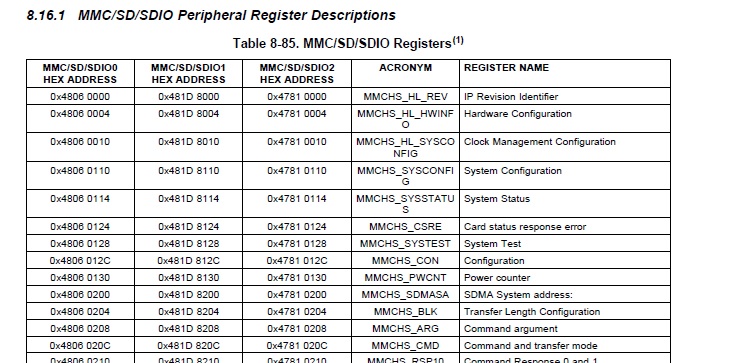
    But the datasheet shows:

    Where's that base address taken from? is that ok?

    Thanks for help

  • Hi.

    Is it possible to reproduce this problem on more DM8148 devices so we can have a few devices to test on? Basically this problem appeared in about 5-6 of our devices in the period of the last 3 months (4 development devices that had lots of reboots and 2 production devices). Is there some external tools, i.e hardware and software for SDIO device/bus integrity checking on DM8148?? The fact that the problem is so difficult to reproduce makes it really hard, and it feels like it need some stress test tools or so to make the rare conditions happen so it can be solved... ;p

    Kind Regards

  • MoonDrop said:
    #elif defined(CONFIG_TI814X) # define OMAP_HSMMC_BASE 0x481D8100

    MoonDrop said:
    But the datasheet shows:

    This is OK. Datasheet provides base address for MMC/SD1 at 0x481D8000 and offset 0x110 for the SYSCONFIG register (MMCHS_SYSCONFIG), thus full address is 0x481D8110. While u-boot code base provides base address for MMC/SD1 at 0x481D8100 and offset 0x10 for the SYSCONFIG register (MMCHS_SYSCONFIG), thus full address is 0x481D8110.

    The u-boot code base by default initialize MMC/SD1 and map to MMC device 0.

    This is what I have on TI EVM loading the 2nd stage u-boot.bin:

    MMC:   OMAP SD/MMC: 0

    TI8148_EVM#mmcinfo
    Device: OMAP SD/MMC
    Manufacturer ID: 3
    OEM: 5344
    Name: SU04G
    Tran Speed: 25000000
    Rd Block Len: 512
    SD version 2.0
    High Capacity: Yes
    Capacity: 3965190144
    Bus Width: 4-bit

    TI8148_EVM#mmc rescan 0
    TI8148_EVM#mmc rescan 1
    MMC Device 1 not found

    TI8148_EVM#fatload mmc 0 0x81000000 u-boot.bin
    reading u-boot.bin

    210408 bytes read
    TI8148_EVM#fatload mmc 1 0x81000000 u-boot.bin
    MMC Device 1 not found

    ** Invalid boot device **
    TI8148_EVM#fatload mmc 0:0 0x81000000 u-boot.bin
    ** Partition 0 not valid on device 0 **

    ** Unable to use mmc 0:0 for fatload **
    TI8148_EVM#fatload mmc 0:1 0x81000000 u-boot.bin
    reading u-boot.bin

    210408 bytes read
    TI8148_EVM#fatload mmc 0:2 0x81000000 u-boot.bin
    reading u-boot.bin

    ** Unable to read "u-boot.bin" from mmc 0:2 **

    The u-boot code base init/config only MMC/SD1 and map it to "mmc 0":

    u-boot/board/ti/ti8148/evm.c

    omap_mmc_init(0);

    Regards,
    Pavel

  • MoonDrop said:
    Is it possible to reproduce this problem on more DM8148 devices so we can have a few devices to test on? Basically this problem appeared in about 5-6 of our devices in the period of the last 3 months (4 development devices that had lots of reboots and 2 production devices). Is there some external tools, i.e hardware and software for SDIO device/bus integrity checking on DM8148?? The fact that the problem is so difficult to reproduce makes it really hard, and it feels like it need some stress test tools or so to make the rare conditions happen so it can be solved... ;p

    We have hardware diagnostic test, that can be run with CCS/JTAG. Refer to the Mistral test sdmmc_card:

    Test configures the DM814X SD Controller, detects and initialises the SD Card. The test writes an pattern to the first block of the sd card. The tests reads back
    the data written on the sd card and verifies it.

    Regards,
    Pavel

  • Hi.

    Thanks for help. Unfortunately the diagnostic for the sd card fails. I just want to make sure my setup was ok: 
    After running SD_MMC_setup initialization sequence (step 2 in README), i got a message to the console:

    CortexA8: GEL Output: 	 ***** This GEL function is not yet tested....***** 
    CortexA8: GEL Output: 	 ***** MMC/SD -1 is initialized....***** 

    Which i guess it's ok, because the test does what it should do. if its not OK please refer me to how to fix this error.

    Then when i run the hsmmc_test i get the following sequence: in detect_card() in hsmmc.c:

    266: err = send_cmd(mmc_base, SDMMC_CMD5, 0x0000);

    err returns here 98304 (0x18000) and goes to the 'else' part (/* Re-Init Card */).... The problem is that already in this stage the repose contains error (0x18000 is CTO and ERRI bits in stat register). Ok, so i assume that for a good reason this error is ignored, and the flow continues to:

    294: err = send_cmd(mmc_base, SDMMC_CMD8, 0x000001AA);

    which in turn returns 98320, which is the same error as before (CTO - timeout error) but bit 4 (BWR) on.
    So the test software does not correctly analyzes the error, and reports the card as version card (sets ver2_card=0)

    then

    err = send_cmd(mmc_base, SDMMC_CMD55, 0x00000000);

    returns 98304 (0x18000 - CTO error), reports card type as MMC card and exists with error.

    So at it seems to me the first command has already failed, but because of not checking for errors in the reponse in the GEL file, the code continues to run.

    So what do you think?

    Is it a problem in my CCS setup? MMC initialization software problem? hardware?

    Thanks for your help :)

  • MoonDrop said:

    After running SD_MMC_setup initialization sequence (step 2 in README), i got a message to the console:

    CortexA8: GEL Output: 	 ***** This GEL function is not yet tested....***** 
    CortexA8: GEL Output: 	 ***** MMC/SD -1 is initialized....***** 

    I tested on the DM814x TI EVM, and have the same. So this is OK.

    MoonDrop said:

    Then when i run the hsmmc_test i get the following sequence: in detect_card() in hsmmc.c:

    266: err = send_cmd(mmc_base, SDMMC_CMD5, 0x0000);

    When I run the test BB_011_SDMMC_CARD_Test.out on the TI EVM, I have success result:

    [CortexA8] SDMMC Tests:
    *) The test verifies the command, clock and data lines of sd/mmc by writing and verifies the data written
    *) Ensure that the Boot Switches are selected as specified in the README
    *) Ensure that an SD card is inserted into the Base Board of your EVM

    Running SDMMC Tests:
        SD Card Detected
        SDMMC: Writing a pattern to Block 1....Write test passed
        SDMMC: Reading from Block 1...Read test passed
        Verify data...Passed

    SDMMC Test Passed

    Please check if your HW design of the MMC is the same as in the TI EVM. If you have differences, you should adjust the test case for your specific design, build and run new executable.

    If your HW design is the same as in the EVM, then this should be HW malfunction of your custom board. It might also be issue to that specific card, it will be good to test more MMC cards, not just one.

    Regards,
    Pavel