This thread has been locked.

If you have a related question, please click the "Ask a related question" button in the top right corner. The newly created question will be automatically linked to this question.

How to Run application code after flashing to NAND Flash?

Other Parts Discussed in Thread: OMAP-L138, OMAPL138

Hi there, I am build the client example provided with the NSP 1_10_00_03 and it works fine but when I tried to flash the *.bin file the example does seem to run. 

I have converted the *.out file to *.bin file using AISGEN Tool (AISgen for D800K008 BOotloader V1.9) 

Command:

sfh_OMAP-L138.exe -targettype C6748_LCDK -flashtype NAND -p COM3 -flash_noubl C:\temp\evmc6747\exampleDesign\ccsv6Examples\omapl138_examples\ndk_evm6748_elf_client\Debug\ndk_evm6748_elf_client.bin

I have LCDK6748 board and I have changed the DIP switch to SW1 (DIP#1 OFF; #2 ON; #3 OFF; #4 ON)

Looks like the operation did complete, but how should I run the example design? 

Thanks,

Mitesh

  • Please make sure that you have to changed the AIS settings for NAND flash with 16bit mode.
    Have you tried to boot any GPIO code from LCDK board (NAND flash) ??
    You will get any UART print from this NDK code , how do you know the IP address ?
    You can add some GPIO stuff and make sure that the program is booting.
  • Hi Thanks for quick reply. I have changed the IP address to be static. Can you tell me what is the procedure to flash application design on a NAND flash and is there any changes to dip sw for it to work? 

    I will try ti run GPIO example as well. 

    Boot Mode=NAND Flash
    Boot Speed=115200
    Flash Width=1
    Flash Timing=3ffffffd
    Configure Peripheral=False
    Configure PLL0=False
    Configure SDRAM=False
    Configure PLL1=False
    Configure DDR2=False
    Configure LPSC=False
    Configure Pinmux=False
    Enable CRC=False
    Specify Entrypoint=False
    Enable Sequential Read=False
    Use 4.5 Clock Divider=False
    Use DDR2 Direct Clock=False
    Use mDDR=False
    ROM ID=3
    Device Type=1
    Input Clock Speed=24
    Clock Type=0
    PLL0 Pre Divider=1
    PLL0 Multiplier=20
    PLL0 Post Divider=2
    PLL0 Div1=1
    PLL0 Div3=3
    PLL0 Div7=6
    PLL1 Multiplier=20
    PLL1 Post Divider=2
    PLL1 Div1=1
    PLL1 Div2=2
    PLL1 Div3=3
    Entrypoint=0
    SDRAM SDBCR=0
    SDRAM SDTMR=0
    SDRAM SDRSRPDEXIT=0
    SDRAM SDRCR=0
    DDR2 PHY=0
    DDR2 SDCR=0
    DDR2 SDCR2=0
    DDR2 SDTIMR=0
    DDR2 SDTIMR2=0
    DDR2 SDRCR=0
    LPSC0 Enable=
    LPSC0 Disable=
    LPSC0 SyncRst=
    LPSC1 Enable=
    LPSC1 Disable=
    LPSC1 SyncRst=
    Pinmux=
    App File String=C:\temp\evmc6747\exampleDesign\ccsv6Examples\omapl138_examples\ndk_evm6748_elf_client\Debug\ndk_evm6748_elf_client.out
    AIS File Name=C:\temp\evmc6747\exampleDesign\ccsv6Examples\omapl138_examples\ndk_evm6748_elf_client\Debug\ndk_evm6748_elf_client.bin
    

  • Hi Mitesh,

    After flashing successfully, Change the boot switches for NAND boot (1:4 = 0111 on C6748 LCDK) and power on or reset the LCDK board. You will Observe the starterware messages on the terminal

    A step by step instruction is given here on how to flash and run the examples on C6748/OMAPL138. Kindly follow them and revert on which step you failed.

  • Hi Titus,
    I am trying to build example GPIO from the C6748_StarterWare_1_20_03_03 / examples/ lcdk6748 and getting error
    Description Resource Path Location Type
    unresolved symbol GPIOBank6Pin12PinMuxSetup, first referenced in ./main.obj gpioLED C/C++ Problem
  • Hi Shankari, thanks for the info.

    However, I am trying to flash example design on the LCDK6748 which has just the DSP core. How can I get the bootloader file *.ais ?

    The map file generated for this design as following info:
    ENTRY POINT SYMBOL: "_c_int00" address: c00e23e0

    Thanks,
    Mitesh
  • Hi Shankari,
    The details about the boot loader in SPRAAT2F are completely different to what is pointed me to, why? Am I missing some thing?
    I did as your link said, I converted boot.out from starter kit lcdk6748 bootloader to *.ais using aisgen and then created *.bin from the application.out using the out2rprc.

    When I flashed and power cycled the board and when connected to the serial port, it says 'StarterWare C7848 Boot Loader Jumping to StarterWare Application...

    But still I can't ping to the board!

    Regards,
    Mitesh
  • Dear,

    When I flashed and power cycled the board and when connected to the serial port, it says 'StarterWare C7848 Boot Loader Jumping to StarterWare Application...

    This sign seems to be the bootloader code is passed the control to the application, so can you put some LED toggle code to confirm that NDK example is booted well & good.
    You also please make sure that you have enabled the EMAC peripheral (PSC1 5th module) while AIS conversion.
  • Hi Titus,

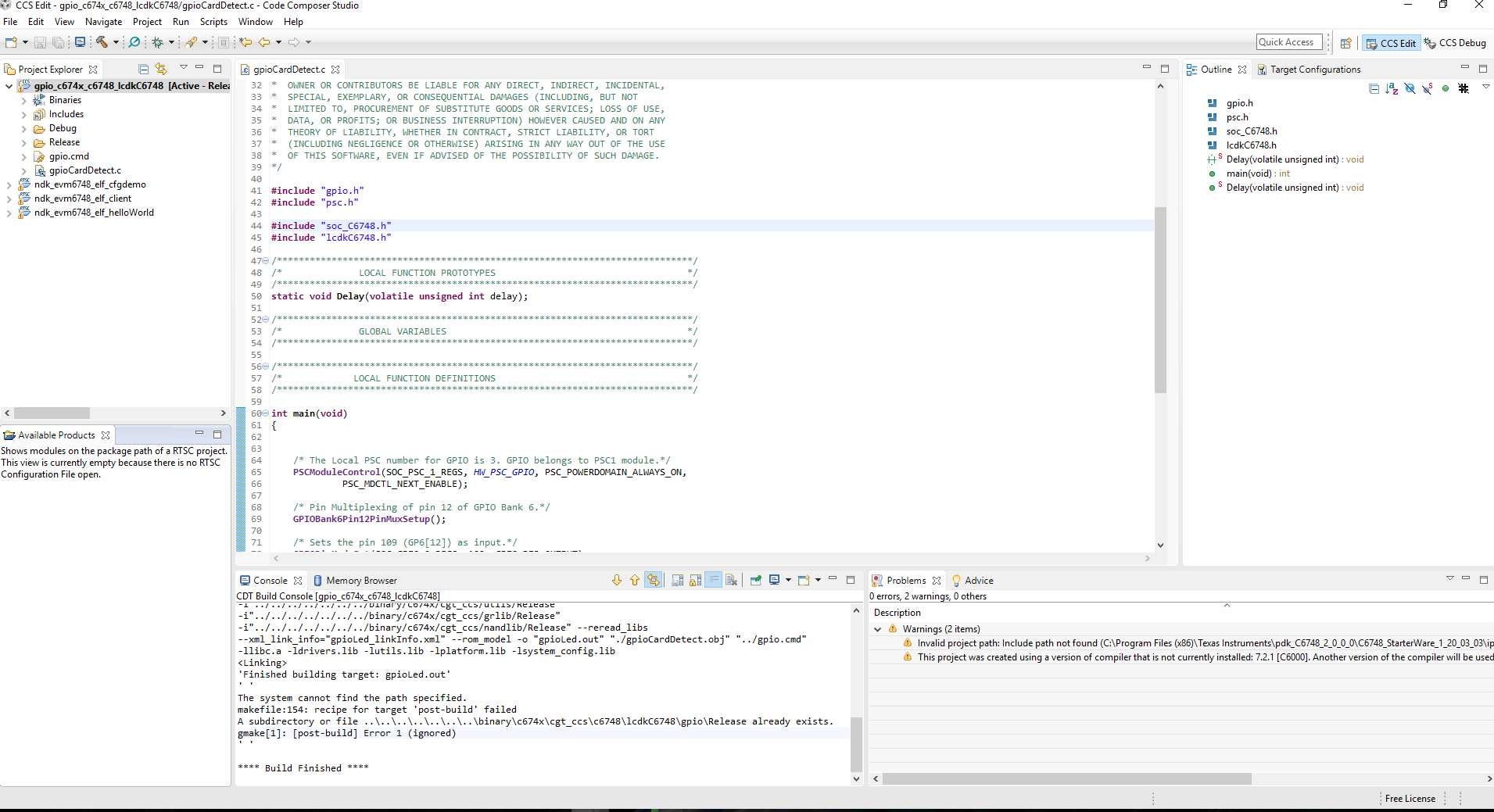
    Thanks, Yes I will trty to load GPIO example design. I have imported the example buyild project and when I try to build ccs errors out stating :

    The system cannot find the path specified.
    makefile:154: recipe for target 'post-build' failed
    A subdirectory or file ..\..\..\..\..\..\..\binary\c674x\cgt_ccs\c6748\lcdkC6748\gpio\Release already exists.
    gmake[1]: [post-build] Error 1 (ignored)

    Any idea how to give CCS write access? 

    Regards,

    Mitesh

  • Import the following project and rebuild on CCS.
    C:\ti\C6748_StarterWare_1_20_04_01\build\c674x\cgt_ccs\c6748\lcdkC6748\gpio

    Can you please attach your screen shot of your problem?
  • You can ignore this error, its created a .out.
    Now ,you can connect target and load the code.
  • No, Titus, I have checked the time stamp on the *.out file is still 2012! It didn't build the out file..
  • I hope its building fine.
    You can also delete the debug and release folder of that project on CCS IDE and do rebuild the project.
  • I did delete the Release folder and when I asked to rebuild it just recreated the Release folder! no out file.
  • Have you modified the project settings or properties ?
    I just import it and able to build with out any problem.
    By default, its configured to "Debug" setting not "Release" that's why I suspect, you may have modified the project.
  • Hi Titus, Just switched the Build Configuration to Release to see if it makes any difference to the error. I have switched it back to Debug but it still complains post-build failed.

    Log:

    **** Build of configuration Debug for project gpio_c674x_c6748_lcdkC6748 ****

    "C:\\ti\\ccsv6\\utils\\bin\\gmake" -k all
    'Building file: C:/Program Files (x86)/Texas Instruments/pdk_C6748_2_0_0_0/C6748_StarterWare_1_20_03_03/examples/lcdkC6748/gpio/gpioCardDetect.c'
    'Invoking: C6000 Compiler'
    "C:/ti/ccsv6/tools/compiler/c6000_7.4.16/bin/cl6x" -mv6740 -g --define=c6748 --include_path="C:/ti/ccsv6/tools/compiler/c6000_7.4.16/include" --include_path="../../../../../../../include" --include_path="../../../../../../../include/hw" --include_path="../../../../../../../include/c674x" --include_path="../../../../../../../include/c674x/c6748" --include_path="../../../../../../../grlib/include" --include_path="../../../../../../../usblib/include" --include_path="../../../../../../../ipclite/include" --include_path="../../../../../../../nandlib/include" --diag_warning=225 --abi=eabi --preproc_with_compile --preproc_dependency="gpioCardDetect.d" "C:/Program Files (x86)/Texas Instruments/pdk_C6748_2_0_0_0/C6748_StarterWare_1_20_03_03/examples/lcdkC6748/gpio/gpioCardDetect.c"
    'Finished building: C:/Program Files (x86)/Texas Instruments/pdk_C6748_2_0_0_0/C6748_StarterWare_1_20_03_03/examples/lcdkC6748/gpio/gpioCardDetect.c'
    ' '
    'Building target: gpioLed.out'
    'Invoking: C6000 Linker'
    "C:/ti/ccsv6/tools/compiler/c6000_7.4.16/bin/cl6x" -mv6740 -g --define=c6748 --diag_warning=225 --abi=eabi -z -m"gpio_c674x_c6748_lcdkC6748.map" --warn_sections -i"C:/ti/ccsv6/tools/compiler/c6000_7.4.16/lib" -i"C:/ti/ccsv6/tools/compiler/c6000_7.4.16/include" -i"../../../../../../../binary/c674x/cgt_ccs/c6748/drivers/Debug" -i"../../../../../../../binary/c674x/cgt_ccs/c6748/lcdkC6748/platform/Debug" -i"../../../../../../../binary/c674x/cgt_ccs/c6748/system_config/Debug" -i"../../../../../../../binary/c674x/cgt_ccs/c6748/ipclib/Debug" -i"../../../../../../../binary/c674x/cgt_ccs/c6748/usblib/Debug" -i"../../../../../../../binary/c674x/cgt_ccs/utils/Debug" -i"../../../../../../../binary/c674x/cgt_ccs/grlib/Debug" -i"../../../../../../../binary/c674x/cgt_ccs/nandlib/Debug" --reread_libs --xml_link_info="gpioLed_linkInfo.xml" --rom_model -o "gpioLed.out" "./gpioCardDetect.obj" "../gpio.cmd" -llibc.a -ldrivers.lib -lutils.lib -lplatform.lib -lsystem_config.lib
    <Linking>
    'Finished building target: gpioLed.out'
    ' '
    The system cannot find the path specified.
    makefile:154: recipe for target 'post-build' failed
    gmake[1]: [post-build] Error 1 (ignored)
    ' '

    **** Build Finished ****
  • This error can be ignored, now you can see updated .out file in debug folder.
  • I made some changes to the write access to my user account and it seems to work now. Thanks for your support and yeah EMAC client example seems to load properly from flash.
  • Then try to enable UART prints in NDK example then replace the regular print with UART print.
    Here is the UART example from starterware and port this too into your NDK example code.
    C:\ti\C6748_StarterWare_1_20_04_01\build\c674x\cgt_ccs\c6748\lcdkC6748\uart

    Then you would get an idea where your code get hang and why we are not able to ping the static IP address.
    Also please make sure that you setup the environment correctly for static IP configuration.
  • Thanks Titus, I will using UART print, as of now I am able to ping to the board and the EMAC client example is working as expected.

    Regards,
    Mitesh
  • Sounds good.
    Glad to hear that you able to solve the problem.
    What is causing the problem ?
  • Hi Titus, everything is good as of now. I have moved on to EMIFA accessing both SDRAM and NAND FLASH memory. (Do you have the schematic and gerber files for the LCDK6748 rev A6?)

    The actually problem with the client NDK example was that I was not enabling the EMAC, PLLs, etc in the nand flash *.bin file. (Which was done by the GEL file, before.)
    Now I am using the AISgen tool to set up all the PLLS, EMAC, GPIO, etc and converted the application *.out design to *.bin file. And all seems to work ;)

    Regards,
    Mitesh
  • Thanks for the update.
    Please let us know if any.