This thread has been locked.

If you have a related question, please click the "Ask a related question" button in the top right corner. The newly created question will be automatically linked to this question.

dm8168 "Hello World!" application

Dear sir,

we are doing the "Hello World!" application and running it on host.we follwed the steps what you have given

but when we do make helloworld,we are getting error like "missing seperator .stop."

we have added the path of esdk instllation that is "usr/local/ezsdk".is this its default path when we do "./ezsdk......"installation of ezsdk.?

we have not change any path while ezsdk installationing,simply we have given next next next.....so while doing export we put this command

export EZSDK="${HOME}/usr/loca/ezsdkl";is this right.?

thank you.


  • MOHAMMAD NASEER M N said:
    we are doing the "Hello World!" application and running it on host.

    The application should be run on the target (DM816x TI EVM), not on the host (laptop with Ubuntu OS).

    MOHAMMAD NASEER M N said:
    but when we do make helloworld,we are getting error like "missing seperator .stop."

    Can you provide full console log output?

    MOHAMMAD NASEER M N said:
    we have added the path of esdk instllation that is "usr/local/ezsdk".is this its default path when we do "./ezsdk......"installation of ezsdk.?

    Where did you install EZSDK? I mean where is the ti-ezsdk_dm816x-evm_5_05_02_00 folder located and did you rename it to ezsdk?

    BR
    Pavel

  • Hi ,

    I wish to know my installation is right or not,

    First i installed codesourcery,arm-2009q1-203-arm-none-linux-gnueabi.bin.Just by changing its permissiom(chmod) and ./arm-2009q1-203-arm-none-linux-gnueabi.bin.

    secondly i installed EZSDK ,by changing permission(chmod) and ./ezsdk_dm816x-evm_5_05_02_00_setuplinux.

    I have not changed any path i just did next while installation.

    I DID ONLY THESE 2 STEPS.DID I NEED TO INSTALL ANY THING ELSE FOR RUNNING HELLO WOLRD PROGRAM,as mentioned ezsdk software developers guide.

    Where did you install EZSDK? I mean where is the ti-ezsdk_dm816x-evm_5_05_02_00 folder located and did you rename it to ezsdk?

    -->>I didnot find this folder "ti-ezsdk_dm816x-evm_5_05_02_00",but i found ezsdk folder in "usr/local/ezsdk".

    where should i found the "ti-ezsdk_dm816x-evm_5_05_02_00" folder,as i installed in standard path ,"usr/local/ezsdk".

    thank you.

  • MOHAMMAD NASEER M N said:
    I DID ONLY THESE 2 STEPS.DID I NEED TO INSTALL ANY THING ELSE FOR RUNNING HELLO WOLRD PROGRAM,as mentioned ezsdk software developers guide.

    Nothing else.

    MOHAMMAD NASEER M N said:
    >I didnot find this folder "ti-ezsdk_dm816x-evm_5_05_02_00",but i found ezsdk folder in "usr/local/ezsdk".

    MOHAMMAD NASEER M N said:
    ./ezsdk_dm816x-evm_5_05_02_00_setuplinux.

    I install EZSDK in my home directory:

    pbotev@mms-0306:~$ pwd
    /home/users/pbotev
    pbotev@mms-0306:~$ ./ezsdk_dm816x-evm_5_05_02_00_setuplinux
    pbotev@mms-0306:~$ cd ti-ezsdk_dm816x-evm_5_05_02_00/
    pbotev@mms-0306:~/ti-ezsdk_dm816x-evm_5_05_02_00$ pwd
    /home/users/pbotev/ti-ezsdk_dm816x-evm_5_05_02_00


    Please install the EZSDK in your home directory, not in /usr/local/ directory.

    Regards,
    Pavel

  • Hi Pavel,
    I did 2 things,but i dint get the folder " ti-ezsdk_dm816x-evm_5_05_02_00"

    1)I changed the directory to /home/edgate_pc/nas/ and copied "ezsdk_dm816x-evm_5_05_02_00_setuplinux",then i did "./ezsdk_dm816x-evm_5_05_02_00_setuplinux".When i start installing,there it was asking the installation folder and i dint change the folder path,it tooks "usr/local/ezsdk" and completed installation.

    2)I changed the directory to /home/edgate_pc/nas/ and copied "ezsdk_dm816x-evm_5_05_02_00_setuplinux",then i did "./ezsdk_dm816x-evm_5_05_02_00_setuplinux".When i start installing,there it was asking the installation folder and i browsed changed to "/home/edgate_pc/nas/ " and completed installation.

    In both cases i dint find the directory "ti-ezsdk_dm816x-evm_5_05_02_00".

    when i do "ls" in my pwd ie "/home/edgate_pc/nas/",i got only "ezsdk_dm816x-evm_5_05_02_00_setuplinux".

    what to do with this?is this because of codesourcery installation path..?beacuse i installed that in its defalut location.

    thank you
  • Mohammad,

    What is the size of your ezsdk_dm816x-evm_5_05_02_00_setuplinux file? It might be broken, can you try download it again.

    MOHAMMAD NASEER M N said:
    2)I changed the directory to /home/edgate_pc/nas/ and copied "ezsdk_dm816x-evm_5_05_02_00_setuplinux",then i did "./ezsdk_dm816x-evm_5_05_02_00_setuplinux".When i start installing,there it was asking the installation folder and i browsed changed to "/home/edgate_pc/nas/ " and completed installation.

    This looks correct.

    MOHAMMAD NASEER M N said:
    what to do with this?is this because of codesourcery installation path..?beacuse i installed that in its defalut location.

    During the EZSDK installation, it will ask you to point to the CodeSourcery install folder. After that, if you point to the right location, the install process will continue.

    Regards,
    Pavel

  • Hi Pavel,

    What is the size of your ezsdk_dm816x-evm_5_05_02_00_setuplinux file? It might be broken, can you try download it again.
    -->>its size is 1.63gb.
    I ll downlaod an again and install once again,ll update you afterwards.

    thank you
  • It is ~1.7GB on my side:

    pbotev@mms-0306:~$ ls -al ezsdk_dm816x-evm_5_05_02_00_setuplinux
    -rwxr-xr-x 1 pbotev mmsol 1674161546 Feb 4 2013 ezsdk_dm816x-evm_5_05_02_00_setuplinux

    Regards,
    Pavel
  • Hi Pavel,

    please send me the link to download "ezsdk_dm816x-evm_5_05_02_00_setuplinux" as i downloaded the file,its only 1.63gb from the link

    .

    thank you.

  • HI pavel,

    can i create folder "ti-ezsdk_dm816x-evm_5_05_02_00" manually ,and install here.?

    thank you.
  • You are well aware of that link, but this is it:

    Regards,
    Pavel

  • MOHAMMAD NASEER M N said:
    can i create folder "ti-ezsdk_dm816x-evm_5_05_02_00" manually ,and install here.?

    No, the EZSDK installer will create that folder for you.

    Regards,
    Pavel

  • Mohammad,

    I download the file again, and I see it will not create the ti-ezsdk_dm816x-evm_5_05_02_00 folder now (like in the past). The ezsdk installer provide me the below folders/files after successful installation:

    bin/
    board-support/
    component-sources/
    docs/
    dsp-devkit/
    etc/
    example-applications/
    filesystem/
    linux-devkit/
    usr/
    ezsdk_5_05_02_00_dm816x_Release_Notes.pdf
    Makefile
    Rules.make
    setup.sh

    So you can create ti-ezsdk_dm816x-evm_5_05_02_00 folder, put the ezsdk_dm816x-evm_5_05_02_00_setuplinux installer in that folder and install there.

    Regards,
    Pavel
  • Hi,

    Now i got the folder with the name
    "ti-ezsdk_dm816x-evm_5_05_02_00",earlier i installed as super user
    thats why i dint get.

    But i dint rename that folder name to "ezsdk" as it is not given in
    the pdf.instead they have given the step

    export EZSDK="${HOME}/ti-ezsdk_dm816x-evm_xx_xx_xx_xx",i did this
    .Because in Makefile they used the word EZSDK.

    i did the following steps,

    1)host $ mkdir ${HOME}/workdir
    host $ cd ${HOME}/workdir

    2)gedit helloworld.c

    3)#include <stdio.h>

    int main()
    {
    printf("Hello World!\n");
    }

    4)host $ gedit Makefile

    5)# Import the variables from the EZSDK so that you can find the EZSDK
    components
    include ${EZSDK}/Rules.make

    helloworld:
    # Make sure that you use a tab below
    $(CSTOOL_PREFIX)gcc -o helloworld helloworld.c

    6)echo $EZSDK

    7)make helloworld

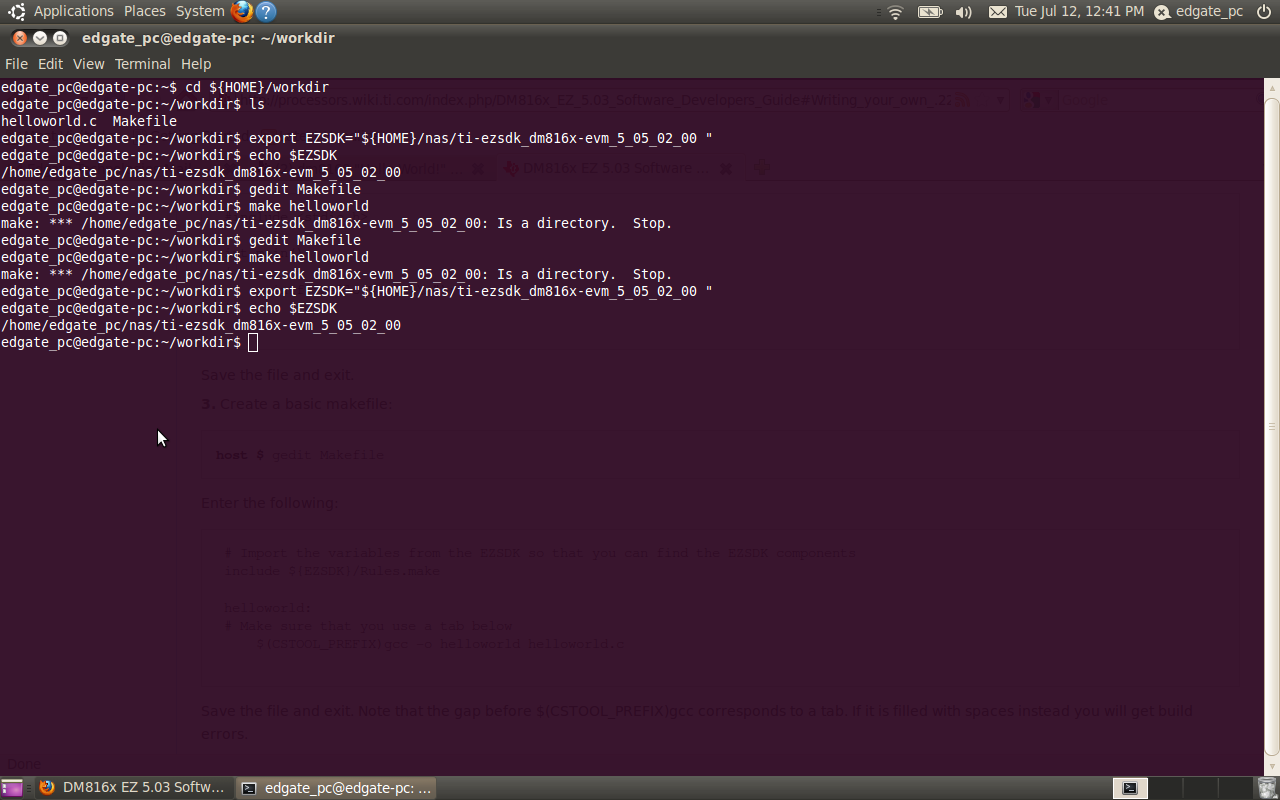
    when i do this,i got errors like

    edgate_pc@edgate-pc:~/workdir$ make helloworld
    make: *** /home/edgate_pc/nas/ti-ezsdk_dm816x-evm_5_05_02_00: Is a
    directory. Stop.
    edgate_pc@edgate-pc:~/workdir$

    thank you.
  • MOHAMMAD NASEER M N said:
    5)# Import the variables from the EZSDK so that you can find the EZSDK
    components
     include ${EZSDK}/Rules.make

     helloworld:
     # Make sure that you use a tab below
     $(CSTOOL_PREFIX)gcc -o helloworld helloworld.c

    Make sure you have <Tab> in the below line:

    helloworld:
    # Make sure that you use a tab below    
              $(CSTOOL_PREFIX)gcc -o helloworld helloworld.c


    MOHAMMAD NASEER M N said:
    6)echo $EZSDK

    What is the output of "echo $EZSDK"?

    Do you export the EZSDK variable to the EZSDK path?

    export EZSDK=.....

    Regards,
    Pavel

  • Hi Pavel,

    I I have done TAB and did  export the EZSDK variable to the EZSDK path,it shows correct path after doing "echo $EZSDK".

    but still the same same problem.

    see the attachmmnet.

    thank you.

  • Can you attach the {HOME}/workdir/Makefile here in the forum? You should click on the "Use rich formatting" button in the right bottom corner, then click on the "Insert File" button and select the Makefile.

    Attach also the {HOME}/nas/ti-ezsdk_dm816x-evm_5_05_02_00/Rules.make file.


    Provide me the out of the below command:

    {HOME}/nas/ti-ezsdk_dm816x-evm_5_05_02_00$ ls

    Regards,
    Pavel

  • Hi Pavel,

    here is al three files.docs.rar If there is any errors in the files,please correct and send me the proper one.

    thank you

  • In Rules.make you have:

    # The installation directory of the SDK.
    EZSDK_INSTALL_DIR=/home/edgate_pc/ti-ezsdk_dm816x-evm_5_05_02_00

    While your install dir is:
    /home/edgate_pc/nas/ti-ezsdk_dm816x-evm_5_05_02_00

    Can you try to fix the issue with editing the Rules.make file?

    EZSDK_INSTALL_DIR=/home/edgate_pc/nas/ti-ezsdk_dm816x-evm_5_05_02_00

  • Rules (1).rar

    HI Pavel,

    I changed but still the result is same..no ouput.see the file what am sending you.

    thank you

  • Hi,
    waiting for your reply Pavel.
    thank you.
  • Looks like this inconsistency can not be corrected manually. I would suggest you to delete ti-ezsdk_dm816x-evm_5_05_02_00 folder and install again.

    The Hello world example is working fine on my side, I can create helloworld executable following the Software Developer User's Guide, there is nothing more/else required than what we have in the Software Developer User's Guide.

    pbotev@mms-0306:~/workdir/helloworld$ echo $EZSDK

    /home/users/pbotev/ti-ezsdk_dm816x-evm_5_05_02_00/

    pbotev@mms-0306:~/workdir/helloworld$ make helloworld

    /home/users/pbotev/workdir/opt/codesourcery/arm-2009q1//bin/arm-none-linux-gnueabi-gcc -o helloworld helloworld.c

    pbotev@mms-0306:~/workdir/helloworld$ ls

    helloworld  helloworld.c  Makefile

    pbotev@mms-0306:~/workdir/helloworld$ file helloworld

    helloworld: ELF 32-bit LSB executable, ARM, version 1 (SYSV), dynamically linked (uses shared libs), for GNU/Linux 2.6.14, not stripped


    Regards,
    Pavel