This thread has been locked.

If you have a related question, please click the "Ask a related question" button in the top right corner. The newly created question will be automatically linked to this question.

XEVMK2LX connect Cortex15 with CCS

Hi,

I am using XEVMK2LX board and would like to connect the Cortex15 with CCS.

I configured the board with "No Boot" mode with dip switch (1111) and setup target configuration. But, I encountered the following issue when connect the Cortex15.

arm_A15_0: Trouble Halting Target CPU: (Error -1323 @ 0x9818) Device failed to enter debug/halt mode because pipeline is stalled. Power-cycle the board. If error persists, confirm configuration and/or try more reliable JTAG settings (e.g. lower TCLK). (Emulation package 6.0.222.0) 

However, I setup the dip switches back to SPI mode (0010) and stop the autoboot. With that I able to connect with Cortex15 with CCS.

Wonder why I can not connect my EVM Cortex15 with CCS when EVM in "No Boot" mode? 

Setup:

CCS  Version: 6.1.3.00034 

Board: XEVMK2LX

  • Hi Khor,

    We do not have K2L EVM's to re-produce this issue however I recommend you to post this on CCS forum for appropriate response. Please refer below wiki for some help,

    PS: Please post your compiler related queries to Compiler forum  TI-RTOS (SYS/BIOS) related queries to TI-RTOS Forum and Code Composer Studio related queries to CCS Forum

    Thank you.

  • Khor,

    Typically, all Keystone II EVMs are flashed with u-boot code on the SPI flash that will come up configure the clock and DDR when you set the boot mode to SPI so you will be able to connect the the device and be able to access the full memory range and the ARM will be non-secure state.

    When you connect in no-boot mode, you need a GEL file to initialize and configure the clocks and DDR. the GEL can be populated on the ARM by going to Tools->GEL file and then selecting the K2L GEL file from ccsv6\ccs_base\emulation\boards\tcievmk2l\gel as described here:
    processors.wiki.ti.com/.../Processor_SDK_RTOS_Setup_CCS

    Make sure before you connect to the ARM that Memory browser is not open and there is no read/write operation going on to the DDR memory.
    Hope this helps.


    Regards,
    Rahul
  • Able to connect the DSP core0 in No boot mode (Emulation) ?
    Try to connect DSP core0 and then connect ARM core0 in exist configuration of yours.

    For ARM core0:
    C:\ti\ccsv6\ccs_base\emulation\boards\tcievmk2l\gel\tcievmk2l_arm.gel
    For DSP core0:
    C:\ti\ccsv6\ccs_base\emulation\boards\tcievmk2l\gel\tcievmk2l.gel

    If you installed the latest processor SDK you should able to see the target config file,
    C:\ti\processor_sdk_rtos_k2l_3_00_00_04\bin\configs\evmk2l\evmk2l.ccxml

    In MCSDK:
    C:\ti\mcsdk_bios_3_01_04_07\tools\program_evm\configs\evmk2l\evmk2l.ccxml

    Use this *.ccxml file to import the target configuration in CCS and try to use it.

    Try to do "Test connection" before connect the target.
  • Hi Rahul,

    I encountered this when using tcievmk2l.gel file 

    arm_A15_0: Trouble Halting Target CPU: (Error -1323 @ 0x9818) Device failed to enter debug/halt mode because pipeline is stalled. Power-cycle the board. If error persists, confirm configuration and/or try more reliable JTAG settings (e.g. lower TCLK). (Emulation package 6.0.222.0)
    arm_A15_0: Trouble Halting Target CPU: (Error -1323 @ 0x9818) Device failed to enter debug/halt mode because pipeline is stalled. Power-cycle the board. If error persists, confirm configuration and/or try more reliable JTAG settings (e.g. lower TCLK). (Emulation package 6.0.222.0)
    arm_A15_0: GEL Output:
    Connecting Target...
    arm_A15_0: GEL: Error while executing OnTargetConnect(): Could not read 0x02620020: execution state prevented access
    at (*((unsigned int *) 0x02620020)&0x0000000E) [tcievmk2l.gel:397]
    at OnTargetConnect()
    arm_A15_0: Trouble Halting Target CPU: (Error -1323 @ 0x9818) Device failed to enter debug/halt mode because pipeline is stalled. Power-cycle the board. If error persists, confirm configuration and/or try more reliable JTAG settings (e.g. lower TCLK). (Emulation package 6.0.222.0)

    /cfs-file/__key/communityserver-discussions-components-files/791/0160.tcievmk2l.gel

    Khor

  • Dear Khor,
    Can you please check out my reply and tell me if you face any problem by referring those steps ?


    I encountered this when using tcievmk2l.gel file

    arm_A15_0: Trouble Halting Target CPU: (Error -1323 @ 0x9818) Device failed to enter debug/halt mode because pipeline is stalled. Power-cycle the board. If error persists, confirm configuration and/or try more reliable JTAG settings (e.g. lower TCLK). (Emulation package 6.0.222.0)

    It seems you are trying to use the DSP gel file into ARM core.
  • Hi Titus,

    I already using evmk2l.ccxml the I follow your instructions to configure gel fies.

    For ARM core0:

    C:\ti\ccsv6\ccs_base\emulation\boards\tcievmk2l\gel\tcievmk2l_arm.gel

    For DSP core0:

    C:\ti\ccsv6\ccs_base\emulation\boards\tcievmk2l\gel\tcievmk2l.gel

    However, it still doesn't work for me when set EVM in no boot mode (1111)

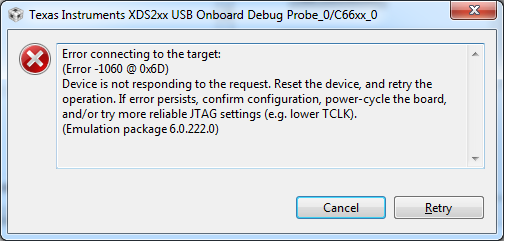
    1) I connect DSP core0, and it prompt me with these error.

    C66xx_0: Error connecting to the target: (Error -1060 @ 0x6D) Device is not responding to the request. Reset the device, and retry the operation. If error persists, confirm configuration, power-cycle the board, and/or try more reliable JTAG settings (e.g. lower TCLK). (Emulation package 6.0.222.0)

    2) I tried again connect ARM core0

    arm_A15_0: Trouble Halting Target CPU: (Error -1323 @ 0x9818) Device failed to enter debug/halt mode because pipeline is stalled. Power-cycle the board. If error persists, confirm configuration and/or try more reliable JTAG settings (e.g. lower TCLK). (Emulation package 6.0.222.0)
    arm_A15_0: GEL Output:
    Connecting Target...
    arm_A15_0: GEL: Error while executing OnTargetConnect(): Could not read 0x02620020: execution state prevented access
    at (*((unsigned int *) 0x02620020)&0x0000000E) [xtcievmk2x_arm.gel:571]
    at OnTargetConnect()
    arm_A15_0: Trouble Halting Target CPU: (Error -1323 @ 0x9818) Device failed to enter debug/halt mode because pipeline is stalled. Power-cycle the board. If error persists, confirm configuration and/or try more reliable JTAG settings (e.g. lower TCLK). (Emulation package 6.0.222.0)
    arm_A15_0: Trouble Halting Target CPU: (Error -1323 @ 0x9818) Device failed to enter debug/halt mode because pipeline is stalled. Power-cycle the board. If error persists, confirm configuration and/or try more reliable JTAG settings (e.g. lower TCLK). (Emulation package 6.0.222.0)

    Information that appear on EVM board when boot in no-boot mode:

    BOOT COMPLETE

    no boot

    BMC Version : 1.1.0.6

    EVMK2L SN: 14510111

    What kind of code running on ARM when power up with no-boot mode? Could the code prevent CCS connect?

    Khor

  • Please make sure that USB cable is proper and connected to Emulation USB port not to UART-USB port.
    Have you did "Test Connection" in CCS with board & Emulator settings ?
    processors.wiki.ti.com/.../TCIEVMK2L_Hardware_Setup
  • Haha. I wish I connect  to the wrong port. But it sure it correct, as I able to connect CCS with CortexA15 when boot in spi boot mode.

    Here is the test connection result, same for spi boot mode or no boot mode

    /cfs-file/__key/communityserver-discussions-components-files/791/7128.Jtag-connection-test.txt

    I able to connect CortexA15 in spi boot mode

    Could it be hardware problem?

    Regards

    Khor

  • I am sure that you have connected to the correct port as we have not got log "Power failure" for JTAG but want to confirm :)

    Can you please try to enable the Adaptive clock and slower down the clock the try to connect ?

    Please refer to the following TI wiki pages.

  • Able to solve the problem using Adaptive freq in Emulator settings ?