This thread has been locked.

If you have a related question, please click the "Ask a related question" button in the top right corner. The newly created question will be automatically linked to this question.

CCSv6 on C6657

Other Parts Discussed in Thread: TMS320C6657

I'm trying to run Hell.c on this device in high memory. I think I need to load the evmC6657.GEL file.

Problem is that I can't see how to do that using CCSv6. The help pages show the Tools Tab in CCSv5, but it doesn't seem to exist in CCSv6.

Peter

  • Hi Peter,

    Moving this to the CCS forum.

    Maybe the quick start guide is the place you have to start:
    processors.wiki.ti.com/.../Category:Code_Composer_Studio_v6

    Best Regards,
    Yordan
  • Hi Yordan
    Thanks, but I can't find any documents that go further than CCSv5
    Am I missing something?

    Peter
  • Hi Peter,

    SOrry, I've mistakenly moved your thread to the CCS forum. I've moved it back to the Keystone forum & notified the support team. Their feedback will be posted here. 

    Best Regards,
    Yordan

  • Peter,

    The target configuration and connecting to the EVM hasn`t changed much between CCSv5 and CCSv6. However, we have some generic CCS and EVM setup instructions with CCSv6 archived here:

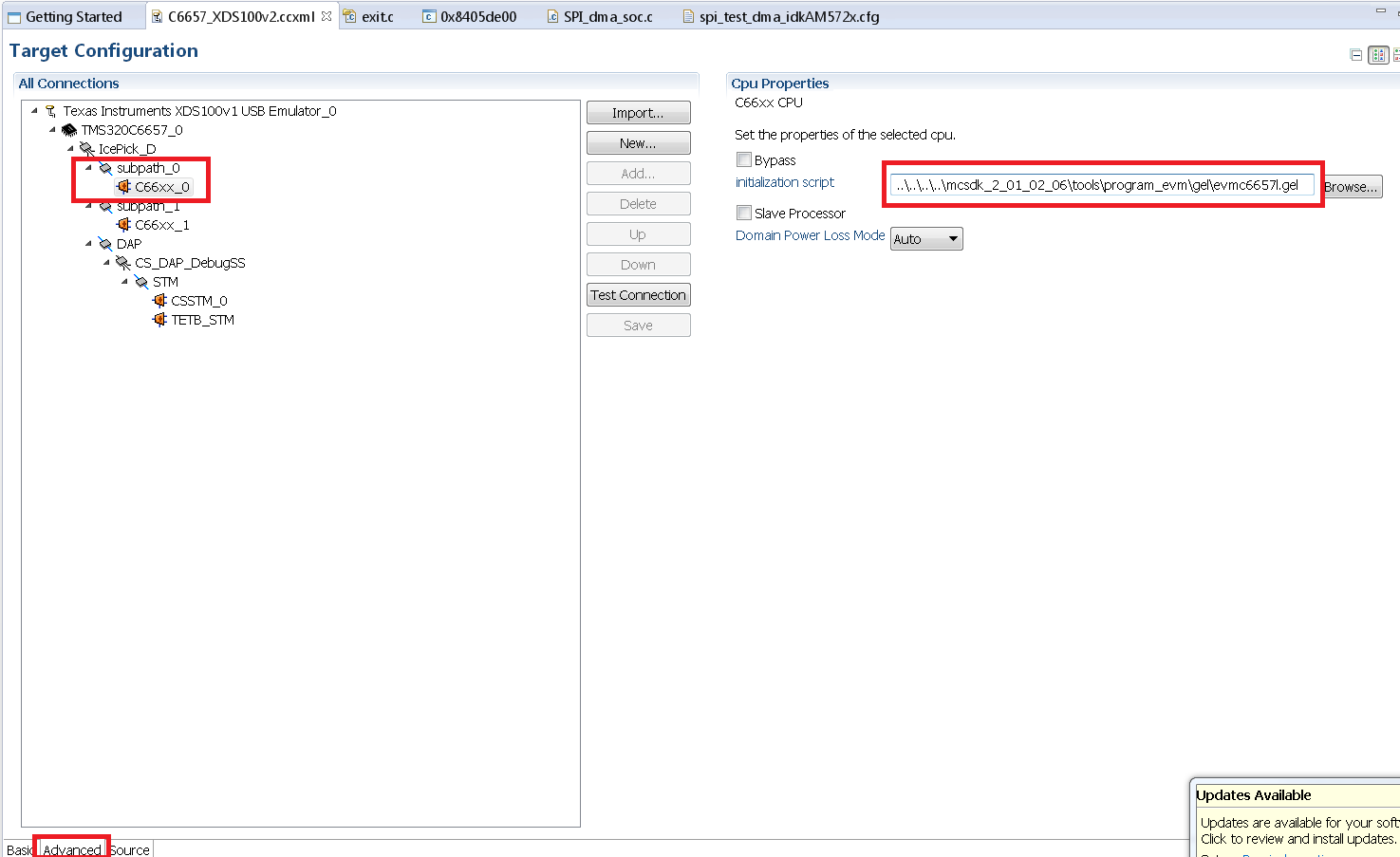
    Create the target configuration for C6657 EVM and XDS200 emulator from New->Target configuration  and selecting XDS100v2 USB emultor and the device as TMS320C6657. IOpen the CCXML file and under Advanced Tab(bottom of the Tab),  select C66x_0 core and browse to the GEL file that is located at <CCS_INSTALL_DIR>\ccsv6\ccs_base\emulation\boards\evmc6657l\gel.

    Save the file and launch the target configuration.When you connect to the C66x Core 0,  you will notice in the console that the clocks, high memory and DDR, and PSC will be configured and the device will be initialized to run code on the it.

    Hope this helps. Please let us know if these don`t work for you and I will try to provide more screenshots that may help with the setup.

    Regards,

    Rahul

  • Great, that worked. Thanks.

    I loaded evmc66571.gel.

    When I try to debug Hello I get:

    C66xx_0: File Loader: Verification failed: Values at address 0x21000000 do not match Please verify target memory and memory map.
    C66xx_0: GEL: File: C:\Users\Peter_TI\workspace_v6_1_3\hello\Debug\hello.out: a data verification error occurred, file load failed.

    I guess the problem is some mismatch between the GEL file and lnk.cmd? The GEL file defines:

    #define DDR_BASE_ADDR 0x21000000

    lnk.cmd is:

    MEMORY
    {
    SHRAM:o = 0x0C000000, l = 0x00100000 /* 1MB Multicore shared Memory */
    /*DDR3RAM: o = 0x80000000 l = 0x08000000 128MB DDR3Memory */
    /*DDR_BASE_ADDR: o = 0x21000000 l = 0x2100000 */
    DDR3RAM: o = 0x21000000, l = 0x7A12000
    }

    SECTIONS
    {
    .text > DDR3RAM
    .stack > DDR3RAM
    .bss > DDR3RAM
    .cio > DDR3RAM
    .const > DDR3RAM
    .data > DDR3RAM
    .switch > DDR3RAM
    .sysmem > DDR3RAM
    .far > DDR3RAM
    .args > DDR3RAM
    .ppinfo > DDR3RAM
    .ppdata > DDR3RAM

    /* COFF sections */
    .pinit > DDR3RAM
    .cinit > DDR3RAM

    /* EABI sections */
    .binit > DDR3RAM
    .init_array > DDR3RAM
    .neardata > DDR3RAM
    .fardata > DDR3RAM
    .rodata > DDR3RAM
    .c6xabi.exidx > DDR3RAM
    .c6xabi.extab > DDR3RAM
    }
  • Hi Peter,

    I presume from your reply that you were able to run the gel file successfully. After that, let us know how did you load the program hello.out??

    After "connect Target", load the .out into target. Choose Run -> Load -> Load Program

    Before the above step, go to project properties and click Resources-->Linked resources--> Path variables and linked resources --> resolve any path problems if any for any of the source files or the linker.cmd file etc.

    Please post the screeshot of CCS with the errors displayed.
  • Peter,

    The external memory start address on this device starts at 0x80000000 and not at 0x21000000. The 0x21000000 is the start of the DDR configuration register address range.

    Please make the section changes in the linker command file to

    MEMORY
    {
    SHRAM:o = 0x0C000000, l = 0x00100000 /* 1MB Multicore shared Memory */
    DDR3RAM: o = 0x80000000 l = 0x08000000 128MB DDR3Memory
    }

    and this should be able to fix your issue.

    Regards,
    Rahul
  • Thanks, I've done that, unfortunately it didn't help

    I'd like to attach a screen shot, but it refuses to work.

    I'll try again in the morning

    Peter

  • Peter Laurie said:

    Thanks, I've done that, unfortunately it didn't help

    I'd like to attach a screen shot, but it refuses to work.

    In CCSv6 I hit Print Screen, or Alt Print Screen, come here and hit Ctrl V, but nothing happens? No result either if I select 'Paste from Word' or other buttons above. 

    Peter

  • How should I 'run the gel file'? I suspect some sort of mismatch between lnk.cmd and the GEL, since the memory window says hello.c linked successfully.
  • Peter,

    IF you have loaded the GEL as I described earlier, the GEL will auto run when you connect to the target. You will see log messages in the CCS console that indicate clocks, DDR ,etc is enabled. IF not, when you load the GEL files, you can manually run them from the Scripts option in the CCS Debug view.

    IF you wish, you can post your project/binary here and we can let you know if we have any issues running it on the EVM.

    Regards,
    Rahul