This thread has been locked.

If you have a related question, please click the "Ask a related question" button in the top right corner. The newly created question will be automatically linked to this question.

AM335x Processor SDK Linux Training: password required


Hello

I'm trying to work with Linux on AM335x ICE using this tutorial: http://processors.wiki.ti.com/index.php/Processor_SDK_Linux_Training:_Hands_on_with_the_Linux_SDK

I've already wrote am335x-evm-linux-rt-03.00.00.04.img on SD card and run it.

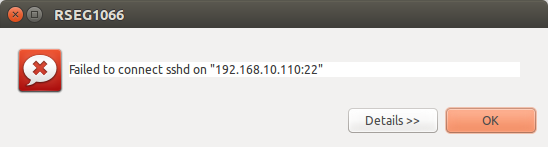
But the problem is when I try to connect to board by SSH (in Ubuntu Terminal or in CCS6 Remote System Explorer) a password is required.

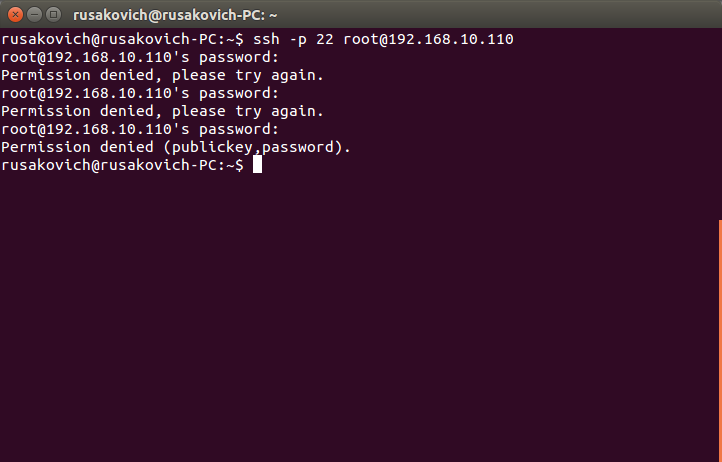
I try to use blank password as it described in the tutorial but it no has effect.

I can't understand why this password isn't blank and how to connect.

  • Hi,

    I will ask the software team to look at this.
  • Hi Aliaksei,

    Can you access /etc/shadow through card reader and share the file content?

    Best Regards,
    Yordan
  • Hello Yordan,

    root::16991:0:99999:7:::
    daemon:*:16991:0:99999:7:::
    bin:*:16991:0:99999:7:::
    sys:*:16991:0:99999:7:::
    sync:*:16991:0:99999:7:::
    games:*:16991:0:99999:7:::
    man:*:16991:0:99999:7:::
    lp:*:16991:0:99999:7:::
    mail:*:16991:0:99999:7:::
    news:*:16991:0:99999:7:::
    uucp:*:16991:0:99999:7:::
    proxy:*:16991:0:99999:7:::
    www-data:*:16991:0:99999:7:::
    backup:*:16991:0:99999:7:::
    list:*:16991:0:99999:7:::
    irc:*:16991:0:99999:7:::
    gnats:*:16991:0:99999:7:::
    nobody:*:16991:0:99999:7:::
    messagebus:!:16991:0:99999:7:::
    pulse:!:16991:0:99999:7:::
    rpc:!:16991:0:99999:7:::
    rpcuser:!:16991:0:99999:7:::
    systemd-timesync:!:16991:0:99999:7:::
    systemd-network:!:16991:0:99999:7:::
    systemd-resolve:!:16991:0:99999:7:::
    avahi:!:16991:0:99999:7:::

  • Hi Aleksei,

    This seems quite strange.. have you modified anything in your linux kernel? Any systemd serivces or something else?

    I've tested this on my side, with the following setup:
    1. Beaglebone black is connected via ethernet cable to Beaglebone white (BOTH boards are running SDK03):
    on both boards I see:
    a) Beaglebone Black:
    [ 248.084204] cpsw 4a100000.ethernet eth0: Link is Up - 100Mbps/Full - flow control rx/tx
    [ 248.092421] IPv6: ADDRCONF(NETDEV_CHANGE): eth0: link becomes ready
    b) Beaglebone White:
    [ 297.308994] cpsw 4a100000.ethernet eth0: Link is Up - 100Mbps/Full - flow control rx/tx
    [ 297.317764] IPv6: ADDRCONF(NETDEV_CHANGE): eth0: link becomes ready
    2. Setup static IPs on both boards:
    a) Beaglebone Black:
    ifconfig eth0 inet 192.168.10.110
    b) Beaglebone White
    ifconfig eth0 inet 192.168.10.100
    3. From either of the boards I connect to the other via ssh, the result is:
    a). Beaglebone Black:
    root@am335x-evm:~# ssh root@192.168.10.100

    Host '192.168.10.100' is not in the trusted hosts file.
    (ssh-rsa fingerprint md5 b0:5d:6f:b7:59:d9:44:50:87:55:24:01:7a:4c:e6:be)
    Do you want to continue connecting? (y/n) y
    root@am335x-evm:~#
    b) Beaglebone White:
    root@am335x-evm:~# ssh root@192.168.10.110

    Host '192.168.10.110' is not in the trusted hosts file.
    (ssh-rsa fingerprint md5 76:35:6d:02:6f:6f:c2:fb:1c:ab:8f:63:06:13:f1:4b)
    Do you want to continue connecting? (y/n) y
    root@am335x-evm:~#

    I didn't have any problems with the logging.

    Best Regards,
    Yordan
  • Hello Yordan,
    Thank you for your help!

    The mistake was I haven't configured static IP of the board.

    But I have one more (maybe quite stupid) question:
    When I connect to the board via UART and setup static IP then I can connect via SSH. But after reboot I have to set IP again.
    I've tried modifying file /etc/network/interfaces to set static IP permanently, like this

    auto eth0
    iface eth0 inet static
    address 192.168.10.110
    netmask 255.255.255.0

    but it has no effect.
    Is there any way to save board's IP?

    Many thanks!

    Best regards,
    Aliaksei
  • Hi Aliaksei,

    I've not dug up to see how systemd configures the network, but I assume that the network service initializes it as dhcp, i.e. have a look at /lib/systemd/network:

     80-container-host0.network -->

                [Network]

                 DHCP=yes

                 LinkLocalAddressing=yes

    80-container-ve.network  ->

              [Network]

              # Default to using a /28 prefix, giving up to 13 addresses per container.

              Address=0.0.0.0/28

              LinkLocalAddressing=yes

              DHCPServer=yes

              IPMasquerade=yes

    I've found that, when you change the /etc/network/interfaces file to:

         auto eth0

         iface eth0 inet static

         address 192.168.10.100

         gateway 192.168.10.1

         netmask 255.255.255.0

         broadcast 192.168.10.255

    It gets overwritten upon reboot, because of the systemd scripts.  However, if you execute ifup eth0 the lan takes the configurations from /etc/network/interfaces. 

    So the workaround is: 
      1. Either change the existing systemd network serivces to use the static ethernet configurations from /etc/network/interfaces

      2. Or add another service, which just executes ifup eth0 and this will take the configurations from /etc/network/interfaces. For a guide on how to write your own systemd service, have a look at this e2e thread: https://e2e.ti.com/support/arm/sitara_arm/f/791/t/539060 

    Hope this helps. 

    Best Regards, 
    Yordan