This thread has been locked.

If you have a related question, please click the "Ask a related question" button in the top right corner. The newly created question will be automatically linked to this question.

OMAPL138 boot issue at high temperature

Other Parts Discussed in Thread: OMAPL138

Hello,

I am using the OMAPL138 device.

When we power up the system at high temperatures, the device does not perform boot from the SPI Flash. (Connected an emulator and saw that it did not porform BOOT).

If the device is allready working, you can go to higher temperatures with no problem. it continues to work well.

Please advice on what can be the cause of such an issue?

I've seen at the device errata about the resistors on the BOOTCFG pins and changed the values to 2K and it did not change a thing.

Thank you,

Svetlana.

  • Dear Svetlana,
    Requested HW team to look into this issue.
    Can you please set boot mode to UART and see you are getting BOOTME message at high temp case.
  • Hi Svetlana
    Since you are able to connect to emulator, it would be good to get the dump from the debug gel file when the boot fails at high temp

    processors.wiki.ti.com/.../OMAP-L1x_Debug_Gel_Files

    Additional questions/things to check
    1) How many boards built/tested vs how many failed. Need to understand if this is a systemic issue
    2) What is the actual temp of the device during the test. Can you confirm that the device is running within the spec'd temp
    3) Please compare the power up sequence between failing vs passing boards or high temp and low temp
    4) Please ensure the clock source is fine at failing temp vs passing temp
    5) Please probe the SPI flash pins , to see if you are seeing reliable activity during high temp (hopefully your SPI boot media is not failing at high temp)
    6) What is the SPI Clock rate? Does reducing the spi clock makes a difference on the failure?
  • Hello Mukul,

    I located the error and it has to do with buffers propogation delay on the SPI lines that interfires with the timing of the interface.

    How do I reduce the  clock rate? How do I set the Bypass mode for the clock?

    The reference clock rate is 24MHz, the SPI clock in the current settings is 50MHz.

    Thank you,

    Svetlana.

  • Hi Svetlana

    For booting, you would've created your AIS Image, where you have the ability to set the PLL0 (CPU frequency) as well as SPI frequency etc.

    Do note that 50 MHz is likely too high for booting from SPI flash.

    The boot loader application note , section 5 has some guidance and also has the following para

    For SPI and I2C master modes, you can enter a desired speed. Depending on the PLL settings and
    granularity in peripheral clock division, AISgen calculates the actual speed nearest to the desired speed
    and shows it in an adjacent box. Recent I2C devices support speeds up to 400 kHz, and SPI devices
    support speeds up to 33 MHz.


    You should try to reduce the speed to 33 MHz or lower. 

  • Svetlana,

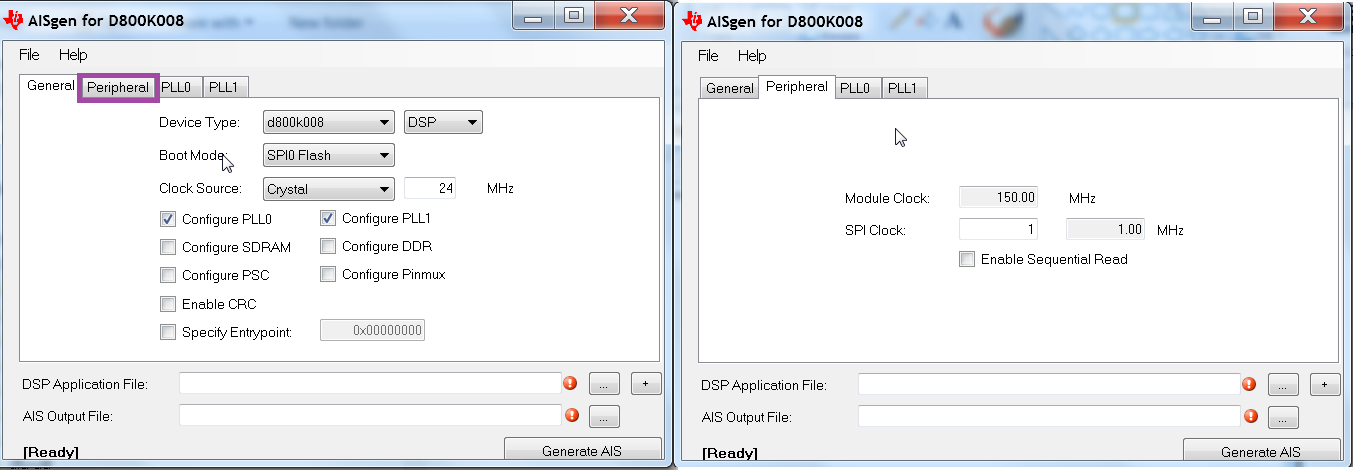
    The clock rate can be modified by changing the AIS settings when creating the boot image as shown in the screenshots below:

    Hope this helps. By setting the PLL0 you can configure the SYStem clocks.

    Regards,

    Rahul