This thread has been locked.

If you have a related question, please click the "Ask a related question" button in the top right corner. The newly created question will be automatically linked to this question.

How to build the g_printer gadget in the kernel?

Hi,

My board is am335x-evm, SDK is ti-processor-sdk-linux-am335x-evm-02.00.02.11.

I used well g_printer (usb device mode) driver.

Method of g_printer that I have used is the module type(configfs.ko,libcomposite.ko,g_printer.ko).

I want to built in the usb device (configfs, libcomposite ,g_printer)  to the kernel.

I checked these wiki pages:

http://processors.wiki.ti.com/index.php/UsbgeneralpageLinuxCore

http://processors.wiki.ti.com/index.php/Linux_Core_MUSB_User's_Guide

but I can't find any method for built in the usb device to the kernel. 

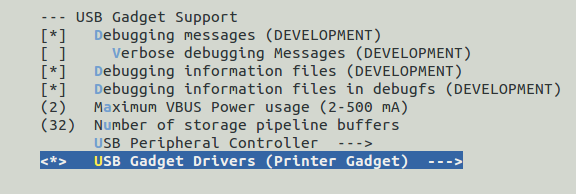
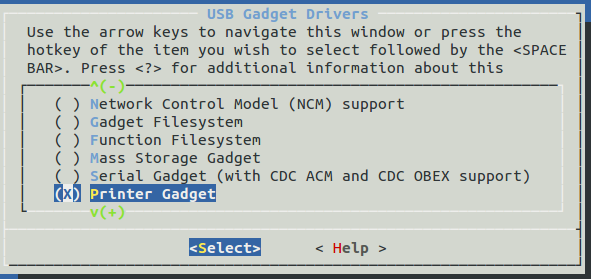
I changed kernel menuconfig as below.

I don't know next step.

Do I have to use "insmod" after kernel menuconfig setting?

How can I do it?

thank you for supporting me all the time


  • This has been forwarded to the software team. They will respond here.
  • Hi,

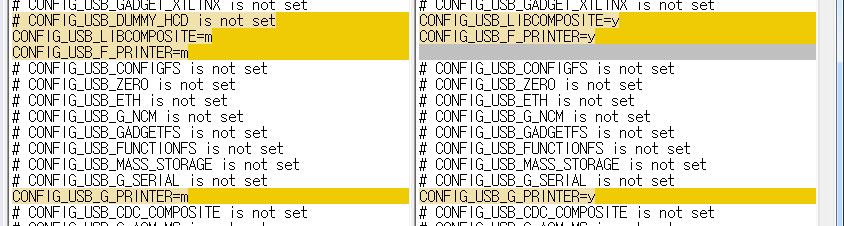
    1. The menuconfig settings you've done are correct. After you do the modifications in menuconfig, you need to save them & exit. Then check the .config file for:
    CONFIG_USB_LIBCOMPOSITE=y
    CONFIG_USB_G_PRINTER=y
    Rebuild the kernel & flash it on your board.

    2. If you use the prebuilt images on the am335x-evm, then you have the G_PRINTER built as a module (but you have to insmod it), you just need to boot your board, and exectue the bellow steps on the evm:
    cd /lib/modules/4.4.12-g3639bea54a/kernel/drivers/usb/gadget
    modprobe libcomposite // or insmod libcomposite.ko
    cd legacy
    modprobe g_printer // or insmod g_printer.ko

    3. The other option is to add those manually to arch/arm/configs/tisdk_am335x-evm_defconfig :

    CONFIG_USB_LIBCOMPOSITE=y
    CONFIG_USB_G_PRINTER=y

    By default these are set as m, change them to y in order to have those drivers built in the kernel image.

    Then rebuild the kenrel:
    cd ~/ti-processor-sdk-linux-am335x-evm-03.00.00.04/
    make linux
    And flash your board with the newly built kernel image.


    Best Regards,
    Yordan
  • I tried to your advice

    After I did the modifications in menuconfig, save menuconfig and exit.

    I checked the .config file


    and rebuild the kernel and flash it on my board.

    but g_printer doesn't work.

    ===============================================
    printer gadget: printer ready
    printer gadget: high-speed config #1: printer
    printer gadget:g interface 0
    ===============================================

    I can't find  any printer gadget message in the booting kernel message.

    Is there a more modifications?

    how to run(up) g_printer,after I do the modifications in menuconfig.

    thank you for your advice.

  • Hi,
    Sorry for the late reply.

    The g_printer seems to be a legacy driver, and may need modifications in order to work with 4.1 kernel.

    1. Can you run lsmod and share the output? Do you see g_printer anywhere?
    2. Is it possible to use the equivalent function driver: usb_f_printer?

    Best Regards,
    Yordan
  • HI, Yordan Kovachev

    1. Can you run lsmod and share the output? Do you see g_printer anywhere?

       1) source position

        linux-4.1.18+gitAUTOINC+bbe8cfc1da-gbbe8cfc/fs/configfs/configfs.ko

        linux-4.1.18+gitAUTOINC+bbe8cfc1da-gbbe8cfc/drivers/usb/gadget/libcomposite.ko

        linux-4.1.18+gitAUTOINC+bbe8cfc1da-gbbe8cfc/drivers/usb/gadget/legacy/g_printer.ko

       2) run lsmod output


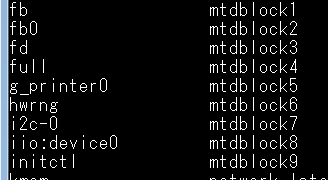
        3) g_printer position (/dev/)


    2. Is it possible to use the equivalent function driver: usb_f_printer?

       I found just usb_f_printer.o file in /drivers/usb/gadget/function

       how to use the usb_f_printer?


    if I use udev, is it  automatically run?

    thanks for your reply