This thread has been locked.

If you have a related question, please click the "Ask a related question" button in the top right corner. The newly created question will be automatically linked to this question.

ISDK 02.01.02.02 default libboard.a build setting

Other Parts Discussed in Thread: SYSBIOS, AM3359, AM4379

Dear Sir,

My SDK is "sysbios_ind_sdk_02.01.02.02", my board is beaglebone black.

I have a question is :

Whatever I import Bootloader or App(ex:i2c_app_eeprom_read), they both reference the libboard.a,
but they(MLO\app) both can run when link the default libboard.a in <C:\ti\sysbios_ind_sdk_02.01.02.02\sdk\starterware\binary\board\lib\am335x-evm\a8\release\gcc\libboard.a>
and can't run when link the libboard.a that I import and builded Pass <C:\ti\sysbios_ind_sdk_02.01.02.02\sdk\starterware\binary\board\lib\am335x-evm\a8\ccs\am335x_debug\libboard.a>

My import source is : C:\ti\sysbios_ind_sdk_02.01.02.02\sdk\starterware\board\ccs, and build configuration set to "am335x_debug",
then use the JTAG(XDS100v2 USB Debug Probe) to single step the source code and it can go into the main() function,
but when I step over the function in libboard.a, it will show the message as bellow:
           No source available for "do_AngelSWI(int, void *) [C:/Users\iec900035\workspace_v6_1_3\ecat_appl\am335x_debug\ecat_appl.out] at 0x8002f5e0"

Can someone tell me the default libboard.a setting ?
     (1) Build Configurations - am335x_release ?   (if I neet the debug build, if it work?)
     (1) General Page:
                 Main -
                    Device -
                       Variant: ?
     
     Advanced settings -
      Compiler version: ?      
      Device endianness: ?
  (2) Build page:
    Builder - use default build command ?
    
    GNU Compiler -
     Runtime - ?
     Symbols - ?

Thanks a lot,
BZ   

  • The ISDK team have been notified. They will respond here.
  • BZ,

    TO start with the ISDK is usually tested only with the AM335x ICE and IDK platforms and not with the beagle bone black so I am not sure if you can get the ethercat app running on the beagle bone black.

    But since your question is regarding bootloaders, I will try to answer the question to the best of my knowledge. The issue with the MLO when built in debug mode seems to be a known issue, we recommend that you build the MLO in release mode so that it links to the release version of the board library. the root cause for this hasn`t been identified yet but we think the size of the debug mode library due to different compiler version or the alignment of the symbols in the debug mode library may be causing this issue.  Can please report the size of the debug mode and the release mode board libraries. and if the compiler version is GNU v4.8.4

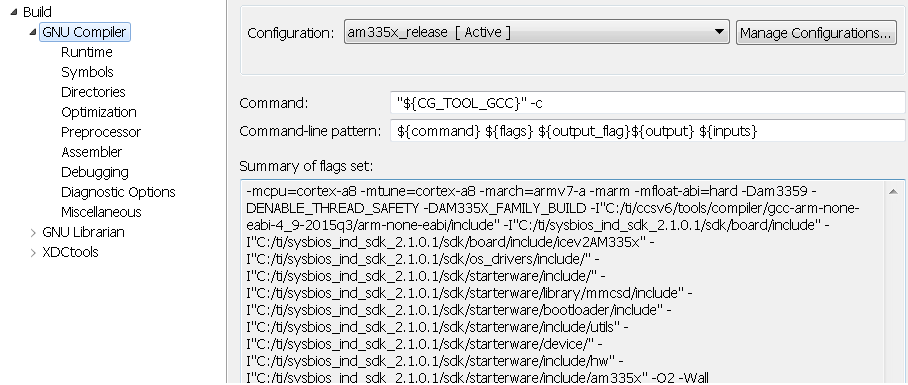
    Can you specify what boot mode you are using ? Most projects in ISDK have a project dependency on the board library so you need to import that library project in the workspace. Once you import you should be able to see the project settings. Here are the project settings:

    Build configurations: am335x_release

    Main

    Family :ARM

    Variant  ICE_AM3359 [Cortex A]

    compiler version: GNU v4.8.4

    Device Endianness: little

    Build :

    Builder - use default build command

    Screen shot for Compiler that includes runtime and symbols:

    Hope this helps.

    regards,

    Rahul

  • Dear Pahul,

    I have try the "release mode" of board project, but it still not work.

    and decause I have to use JTAG to debug my app,

    so all the relative library need to set in debug mode.

    And not only MLO but app both have this problem: only use the release board library can run.

    My SDK is "sysbios_ind_sdk_02.01.02.02", so the Symbols of GNU Compiler of Board project

    is different to yours, is that right?

    BTW. how can I install GNUv4.8.4 on CCS6? maybe I need to try the different compiler.

    I have my setting as bellow, please help me check it, thanks.


    BR,

    BZ

  • upload the setting

  • Hi BZ


    Regretfully the SYSBIOSSDK-IND-SITARA 02_01_02_02 and the included  starterware applications, like the bootloader, are configured for only the AM3359 ICE v2 and the AM4379 IDK EVMs.  


    The boards that are supported by SYSBIOS Industrial SDK 02.01.02 are described in the Release Notes at http://processors.wiki.ti.com/index.php/SYSBIOS_Industrial_SDK_02.01.02_Release_Notes#Device_Support

    This section also contains other configuration requirements for projects that are contained in SYSBIOSSDK-IND-SITARA 02_01_02_02

    These are:

    Code Composer Studio version CCS 6.1.2.00015

    Compiler GNU v4.8.4 (Linaro)

    SYS/BIOS 6.45.01.29 Real Time Operating System

    XDC Tool 3.32.00.06

    NDK 2.24.3.35

    Different versions of CCS can be downloaded at: http://processors.wiki.ti.com/index.php/Download_CCS  When it is necessary to maintain different versions of CCS – one method is to install them in separate directories. The CCS 6.1.2.00015 will download the GNUv4.8.4 when the load gnu compiler option is selected.

    Sysbios versions can be downloaded from http://software-dl.ti.com/dsps/dsps_public_sw/sdo_sb/targetcontent/bios/sysbios/index.html

    XDCTools versions can be downloaded from http://software-dl.ti.com/dsps/dsps_public_sw/sdo_sb/targetcontent/rtsc/

    NDK versions can be downloaded at http://software-dl.ti.com/dsps/dsps_public_sw/sdo_sb/targetcontent/ndk/

    Verify that IA_SDK_HOME  is defined as a system environment variable as (for the default install location)  C:\ti\sysbios_ind_sdk_02.01.02.02\sdk

    David