This thread has been locked.

If you have a related question, please click the "Ask a related question" button in the top right corner. The newly created question will be automatically linked to this question.

C6678_directROM_boot_examples SPI boot problem

Hello!

I'm trying ROM SPI boot example and at first I've loaded prebuilt images due to docs in project directory. I've used norwriter_evm6678.out and app.data from writer dir and loaded GEL-file from MCSDK_2_01_02_06. After running norwriter and  power up board I see no led blinking. Also after loading GEL-file  there was only messages in console describing that Setup_Memory_Map... Done. In doc I see a lot of other messages in picture. What's wrong with loading GEL-file could it be?

  • Make sure to set the noboot while flashing, connect and load the gel file on core0 of C6678.

    Thank you.

  • Already done. But no effect...
  • I also discovered that when I'm loading prebuilt dat file in 0x80000000 there is in memory browser 8th word is 0x5100f401 but 0x0000f401 is right if I correctly understand that 0x51 is for IBL only? I've manually from memory browser changed word to 0x0000f401 and tryed one more time with no effect too
  • There is one more problem as I understood after loading gel-file I can't see all board initialization  messages in console as in printscreen in doc file in example

  • Alex,

    I tried the prebuilt boot binary on the EVM and I am able to blink the LEDs as described int he document. Based on your inputs let me try to debug your setup and see if that helps root cause the issue:

    1. Initially when you powered up the EVM, did you set the switch to no boot mode.

    2. When you connect to the target to flash the device, did you use the C6678 GEL file while creating the target configuration file in CCS.

    when you connect to the device, you should see a GEL initialization log as shown below:

    C66xx_0: GEL Output: 
    Connecting Target...
    C66xx_0: GEL Output: DSP core #0
    C66xx_0: GEL Output: C6678L GEL file Ver is 2.00500011 
    C66xx_0: GEL Output: Global Default Setup...
    C66xx_0: GEL Output: Setup Cache... 
    C66xx_0: GEL Output: L1P = 32K   
    C66xx_0: GEL Output: L1D = 32K   
    C66xx_0: GEL Output: L2 = ALL SRAM   
    C66xx_0: GEL Output: Setup Cache... Done.
    C66xx_0: GEL Output: Main PLL (PLL1) Setup ... 
    C66xx_0: GEL Output: PLL in Bypass ... 
    C66xx_0: GEL Output: PLL1 Setup for DSP @ 1000.0 MHz.
    C66xx_0: GEL Output:            SYSCLK2 = 333.333344 MHz, SYSCLK5 = 200.0 MHz.
    C66xx_0: GEL Output:            SYSCLK8 = 15.625 MHz.
    C66xx_0: GEL Output: PLL1 Setup... Done.
    C66xx_0: GEL Output: Power on all PSC modules and DSP domains... 
    C66xx_0: GEL Output: Power on all PSC modules and DSP domains... Done.
    C66xx_0: GEL Output: PA PLL (PLL3) Setup ... 
    C66xx_0: GEL Output: PA PLL Setup... Done.
    C66xx_0: GEL Output: DDR3 PLL (PLL2) Setup ... 
    C66xx_0: GEL Output: DDR3 PLL Setup... Done.
    C66xx_0: GEL Output: DDR begin (1333 auto)
    C66xx_0: GEL Output: XMC Setup ... Done 
    C66xx_0: GEL Output: 
    DDR3 initialization is complete.
    C66xx_0: GEL Output: DDR done
    C66xx_0: GEL Output: DDR3 memory test... Started
    C66xx_0: GEL Output: DDR3 memory test... Passed
    C66xx_0: GEL Output: PLL and DDR Initialization completed(0) ...
    C66xx_0: GEL Output: configSGMIISerdes Setup... Begin
    C66xx_0: GEL Output: 
    SGMII SERDES has been configured.
    C66xx_0: GEL Output: Enabling EDC ...
    C66xx_0: GEL Output: L1P error detection logic is enabled.
    C66xx_0: GEL Output: L2 error detection/correction logic is enabled.
    C66xx_0: GEL Output: MSMC error detection/correction logic is enabled.
    C66xx_0: GEL Output: Enabling EDC ...Done 
    C66xx_0: GEL Output: Configuring CPSW ...
    C66xx_0: GEL Output: Configuring CPSW ...Done 
    C66xx_0: GEL Output: Global Default Setup... Done.
    C66xx_0: GEL Output: Invalidate All Cache...
    C66xx_0: GEL Output: Invalidate All Cache... Done.
    C66xx_0: GEL Output: GEL Reset...
    C66xx_0: GEL Output: GEL Reset... Done.
    C66xx_0: GEL Output: Disable all EDMA3 interrupts and events.

    3. You are correct, after you load the pre-built app.dat in the package, you need to change the 8th word from 0x5100f401 to 0x0000f401

    4. When the SPI writer completes, you should see the following console message

    [C66xx_0] NOR Writer Utility Version 01.00.00.03
    
    Flashing sector 0 (0 bytes of 58860)
    Reading and verifying sector 0 (0 bytes of 58860)
    NOR programming completed successfully

    5. After the flashing is completed, please set the eVM to SPI boot as described here:


    Other debug techniques:

    * If the LEDs don`t blink in SPI boot. Connect to device in CCS (Remove GEL initialization before connecting). check the value of C66x_0 Program counter. If the Device is in region 0x0080xxxx that means the device is stuck in ROM. Report the PC value.

    * After connecting to device and checking PC, run the debug GEL file provided here and check if the device initialization and ROM status:

    Hope this helps.

    Regards,

    Rahul

  • Thing gone better! Now I'm loading gel file in configuration file and initialization begins. But with little difference: gel version is 2.0 and after message 'Power on all PSC modules and DSP domains...' goes message 'Security Accelerator disabled!'. All other messages has no difference. After power off and power on board there is still no led blinking. While switches were in SPI boot positions I've tryed to connect to board with debud button but Debugger Running window was opened for some munites with no effect and Test Configuration button also stopped after messaging on .out file loading. So I can't check PC value
  • And one more strange thing... when I'm trying to load app.dat to 0x80000000 and check option to use address and other parameters from file for some unknown reason file loads not on 0x80000000 base address.
  • After some tries to reflash I've connected to board in SPI boot mode. PC was 0x0c04cabo. Could it be that I've chosen wrong way to connect? I've pushed button to debug led_play programm. Could it be that PC was rewritten at that moment?
  • I've found also topic about hardware nomenclature and problem with booting.

    e2e.ti.com/.../167672

    Could it be meaningful for me with such version of example project?
  • Alex,

    Good to know you are making progress. You can ignore the Security accelerator is disabled message from the GEL.

    When you load the boot image using memory browser and choose to populate the address and the size for the CCS file, you need to manually change the load address to 0x80000000 for the image to load at base of DDR memory. Please give this a try and let us know.

    You mentioned that after reflashing and connecting to board in SPI boot mode PC is at 0x0c04cab0. this indicates that the DSP booted using your boot image as the PC is in MSMC memory. You can confirm this by doing Run-> Load -> Load Symbols in CCS debug View and loading the symbols from led.out provided in the package. If you have not built it, you can use the .out attached below:

    3113.led_play.zip

    I am not sure why the LEDs are not blinking on the EVM though. Potential reasons could be faulty LEDs or the time period for blinking the LEDs is low so you always see the LEDs glowing.  

    Regards,

    Rahul

  • Good day, Rahul! I've seen blinking while loading led_play.out in no boot mode. When I'm loading image in flash I've used 'load memory' button and manually changed address to 0x80000000, checked 'use header information from file...' and stayed unchanged length parameter in window and swap button unchecked. After that I see data in memory. Before it I've manually changed 0x5100f401 to 0x0000f401 in app.dat. I'm using /spiboot/bin/writer/app.dat file and norwriter from that dir. Nor_writer_input.txt is file_name=app.dat start_addr=0. But still don't blinking

  • Rahul! Can you also give me link to download working version of SPI Boot example project please? I guess it could be that I've downloaded old one...
  • Source and object code for direct SPI boot example provided here is the latest version:
    processors.wiki.ti.com/.../KeystoneI_Bootloader_Resources_and_FAQ
  • Thank you! I've verified that I've used the same project. Still does not work. What am I doing wrong? I have no idea... Looks flashing is good but no blinking after power on
  • Rahul, I'll pray for solving this problem and shall not eat grains and beans today!;) Guess it helps
  • Sorry for the delayed response on this Alex.

    I have confirmed that the examples is working as described in the document, so I have to assume that there is something missing in the steps that you executed. SO please provide as much detail about the steps you followed so that we don`t miss some thing.

    Just to confirm, you mentioned you have flashed the SPI NOR on the EVM in no-boot mode and when you chnage the switeches to SPI NOR and power on the EVM, you don`t see the LEDs blinking and the COre0 is not executing code in 0x0c0x_xxxx location (MSMC) memory. What is the location of the PC when you change the boot switches, power up and connect to core 0. Are you seeing the same address every time ?

    I have tried to create a more detailed document with screenshots for you to follow and confirm that you are not missing any steps. Please review the steps with the documentation and let us know if you find anything missing.

    SPI_boot_steps_with_screenshots.docx

    I hope this helps.

    Regards,

    Rahul

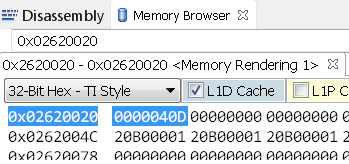
  • Ruhul, thank you for doc file! I've checked that I did all steps to flash correct. After flashing and turning switches in SPI BOOT positions and power on I've pushed debug button and I see DEVSTAT reg (0x02600020) is 0x0.
  • I believe that this is the root cause of the issue for the SPI boot, the DEVSTAT register needs to be set to 0x000040D as you can see:

    This means that the BOOTMODE PINS of the SOC are not being driven correctly by the FPGA on your EVM. On the EVM the FPGA drives the boot mode pins based on the SW settings and this firmware doesn`t seem to be working as expected.  If this is a new EVM then, I recommend that you report the issue to the board manufacturer.

    The FPGA firmware is available on Board manufacturer website here if you choose to reflash the firmware:


    Before you flash the FPGA firmware, you can try the following steps to confirm SPI boot is working.e 

    1. Open Memory browser, go to KICK0 register (0x0262 0038) and write value 0x83E70B13

    2. Got to KICK1 (0x0262003C) and write value 0x95A4F1E0; This will unlock the bootcfg Register space.

    3. Now got to DEVSTAT register and change it to 0x0000040D to set SPI boot mode.

    4. Now select Core0 and go to Run->Reset ->CPU Reset. This will set Core0 PC to 0x20B00000 (start of ROM)

    5. Now click on Core0 and run the core (or Press F8). 

    Let me know if you see the LEDs blinking now.

    Regards,

    Rahul 

  • Rahul, sorry, I've looked devstat wrong address... On monday I'll check it again. And one more simple question please!.. Am I correctly connected to board while checking devstat? I've bypassed gel file in configuration and pushed 'debug led_play.out'. Simply I don't know another method to connect to EVM in CCS...
  • Rahul, it seems to get a little better. I've changed DEVSTAT to 0x0000040d as you wrote above and after rerunning cpu I see blinking. Then I've checked again DEVSTAT after power off board and setting switches to SPI boot. There is 0x0000080b. What's wrong could be? The switches turned right.

  • Alex,

    If the switches are set to SPI boot mode and you see the DEVSTAT as 0x0000080b then I think there is some hardware issue with the EVM.

    The BOOTMODE[15:0] pins are latched into DEVSTAT register when you power up the SOC and as you can see from the schematics these BOOTMODE pins to the SOC are driven by the GPIOs from the FPGA on the EVM. The FPGA reads the Switch settings and then drives the GPIOs to set the BOOTMODE pins.

    Can you confirm the revision number of your EVM and also that the switch settings are for ROM SPI boot  as shown in the image below:

    The BootROM reads the DEVSTAT to determine the boot mode and to set the PLL clocks etc. 

    SPI boot DEVSTAT:  0x40D   (little endian SPI boot)

    I2C boot DEVSTAT:  0x80B  (Little endian I2C boot). This is used for IBL NOR boot not for ROM SPI boot.

    Regards,

    Rahul 

  • Yes, I've switched in same positions. My EVM have rev. 3B and silicon version higher than 1.0
  • Rahul, can it be that version of FPGA .bit file is old? How can I check it and where can I get .bit file?
  • Alex,

    Tools to upgrade the FPGA firmware are provided by the Board Manufacturer (Advantech).

    HEre is the link to Advantech website, where you can download the tools and the firmware for the EVM:
    www2.advantech.com/.../6678le_download3.aspx

    You could also check with Advatech support, regarding what else could cause this issue with the EVM.

    Regards,
    Rahul