This thread has been locked.

If you have a related question, please click the "Ask a related question" button in the top right corner. The newly created question will be automatically linked to this question.

EVM6678 EDMA debugging while PCIe transactions

Good day!

I'm debugging writing transactions from Windows host PC to EVM6678 using PCIe example project and some software on host PC.

First thread was here:

 

The problem is that dstbuf remains empty while writing to BAR1 from host PC. It's strange but I can read by host PC written data but nothing is in dstbuf. I have some questions.

1) Could it be that EDMA for some reason does not work? What steps I have to do to debug EDMA to see that something is in queue or translation goes to wrong address etc?

2) I can't see dstbuf in list of variables in cache view. Is it ok? Could it be that dstbuf is not in cache? May be I need to look in compilation logs warnings on dstbuf or somewhere else?

3) Could it be that dstbuf does not evaluates because of connecting gel file or using wrong platform or rtsc configuration? (I've got source code by running create project bat file and have not modified it at all).

4) How to debug that some data recieved by PCIe controller on side of controller?

  • Hi Alexander,

    I've forwarded this to the PCIe experts. Their feedback should be posted here.

    BR
    Tsvetolin Shulev
  • Does anybody can help? Simple question - I can read and write evm6678 memory through BAR1 by host PC but I can't see any changes in dstbuf while debugging in CCS

  • Alexander,

    So, from PC you can write into DSP memory then read back, but you didn't see the data pattern in the DSP dstBuf memory, you wonder where the data landed. Something you did: change different dstBuf location, search the whole DSP memory range.

    Do you have another PCIE EP in your system that you possibly W/R into it instead of 6678 EVM? 

    If dstBuf is declared as a global variable, then you should be able to know it is address in memory map, you can also type this in views---> expressions to see where it is.

    Then in CCS memory window, you can see it at that address. Toggle L1D cache, L2 cache to check if you can see the data pattern.  

    If you still suspect cache issue, in the GEL file please disable L1D and L2 cache (set size to 0) and make sure dstBuf in L2 and check in CCS memory window.

    Regards, Eric

  • Eric, thank you for help.  I've already tryed such steps that you suggested. I've disabled caching by rebuilding platform with no cache. Also I tryed to set BAR1  inbound address to 0 as described in PCIe user guide to make inbound translation using outer address from PCIe side of BAR1 as target address for translation and I've wrote also such mask with what I can modify outer BAR1 address to dstbuf address. Also no result. But also I've seen another interesting thing. I can see difference in mem dump which I've read by host PC when I'm writing different addresses on PCIe side BAR1 reg. If I have 3 addresses I can write and read 3 arrays of data. And another thing - mem dump does not affect changing BAR1 in application registers.

    I have one EVM in system.

    On all address searching - may be I did that not correct last time

  • Alexander,

    Do you have some tests with the same Windows PC and PCTree SW, but another card (non TI C6678 EVM) and made sure the data can be landed properly on the card?

    Or, if you have a Linux PC with this C6678 EVM, are you able to verify if you can see the data landed by our Linux PCIE driver under ti\mcsdk_2_01_02_06\tools\boot_loader\examples\pcie?

    Regards, Eric
  • I've also Xilinx vc707 board and I see transactions on waveform view. PCITree was recomended by Xilinx to debug PCIe features
  • I've got no Linux PC. Only some different WinXP or Win7 32 bit PCs
  • On another PC there was successfully performed write/read operation with PCITree on Xilinx evm
  • Eric, can you take a fast look is there something wrong with addresses? May be I  need to change BARs or let host PC modify registers on boot?

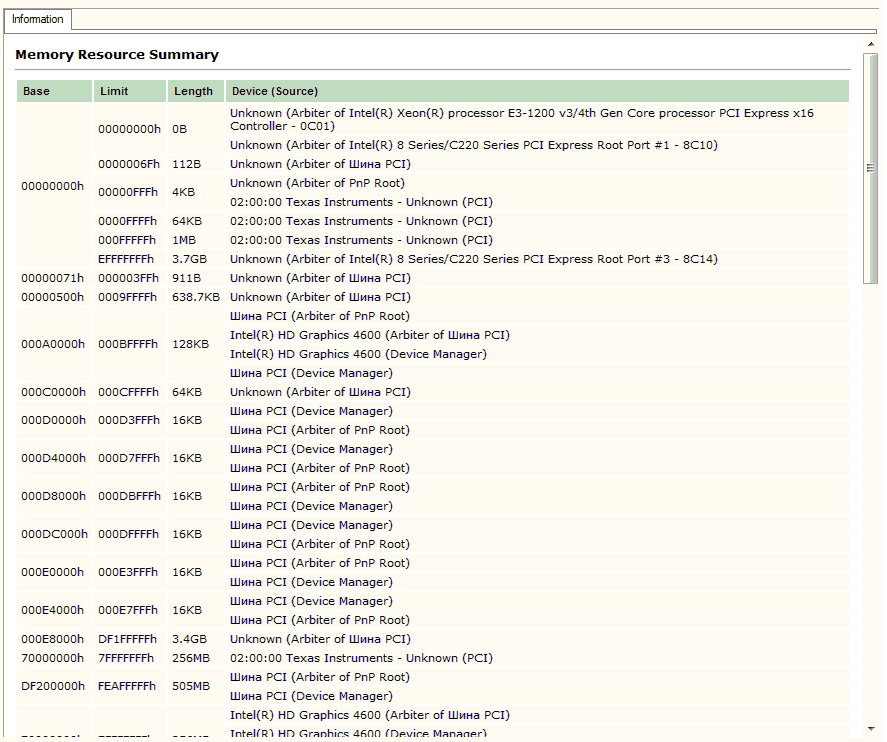
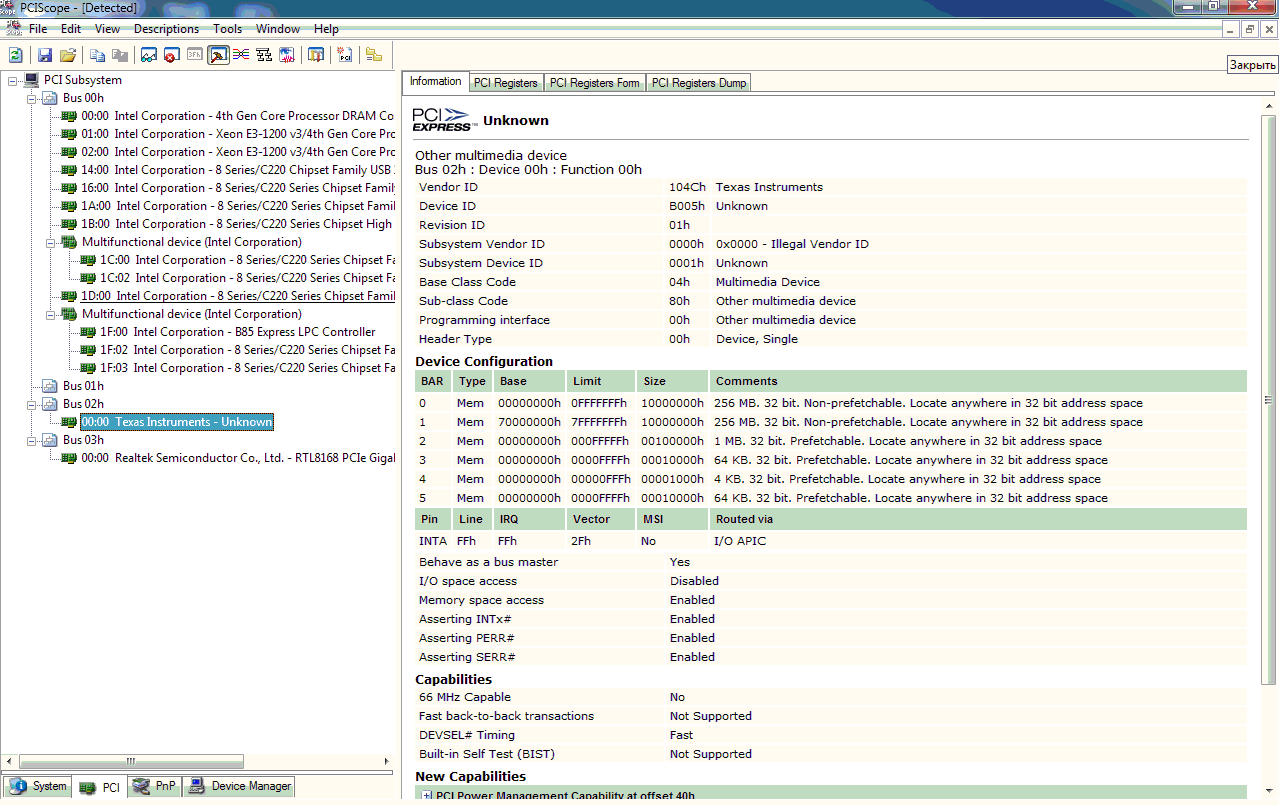
  • I have some changes in situation. I've installed PCIScope and Jungo WinDriver on same host PC. WinDriver shows message while opening evm. It tells that hardware could not be opened, resource overlap. I've checked that  addresses in BARs are out of range of bus 2. I've changed BARs.Now while write/read transactions software shows 0xFFFFFFFF all memory cells, dstbuf is still empty. But now I guess I'm writing in right place but evm does not answer properly.

  • Hi,

    You can try to use BAR1 0x7000_0000, this is a 32-bit memory no-prefetchable bar (same as our test between two TI EVMs, EP side). Then check 0x2180_0300 to 0x2180_030c on DSP side how the inbound translation setup. Will any read/write from/to 0x7000_0000 using your host SW reflected on DSP memory (check address on IB_OFFSET0)?

    Regards, Eric
  • I'm already tryed 0x70000000. Software on host PC shows that I have some resource overlap with that default addresses in example. Changing addresses due to PCI to PCI bridge helps to avoid it.

    Also I've got something! I've turned switches to ROM PCIe Boot and after power on PC evm appeared in system and host PC automatically modified BARs due to PCs address ranges and I can write or read some trash to DSP.

    My previous switch settings were:
    Sw3 - sw6: 1000 0000 0010 0000, sw9: 10

    Could it be that there was something wrong with switches?

    Also I'll check difference between memdump of config regs while running example and ROM PCIe Boot case
  • Successfull! I've got array of data from host PC in DSP memory!

    But I've got it in a strange way. I have turned switches which are intended in booting to ROM PCIE Boot positions. After host PC power up I have checked that evm appeared in system with initialized BARs by host PC. Then I have modified PCIe application regs:

    1. Offset 0x310 to 0x1,

    2. Offset 0x314 to BAR1 reg value,

    3. Offset 0x31c to wanted address in DSP memory.

    Also I've turned off caching in platform. BAR1 was configured as prefetched memory by host PC. After all that things done I've got right array in DSP memory after write transactions by host PC.

    After that I have a question. Host PC successfully initialized EVM if I'm using ROM PCIe Boot mode.  But in another case EVM dissapear out of system if I run PCIe example project, reboot host PC and check again list of devices on PCIe bus. Why can't I run example, reboot host PC, so PC can init EVM properly while rebooting, and have fun with EVM?

  • Hi,

    Good news! Please check www.ti.com/.../sprac59.pdf. When you run the EVM in PCIE boot mode, it actually use the SBL (in EEPROM), not ROM, to initialize the PCIE module. The SBL has code to deal with spread sprectum clock from PC and may avoid the hot reset from host PC.

    When you use JTAG/CCS to load and run the PCIE example (this is the way we debug PCIE with a host PC before we burn the image into EEPROM), may be the link is not stable or got lost due to above reasons. But the PCIE link status is NOT correctly reflected in PCITree software. If in CCS/JTAG case, you can make sure 0x2180_1728 bit 0:4 = 0x11 stable (e.g, continously refresh the CCS memory window to check this register), I don't think of any other reason's your R/W can't be landed on DSP side.

    Regards, Eric
  • Hi, Eric! I've tryed to run iblPCIeWorkaround() function in new project due to PCIe FAQ. Also I've added in code devicePllConfig() and iblEnterRom()  functions from  c66xinit.c. At first I've tryed to run new project with  different combinations of  using these functions in code. After running project  and rebooting host PC evm could not enumerated in system. What am I doing wrong?

  • Hi,

    The "iblPCIeWorkaround() function in new project due to PCIe FAQ. Also I've added in code devicePllConfig() and iblEnterRom()  functions from c66xinit.c" are intended to be run from EEPROM as secondary booyloader. You add those code into your CCS project and load/run by CCS? How do you control the timing when the code runs while the Host PC BIOS enumerates the PCIE bus?

    If the PCIE fails to enumerate: please check and make sure 0x2620358 = 0x1c9, 0x262015c = 0x1, 0x21800004 = 0x7.

    Regards, Eric 

  • Eric, 0x262015 reg is 0x201 for some reason
  • What timing count means? Am I missing something in understanding of iblPCIeWorkaround() or enumeration process by host PC?

  • Eric, I've also checked what should happen if I turn on PC with evm in ROM PCIe Boot mode and reboot PC one or more times. After first reboot evm could not be enumerated by PC and I've checked that PMRST_IRQ_STATUS_RAW reg is 0x9. Does that means that host PC writes turn off command to evm and it simply switches off PCIESS module and cause enumeration trouble after rebooting? Am I need to do something in code in evm if PC reboot detected?
  • Hi,

    I thought you already have PCIE enumeration worked with PC + 6678 EVM, where the PCIE init is done by CCS/JTAG. And you can use PCITree software running on PC to read/write DSP memory. Isn't your goal achieved already?

    Then why you need to add those IBLPCIE workaround code into your working setup?

    If you want to use the PCIE boot mode of the EVM, please flash the IBL code to EEPROM 0x51 and this code should be able to make your PCIE enumeration happening.

    Please don't mess IBL PCIE code and PCIE test example code together, you need to find out what is needed and what is not.

    If 0x262015c=0x201 that means you have PCIE signal detection loss, you need to make sure:

    - PCIE clock comes from PCIE edge connector (from PC), not onboard oscillator

    - EVM's FPGA mutex is setup to receive clock from PCIE edge connector

    PCIE enumeration will not work, unless you have 0x262015c = 0x1 and stable.

    Regards, Eric  

  • Yes, I've reached the goal. And I want to thank you for help in that case. I didn't believed that it can work. But I want now to have code to write it in EEPROM in future to get enumeratable evm every time I reboot or power on PC. Today I've modified pcie example code. I've added reading 0x262015c in cycle after link training and if reg is in undesired state I'm simply reruning example from beginning. And I've got enumeration. It was good but PC hangs up if trying to read/write memory. Maybe you have some ideas on it or what strategy to choose to write such code? I realise that I need also to improve my pcie skills at all
  • Hi,

    "But I want now to have code to write it in EEPROM in future to get enumeratable evm every time I reboot or power on PC" =====> we already have the code for that:
    IBL_ENABLE_PCIE_WORKAROUND in mcsdk_2_01_02_06\tools\boot_loader\ibl\src\device\c66x\c66xinit.c. The image can make sure "get enumeratable evm every time I reboot or power on PC".

    You can modify this code and rebuild the EEPROM image and rewrite to 0x51. Please use this as the base for your future work, don't start from porting this code into the CCS based PCIE example.

    Regards, Eric
  • Ok, thank you, Eric! I think I reached enough success in that case.

    P.S. May be it could be useful for you - after first reboot using pcie boot mode and no CCS projects running evm becomes unenumerateble. May be it's bug or may be some feature of my PC