


Part Number: 66AK2H14
Hi all,
Software environment: Processor SDK 0.3.01.00.06
On my custom board, I rebuilt the UBOOT and now the UBOOT was up after setting the 66AK2H14 as ARM SPI BOOT MODE.
Then I followed this page  and tried to boot the Linux from USB mass storage device.
I clearly followed every steps to setup the USB boot environment.
The following instructions seem not complete.
setenv boot usb
setenv args_all 'setenv bootargs console=ttyS0,115200n8 rootwait"
setenv args_usb 'setenv bootargs ${bootargs} rootfstype=ext4 root=/dev/sda2 rw ip=dhcp'
setenv init_usb 'usb start; run set_fs_none args_all args_usb'
setenv get_fdt_usb 'fatload usb 0:1 ${addr_fdt} ${name_fdt}'
setenv get_kern_usb 'fatload usb 0:1 ${addr_kern} ${name_kern}'
setenv get_mon_usb 'fatload usb 0:1 ${addr_mon} ${name_mon}'
saveenv
So I added some other steps as below
setenv boot usb
setenv args_all 'setenv bootargs console=ttyS0,115200n8 rootwait'
setenv args_usb 'setenv bootargs ${bootargs} rootfstype=ext4 root=/dev/sda2 rw ip=dhcp'
setenv init_fw_rd_usb 'setenv rd_spec -'
setenv set_fs_none 'setenv addr_uinitrd -'
setenv init_usb 'usb start; run set_fs_none args_all args_usb'
setenv get_fdt_usb 'fatload usb 0:1 ${addr_fdt} ${name_fdt}'
setenv get_kern_usb 'fatload usb 0:1 ${addr_kern} ${name_kern}'
setenv get_mon_usb 'fatload usb 0:1 ${addr_mon} ${name_mon}'
setenv name_fdt 'uImage-k2hk-evm.dtb'
setenv name_kern 'uImage-keystone-evm.bin'
setenv name_mon 'skern-k2hk-evm.bin'
setenv addr_fdt '0x88000000'
setenv addr_kern '0x82000000'
And the complete UBOOT environment variables were as below
=> print
addr_fdt=0x88000000
addr_kern=0x82000000
addr_mon=0x0c5f0000
addr_secdb_key=0xc000000
addr_ubi=0x82000000
arch=arm
args_all=setenv bootargs console=ttyS0,115200n8 rootwait
args_net=setenv bootargs ${bootargs} rootfstype=nfs root=/dev/nfs rw nfsroot=${serverip}:${nfs_root},${nfs_options} ip=dhcp
args_ramfs=setenv bootargs ${bootargs} rdinit=/sbin/init rw root=/dev/ram0 initrd=0x808080000,80M
args_ubi=setenv bootargs ${bootargs} rootfstype=ubifs root=ubi0:rootfs rootflags=sync rw ubi.mtd=ubifs,2048
args_usb=setenv bootargs ${bootargs} rootfstype=ext4 root=/dev/sda2 rw ip=dhcp
baudrate=115200
board=ks2_evm
board_name=ks2_evm
boot=usb
bootcmd=run init_${boot} init_fw_rd_${boot} get_fdt_${boot} get_mon_${boot} get_kern_${boot} run_mon run_kern
bootdelay=2
bootdir=/boot
bootm_size=0x10000000
burn_ubi=nand erase.part ubifs; nand write ${addr_ubi} ubifs ${filesize}
burn_uboot_nand=nand erase 0 0x100000; nand write ${loadaddr} 0 ${filesize}
burn_uboot_spi=sf probe; sf erase 0 0x90000; sf write ${loadaddr} 0 ${filesize}
cpu=armv7
ethact=K2HK_EMAC_TEST
ethaddr=a0:f6:fd:92:05:48
fdt_addr_r=0x88000000
fdtaddr=0x88000000
fdtcontroladdr=beee7b20
get_fdt_net=dhcp ${fdtaddr} ${tftp_root}/${name_fdt}
get_fdt_nfs=nfs ${fdtaddr} ${nfs_root}/boot/${name_fdt}
get_fdt_ramfs=dhcp ${fdtaddr} ${tftp_root}/${name_fdt}
get_fdt_ubi=ubifsload ${fdtaddr} ${bootdir}/${name_fdt}
get_fdt_usb=fatload usb 0:1 ${addr_fdt} ${name_fdt}
get_fs_ramfs=dhcp ${rdaddr} ${tftp_root}/${name_fs}
get_kern_net=dhcp ${loadaddr} ${tftp_root}/${name_kern}
get_kern_nfs=nfs ${loadaddr} ${nfs_root}/boot/${name_kern}
get_kern_ramfs=dhcp ${loadaddr} ${tftp_root}/${name_kern}
get_kern_ubi=ubifsload ${loadaddr} ${bootdir}/${name_kern}
get_kern_usb=fatload usb 0:1 ${addr_kern} ${name_kern}
get_mon_net=dhcp ${addr_mon} ${tftp_root}/${name_mon}
get_mon_nfs=nfs ${addr_mon} ${nfs_root}/boot/${name_mon}
get_mon_ramfs=dhcp ${addr_mon} ${tftp_root}/${name_mon}
get_mon_ubi=ubifsload ${addr_mon} ${bootdir}/${name_mon}
get_mon_usb=fatload usb 0:1 ${addr_mon} ${name_mon}
get_ubi_net=dhcp ${addr_ubi} ${tftp_root}/${name_ubi}
get_ubi_nfs=nfs ${addr_ubi} ${nfs_root}/boot/${name_ubi}
get_uboot_net=dhcp ${loadaddr} ${tftp_root}/${name_uboot}
get_uboot_nfs=nfs ${loadaddr} ${nfs_root}/boot/${name_uboot}
init_fw_rd_net=dhcp ${rdaddr} ${tftp_root}/${name_fw_rd}; run set_rd_spec
init_fw_rd_ramfs=setenv rd_spec -
init_fw_rd_ubi=ubifsload ${rdaddr} ${bootdir}/${name_fw_rd}; run set_rd_spec
init_fw_rd_usb=setenv rd_spec -
init_net=run args_all args_net
init_nfs=setenv autoload no; dhcp; run args_all args_net
init_ramfs=run args_all args_ramfs get_fs_ramfs
init_ubi=run args_all args_ubi; ubi part ubifs; ubifsmount ubi:rootfs;
init_usb=usb start; run set_fs_none args_all args_usb
kernel_addr_r=0x82000000
loadaddr=0x82000000
mem_lpae=1
mtdparts=mtdparts=davinci_nand.0:1024k(bootloader)ro,512k(params)ro,-(ubifs)
name_fdt=uImage-k2hk-evm.dtb
name_fs=arago-console-image-k2hk-evm.cpio.gz
name_fw_rd=k2-fw-initrd.cpio.gz
name_kern=uImage-keystone-evm.bin
name_mon=skern-k2hk-evm.bin
name_ubi=k2hk-evm-ubifs.ubi
name_uboot=u-boot-spi-k2hk-evm.gph
nfs_options=v3,tcp,rsize=4096,wsize=4096
nfs_root=/export
no_post=1
pxefile_addr_r=0x80100000
ramdisk_addr_r=0x88080000
rdaddr=0x88080000
run_kern=bootz ${loadaddr} ${rd_spec} ${fdtaddr}
run_mon=mon_install ${addr_mon}
scriptaddr=0x80000000
set_fs_none=setenv addr_uinitrd -
set_rd_spec=setenv rd_spec ${rdaddr}:${filesize}
soc=keystone
stderr=serial@02530c00
stdin=serial@02530c00
stdout=serial@02530c00
tftp_root=/
vendor=ti
ver=U-Boot 2016.05-00118-ga7b7639-dirty (Dec 31 2016 - 14:23:47 +0800)

Environment size: 3779/262140 bytes
Then I typed the BOOT command. The boot message was showed as below
=> boot
starting USB...
USB0:   Register 2001040 NbrPorts 2
Starting the controller
USB XHCI 1.00
scanning bus 0 for devices... 2 USB Device(s) found
       scanning usb for storage devices... 1 Storage Device(s) found
reading uImage-k2hk-evm.dtb
54305 bytes read in 60 ms (883.8 KiB/s)
reading skern-k2hk-evm.bin
45056 bytes read in 44 ms (1000 KiB/s)
reading uImage-keystone-evm.bin
3459928 bytes read in 1870 ms (1.8 MiB/s)
K2_BM_15. 07-nogit SoC:k2hk built:10:27:44, Dec 31 2016

## installed monitor, freq [200000000], status 0
Kernel image @ 0x82000000 [ 0x000000 - 0x34cb58 ]
## Flattened Device Tree blob at 88000000
   Booting using the fdt blob at 0x88000000
   Loading Device Tree to 8ffef000, end 8ffff420 ... OK

Starting kernel ...

Uncompressing Linux... done, booting the kernel.
You could see that the BOOT sequences was stuck.
From this page
I had set the kernel using 'Kernel low-level debugging functions' and 'early printk'.
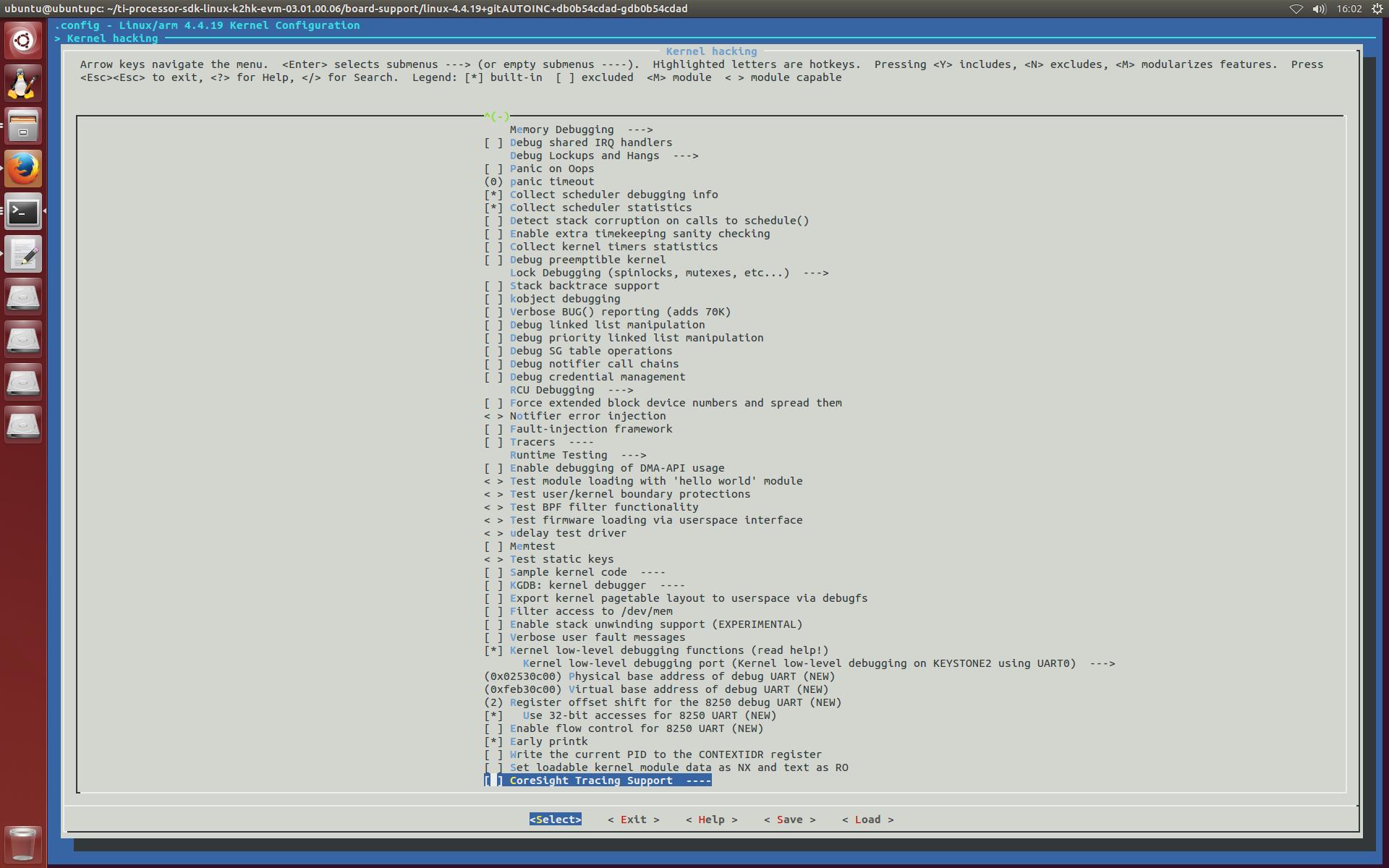
But I still had no more things output after 'booting the kernel'.
So how should I do to debug further? How to enable CONFIG_DEBUG_LL? Could anyone help me?
Regards,
Feng


