This thread has been locked.

If you have a related question, please click the "Ask a related question" button in the top right corner. The newly created question will be automatically linked to this question.

RTOS: SDK upgrade causes EtherCAT Port0 operation failure

Other Parts Discussed in Thread: SYSBIOS, AM3357, AM3359, TLK110, TLK106

Tool/software: TI-RTOS

Dear TI,

Our products use TI solution as ECAT Slave. We see ECAT bugs fix on TI's website and we download and successfully updated the newer SDK.

But the EtherCAT Port0 operation failed.

Following is our environment:

Hardware:

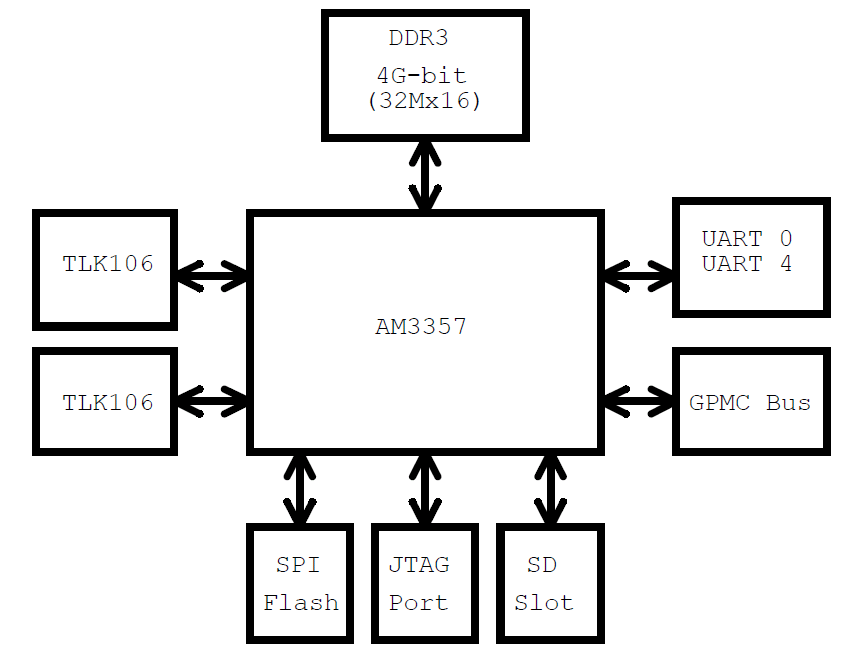
- CPU:  AM3357BZCZD30 / 300MHz

- PHY: TLK-106

 Software:

- Code Composer Studio version CCS 6.1.0.00104

- SYSBIOS 6.41.04.54

- XDC 3.30.06.67

- Compiler version TI v5.1.11

- ECAT SDK: am335x_sysbios_ind_sdk_01.01.01.01  <----- EtherCAT Port0&Port1 operating normally.


After updating newer SDK, The ECAT Port0 is failed.

    am335x_sysbios_ind_sdk_01.01.02.01  <----- EtherCAT Port0 operation failed, but Port1 is normally.

    am335x_sysbios_ind_sdk_01.01.03.03  <----- EtherCAT Port0 operation failed, but Port1 is normally.


I have checked the SDKs only the PRU firmware are different. Please help to check the PRU from SDK_01.01.01.01 after what changes.

Many thanks

Anders

  • The EtherCAT experts have been notified. They will respond here.
  • Dear TI,

    Is there any further reply/information?

    Best regards,
    Anders
  • Hi Anders

    Thank you for the description. Would it be possible to get some additional information about the operating conditions in which you are seeing the failure?

    What are the conditions where the failure is observed?

    What is the EtherCAT master? 

    What is being sent ?

    How many slaves are in the configuration?

    Where is the AM335x device in the sequence of slaves?

    David

  • Hi David,

    I using Beckhoff TwinCAT as the Master and connect only One slave. Then scanning for device and I do not see any way of making a connection to the slave device.
    I can see that the link LED on the slave is blinking, but the ECAT Run LED is off.

    BUT, If I use "ECAT port 1" on slave to connect, Then scanning for device with TwinCAT. I can see that slave and operating to OP state.

    And now, I disconnect and return to connect with "ECAT port 0" on slave, Then scanning for device with TwinCAT again. I can see that slave and operating to OP state.

    I feel strange why ECAT port 0 is working properly after ECAT port 1 connected or plugged.
    This situation happens after upgrading the newer SDK.

    I have checked the newer SDK that only the PRU firmware are different.
    I did an experiment, I use the newer SDK(01.01.02.01&01.01.03.03) but PRU firmware replace older version 01.01.01.01.
    Then scanning for device with TwinCAT. The ECAT port 0 on the slave is working properly and operating to OP state.

    It seems the PRU firmware has some changes on ECAT port0 handle on slave.
    Any Ideas? Need more information?

    Best Regards,
    Anders
  • Hi Anders

    I understand. Let me check with our experts.

    David
  • Hi Anders

    Can you tell us the differences between your board and the ICE board?

    David
  • Hi David,

    The differences between our Slave board and the ICE board as following:

    1. CPU:  AM3357BZCZD30 (300MHz)

    2. PHY chip: TI TLK-106

    Anders

  • Anders
    I apologize for the delay. We are not seeing a change which would suggest this.
    Approaching this from another direction - do you see the same behavior on an AM335xICE V2 EVM using the default clock settings which include a 600 MHz ARM clock?
    David
  • Hi David,

    I tested AM335xICE V2 EVM board (default ARM clock 600 MHz) with newer SDK and newer PRU firmware, it does not have this phenomenon.

    The differences between our Slave board and the ICE board are CPU(AM3357: 300MHz) and PHY(TI TLK-106), Will it be possible that CPU version caused?

    I have no idea why using newer PRU firmware(01.01.02.01&01.01.03.03) that the ECAT port 0 will be working properly after ECAT port 1 must be plugged first.

    Do you have any suggestion?

    Many Thanks,

    Anders

  • Hi Anders

    Our experts have not seen any issues in operating the AM335x ISDK Examples at 300MHz. It is relatively simple to check clock frequency dependencies by changing the CCS6.1.2 AM3359 ICE V2 Gel in C:\ti\ccsv6\ccs_base\emulation\boards\ice_am3359\gel\TMDXICE3359.gel OPP100 configuration to use a 300 vs the 600 MHz clock configuration for the MPU.

    My understating is that the test run was the ISDK example on the AM335x ICE V2 board. The AM335x ICE boards uses the TLK110 versus the TLK-106 phy. There are a few differences between these Phys.
    Would it be possible to run your software on the AM335x ICE board but using the ISDK based TLK110 phy drivers in place of your TLK106 phy drivers?


    David