This thread has been locked.

If you have a related question, please click the "Ask a related question" button in the top right corner. The newly created question will be automatically linked to this question.

AM3358: USB BOOTP DHCP Settings for Linux Server

Part Number: AM3358


I'm attempting to boot the Beaglebone Black over USB to prove I can initialy load and flash the MMC of a production Sitara-based system. One question I have is how to configure dhcp.

The Ubuntu 12.04 Set Up to Network Boot an AM335x Based Platform wiki provides this example for dhcp.conf:

subnet 192.168.2.0 netmask 255.255.255.0 
{   
range dynamic-bootp 192.168.2.2 192.168.2.100;   
if substring (option vendor-class-identifier, 0, 10) = "AM335x ROM"   
{     
filename "u-boot-spl-restore.bin";   
}  
elsif substring (option vendor-class-identifier, 0, 10) = "DM814x ROM"  
{     
filename "u-boot-spl-restore.bin";   
}   
elsif substring (option vendor-class-identifier, 0, 17) = "AM335x U-Boot SPL"   
{     
filename "u-boot-restore.img";   
}   
else   
{     filename "zImage";   
}     
range 192.168.2.101 192.168.2.199; 
}

The dhcp.conf file specifies the range for assigning addresses for dynamic-bootp clients and specifies the file to upload based on information from the Sitara Boot ROM client.

The AM335x U-Boot User's Guide wiki provides this example in the section "Booting Over CPSW Ethernet":

host am335x_evm 
{ 
hardware ethernet de:ad:be:ee:ee:ef; 
if substring (option vendor-class-identifier, 0, 10) = "DM814x ROM" 
{   
filename "u-boot-spl.bin"; 
}
elsif substring (option vendor-class-identifier, 0, 17) = "AM335x U-Boot SPL"
{   
filename "u-boot.img"; 
} 
else
{   
filename "uImage-am335x"; 
}  
}

I believe these two files aim to accomplish the same thing:

  1. to tftp the u-boot-spi.bin when the Sitara client is Public ROM Code controlled
  2. and then to tftp u-boot.img files when the Sitara client is running the SPL instructions client.

This should look the same if the transport medium is ethernet or USB.

From the dhcp.conf manpage:

"If clients on a subnet are to be assigned addresses dynamically, a range declaration must appear within the subnetdeclaration. For clients with statically assigned addresses, or for installations where only known clients will be served, each such client must have a host declaration."

So, the first example uses dynamic addresses and the second example uses static addresses.

The dhcp.conf manpages also says this:

"In order for a BOOTP client to be recognized, its network hardware address must be declared using a hardware clause in the host statement. hardware-type must be the name of a physical hardware interface type."

Using the dynamic conf example, I am able to have the Sitara come up, broadcast, and receive the u-boot-spl.bin file via tftp. But I seem to have network errors after the network interfaces goes down after the SPL file is transferred. It looks to me like the Sitara can not connect back to the Linux server. (I aslo cannot figure out how to keep wireshark up at that time, so I can't see what is going on, but that is probably a different topic)

Is the issue that I am not using the hardware statement in the dhcp.conf? My Sitara BOOTP client seems to be recognized initialy, but not after receiving the SPL file. Maybe my most basic question is: what does the statement "in order for a BOOTP client to be recognized" mean in the context of booting the Sitara over USB?

  • Thanks Biser. I should have mentioned that I started with the Sitara Linux Program the eMMC on Beaglebone Black wiki. It has been invaluable. It links to the  Ubuntu 12.04 Set Up to Network Boot an AM335x Based Platform wiki mentioned in my post. It does not answer my question, or at least I can't find the answer.

  • Maybe a better first question is this: Why are the example snippets for dhpcd.conf from the Ubuntu 12.04 Set Up to Network Boot an AM335x Based Platform wiki and the AM335x U-Boot User's Guide different?


    They both appear to have the same purpose, to provide the name of the files to the dhcp server. The file names are different, but from my understanding, that is not important. It only matters that the name matches the file in the /tftpboot directory (or which ever directory that was specified when the SDK was installed. 

    Is it just the case that either will work and the examples happen to be different? Does the dhcp.conf file need both entries to peripheral boot via USB?

  • The wiki processors.wiki.ti.com/.../AM335x_U-Boot_User's_Guide that you refer is obsolete. It's valid for the Linux SDK 6.0 (kernel v.3.2). The wiki that covers current releases is processors.wiki.ti.com/.../Linux_Core_U-Boot_User's_Guide
  • Biser,

    Thank you for pointing that out! I did not realize that I was reading the obsolete U-BOOT guide! The Sitara Linux Program the eMMC on Beaglebone Black wiki does link to the correct Linux Core U-Boot User's Guide. I must have navigated to the obsolete version in my searching.

    I sill do not understand why the U-Boot User's Guide has this example dhcp host entry (slightly different than the example from the obsolete link in my original post):

    host am335x_evm {
      hardware ethernet de:ad:be:ee:ee:ef;
      # Check for PG1.0, typically CPSW
      if substring (option vendor-class-identifier, 0, 10) = "DM814x ROM" {
        filename "u-boot-spl.bin";
      # Check for PG2.0, CPSW or USB RNDIS
      } elsif substring (option vendor-class-identifier, 0, 10) = "AM335x ROM" {
        filename "u-boot-spl.bin";
      } elsif substring (option vendor-class-identifier, 0, 17) = "AM335x U-Boot SPL" {
        filename "u-boot.img";
      } else {
        filename "zImage-am335x-evm.bin";
      }
    }

    And the Ubuntu 12.04 Set Up to Network Boot an AM335x Based Platform has similar, but different example that seem to do the same thing differently.

  • I have notified the software team. They will respond here.
  • I'm still trying to figure out why the two TI sources seem to provide different examples of how to configure the isc-dhcp-server and also trying to figure out why my USB peripheral boot is not working. I started with a fresh install of Ubuntu 16.04 this time and followed the instructions identically as before with one additional step. I added this to /etc/default/grub

    GRUB_CMDLINE_LINUX="net.ifnames=0 biosdevname=0" 

    and then updated grub and rebooted.

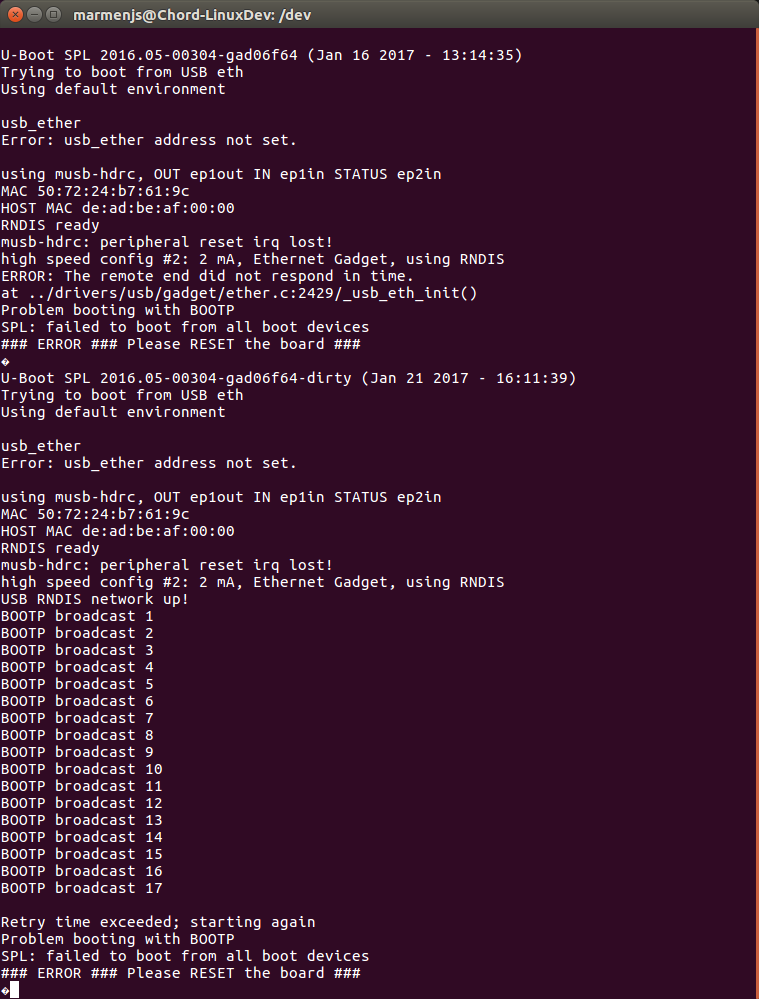
    That got me back to my original problem of SPL not being able to get the U-Boot IMG (I think). I had problems earlier of SPL not being tftpd and the Sitara trying to UART boot instead. That was solved in this post. So now with my new 16.04 set up I got this:

    So I'm back in business with the u-boot-spl-restor.bin file being tftp and have network problem moving on from that point.

    Thinking back to my dhcp.conf question in this post, I tried a few iterations of changes in the dhcp.conf file using the "host" with "hardware" example in the U-Boot User's Guide. I got that trying to tftp, but now I could see on wireshark that "File not found" on the host when the same request was made. So I restored the old dhcp.conf file, but I'm seeing the same result. This makes no sense to me.

    I did not touch anything relating to tftp (not directly or knowingly anyway). I have triple checked file names and permissions. I can't for the life of me figure out why I just can't go back to the dhcp.conf that was working a few hours ago. Any advice where to look? I'm back to getting the 'C's, on my terminal which tells me USB boot failed and the processor moved on to UART.

  • My tftp problem was a result of Ubuntu 16.04 using systemd. In  14.04 I followed the TI wiki instructions and configured tftpd-hpa to be started by xinetd. In 16.04, systmed starts tftp-hpa at startup (by default it seems). The first time I tried my 16.04 set up, tftp worked because I had not restarted Ubuntu after installing tftpd-hpa. After a restart, the uboot-spl-restore.bin file could not be tftp'd because systemd brought up tftpd-hpa at startup with the wrong parameters (the location of the files for one). I updated /etc/default/tftpd-hpa to have the configuration settings that I had previously used in /etc/xinetd/tftp and then deleted the tftp file. I am back to being able to get the uboot-spl-restore.bin over to the beaglebone black every time. 

    Now I'm back to trying to figure out why SPL cannot get the the u-boot-restore.img from the Ubuntu server.

  • Changing .../drivers/usb/gadget/ether.c  to this:

    #define USB_CONNECT_TIMEOUT (15 * CONFIG_SYS_HZ)

    which I read about here, fixed the ERROR: The remote end did not respond in time.

    Before and after picture: