


Part Number: TI-RTOS-MCU
Tool/software: TI-RTOS
Hi,
I am using CCS V6.2, TI-RTOS v2.16, installed the wolfSSL V3.10.0(build complete)
I am trying to run a "tcpecoTls" example project imported from the Resource Explorer, I linked "wolfSSL dir path" in include path of my project properties,

the "target library dir" in the ARM Compiler file Search path.

and according to "readme.text"
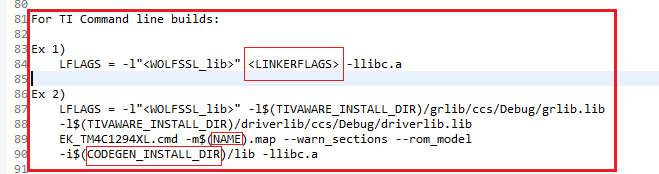
in the TI Command line builds, as in above image, I was not get what is <LINKERFLAGS>, <NAME> & <CODEGEN_INSTALL_DIR> and why this step is need. So I skip the step.
Now the build is gets finished but after run I was getting an error print :
tcpHandler: Error loading ca_cert_der_2048 please check the wolfssl/certs_test.h file.(system print in main)
because of SSL_SUCCESS failure.
Can you please help to solve me to solve my issue.
Regards,
Raghu DS

