This thread has been locked.

If you have a related question, please click the "Ask a related question" button in the top right corner. The newly created question will be automatically linked to this question.

Linux/AM5728: GStreamer issues with custom camera connection

Part Number: AM5728
Other Parts Discussed in Thread: TLV320AIC3104

Tool/software: Linux

Hi All, 

We are using camera module and processor module of AM572x GP EVM.

processors.wiki.ti.com/.../AM572x_GP_EVM_Hardware_Setup

We developed custom camera connection board through which we connected camera module with processor module without the using LCD module.

To check the pinmux and device tree changes please https://e2e.ti.com/support/arm/sitara_arm/f/791/t/584261 

The camera module succefully connects and mt9t11x driver loads succesfully...

[ 8.120157] mt9t11x 4-003c: input-clock-freq: 32000000
[ 8.126192] mt9t11x 4-003c: pixel-clock-freq: 96000000
[ 8.155980] mt9t11x 4-003c: GPIO lookup for consumer reset
[ 8.155991] mt9t11x 4-003c: using device tree for GPIO lookup
[ 8.156060] of_get_named_gpiod_flags: parsed 'reset-gpios' property of node '/ocp/i2c@4807c000/mt9t11x@3C[0]' - status (0)
[ 8.156078] mt9t11x 4-003c: GPIO lookup for consumer powerdown
[ 8.156084] mt9t11x 4-003c: using device tree for GPIO lookup
[ 8.156103] of_get_named_gpiod_flags: parsed 'powerdown-gpios' property of node '/ocp/i2c@4807c000/mt9t11x@3C[0]' - status (0)
[ 8.156115] mt9t11x 4-003c: GPIO lookup for consumer oscen
[ 8.156120] mt9t11x 4-003c: using device tree for GPIO lookup
[ 8.156136] of_get_named_gpiod_flags: parsed 'oscen-gpios' property of node '/ocp/i2c@4807c000/mt9t11x@3C[0]' - status (0)
[ 8.156149] mt9t11x 4-003c: GPIO lookup for consumer bufen
[ 8.156154] mt9t11x 4-003c: using device tree for GPIO lookup
[ 8.156170] of_get_named_gpiod_flags: parsed 'bufen-gpios' property of node '/ocp/i2c@4807c000/mt9t11x@3C[0]' - status (0)
[ 8.156181] mt9t11x 4-003c: Pallab is here . Enjoy
[ 8.181634] of_get_named_gpiod_flags: can't parse 'gpio-reset' property of node '/ocp/i2c@48070000/tlv320aic3104@18[0]'
[ 8.181786] aic_dvdd_fixed: supplied by vdd_3v3
[ 8.228153] mt9t11x 4-003c: mt9t111 chip ID 2680
[ 8.236862] mt9t11x 4-003c: mt9t11x sensor driver registered !!

[ 11.216514] vip 48990000.vip: loading firmware vpdma-1b8.bin
[ 11.237694] vip 48990000.vip: VPDMA firmware loaded
[ 11.242818] vip2-s0: Port A: Using subdev mt9t11x for capture
[ 11.267939] vip2-s0: device registered as video1

Also from i2cdetect it shows that camera sensor is present on the i2c line  

root@am57xx-evm:~# i2cdetect -r 4
WARNING! This program can confuse your I2C bus, cause data loss and worse!
I will probe file /dev/i2c-4 using read byte commands.
I will probe address range 0x03-0x77.
Continue? [Y/n] y
0 1 2 3 4 5 6 7 8 9 a b c d e f
00: -- -- -- -- -- -- -- -- -- -- -- -- --
10: -- -- -- -- -- -- -- -- -- -- -- -- -- -- -- --
20: -- -- -- -- -- -- -- -- -- -- -- -- -- -- -- --
30: -- -- -- -- -- -- -- -- -- -- -- -- UU -- -- --
40: -- -- -- -- -- -- -- -- -- -- -- -- -- -- -- --
50: -- -- -- -- -- -- -- -- -- -- -- -- -- -- -- --
60: -- -- -- -- -- -- -- -- -- -- -- -- -- -- -- --
70: -- -- -- -- -- -- -- --

But as soon as I want to use camera and launch any gstreamer pipeline it device hangs and below message comes in dmesg

[ 549.385245] omap_i2c 4807c000.i2c: controller timed out


[ 549.405270] ------------[ cut here ]------------
[ 549.409922] WARNING: CPU: 1 PID: 1148 at drivers/media/v4l2-core/videobuf2-core.c:1315 vb2_start_streaming+0xe0/0x15c()
[ 549.420824] Modules linked in: bc_example(O) usbhid rpmsg_rpc rpmsg_proto rpmsg_pru xhci_plat_hcd xhci_hcd usbcore cbc drbg xfrm_user xfrm4_tunnel dwc3 udc_core ipcomp xfrm_ipcomp virtio_rpmsg_bus esp4 ah4 bluetooth af_key xfrm_algo sha512_generic sha512_arm sha256_generic hmac md5 sha1_generic sha1_arm_neon sha1_arm ti_vip snd_soc_simple_card omap_sham ecb pru_rproc pvrsrvkm(O) rtc_ds1307 pruss_intc ahci_platform libahci_platform libahci omap_aes_driver snd_soc_omap_hdmi_audio pruss omap_wdt dwc3_omap libata scsi_mod ti_vpe ti_sc ti_csc ti_vpdma extcon_palmas omap_des rtc_omap extcon omap_rng rtc_palmas snd_soc_tlv320aic3x mt9t11x rng_core debugss_kmodule(O) omap_remoteproc remoteproc virtio virtio_ring sch_fq_codel uio_module_drv(O) uio gdbserverproxy(O) cryptodev(O) cmemk(O)
[ 549.491147] CPU: 1 PID: 1148 Comm: v4l2src0:src Tainted: G O 4.4.32-gadde2ca9f8 #1
[ 549.499882] Hardware name: Generic DRA74X (Flattened Device Tree)
[ 549.505998] Backtrace:
[ 549.508473] [<c00130e4>] (dump_backtrace) from [<c00132e0>] (show_stack+0x18/0x1c)
[ 549.516073] r7:c04aa82c r6:600e0013 r5:00000000 r4:c0952dcc
[ 549.521798] [<c00132c8>] (show_stack) from [<c02b420c>] (dump_stack+0x8c/0xa0)
[ 549.529057] [<c02b4180>] (dump_stack) from [<c00349c4>] (warn_slowpath_common+0x88/0xb8)
[ 549.537180] r7:c04aa82c r6:00000523 r5:00000009 r4:00000000
[ 549.542900] [<c003493c>] (warn_slowpath_common) from [<c0034a98>] (warn_slowpath_null+0x24/0x2c)
[ 549.551721] r8:c096dc14 r7:ffffff92 r6:ec709c68 r5:ec709ebc r4:ec709dc4
[ 549.558495] [<c0034a74>] (warn_slowpath_null) from [<c04aa82c>] (vb2_start_streaming+0xe0/0x15c)
[ 549.567322] [<c04aa74c>] (vb2_start_streaming) from [<c04ac438>] (vb2_core_streamon+0x114/0x160)
[ 549.576142] r7:c0496edc r6:ed5c6c00 r5:ed9b8d80 r4:ec709c68
[ 549.581862] [<c04ac324>] (vb2_core_streamon) from [<c04ae288>] (vb2_streamon+0x38/0x58)
[ 549.589897] r5:ed9b8d80 r4:00000001
[ 549.593505] [<c04ae250>] (vb2_streamon) from [<c04ae2ec>] (vb2_ioctl_streamon+0x44/0x48)
[ 549.601632] [<c04ae2a8>] (vb2_ioctl_streamon) from [<c0496f00>] (v4l_streamon+0x24/0x28)
[ 549.609754] r5:40045612 r4:c04ae2a8
[ 549.613361] [<c0496edc>] (v4l_streamon) from [<c049ad48>] (__video_do_ioctl+0x2c0/0x334)
[ 549.621484] r5:40045612 r4:00000001
[ 549.625091] [<c049aa88>] (__video_do_ioctl) from [<c049a77c>] (video_usercopy+0x1d4/0x4c4)
[ 549.633387] r10:00000001 r9:00148014 r8:d1c03e30 r7:00000000 r6:00000004 r5:00000004
[ 549.641289] r4:40045612
[ 549.643840] [<c049a5a8>] (video_usercopy) from [<c049aa84>] (video_ioctl2+0x18/0x1c)
[ 549.651614] r10:00000000 r9:d1c02000 r8:ed73a6cc r7:00148014 r6:40045612 r5:ed9b8d80
[ 549.659514] r4:ed5c6c00
[ 549.662074] [<c049aa6c>] (video_ioctl2) from [<c04959e4>] (v4l2_ioctl+0xa8/0xe0)
[ 549.669506] [<c049593c>] (v4l2_ioctl) from [<c0130958>] (do_vfs_ioctl+0x3f0/0x614)
[ 549.677104] r9:d1c02000 r8:00148014 r7:0000000a r6:ed9b8d80 r5:ed4b6958 r4:00148014
[ 549.684924] [<c0130568>] (do_vfs_ioctl) from [<c0130bb8>] (SyS_ioctl+0x3c/0x64)
[ 549.692262] r10:00000000 r9:d1c02000 r8:00148014 r7:40045612 r6:ed9b8d80 r5:0000000a
[ 549.700163] r4:ed9b8d81
[ 549.702715] [<c0130b7c>] (SyS_ioctl) from [<c000fa20>] (ret_fast_syscall+0x0/0x34)
[ 549.710315] r9:d1c02000 r8:c000fbc4 r7:00000036 r6:b6b003c8 r5:b53120c8 r4:00000000
[ 549.718307]

---[ end trace 4c286026f3a769d2 ]---

If anyone can suggest some pointer, it will be really helpful !!

Attached issue logs :- 4747.log2.txt

Regards

Pallab Sarkar


  • The software team have been notified. They will respond here.
  • HI ,

    Just to confirm further that my pin mux settings are proper or not I have done below experiments.

    1. Connected a IMU(MPU9150) on my pinmuxed i2c5 line . It worked well and I got sensor data, so i2c5 pinmuxing seems to be working.

    2. Next is I verified the GPIO pinmuxing required for camera to work . Changes are done in mux_data.h and am57xx-beagle-x15-common.dtsi.(As shared in e2e.ti.com/.../584261)

    Changes seems to be fine , but when I checked the pinmux status for those GPIO pins

    root@am57xx-evm:/sys/kernel/debug/pinctrl/4a003400.pinmux# cat pinmux-pins
    pin 12 (4a003430.0): (MUX UNCLAIMED) (GPIO UNCLAIMED)
    pin 13 (4a003434.0): (MUX UNCLAIMED) (GPIO UNCLAIMED)
    pin 14 (4a003438.0): (MUX UNCLAIMED) (GPIO UNCLAIMED)
    pin 15 (4a00343c.0): (MUX UNCLAIMED) (GPIO UNCLAIMED)
    Is this can be point of concern ???

    Also just to make sure its not issue of gstreamer etc I tried to use dmabuftest commands also
    processors.wiki.ti.com/.../DRA7xx_GLSDK_Software_Developers_Guide

    but system hangs after that . no logs/errors!

    Please share if anything I am missing or further pointers will be helpful

    Regards
    Pallab Sarkar
  • Hi Pallab,

    Your problem starts at :
    [ 549.385245] omap_i2c 4807c000.i2c: controller timed out
    Are you using the UNMODIFIED EVM & Camera module?
    Is it possible to probe the i2c communication between the camera & the processor either with logic analyzer, or an oscilloscope?

    Are you using wayland sync?
    The following worked on my GP EVM:
    root@am57xx-evm:~# gst-launch-1.0 v4l2src device=/dev/video1 num-buffers=1000 io-mode=4 ! 'video/x-raw, \
    > format=(string)YUY2, width=(int)1280, height=(int)720' ! vpe num-input-buffers=8 ! queue ! waylandsink

    I am using :
    root@am57xx-evm:~# uname -a
    Linux am57xx-evm 4.4.19-gdb0b54cdad #1 SMP PREEMPT Mon Oct 3 18:04:11 EDT 2016 armv7l GNU/Linux

    Official SDK03.01

    Best Regards,
    Yordan
  • Hi Yordan,

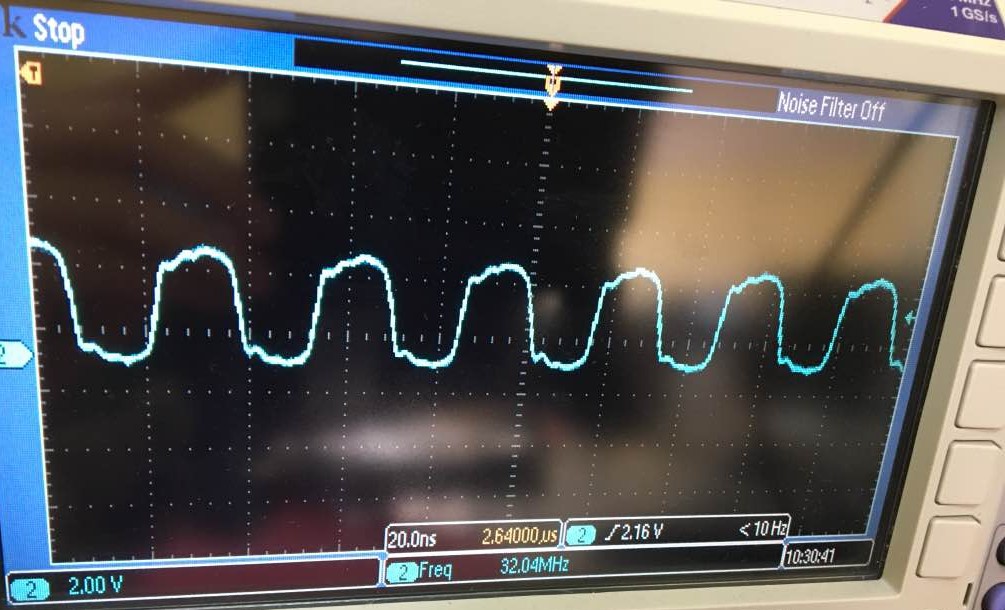
    We did check the oscillator output in camera module, strangely its showing sine wave of very low frequency. I guess it must be square wave with frequency of around Mhz. Is it the problem of crystal oscillator?

    We also assume that following gpios must be output from the Beagleboard to control the Camera module -

    Gpio5_10 (mcasp1_axr8)

    Gpio5_12 (mcasp1_axr10)

    Gpio4_17 (mcasp1_axr11)

    Gpio5_11 (mcasp1_axr9)

    But in mux_data.h file these are declared as input pins. Should we correct these pins by declaring as output?

  • Hi,
    Any update ?
  • Hi,

    We did check the oscillator output in camera module, strangely its showing sine wave of very low frequency

    This is strange. The measurement on my EVM shows 32MHz square signal from the oscilator (Y1 on the camera board), so it is possible for you to be facing hw issue, see bellow picture: 


    Apologies for the low quality, I don't have usb on my scope.  

    Do you use a custom camera board? As for the GPIO settings you should refer to the prebuilt settings (if you're using the reference hardware). 

    Best Regards, 
    Yordan

  • Thanks for your input,

    We reconfirmed at found cam hw seems to be fine,
    I have enabled additional log and can see below important debug messages from driver .

    [ 232.591210] vb2: vb2_verify_memory_type: USERPTR for current setup unsupported
    [ 232.600496] vb2: vb2_core_reqbufs: call_qop(ec7cb468, queue_setup)
    [ 232.606711] vb2: __vb2_buf_mem_alloc: call_memop(ec7cb468, 0, alloc)
    [ 232.614373] vb2: __vb2_queue_alloc: call_vb_qop(ec7cb468, 0, buf_init) (nop)
    [ 232.621502] vb2: __vb2_buf_mem_alloc: call_memop(ec7cb468, 1, alloc)
    [ 232.629341] vb2: __vb2_queue_alloc: call_vb_qop(ec7cb468, 1, buf_init) (nop)
    [ 232.636423] vb2: __vb2_buf_mem_alloc: call_memop(ec7cb468, 2, alloc)
    [ 232.644169] vb2: __vb2_queue_alloc: call_vb_qop(ec7cb468, 2, buf_init) (nop)
    [ 232.651320] vb2: __setup_offsets: buffer 0, plane 0 offset 0x00000000
    [ 232.657836] vb2: __setup_offsets: buffer 1, plane 0 offset 0x001c2000
    [ 232.664358] vb2: __setup_offsets: buffer 2, plane 0 offset 0x00384000
    [ 232.670902] vb2: __vb2_queue_alloc: allocated 3 buffers, 1 plane(s) each
    [ 232.677643] vb2: vb2_buffer_in_use: call_memop(ec7cb468, 0, num_users)
    [ 232.684221] vb2: vb2_buffer_in_use: call_memop(ec7cb468, 1, num_users)
    [ 232.690857] vb2: vb2_buffer_in_use: call_memop(ec7cb468, 2, num_users)
    [ 232.697439] vb2: vb2_core_expbuf: call_memop(ec7cb468, 0, get_dmabuf)
    [ 232.703933] vb2: vb2_core_expbuf: buffer 0, plane 0 exported as 20 descriptor
    [ 232.711237] vb2: __qbuf_mmap: call_vb_qop(ec7cb468, 0, buf_prepare)
    [ 232.717533] vb2: vb2_buffer_in_use: call_memop(ec7cb468, 0, num_users)
    [ 232.724109] vb2: vb2_core_qbuf: qbuf of buffer 0 succeeded
    [ 232.729739] vb2: vb2_core_expbuf: call_memop(ec7cb468, 1, get_dmabuf)
    [ 232.736223] vb2: vb2_core_expbuf: buffer 1, plane 0 exported as 22 descriptor
    [ 232.743457] vb2: __qbuf_mmap: call_vb_qop(ec7cb468, 1, buf_prepare)
    [ 232.749802] vb2: vb2_buffer_in_use: call_memop(ec7cb468, 1, num_users)
    [ 232.756385] vb2: vb2_core_qbuf: qbuf of buffer 1 succeeded
    [ 232.761937] vb2: vb2_core_expbuf: call_memop(ec7cb468, 2, get_dmabuf)
    [ 232.768465] vb2: vb2_core_expbuf: buffer 2, plane 0 exported as 24 descriptor
    [ 232.775666] vb2: __qbuf_mmap: call_vb_qop(ec7cb468, 2, buf_prepare)
    [ 232.782025] vb2: vb2_buffer_in_use: call_memop(ec7cb468, 2, num_users)
    [ 232.788578] vb2: vb2_core_qbuf: qbuf of buffer 2 succeeded
    [ 232.794127] vb2: __enqueue_in_driver: call_memop(ec7cb468, 0, prepare)
    [ 232.800752] vb2: __enqueue_in_driver: call_vb_qop(ec7cb468, 0, buf_queue)
    [ 232.807568] vb2: __enqueue_in_driver: call_memop(ec7cb468, 1, prepare)
    [ 232.814158] vb2: __enqueue_in_driver: call_vb_qop(ec7cb468, 1, buf_queue)
    [ 232.821044] vb2: __enqueue_in_driver: call_memop(ec7cb468, 2, prepare)
    [ 232.827598] vb2: __enqueue_in_driver: call_vb_qop(ec7cb468, 2, buf_queue)
    [ 232.834437] vb2: vb2_start_streaming: call_qop(ec7cb468, start_streaming)
    [ 232.841607] mt9t11x 4-003c: mt9t11x_s_stream: enable: 1
    [ 232.846855] mt9t11x 4-003c: __mt9t11x_set_power: on: 1
    [ 232.878057] mt9t11x 4-003c: mt9t11x_init_camera_optimized:
    [ 232.883595] mt9t11x 4-003c: mt9t11x_reset:
    [ 232.904380] mt9t11x 4-003c: mt9t11x_set_pll_dividers:
    [ 232.938482] vb2: vb2_start_streaming: driver refused to start streaming
    [ 232.945136] ------------[ cut here ]------------
    [ 232.951448] WARNING: CPU: 0 PID: 1110 at drivers/media/v4l2-core/videobuf2-core.c:1315 vb2_start_streaming+0xec/0x1c4()


    One thing I noticed that even though I am using "io-mode= 4" i.e DMA in gstreamer commands , why I can see below error

    [ 232.591210] vb2: vb2_verify_memory_type: USERPTR for current setup unsupported

    Did I am missing something ?
    Attaching the detailed logs 8080.dmesg.txt

    Regards
    Pallab Sarkar