This thread has been locked.

If you have a related question, please click the "Ask a related question" button in the top right corner. The newly created question will be automatically linked to this question.

EVMK2H: First start, SOC Power Failure

Part Number: EVMK2H
Other Parts Discussed in Thread: UCD9244, UCD9090

I looked at two other threads with this issue here:

https://e2e.ti.com/support/dsp/c6000_multi-core_dsps/f/639/p/460542/1655543

https://e2e.ti.com/support/dsp/c6000_multi-core_dsps/f/639/p/490341/1816333#pi316458=1

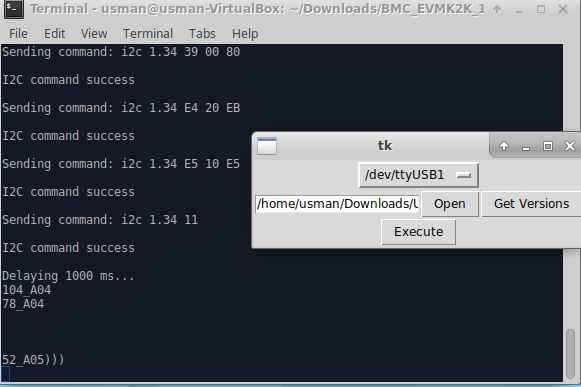
I used the latest bmc_tool.py and I was able to update one of the UCD modules, UCD9244_78 from A03 to A04. The rest of them fail on updating, also updating the bmc fails.

Here are the current UCD versions on the board: 

UCD9090_104_A04 (fails to update, but on latest version already)

UCD9244_78_A04 (updated successfully from A03)

UCD9244_52_A03 (fails to update to A05)

TI representative said that a forum post must be made before a RMA can happen.

  • Usman,

    What is the revision of EVM that you have. Can you explain what failures are you seeing during the update? If these are I2C timing failures, can you try a few times. On the boards we have updated in house, we do see periodic failures but the update goes through when we retry so feel the delay are not set to the optimal settings by the board manufacturer. UCD9244_52_A05 is the critical one to update so I would try that first.

    If your board is Rev4.0 then BMC update should not be required as far as I know.

    Regards,
    Rahul

    PS: If the update doesnt go through then Advantech has an eRMA process setup :
    http://erma.advantech.com.tw/
  • EVM is Rev4.0, the failure was occurring for UCD9244_52_A05 is on i2c 1.34 00 00. I upgraded ubuntu to 16.10 last night and that seems to have changed something. The UCD9244_52_A05 successfully updated, but the version list looks off. I have the boot pins set to 0010 now and it does not get SoC Power Failure anymore but it does not show the IP address like the setup guide states either. It says "IP address: emon".

  • I think the issue with IP address not being displayed is a known issue. Please refer to this post
    e2e.ti.com/.../1857795

    The easiest way to get around this is to connect a mini USB cable provided in the kit to the UART2USB port and connect to the SOC UART. Linux boot should display the IP address on the UART port right before the login prompt shows up.

    Regards,
    Rahul
  • The problem turned out to be that the ethernet cable was dead, using another ethernet cable made it work.