This thread has been locked.

If you have a related question, please click the "Ask a related question" button in the top right corner. The newly created question will be automatically linked to this question.

CCS/PROCESSOR-SDK-AM335X: Include and library files location

Part Number: PROCESSOR-SDK-AM335X


Tool/software: Code Composer Studio

Starting with CCS 6.1, and a BBB tethered to a Backhawk V100...  I create a simple "Hello" project with the wizard.  (It fails to compile because of some floating point issue... "vfpv3"  I fix that).

I compile, load it, debug it.  No problem.

The project also included PDK am335x 1.0.5 and NDK 2.25.1.11 (yes, I added them, I hope to start learning those suites).    So I decide to add some GPIO to the little test project.  

I am using the only doc that I can find:  "C:/ti/pdk_am335x_1_0_5/packages/API_Documentation.html"   (As lacking as it is...)

I add a simple #include <GPIO.h>..  Nope.  Fails to find that header file.  I start digging...  

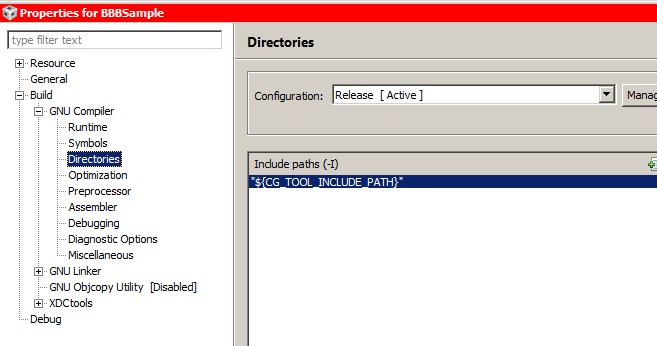
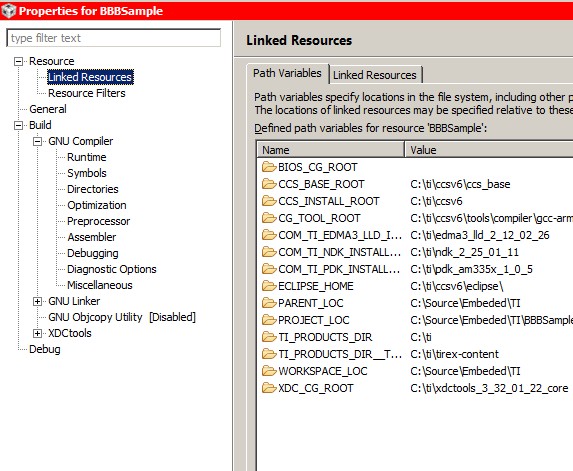
I do have a defined variable:  COM_TI_PDK_INSTALL_DIR pointing to C:\ti\pdk_am335x_1_0_5.    But that not where the header file is, it's deeper.  However to complicate things, that "predefined variable"  (or whatever CCS calls it) isn't in my include path anyway.  The only one in my include path is  "${CG_TOOL_INCLUDE_PATH}"   Except that it's not defined anywhere in the "Linked Resources" tab....????  What is going on here???

First question:  Where is the header file and how is it "properly" included relative to these "Linked Resources"?  How is it supposed to be found when none of the defined macros match the include paths passed to the compiler??  How do those "Linked Resources" stitch together.  Because I HAVE READ THE CCS TUTORIALS, and this is how I was under the impression was supposed to function.

Next, I do a search, and HARDCODE the path to that file, just to get it to compile.  So then I add one of those GPIO calls from the documentation (You can imagine where this is going...)  Next, of course, the linker can't find it either. I get a "undefined reference to `GPIO_init' "

Next question:  Where are the libs that contain this call?  What is the lib name? 

The doc file  "C:/ti/pdk_am335x_1_0_5/packages/API_Documentation.html" says absolutely NOTHING about where these headers and libs are, or even what the name of the lib file is.  It barely gives adequate explanations of the functions themselves.

And, since I'm posting this question because the documentation is so lacking...  In expectation that the NDK suite will have the same problems, can someone also answer those questions about the NDK as well?

Because none of this is fitting together like a "normal" project, like the kinds I have built with makefile over the past 25 years.

Last question: Is there a real document that explains what libs to link to when using the PDK, NDK, (or maybe xdias, uia, or other suites I may try in the future)?

-CSW

  • Christopher,

    The documentation for Processor SDK RTOS is found at location :

    I would start with the Getting started guide to setup the  SDK and follow the instructions upto the section that describes creation of Peripheral driver examples:

    Create the GPIO driver example using the pdkProjectCreate and import it in CCS to see how to setup the TI RTOS configuration to include the board, OSAL, GPIO driver. For NDK, you will need to create example project for a component called NIMU  (locate documentation under Network Section).

    In short summary to build an GPIO example with Processor SDK RTOS you need to add the following modules in your RTOS configuration file:

    /* ================ Driver configuration ================ */
    
    /* Load the OSAL package */
    var osType = "tirtos"
    var Osal = xdc.useModule('ti.osal.Settings');
    Osal.osType = osType;
    
    /*use CSL package*/
    var socType           = "am335x";
    var Csl = xdc.loadPackage('ti.csl');
    Csl.Settings.deviceType = socType;
    
    
    /* Load the board package */
    var Board = xdc.loadPackage('ti.board');
    Board.Settings.boardName = "bbbAM335x";
    
    /* Load the gpio package */
    var GpioPackage = xdc.loadPackage('ti.drv.gpio');
    GpioPackage.Settings.enableProfiling = true;

    This will link the GPIO driver, CSL library, board library and osal (os abstraction library) in your application. The required GPIO header files can be located under:

    pdk_am335x_1_0_5\packages\ti\drv\gpio

    I recommend that you scan through the training that describes "Application development with Processor SDK RTOS" where the software stack and the steps to get setup have been described in a logical flow which may help you understand the software stack.This training uses X15 or AM572x GP EVM but the concepts applies to AM335x devices as well. some common SDK related questions have been addressed in Processor SDK RTOS FAQ

    Hope this helps you get started.

    Regards,

    Rahul

  • Rahul,

    Thanks for taking the time to reply.  I have searched much of these link already, and it has not answered my questions.

    But, first, let me say that after looking through some of the links again, nothing explained what I am looking for.  So I did paste this in, and it changes the failure to compile to something else.

    Rahul Prabhu said:

    In short summary to build an GPIO example with Processor SDK RTOS you need to add the following modules in your RTOS configuration file:

    /* ================ Driver configuration ================ */
    
    /* Load the OSAL package */
    var osType = "tirtos"
    var Osal = xdc.useModule('ti.osal.Settings');
    Osal.osType = osType;
    
    /*use CSL package*/
    var socType           = "am335x";
    var Csl = xdc.loadPackage('ti.csl');
    Csl.Settings.deviceType = socType;
    
    
    /* Load the board package */
    var Board = xdc.loadPackage('ti.board');
    Board.Settings.boardName = "bbbAM335x";
    
    /* Load the gpio package */
    var GpioPackage = xdc.loadPackage('ti.drv.gpio');
    GpioPackage.Settings.enableProfiling = true;

    Now I get this error:

    undefined reference to `GPIO_config'	BBBSample		line 89, external location: \home\gtbldadm\processor-sdk-rtos-krogoth-build\build-CORTEX_1\arago-tmp-external-linaro-toolchain\work\am335x_evm-linux-gnueabi\gpio-lld-rtos\01.00.00.05-r0.3.tisdk-int1\build\ti\drv\gpio\src\GPIO_drv.c	C/C++ Problem
    

    This is an unresolved reference not even in my sample project.  My sample doesn't even call "GPIO_config".  Obviously, "GPIO_drv.c" within a lib is calling this function, so I need yet another lib to resolve it.

    But the more fundamental question is: How do you even know what those "XDC" things are?  In the 30+ PDF files I've had to look through, and hours of videos, I have not had this explained to me.

    Rahul Prabhu said:

    The required GPIO header files can be located under:

    pdk_am335x_1_0_5\packages\ti\drv\gpio


    Yes, I found them there. What I cannot understand is how the compiler finds it there. I've used compilers for years, and fully understand include search paths. There is only one single setting in the include path:


    And it is a MACRO value that isn't even defined anywhere in the Path Varialbles:


    So, there is some hidden magic that is allowing the compiler to know directories to search for headers. And that setting is, again, not explained anywhere I have found.

    Rahul Prabhu said:

    I recommend that you scan through the training that describes "Application development with Processor SDK RTOS" where the software stack and the steps to get setup have been described in a logical flow which may help you understand the software stack.This training uses X15 or AM572x GP EVM but the concepts applies to AM335x devices as well. some common SDK related questions have been addressed in Processor SDK RTOS FAQ


    These two links simply take to me a page that says:
    Unfortunately, the page you've requested no longer exists. Please use the search form above to locate the information you're interested in.


    Rahul Prabhu said:

    Processor SDK RTOS Getting Started Guide - Texas Instruments Wiki
    processors.wiki.ti.com

    I had already done those builds...  The only thing I comprehend about this is that it builds the peripheral libraries.  That does NOT solve the question of where they are, or how to tell the linker to link to them.   Apparently that is done with those app.cfg "XDC" settings which you provided above, but they are not documented in any fashion I can find.
    (And, by they way, the GUI based app configuration tool doesn't work, so I am left totally lost trying to add things manually to it...  XGCONF simply tells me:
    "Sorry, I'm having problems creating this editor. An unexpected exception was thrown.
    org.eclipse.rtsc.xdctools.INVALID_CODEGEN_LOCATION: Invalid codegen location"

    )

    I imported a sample  "GPIO_LedBlink_bbbAM335x_armTestProject", and it builds (with a couple of warnings).  The am335x_app_bbbam335x.cfg file for it is twice the size, and has many things that do not overlap with the "wizard" based project I created.  Have spent literally hours trying to compare setting between GPIO_LedBlink_bbbAM335x_armTestProject (which links) and my wizard based project which I am trying to add GPIO to.
    And to answer in advance, your question of "why not just use the example"...  because someday, in the future, I will want to add something else, like I2C, NDK, or who knows what.  If I can't add simply GPIO libs to my wizard created project, I have no confidence that I can add some other lib (or I guess you TI people call it RTSC) to a project.
    (Also, that example is a mess.  It uses more #ifdef that actual code, doesn't use any "task" even through it calls "BIOS_start", and there are functions defined, but are never called...?  I can't tell.  There is no "TimerIntRegister" function registering a timer event, like there is in the TivaWare libs )
    Lastly:

    Rahul Prabhu said:

    The documentation for Processor SDK RTOS is found at location :

    Processor SDK RTOS Software Developer Guide - Texas Instruments Wiki
    processors.wiki.ti.com