This thread has been locked.

If you have a related question, please click the "Ask a related question" button in the top right corner. The newly created question will be automatically linked to this question.

Starterware/TMDSICE3359: Project creation issues

Part Number: TMDSICE3359
Other Parts Discussed in Thread: SYSBIOS, CCSTUDIO, AM3359

Tool/software: Starterware

Using "processor_sdk_rtos_am335x_4_00_00_04," I have tried to get the test project creation done following the link http://processors.wiki.ti.com/index.php/Rebuilding_The_PDK 

  • So what is your question?
  • Need help to resolve the issue with version 4.0
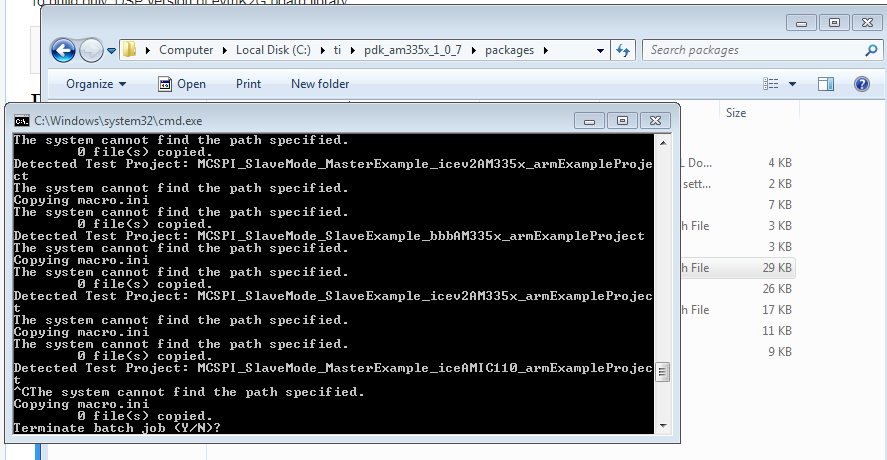
    What could possibly have caused the change in folder structure that the cmd says path is incorrect.
    how should i fix this to get the example projects?
    I've compared the batch files from both versions, the is not difference as all the packages have been extracted to C:/ti.
    There is something that i am missing and am unable to fix it.
  • Komal,
    It would be helpful if you could provide a build log or any other details about the errors you are seeing. What release are you using?
    Are you following the instructions here? processors.wiki.ti.com/.../Rebuilding_The_PDK

    Lali
  • I have the TMDSICE3359 with me. Being an Industrial communications board I will be using it for industrial automation application.
    The IDE I prefer to use for my development is IAR. Therefore I need bare metal examples to run on this board first via CCS and the its migration IAR.
    If I were able to successfully create the test projects mentioned in earlier posts, I could load the programs through CCS. But that step itself isn’t working for me.
    Next I would need support on creating the .ipcf files so that I can import a CCS project to IAR.
    Once I complete these steps, I can begin my application development used to drive motors/pumps.
    a snapshot of the error is attached below.
  • Greetings Lali,

    I have resolved the path issues with CCS.

    >REM Install Location for CCS 

    >set CCS_INSTALL_PATH=C:\ti\ccsv7 

    >REM set CCS_INSTALL_PATH=%TOOLS_INSTALL_PATH%\ccsv7 

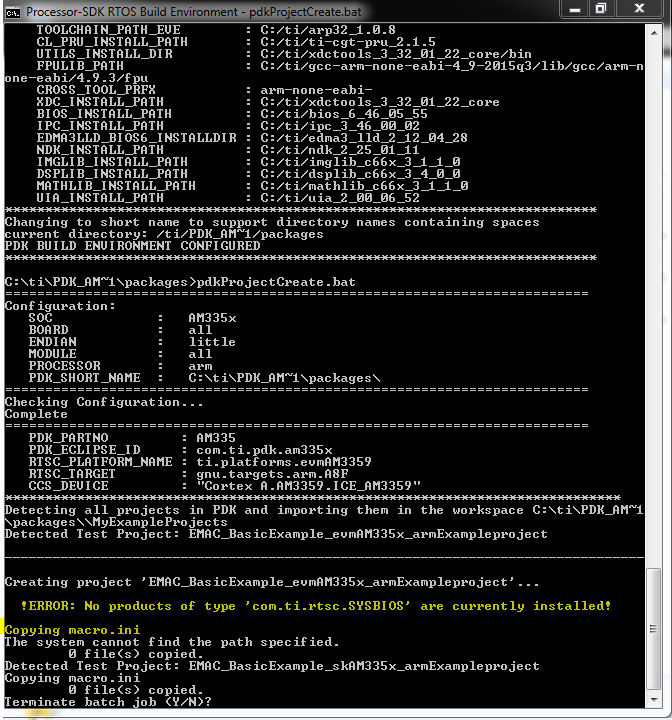
    Post this change, the pdkProjectCreate.bat file began to extract the example projects. But again i faced an issue with the com.ti.rtsc.SYSBIOS setup.

    Please see the yellow highlights in attached screenshot.

    I had a closer look at the error section in .bat file:

    >echo Detected Test Project: %%~nI

    >REM Goto each directory where the test project file is located and create the projects.
    pushd %%~dI%%~pI

    >REM Execute the command to create the project using the parameters specified above.
    %CCS_INSTALL_PATH%\%AUTO_CREATE_COMMAND% -data %MY_WORKSPACE% -application com.ti.ccstudio.apps.projectCreate -ccs.name %%~nI -ccs.outputFormat %OUTPUT_FORMAT% -ccs.device %CCS_DEVICE% -ccs.endianness %ENDIAN% -ccs.kind executable -ccs.cgtVersion %CGT_VERSION% -rtsc.xdcVersion %XDC_VERSION% -rtsc.enableDspBios -rtsc.biosVersion %BIOS_VERSION% -rtsc.buildProfile "debug" -rtsc.products "%RTSC_PRODUCTS%" -rtsc.platform "%RTSC_PLATFORM_NAME%" -rtsc.target %RTSC_TARGET% -ccs.rts libc.a -ccs.args %%~nI%%~xI %SIMULATOR_SUPPORT_DEFINE% -ccs.overwrite full -ccs.setPostBuildStep "${TI_PDK_INSTALL_DIR}/packages/pdkAppImageCreate.bat ${TI_PDK_INSTALL_DIR}/packages ${CG_TOOL_ROOT} ${PROJECT_LOC}/${ConfigName} ${ProjName} %SOC% %PROCESSOR%"

    > echo Copying macros.ini >> Can see this line in the echo on cmd. 

    My understanding says that the extraction is done till next above step. yet i see the missing RTSC error. 

    Please could you help me resolve the same to complete the Project Generation??

    Versions used:

    CCS : 7.1

    processor sdk: v4

    pdk : 1.07

    SOC : AM3359

    Test Board: TMDSICE3359

  • Hi,
    The project generation completed. CCS went for an update and fixed things. Thank you for the help.