This thread has been locked.

If you have a related question, please click the "Ask a related question" button in the top right corner. The newly created question will be automatically linked to this question.

CCS/PROCESSOR-SDK-AM335X: Bootloader project

Part Number: PROCESSOR-SDK-AM335X

Tool/software: Code Composer Studio

hi,

   I have changed  from SYSBIOSSDK-IND-SITARA to PRU-ICSSIndustrial and Processor SDK .  I can't find out import Bootloader project found at C:\ti\pdk_am335x_1_0_7\packages\ti. I need to build own new bootloader.

Who can help me to solve the problem? Thanks.

  • The RTOS team have been notified. They will respond here.
  • Please refer to my responses here:
    e2e.ti.com/.../2191813

    The bootloader build is now makefile based in Processor SDK RTOS. You can build the MLO by going into pdk_am335x_x_x_x/packages and build using “gmake starterware_boot”

    Ensure that you setup the SDK build environment as described here, before you invoke the build:
    processors.wiki.ti.com/.../Processor_SDK_RTOS_Building_The_SDK

    The SDK team is supporting CCS projects only for driver examples and all other libraries and boot related software is migrating to makefile based build in the SDK. You can create a CCS Project for this software by adding all relevant source files to CCS project and using the same compiler settings.

    Regards,
    Rahul
  • hi,Rahul

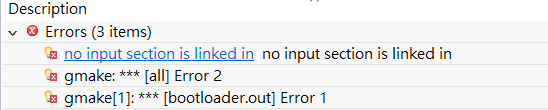
        I create a CCS Project at directory of C:\ti\pdk_am335x_1_0_7\packages\ti\starterware\bootloader and add all relevant include files to CCS project. But build project is not success. The error is as following:


    This error what is the problem.

    Regards,
    Shian

  • Please run the gmake command to build the bootloader as this will show you all the input files that you need to create the output binary.

    The error that you indicate indicates that the linker command file (.lds/.cmd) is not included in your project so the ARM linker is unable to find the memory configuration where it needs to deploy the different code and data memory sections to generate the out put binary.

    Hope this helps.

    Regards,
    Rahul
  • HI Rahul,
    Thank you for your quickly reply. I run gmake starterware_boot command to build my bootloadter. It is ok. The gmake(gmake starterware_boot) command is a making prototype bootloader, if we add some program code at C:\ti\pdk_am335x_1_0_7\packages\ti\starterware\bootloader, the gmake command is seem to error. Whether to generate new projects is the right way?


    Regards,
    Shian
  • Can you indicate what new code have you added to the bootloader and what is the reported build error. Without the error log, we can`t comment on what is causing the issue. Please copy the build log to a text file and attach it for our analysis.