


Part Number: TMS320C6657
Tool/software: Code Composer Studio
Hello,
I am attempting to use a Dell Precision T7400 to connect to a TMDSEVM6657LS EVM board. I am using CCSv5 and the operating system on the computer is Windows 7. I am attempting to run a "Hello World" program on this board through the XDS200 connection. I have run into a few issues:
1) When I make the target configuration and I attempt to select the Board or Device as TMS320C6657, a window pops up as shown below:
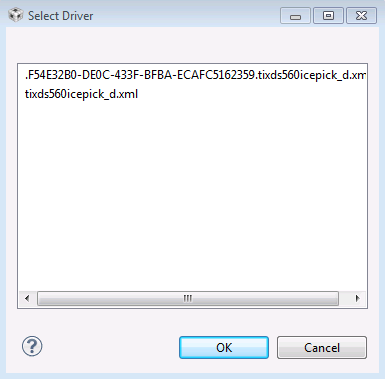
Every time I click on the driver and press ok, this same box opens up again. I have to click ok at least 4 times before I am able to select the device TMS320C6657. Is this normal? I haven't seen anything like this online.
2) From part 1, I have tried both drivers, but when I run "Test Connection", I am unsuccessful in connecting to the EVM because of the following error message:
E_RPCENV_IO_ERROR(-6) No connection: DTC_IO_Open::dtc_io
Failed to open i/o connection (xds2xxu:0)
An error occurred while soft opening the controller.
-----[An error has occurred and this utility has aborted]--------------------
This error is generated by TI's USCIF driver or utilities.
The value is '-250' (0xffffff06).
The title is 'SC_ERR_ECOM_EMUNAME'.
The explanation is:
An attempt to access the named emulator via USCIF ECOM has failed.
To the best of my knowledge, this seems to be a "Host Connection Error". When I do try to connect to the target core on the EVM anyway, I receive an error about a mismatch of the endianness between the "Hello World" output file and the target endianness. Last piece of information, I read about needing a CSL lib called "ti.csl.ae66(Little endian)" or "ti.csl.ae66e(big endian)", but these files are not in my pdk_C6657_1_1_1_4 folder. Does anyone know about these files?
If anyone has any ideas about the reason and possible solutions behind my problems, I greatly appreciate the help. Also, let me know if I need to clarity/ supply any more information.
Thank you,
Joseph


