This thread has been locked.

If you have a related question, please click the "Ask a related question" button in the top right corner. The newly created question will be automatically linked to this question.

Linux/AM3352: USB controller problem

Part Number: AM3352
Other Parts Discussed in Thread: AM1808

Tool/software: Linux

Hi Team

Recently, my customer encountered an USB problem on AM335x platform.

On the platform, the USB1 is worked as USB host and it is used for the connection of a 2D barcode scanner USB device.

Nothing went on wrong until they did a quick plug-in and out test. In this test, the 2D barcode scanner USB device is plugged in then out, then in, then in… at a very high speed. That means the USB device is continuously connected and then disconnected.

At some time, the USB will stop work. By checking it carefully, it was found out that the system would not enumerate the USB device anymore.   

If the issue occurred, only powering down then up the USB device, or plugged it out then in, would not recover the USB status.

Log can be found as attached. 

Then after debugging, I found that, this issue can be recovered by manually generating the babble interrupt when using the command ”echo b > /proc/driver/musb_hdrc.1”.

After doing this, the USB device could work normally. Log can be checked as attached.


So here I have 3 questions:

  1. Do you have any idea how this issue happened, and why the babble interrupt could solve it?
  2. Is there any driver code patch could help to recover this, rather than input the echo command manually?
  3. I’m digging the root cause is because on the AM1808 platform, we have similar issue observation. You can check the previous email loop. As AM1808 didn’t provide the /proc/driver/musb_hdrc.1 in Linux, and it is a very old platform. We can hardly get any progress there. I’m wondering if this AM335x solution could help.


Feel free to let me know if you have any comments! Thanks!

[ 6664.777862] musb_proc_write 726: Command E not implemented 
[ 6678.827423] musb_proc_write 726: Command E not implemented 
[ 6685.898010] ti81xx_interrupt 1093: CAUTION: musb1: Babble Interrupt Occured 
[ 6685.898315] musb_babble_workaround 899: Babble: devtcl(98)Restarting musb.... 
[ 6685.898590] usb 1-1: USB disconnect, device number 44 
[ 6685.998992] musb-hdrc: ConfigData=0xde (UTMI-8, dyn FIFOs, bulk combine, bulk split, HB-ISO Rx, HB-ISO Tx, SoftConn) 
[ 6685.999023] musb-hdrc: MHDRC RTL version 2.0 
[ 6685.999023] musb-hdrc: setup fifo_mode 4 
[ 6685.999053] musb-hdrc: 28/31 max ep, 16384/16384 memory 
[ 6685.999084] musb-hdrc.1: bulk split disabled 
[ 6685.999084] musb-hdrc.1: bulk combine disabled 
[ 6686.386077] usb 1-1: new full-speed USB device number 45 using musb-hdrc 
[ 6686.499511] usb 1-1: not running at top speed; connect to a high speed hub 
[ 6686.501159] usb 1-1: New USB device found, idVendor=05e3, idProduct=0608 
[ 6686.501190] usb 1-1: New USB device strings: Mfr=0, Product=1, SerialNumber=0 
[ 6686.501190] usb 1-1: Product: USB2.0 Hub 
[ 6686.505737] hub 1-1:1.0: USB hub found 
[ 6686.507293] hub 1-1:1.0: 2 ports detected 
[ 6686.779266] usb 1-1.1: new full-speed USB device number 46 using musb-hdrc 
[ 6686.867919] usb 1-1.1: New USB device found, idVendor=04e7, idProduct=0050 
[ 6686.867980] usb 1-1.1: New USB device strings: Mfr=1, Product=2, SerialNumber=3 
[ 6686.868011] usb 1-1.1: Product: Elo TouchSystems 2216 AccuTouch庐 USB Touchmonitor Interface 
[ 6686.868011] usb 1-1.1: Manufacturer: EloTouchSystems,Inc 
[ 6686.868041] usb 1-1.1: SerialNumber: 50U12622 
[ 6686.882324] input: EloTouchSystems,Inc Elo TouchSystems 2216 AccuTouch庐 USB Touchmonitor Interface as /devices/platform/omap/musb-ti81xx/musb-hdrc.1/usb1/1-1/1-1.1/1-1.1:1.0/input/input56[ 6686. 
897491] generic-usb 0003:04E7:0050.0051: input,hidraw0: USB HID v1.00 Pointer [EloTouchSystems,Inc Elo TouchSystems 2216 AccuTouch庐 USB Touchmonitor Interface] on usb-musb-hdrc.1-1.1/input0 

  • Steven,

    Steven Liu1 said:
    ”echo b > /proc/driver/musb_hdrc.1”.

    It seems the system uses SDK6.0, right?

    Steven Liu1 said:
    Do you have any idea how this issue happened, and why the babble interrupt could solve it?

    We need a debug log to see what happened. Please turn on the debug message in ti81xx_interrupt() in ti81xx.c, then run the test again until the issue happened.

    The driver handles the babble interrupt, which resets the usb subsystem and the driver stack, so manually generating a babble interrupt triggers the usb subsystem reset, which solves any usb lockup.

    Steven Liu1 said:
    Is there any driver code patch could help to recover this, rather than input the echo command manually?

    We have to understand what the usb lockup is then to find a solution. The echo command to generate babble interrupt is just a workaround. Most importantly, until we know where the usb locks up, we don't know where in the kernel to patch.

  • Hi Bin,

    Today I got Mindray's feedback as they reproduced this issue. 

    Please see attached file for the message logs. 

    After [ 3374.819091], there was no interrupt generation when plugging in and out USB devices. 

    Mindray_USB_AM335X_dmsg.log

  • Steven,

    At timestamp [ 3374.819091], usbintr=0x80, which means VBUS ERROR happened, the usb controller left host mode, so it cannot enumerate any device any more.

    Please check if the customer board has minimum 120uF cap on the VBUS line, closing to the usb port(receptacle).
  • Hi Bin,

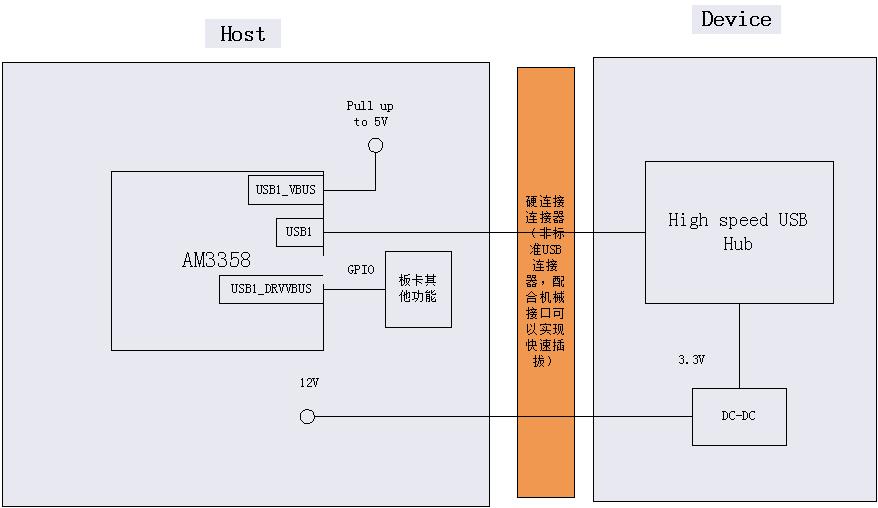
    As the USB1's design is as below, the USB1_VBUS is connected to a 5V power rail internally. So I asked customer to test this USB1_VBUS to check the voltage to see whether it might be less than 4.75V. 

    My question would be whether the 5V power rail going below 4.75V is the only reason for this USB VBUS error? Or is there any other concerns?


  • Steven,

    The USB Spec requires VBUS >=4.4V, but I am not sure if it < 4.75v would cause an issue.

    However, with SDK6.0 (kernel v3.2), if directly connecting USB1_VBUS to a 5V power rail for the host-only port, the patch in the link below should be applied.

    http://e2e.ti.com/support/arm/sitara_arm/f/791/p/306183/1068885#1068885

    The diagram shows the usb connection between the host and device does not use a standard usb connector, please ensure the connector will connect the VBUS/GROUND first and DP/DM after it when plug, and disconnect DP/DM first and VBUS/GROUND after it when unplug. Otherwise, the behavior is not characterized.

    In the first post, you mentioned the test does plug/unplug in very high speed rate, how high is it? how many time per minute?

  • Hi Bin,
    Yes, I've asked them to add the patch, but issue still existed.

    The diagram shows the usb connection between the host and device does not use a standard usb connector, please ensure the connector will connect the VBUS/GROUND first and DP/DM after it when plug, and disconnect DP/DM first and VBUS/GROUND after it when unplug. Otherwise, the behavior is not characterized.
    > When doing the plug and unplug operation, the VBUS are always ON. Does this against the USB behavior rule?

    In the first post, you mentioned the test does plug/unplug in very high speed rate, how high is it? how many time per minute?
    > it's about 2 times per second. For one minute, I guess the maximum times can go beyond 100.
  • Steven,

    Let wait for the customer's test result on USB1_VBUS, I am not sure what else could cause the VBUS ERROR.

    Steven Liu1 said:
    > When doing the plug and unplug operation, the VBUS are always ON. Does this against the USB behavior rule?

    Yes, this is the attach and detach procedure defined in the USB Spec. But it might have less impact in this design, because the usb device (hub) is self-powered.

  • Steven,
    This is not a supported use-case. This customer is using a non-standard connector (rather than a USB-IF designed/approved connector) *and* manually unplugging/re-plugging this non-standard connector ~2x a second over ~100 iterations to elicit this issue.

    These variables are not comprehended as part of the USB-IF test specification or our internal test procedures.

    We can investigate this as time permits, but it cannot be considered a priority.