This thread has been locked.

If you have a related question, please click the "Ask a related question" button in the top right corner. The newly created question will be automatically linked to this question.

AM5728: GStreamer error


hello:

   Card: 5728 SDK: processor sdk 3.3


1.   gst-launch-1.0 v4l2src device=/dev/video1 io-mode=4 ! 'video/x-raw, format=(string)YUY2, width=(int)1920, height=(int)1080, framerate=(fraction)30/1' ! vpe num-input-buffers=6 ! 'video/x-raw, format=(string)NV12, width=(int)1920, height=(int)1080,framerate=(fraction)30/1' ! ducatih264enc bitrate=4000 ! filesink location=test.h264      

2.     gst-launch-1.0 v4l2src device=/dev/video2 io-mode=4 ! 'video/x-raw, format=(string)YUY2, width=(int)1920, height=(int)1080, framerate=(fraction)30/1' ! vpe num-input-buffers=6 ! 'video/x-raw, format=(string)NV12, width=(int)1920, height=(int)1080,framerate=(fraction)20/1' ! ducatih264enc bitrate=4000 ! filesink location=test_2.h264


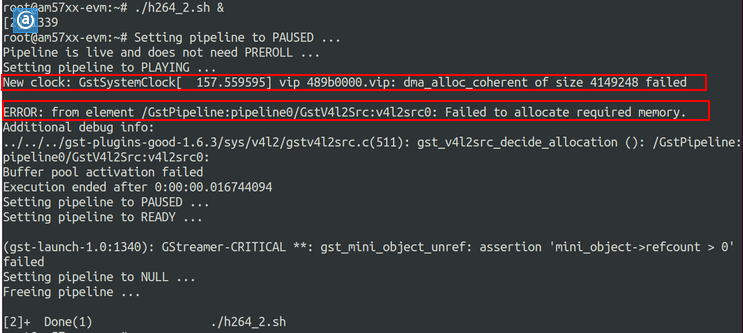
     While using gstreamer to save  2-way 1080P60 video, the following error will appear:
  

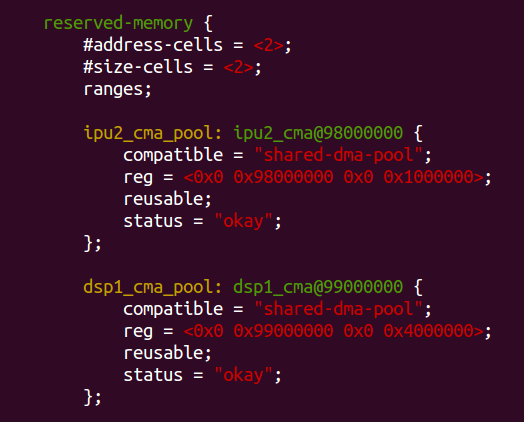
I tried to reduce the tree ipu2_cma_pool device 5728, the reg = <0x0 0x95800000 0x0 0x3800000>; modify reg = <0x0 0x98000000 0x0 0x1000000>;

When I run the above pipeline, I get an error:

Setting pipeline to PAUSED ...
Pipeline is live and does not need PREROLL ...
ERROR: from element /GstPipeline:pipeline0/GstV4l2Src:v4l2src0: Internal data flow error.
Additional debug info:
../../../../gstreamer-1.6.3/libs/gst/base/gstbasesrc.c(2943): gst_base_src_loop (): /GstPipeline:pipeline0/GstV4l2Src:v4l2src0:
streaming task paused, reason not-negotiated (-4)
ERROR: pipeline doesn't want to preroll.
Setting pipeline to PAUSED ...
Setting pipeline to READY ...
Setting pipeline to NULL ...
Freeing pipeline ...
Setting pipeline to PAUSED ...
MmRpc_create: Error: open failed, name=/dev/rpmsg-dce
ERROR: Pipeline doesn't want to pause.
ERROR: from element /GstPipeline:pipeline0/GstDucatiJPEGEnc:ducatijpegenc0: Could not initialize supporting library.
Additional debug info:
../../../../gst-plugins-base-1.6.3/gst-libs/gst/video/gstvideoencoder.c(1566): gst_video_encoder_change_state (): /GstPipeline:pipeline0/GstDucatiJPEGEnc:ducatijpegenc0:
Failed to start encoder
../git/libdce.c:416:    dce_ipc_init    ERROR: Failed eError == DCE_EOK error val -4../git/libdce.c:479:      Engine_open      ERROR: Failed dce_ipc_init(coreIdx) == DCE_EOK error val -4Setting pipeline to NULL ...
Freeing pipeline ... 

  • The software team have been notified. They will respond here.
  • Hello,

    I would recommend you to move to the latest PSDK version. 

    In the pipelines above, you should add h264parse between encoder and filesink.

    user4205571 said:

    When I run the above pipeline, I get an error:

    ERROR: Pipeline doesn't want to pause.
    ERROR: from element /GstPipeline:pipeline0/GstDucatiJPEGEnc:ducatijpegenc0: Could not initialize supporting library.
    Additional debug info:
    ../../../../gst-plugins-base-1.6.3/gst-libs/gst/video/gstvideoencoder.c(1566): gst_video_encoder_change_state (): /GstPipeline:pipeline0/GstDucatiJPEGEnc:ducatijpegenc0:
    Failed to start encoder
    ../git/libdce.c:416:    dce_ipc_init    ERROR: Failed eError == DCE_EOK error val -4../git/libdce.c:479:      Engine_open      ERROR: Failed dce_ipc_init(coreIdx) == DCE_EOK error val -4Setting pipeline to NULL ...
    Freeing pipeline ... 

    What is the pipeline that you are executing? In the above pipelines I see ducatih264enc but in this log it seems like ducatiJPEGenc is failing. 

    There is limitation how many instance of enc could be run at the same time probably you reached this limitation that is why you are seeing engine_open failed.

    As I said I would recommend you to use latest PSDK since the gstreamer version is 1.8 and contains fixes. 

    BR
    Margarita

  • Hello,

    You could check this thread also:
    e2e.ti.com/.../639531

    Hope this helps.

    BR
    Margarita
  • hello:
    I refer to the following document amended ipu2_cma_pool:
    http://www.ti.com/general/docs/lit/getliterature.tsp?baseLiteratureNumber=sprac60&fileType=pdf&keyMatch=AM57x Processor SDK Linux®%3A Customizing Multicore Applications to Run on New Platforms&tisearch=Search-EN-Support


    After modifying ipu2_cma_pool, I run the following pipeline:
    gst-launch-1.0 -v v4l2src device=/dev/video1 io-mode=4 ! 'video/x-raw, format=(string)YUY2, width=(int)1280, height=(int)720, framerate=(fraction)60/1' ! vpe num-input-buffers=8 ! 'video/x-raw, format=(string)NV12, width=(int)1280, height=(int)720, framerate=(fraction)60/1' ! tee name=t ! queue ! ducatijpegenc ! jpegparse ! filesink location=test.jpg t. ! queue ! waylandsink

    When I run the above pipeline, I get an error:

    ERROR: Pipeline doesn't want to pause.
    ERROR: from element /GstPipeline:pipeline0/GstDucatiJPEGEnc:ducatijpegenc0: Could not initialize supporting library.
    Additional debug info:
    ../../../../gst-plugins-base-1.6.3/gst-libs/gst/video/gstvideoencoder.c(1566): gst_video_encoder_change_state (): /GstPipeline:pipeline0/GstDucatiJPEGEnc:ducatijpegenc0:
    Failed to start encoder
    ../git/libdce.c:416: dce_ipc_init ERROR: Failed eError == DCE_EOK error val -4../git/libdce.c:479: Engine_open ERROR: Failed dce_ipc_init(coreIdx) == DCE_EOK error val -4Setting pipeline to NULL ...
    Freeing pipeline ...

  • Hello,

    I tested these pipelines on my side:

    gst-launch-1.0 -v videotestsrc ! 'video/x-raw, format=(string)YUY2, width=(int)1280, height=(int)720, framerate=(fraction)60/1' ! vpe num-input-buffers=8 ! 'video/x-raw, format=(string)NV12, width=(int)1280, height=(int)720, framerate=(fraction)60/1' ! tee name=t ! queue ! ducatijpegenc ! jpegparse ! filesink location=test.jpg t. ! queue ! waylandsink -e

    gst-launch-1.0 -v videotestsrc ! 'video/x-raw, format=(string)YUY2, width=(int)1280, height=(int)720, framerate=(fraction)60/1' ! vpe num-input-buffers=8 ! 'video/x-raw, format=(string)NV12, width=(int)800, height=(int)480, framerate=(fraction)60/1' ! tee name=t ! queue ! ducatijpegenc ! jpegparse ! filesink location=test.jpg t. ! queue ! waylandsink -e

    Both are working I do not observe encoder's error.

    Please, try on your side with the latest PSDK.

    Please check this thread also:
    e2e.ti.com/.../2331605

    "You can specify the cma pool size in kernel bootargs as cma=64M. If that doesn't work, you can try cma=128M."

    BR
    Margarita