This thread has been locked.

If you have a related question, please click the "Ask a related question" button in the top right corner. The newly created question will be automatically linked to this question.

CCS/66AK2H14: how to include driver code to our own created application project

Part Number: 66AK2H14
Other Parts Discussed in Thread: SYSBIOS

Tool/software: Code Composer Studio

Hi,

I am using 66AK2H14 processor with TI-RTOS/SYS-BIOS using CCSV7 tool.

I created my own application code as required by the client, for that I had to include driver file. So when I include driver file using  "#include", I got fatal error.

c:\ti\pdk_k2hk_4_0_6\packages\ti\drv\gpio\soc\gpio_soc.h:45:30: fatal error: ti/drv/gpio/GPIO.h: No such file or directory
#include <ti/drv/gpio/GPIO.h>

and also how to include ti/drv/gpio/src/GPIO_drv.c- This file contains the GPIO driver interface APIs. These APIs are used for configuration of general purpose I/O instanace. Using that file I have writtern application code.

I request you to tell me the procedure to include driver code to our own created application project as soon as possible.

  • Aishwarya,

    I can't speak about the entire procedure of how to integrate the driver code into a specific application - the experts at the device forum are usually better equipped to guide you on this task.

    If you want to simply add a source file to your project you can simply follow the details shown at:

    software-dl.ti.com/.../sdto_ccs_build-handbook.html

    I can talk about the specific build error. How did you include the file?

    I see from the PDK package that line 45 of the file <GPIO_soc.h> contains the relative path to the missing GPIO.h file. In other words, it is specified as #include <ti/drv/gpio/GPIO.h>

    This tells me that you need to add the path c:\ti\pdk_k2hk_4_0_6\packages to the compiler include options, so it can properly resolve all relative paths.

    Please give this a try.

    Hope this helps,
    Rafael
  • Hi,

    Thanks for your reply.

    I have added my files  which I needed. Later I referred example project C:\ti\pdk_k2hk_4_0_6\packages\ti\drv\gpio\test\led_blink\src/main_led_blink.c. It successfully got built without any errors.

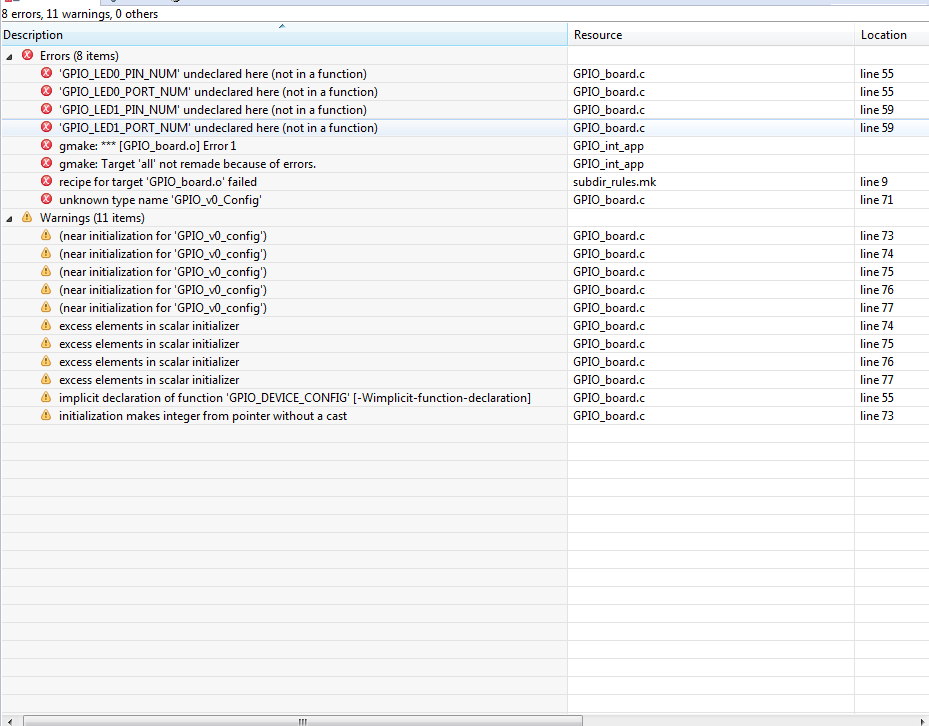
    So I included all files, header files, and directories path which are inserted in example project. But when I compiled my project(GPIO_int_app.c) I am getting error for GPIO_board.c file which is also included in already existing example project. Since I have inserted same file from example, I am not able to make out why those errors are coming to my project.

    For your reference I have attached my project and even the screenshot of my project's error. Please help me to solve this error as soon as possible.

    GPIO_int_app.rar

  • Hi,

    Thanks for sending the project. I noticed there are a few differences between your project and the example shipped with the SDK (GPIO_LebBlink_K2H_EVM_armTestProject):

    - Some compiler symbols are missing, namely evmK2H and SOC_K2H. (under GNU Complier → Symbols → Define symbols)

    - After inserting these, the project started to show some internal SYSBIOS errors that are described at section 10.6 of the page below:

    http://processors.wiki.ti.com/index.php/Processor_SDK_RTOS_FAQ 

    - Per the description above, I removed the libraries gcc, m, nosys and c from the linker (under GNU Linker → Libraries → Libraries) and matched the paths to the Library Search Path shown in the example project.  

    - I then removed the option -specs=nano.specs from the Linker options (GNU Linker → Miscellaneous → Other flags) and added the option "rdimon.specs" to the Compiler options (GNU Compiler → Miscellaneous → Override built-in specs with... ) - this option adds a few libraries

    - In the same screen I also matched the Assembly source specific flags and Other flags with the example project.

    - I cleaned several include paths and references to source files .

    At this point the project itself failed to build as the main source file does not define the task gpio_test (which you need to define) and other issues related to the migration process per se. In this case, I would strongly suggest you to check with the experts at the device forum.

    The project I modified is shown attached.

    Hope this helps,

    Rafael

    0755.GPIO_int_app.rar

  • Hi,

       How to contact experts to solve this problem? Can you suggest any one to help me as soon possible.

  • Aishwarya,

    I notified another team that may provide additional information.

    Regards,
    Rafael
  • Hi Rafael
    Thanks for forwarding this to us.

    Aishwarya

    I will ask the software team to help out on this.

    REgards
    Mukul
  • Aishwarya,

    I downloaded the project attached by Rafael and was able to get it to build successfully by commenting out the line Program.global.echo = Task.create("&gpio_test", task0Params); in GPIO_int_app.cfg (since it appears you are not using this task).

    I hope this helps. Please let us know if you run into any other issues.

    Best,
    Sahin