This thread has been locked.

If you have a related question, please click the "Ask a related question" button in the top right corner. The newly created question will be automatically linked to this question.

TMDSCSK388: dm388

Part Number: TMDSCSK388
Other Parts Discussed in Thread: DM388

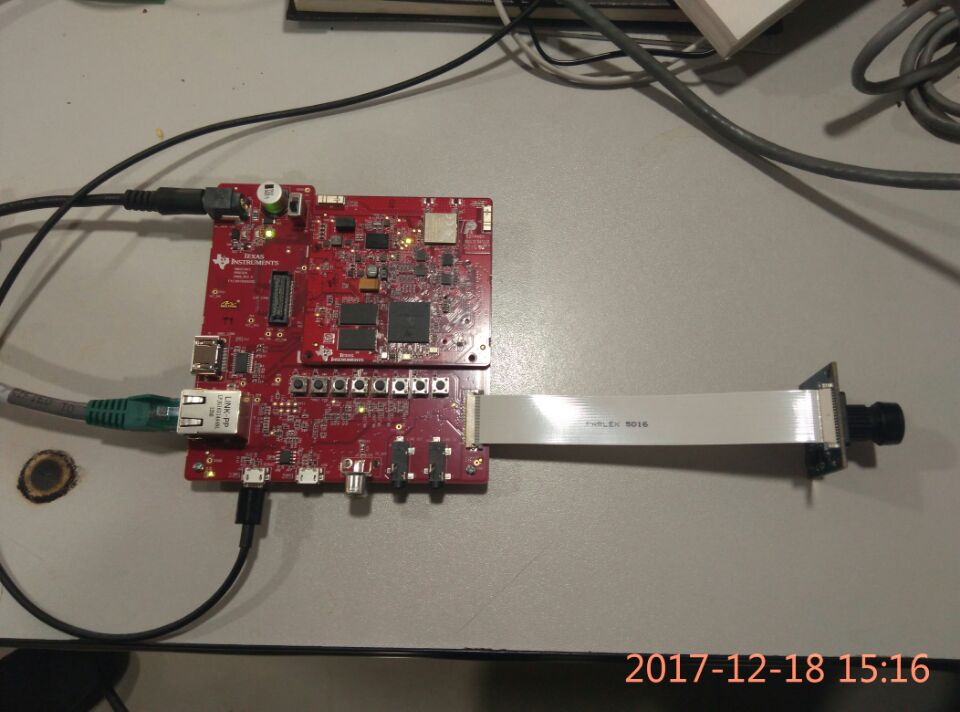
TMDSCSK388 purchased at Ti Store, order no. 1682548.

1、According to the User Guide, the TMDSCSK388 is set up。In TeraTerm after setting the serial port option,  Boot up is not happening its showing " CCCCCCCC " continues  in Teraterm window。 No boot up and  No signal from HDMI port。

2、The prebuilt binaries from the IPNC RDK 3.9.1 package is flashed on the new micro-SD , Re-create SD card, not solve the issue also。


3、Rebuild the software with DM388 option set in Rles.make file sysclean & sysall to build ,Re-create SD card, not solve the issue also。

I request you to support me to resolve above issues,thanks
  • The steps to re-create SD card are as follows:
    1:Direct use of the file on IPNC RDK 3.9.1, with the following command:
    sudo./mksd-ti81xx.sh/dev/sdb/home/zhangchun/ti/ipnc_rdk-3.9.1/Source/ipnc_rdk/binaries/DM388/sd/MLO/home/zhangchun/ti/ipnc_rdk-3.9.1/Source/ipnc_rdk/binaries/DM388/sd/u-boot.img/home/zhangchun/ti/ipnc_rdk-3.9.1/Source/ipnc_rdk/binaries/DM388/sd/dm38x-csk.dtb/home/zhangchun/ti/ipnc_rdk-3.9.1/Source/ipnc_rdk/binaries/DM388/sd/uImage/home/zhangchun/ti/ipnc_rdk-3.9.1/Source/ipnc_rdk/binaries/DM388/sd/filesystem_DM388_FULL_FEATURE.tar.gz

    The information of the terminal is as follows:
    zhangchun@zhangchun-LIFEBOOK-LH532:~/ti/ipnc_rdk-3.9.1/Utils/sd-script$ sudo ./mksd-ti81xx.sh /dev/sdb /home/zhangchun/ti/ipnc_rdk-3.9.1/Source/ipnc_rdk/binaries/DM388/sd/MLO /home/zhangchun/ti/ipnc_rdk-3.9.1/Source/ipnc_rdk/binaries/DM388/sd/u-boot.img /home/zhangchun/ti/ipnc_rdk-3.9.1/Source/ipnc_rdk/binaries/DM388/sd/dm38x-csk.dtb /home/zhangchun/ti/ipnc_rdk-3.9.1/Source/ipnc_rdk/binaries/DM388/sd/uImage /home/zhangchun/ti/ipnc_rdk-3.9.1/Source/ipnc_rdk/binaries/DM388/sd/filesystem_DM388_FULL_FEATURE.tar.gz
    [sudo] password for zhangchun:
    All data on /dev/sdb now will be destroyed! Continue? [y/n]
    y
    [Partitioning /dev/sdb...]
    unmounting device '/dev/sdb1'
    unmounting device '/dev/sdb2'
    1024+0 records in
    1024+0 records out
    1048576 bytes (1.0 MB) copied, 0.496508 s, 2.1 MB/s
    Disk /dev/sdb doesn't contain a valid partition table
    DISK SIZE - 15640559616 bytes
    CYLINDERS - 1901
    Checking that no-one is using this disk right now ...
    OK

    Disk /dev/sdb: 1901 cylinders, 255 heads, 63 sectors/track

    sfdisk: ERROR: sector 0 does not have an msdos signature
    /dev/sdb: unrecognized partition table type
    Old situation:
    No partitions found
    New situation:
    Units = cylinders of 8225280 bytes, blocks of 1024 bytes, counting from 0

    Device Boot Start End #cyls #blocks Id System
    /dev/sdb1 * 0+ 8 9- 72261 c W95 FAT32 (LBA)
    /dev/sdb2 10 1900 1891 15189457+ 83 Linux
    /dev/sdb3 0 - 0 0 0 Empty
    /dev/sdb4 0 - 0 0 0 Empty
    Successfully wrote the new partition table

    Re-reading the partition table ...

    If you created or changed a DOS partition, /dev/foo7, say, then use dd(1)
    to zero the first 512 bytes: dd if=/dev/zero of=/dev/foo7 bs=512 count=1
    (See fdisk(8).)
    [Making filesystems...]
    [Copying files...]
    [Done]


    2:Modify Rules.make(dm388),makeclean,makesysall recompile IPNC RDK 3.9.1
    sudo ./mksd-ti81xx.sh /dev/sdb /home/zhangchun/ti/ipnc_rdk-3.9.1/Source/ipnc_rdk/tftp/DM388/sd/MLO /home/zhangchun/ti/ipnc_rdk-3.9.1/Source/ipnc_rdk/tftp/DM388/sd/u-boot.img /home/zhangchun/ti/ipnc_rdk-3.9.1/Source/ipnc_rdk/tftp/DM388/sd/dm38x-csk.dtb /home/zhangchun/ti/ipnc_rdk-3.9.1/Source/ipnc_rdk/tftp/DM388/sd/uImage /home/zhangchun/ti/ipnc_rdk-3.9.1/Source/ipnc_rdk/binaries/DM388/sd/filesystem_DM388_FULL_FEATURE.tar.gz/home/zhangchun/ti/ipnc_rdk-3.9.1/Source/ti_tools/ipnc_psp_arago/kernel/ti_config_fragments/defconfig_builder.sh -w .

    the re-create sd card also not work
  • There is switch for nand boot and sd card boot hope you have toggled switch for sd card boot.

  • The switch is set to sd card boot. I suspect DDR is a problem. How to determine whether DDR works properly?
    Thanks & Regards,
    angunyu
  •  We purchased the TMDSCSK388-CSKCC-BNDL in ti-store on December 16,2017. order no: 1682548. Can't work all the time.

    Contacted ti-china, they said that it was necessary for e2e's engineers to decide what was the problem?

    Hope e2e's engineer will reply as soon as possible.

    Thanks & Regards,

    angunyu