This thread has been locked.

If you have a related question, please click the "Ask a related question" button in the top right corner. The newly created question will be automatically linked to this question.

CCS/PROCESSOR-SDK-AM335X: Creating BIN from OUT

Part Number: PROCESSOR-SDK-AM335X

Tool/software: Code Composer Studio

Hello,

I have two projects...  On the BeagleBoneBlack, using CCS 7.2  

Both projects work when loaded via the XDSv2 JTAG.  But when I place the "app" on an SD card, one works, one doesn't.

The one that works is a small, example, "GPIO_LedBlink_bbbAM335x_armTestProject"  straight out of the "pdk_am335x_1_0_7" folder.

The one that doesn't work via the SD card is one I created, and doesn't use the PDK.  The script is chapping a phenomenal amount off of the OUT file.  I think its way too much.  But without any resources or doc, I have no idea.

The one that works:

02/05/2018 08:07 PM 98,312   app
02/05/2018 08:07 PM 98,304   GPIO_LedBlink_bbbAM335x_armTestProject.bin
02/05/2018 08:07 PM 751,583  GPIO_LedBlink_bbbAM335x_armTestProject.map
02/05/2018 08:07 PM 671,393  GPIO_LedBlink_bbbAM335x_armTestProject.out

You can easily see that the "pdkAppImageCreate.bat" script created the bin file, then created the "app" file (8 bytes larger as expected).

It reduces the BIN file to a fraction of the original OUT file, but I can't find anything that describes what it's actually doing.  The "app" files works, so I can't complain...

As for the one that doesn't work...

02/05/2018 08:13 PM 98,292    app
02/05/2018 08:13 PM 98,284    RNDIS.bin
02/05/2018 08:13 PM 599,894   RNDIS.map
02/05/2018 08:13 PM 1,419,500 RNDIS.out

The script again created a BIN which is a fraction of the OUT file.  In-fact, it actually smaller!  Except my program is, quite understandably, larger.

Again, since I have no idea what it's doing in that step, I have no way of figuring out what is broken.

Both build reports show nothing in error in the pdkAppImageCreate.bat output:

'Invoking: GNU Linker'
"C:/ti/ccsv7/tools/compiler/gcc-arm-none-eabi-6-2017-q1-update/bin/arm-none-eabi-gcc.exe" -mtune=cortex-a8 ........... -lnosys -lc -lc -Wl,--end-group 
'Finished building target: GPIO_LedBlink_bbbAM335x_armTestProject.out'
' '
C:/ti/pdk_am335x_1_0_7/packages/pdkAppImageCreate.bat C:/ti/pdk_am335x_1_0_7/packages C:/ti/ccsv7/tools/compiler/gcc-arm-none-eabi-6-2017-q1-update C:/Users/scott/workspace_v7/GPIO_LedBlink_bbbAM335x_armTestProject/Debug GPIO_LedBlink_bbbAM335x_armTestProject AM335x arm

and

'Invoking: GNU Linker'
"C:/ti/ccsv7/tools/compiler/gcc-arm-none-eabi-6-2017-q1-update/bin/arm-none-eabi-gcc.exe"   ........... -lnosys -lc -Wl,--end-group 
'Finished building target: RNDIS.out'
' '
C:/ti/pdk_am335x_1_0_7/packages/pdkAppImageCreate.bat C:/ti/pdk_am335x_1_0_7/packages C:/ti/ccsv7/tools/compiler/gcc-arm-none-eabi-6-2017-q1-update C:/Users/scott/workspace_v7/RNDIS/Debug RNDIS AM335x arm

Is there any clue someone can provide so I can start digging?  Because CCS is just hiding everything from me that would allow me to troubleshoot.

-CSW

  • The RTOS team have been notified. They will respond here.
  • Good, then they can explain how to make this environment stop shooting me in the foot...

    I continue to dig and I examined the map file.  I find that the example project and my project have different entry points.

    Specifically, the demo project has 

     .c_int00       0x80000000       0xb4 C:\ti\bios_6_46_05_55\packages\gnu\targets\arm\rtsv7A\lib\boot.aa8fg(boot.oa8fg)

    While my project has

     .c_int00       0x800040e0       0xb4 C:\ti\bios_6_46_05_55\packages\gnu\targets\arm\rtsv7A\lib\boot.aa8fg(boot.oa8fg)

    The batch script which creates this, is located in C:\ti\pdk_am335x_1_0_7\packages, and uses the HARDCODED step of

        %PDK_PATH%/ti/starterware/tools/ti_image/tiimage.exe 0x80000000 NONE %APP_NAME%.bin app )

    I manually go in and change the entry point address, and viola!  It's working now.

    In other words, the entry point address is set by the script to 8000:0000  and CANNOT BE CHANGED, as this script is intended to be used for ALL projects.  And I have yet to find any way to forcibly tell the compiler to set the entry point address to a value of my desire.  The CFG is generating linker scripts and make files all behind my back and out of my control.

    And, of course the entire environment has everything obfuscated and hidden, so users spend days trying to figure out why something is broken.  Then spend more days trying to figure out how to "get around" what the environment is doing...

    So...  How do I "get around" this issue where the script (which is called automatically by generated demo projects) has decided that every project must have an entry point of 8000:0000, but actual projects that I create may use just about any location as it's entry point?? 

    And I won't even know the true entry point until after the linker has run and I examine the MAP file, because I can't actually set an entry point of my choosing, as the CFG build system will overwrite any linker scripts...??

    -CSW

  • Hi Christopher,

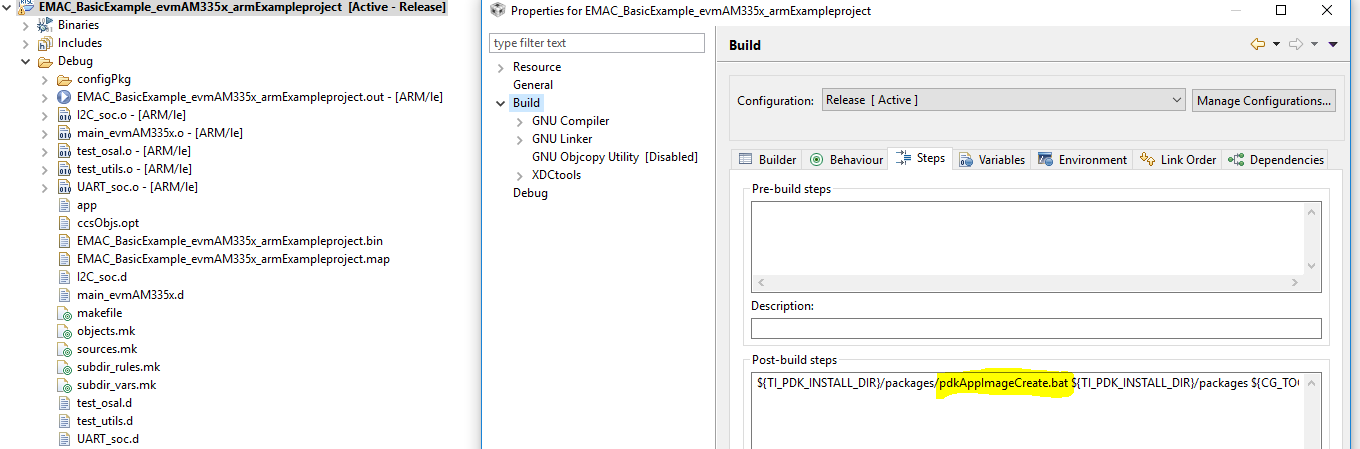
    If you take a look at the CCS project properties, the Build section invokes the pdkAppImageCreate.bat.

    Can you create your own (pdkAppImageCreate_Christopher.bat) and call this script with the entry point you desire from CCS by adjusting the post-build steps parameter as below?

    Lali

  • Yes, I can, and I was going to go forward with that. But the issue remains as to what value to put in my own batch file, without knowing what the entry point is. And that means the post build step has executed by the time I can look in the map file to see what the entry point is.

    And constantly changing it as the development is done in large steps.

    I guess I have to write my own program, to take apart the map file, find the entry point address, modify the batch file, then call it.

    But this is a large hole in the attempt to "do it for you under the covers".

    And I haven't (yet) opened the can of worms to do this with the TI compiler. The "tiobj2bin.bat" script is not creating an image that runs from as SD card either, and this isn't the same problem, because that script only creates a *.bin file. It never calls "tiimage.exe" to install the length and entry point (so I ran that myself, using the entry point from the map file).

    The TI compiler is the current specified tool being used by the existing teams, and not subject to being changed.