This thread has been locked.

If you have a related question, please click the "Ask a related question" button in the top right corner. The newly created question will be automatically linked to this question.

RTOS/AM3358: Changing MPU frequency

Part Number: AM3358

Tool/software: TI-RTOS

Hello, I am running a BeagleBone Black board and would like to change (both try increasing or decreasing) the processor speed.  

When looking at the SYS/BIOS config file in the "Program" section, it says that I need to choose a different platform to change any of the board parameters like the processor speed.

I have investigated pinmux building but where in that board build process do you set the processor speed?

Thanks!

  • The RTOS team have been notified. They will respond here.
  • Hi Alexander,

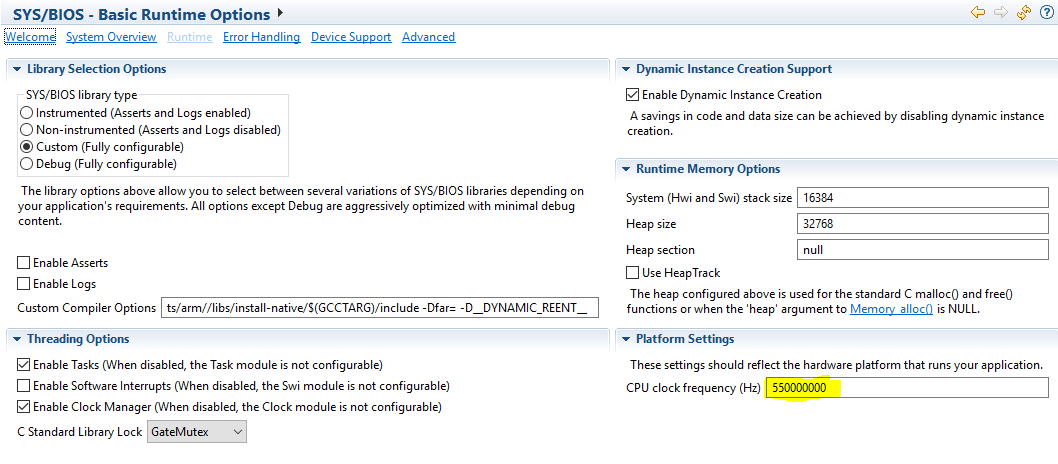
    You can configure the BIOS cpu frequency in the .cfg file to match the frequency that the CPU is running at by adding this to your .cfg file. For example 550MHz:

    BIOS.cpuFreq.lo = 550000000;

    I assume you have set your MPU frequency in the GEL file as well. If you are unsure on how to do that, please let me know.
    Hope this helps.

    Lali

  • I was aware of how to change the platform settings but your comment on setting the speed in the GEL file seems more in line with what I need to do.  (The issue I had was setting the CPU frequency in the highlighted area you show above would create a mis-match with, I am assuming the GEL file) and not run.

    What is the method of changing the MPU frequency in the GEL file and how do I incorporate that into my build? Do I need to rebuild my board files after I change the GEL or does it get compiled when I build my CCS project?

    Thanks for the help!

  • Alexander,

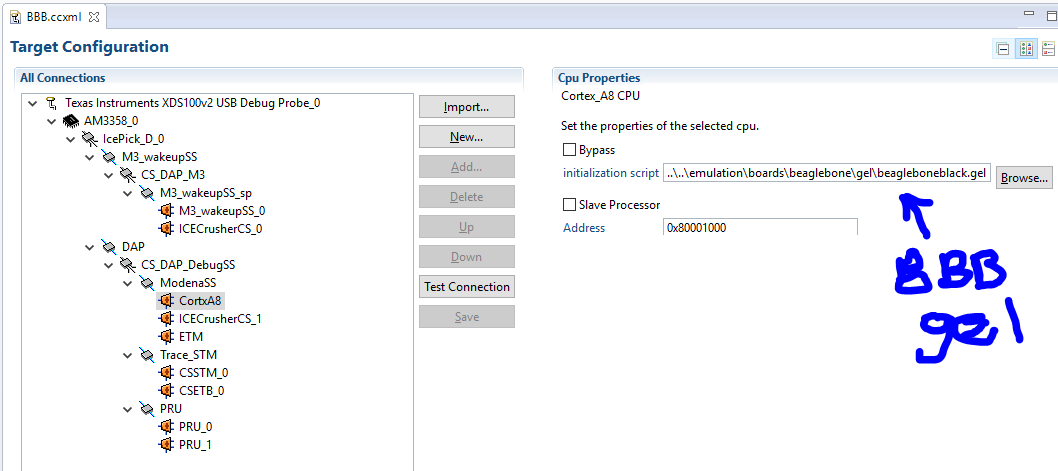
    You can define a GEL file that can be loaded on the core when its connected in CCS as illustrated below. You can get to this window by double-clicking your CCS BeagleBone Black (BBB) target configuration and going to the advanced tab.

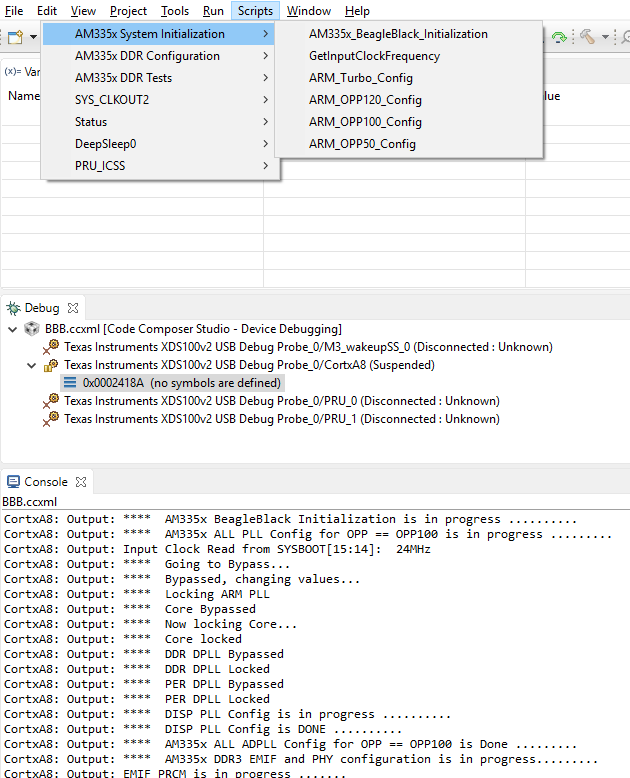
    Once you have launch the target config and connected to the A8 core, see the screenshot below on accessing the GEL hot-menus.

    The console will spit out the initialization messages as the GEL loads. Here's a good wiki that discusses GEL files in general if you are interested http://processors.wiki.ti.com/index.php/GEL 

    Lali

  • Forgot to mention that the GEL is located at C:\ti\ccsv7_3\ccsv7\ccs_base\emulation\boards\beaglebone\gel\beagleboneblack.gel in your CCS installation.

    Lali
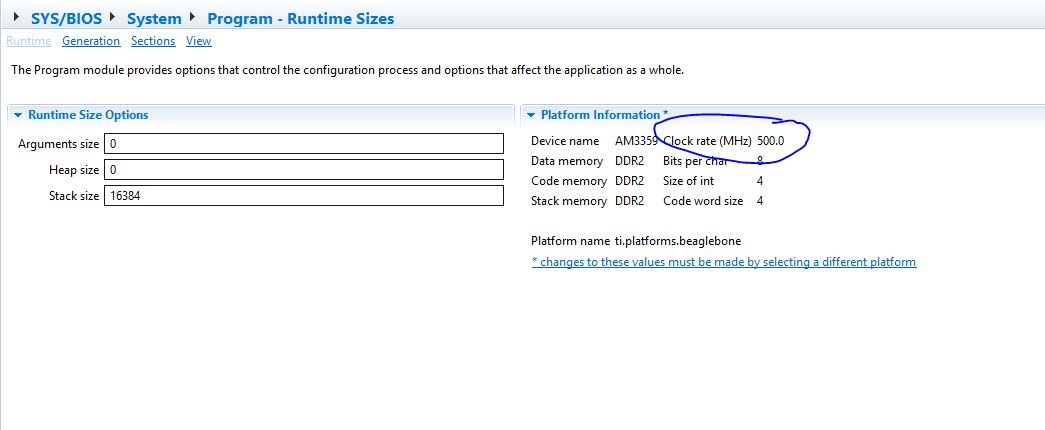
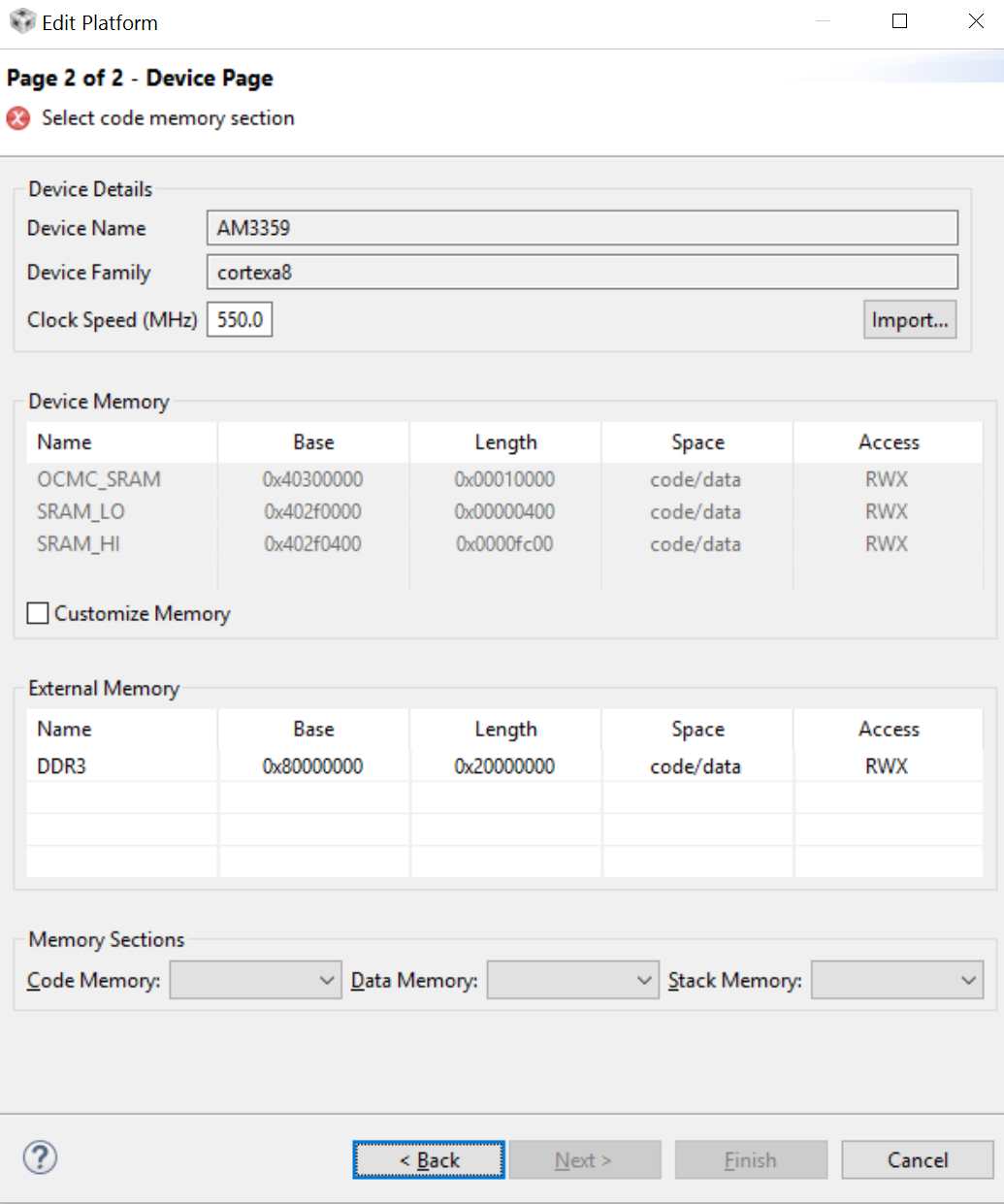
  • This is good information but not was I was asking about.  I need to change the platform clock rate shown in this view to actually change what the processor speed is running at for my project, correct?  See screenshot below:

    It appears  that I need to change this via Project --> RTSC --> Platform --> edit/view, correct?

    I looked into this but don't know where the files are stored for me to view them.  If I am way off and don't need to do any of this, please let me know.

  • Alexander,

    To change this setting:

    • Project>RTSC Tools>Platform>Edit/view
    • In Platform Package Repository, navigate to C:\ti\bios_6_52_00_12\packages
    • ti.platforms.evmAM3359 and click next.

    Here you manipulate the CPU that's in the platform information section of XGCONF.

    Alternatively, you can also set the CPU frequency in the .cfg file by inserting the below line. This will override the settings from above.

    BIOS.cpuFreq.lo = 550000000;

    Keep in mind that whatever CPU setting you have here must match what you set in the GEL or secondary Bootloader (SBL), otherwise you will have incorrect timing of your clock ticks.

    Hope this answers you question.

    Lali

  • Lali,
    There isn't a "Nitro" option in the GEL file. It only has options up to OPP_TURBO in the .GEL file. How am I supposed to get the 1Ghz performance on the chip? There is also no reference to the PMIC voltage in the GEL file so how is that changed?

    Can TI provide an updated GEL file or how do I get the 1Ghz performance?

    Are there run time APIs for DVFS?
  • Alex,

    To set the MPU to NITRO mode, you need to change the PMIC voltage by sending I2C commands to increase the core voltage and then scale the frequency. This functionality can be done using power management(PM) driver that we provide in the Processor SDK RTOS. The PM LLD comes with a PMRTOS measurement example designed for AM335x GP EVM that demonstrates setting the core to different OPP. The LLD and example can be located in the PDK at the following location PDK_INSTALL_PATH\packages\ti\drv\pm\examples\pmrtos_measurement 


    Documentation:
    processors.wiki.ti.com/.../Processor_SDK_RTOS_PM
    www.ti.com/.../spraca5.pdf

    Please review the collateral and let us know if you have any questions regarding the same.

    Regards,
    Rahul

    Note: The example has been created with the AM335x GP EVM

    The DPLL setting for AM335x NITRO MODE are provided in the driver and also in the spreadsheet that we have provided in the board porting package.

  • Lali,
    How do I change the CPU setting in the SBL? I am looking and cannot find where that is actually set!

    Thanks!
  • Alex,

    Setting up the PLL for the SOC is performed in the function SBLPlatformPllInit that is found under:
    <PDK_INSTALL_PATH>\packages\ti\starterware\bootloader\src\am335x\sbl_am335x_platform_pll.c

    If you wish to setup CPU in NITRO mode then we don`t recommend doing this from the bootloader. The bootloader software is designed for reliable boot and is typically tested with operating voltage that are setup by default on the evaluation platform that can support only OPP_NOM or OPP_TURBO modes. The way to achieve Nitro mode operation would be to bootload the application in OPP_NOM frequencies and use the PMLLD to go to the higher operating point at the start of the application.

    Regards,
    Rahul