This thread has been locked.

If you have a related question, please click the "Ask a related question" button in the top right corner. The newly created question will be automatically linked to this question.

AM3358-EP: DDR3 software leveling fails

Part Number: AM3358-EP

Hi,

I'm trying to tune my custom board using the TI tool - it always gives zeros, and if I try using zeros to configure the register, I can't access RAM.  What might cause this?

Currently I'm just using the EMIF/DDR config from the ICEv2.1A GEL file, which surprisingly works on my custom board - I can run code in the DDR.

I've tried the tool http://processors.wiki.ti.com/index.php/AM335x_DDR_PHY_register_configuration_for_DDR3_using_Software_Leveling on the ICE board to make sure I'm using it correctly - it works fine.

On my target hardware, I get this:

[CortxA8]
Enter the PHY_INVERT_CLKOUT value (0 or 1) from the spreadsheet
0

Enter the Seed RD_DQS_SLAVE_RATIO Value in Hex to search the RD DQS Ratio Window
40

Enter the Seed FIFO_WE_SLAVE_RATIO Value in Hex to search the RD DQS Gate Window
95

Enter the Seed WR_DQS_SLAVE_RATIO Write DQS Ratio Value in Hex to search the Write DQS Ratio Window
5

***************************************************************
 The Slave Ratio Search Program Values are...
***************************************************************
PARAMETER                       MAX  |  MIN  | OPTIMUM |  RANGE 
***************************************************************
DATA_PHY_RD_DQS_SLAVE_RATIO    0x000 | 0x000 |  0x000  | 0x000
DATA_PHY_FIFO_WE_SLAVE_RATIO   0x000 | 0x000 |  0x000  | 0x000
DATA_PHY_WR_DQS_SLAVE_RATIO    0x000 | 0x000 |  0x000  | 0x000
DATA_PHY_WR_DATA_SLAVE_RATIO   0x000 | 0x000 |  0x000  | 0x000
***************************************************************
rd_dqs_range = 0
fifo_we_range = 0
wr_dqs_range = 0
wr_data_range = 0

Optimal values have been found!!

***************************************************************
 The Slave Ratio Search Program Values are...
***************************************************************
PARAMETER                       MAX  |  MIN  | OPTIMUM |  RANGE 
***************************************************************
DATA_PHY_RD_DQS_SLAVE_RATIO    0x000 | 0x000 |  0x000  | 0x000
DATA_PHY_FIFO_WE_SLAVE_RATIO   0x000 | 0x000 |  0x000  | 0x000
DATA_PHY_WR_DQS_SLAVE_RATIO    0x000 | 0x000 |  0x000  | 0x000
DATA_PHY_WR_DATA_SLAVE_RATIO   0x000 | 0x000 |  0x000  | 0x000
***************************************************************


My seed spreadsheet is:

Parameters Comments
DDR clock frequency 400 MHz input maximum frequency you will use
PHY_INVERT_CLKOUT 0 If (DDR_CK length) < (DDR_DQS length), then use 1. If (DDR_CK length) > (DDR_DQS length), then use 0.
Trace Length (inches)
Byte 0 Byte 1
DDR_CK trace 1.451502 2.004549 input the average of DDR_CK and DDR_CKn traces. If you have two x8 memories, use the trace lengths for each corresponding byte. 
DDR_DQSx trace 1.452371 1.45437 x can be 0 or 1, corresponding to each byte.
Intermediate values (per byte lane)
WR DQS 0 A these are just used for the calculations below
RD DQS 40 40 these are just used for the calculations below
RD DQS GATE 90 9A these are just used for the calculations below
Seed values used in CCS code
DATAx_PHY_RD DQS_SLAVE_RATIO 40
DATAx_PHY_FIFO_WE_SLAVE_RATIO 95
DATAx_PHY_WR DQS_SLAVE_RATIO 5
Register value
CMDx_PHY_CTRL_SLAVE_RATIO 80

Thanks.

  • Have you tried with PHY_INVERT_CLKOUT = 1?
  • It appears that the SW leveling had issues since all the values were reported back as 0x0. Please try with invert_clkout=1 as Biser suggested. Also, please make sure you have set all your EMIF settings as described in the link here:

    http://processors.wiki.ti.com/index.php/AM335x_EMIF_Configuration_tips


    Regards, Siva

  • Hi,

    Thanks for the quick reply!

    I tried clock invert = 1, I also tried some random seed values from the examples just to see what would happen.  The levelling tool returns zero in all cases, see below.  I've been through the EMIF setup but I'll go through again in case I miss anything.

    I was wondering if the source code for the tool is available - maybe there's a simple failure case somewhere that causes the zero results.  Bear in mind that the DDR works fine in normal operation so there can't be any major errors in the setup.

    [CortxA8]
    Enter the PHY_INVERT_CLKOUT value (0 or 1) from the spreadsheet
    0

    Enter the Seed RD_DQS_SLAVE_RATIO Value in Hex to search the RD DQS Ratio Window
    40

    Enter the Seed FIFO_WE_SLAVE_RATIO Value in Hex to search the RD DQS Gate Window
    95

    Enter the Seed WR_DQS_SLAVE_RATIO Write DQS Ratio Value in Hex to search the Write DQS Ratio Window
    5

    ***************************************************************
     The Slave Ratio Search Program Values are...
    ***************************************************************
    PARAMETER                       MAX  |  MIN  | OPTIMUM |  RANGE 
    ***************************************************************
    DATA_PHY_RD_DQS_SLAVE_RATIO    0x000 | 0x000 |  0x000  | 0x000
    DATA_PHY_FIFO_WE_SLAVE_RATIO   0x000 | 0x000 |  0x000  | 0x000
    DATA_PHY_WR_DQS_SLAVE_RATIO    0x000 | 0x000 |  0x000  | 0x000
    DATA_PHY_WR_DATA_SLAVE_RATIO   0x000 | 0x000 |  0x000  | 0x000
    ***************************************************************
    rd_dqs_range = 0
    fifo_we_range = 0
    wr_dqs_range = 0
    wr_data_range = 0

    Optimal values have been found!!

    ***************************************************************
     The Slave Ratio Search Program Values are...
    ***************************************************************
    PARAMETER                       MAX  |  MIN  | OPTIMUM |  RANGE 
    ***************************************************************
    DATA_PHY_RD_DQS_SLAVE_RATIO    0x000 | 0x000 |  0x000  | 0x000
    DATA_PHY_FIFO_WE_SLAVE_RATIO   0x000 | 0x000 |  0x000  | 0x000
    DATA_PHY_WR_DQS_SLAVE_RATIO    0x000 | 0x000 |  0x000  | 0x000
    DATA_PHY_WR_DATA_SLAVE_RATIO   0x000 | 0x000 |  0x000  | 0x000
    ***************************************************************

    ===== END OF TEST =====

    Enter the PHY_INVERT_CLKOUT value (0 or 1) from the spreadsheet
    1

    Enter the Seed RD_DQS_SLAVE_RATIO Value in Hex to search the RD DQS Ratio Window
    40

    Enter the Seed FIFO_WE_SLAVE_RATIO Value in Hex to search the RD DQS Gate Window
    95

    Enter the Seed WR_DQS_SLAVE_RATIO Write DQS Ratio Value in Hex to search the Write DQS Ratio Window
    5

    ***************************************************************
     The Slave Ratio Search Program Values are...
    ***************************************************************
    PARAMETER                       MAX  |  MIN  | OPTIMUM |  RANGE 
    ***************************************************************
    DATA_PHY_RD_DQS_SLAVE_RATIO    0x000 | 0x000 |  0x000  | 0x000
    DATA_PHY_FIFO_WE_SLAVE_RATIO   0x000 | 0x000 |  0x000  | 0x000
    DATA_PHY_WR_DQS_SLAVE_RATIO    0x000 | 0x000 |  0x000  | 0x000
    DATA_PHY_WR_DATA_SLAVE_RATIO   0x000 | 0x000 |  0x000  | 0x000
    ***************************************************************
    rd_dqs_range = 0
    fifo_we_range = 0
    wr_dqs_range = 0
    wr_data_range = 0

    Optimal values have been found!!

    ***************************************************************
     The Slave Ratio Search Program Values are...
    ***************************************************************
    PARAMETER                       MAX  |  MIN  | OPTIMUM |  RANGE 
    ***************************************************************
    DATA_PHY_RD_DQS_SLAVE_RATIO    0x000 | 0x000 |  0x000  | 0x000
    DATA_PHY_FIFO_WE_SLAVE_RATIO   0x000 | 0x000 |  0x000  | 0x000
    DATA_PHY_WR_DQS_SLAVE_RATIO    0x000 | 0x000 |  0x000  | 0x000
    DATA_PHY_WR_DATA_SLAVE_RATIO   0x000 | 0x000 |  0x000  | 0x000
    ***************************************************************

    ===== END OF TEST =====

    Enter the PHY_INVERT_CLKOUT value (0 or 1) from the spreadsheet
    0

    Enter the Seed RD_DQS_SLAVE_RATIO Value in Hex to search the RD DQS Ratio Window
    40

    Enter the Seed FIFO_WE_SLAVE_RATIO Value in Hex to search the RD DQS Gate Window
    73

    Enter the Seed WR_DQS_SLAVE_RATIO Write DQS Ratio Value in Hex to search the Write DQS Ratio Window
    1

    ***************************************************************
     The Slave Ratio Search Program Values are...
    ***************************************************************
    PARAMETER                       MAX  |  MIN  | OPTIMUM |  RANGE 
    ***************************************************************
    DATA_PHY_RD_DQS_SLAVE_RATIO    0x000 | 0x000 |  0x000  | 0x000
    DATA_PHY_FIFO_WE_SLAVE_RATIO   0x000 | 0x000 |  0x000  | 0x000
    DATA_PHY_WR_DQS_SLAVE_RATIO    0x000 | 0x000 |  0x000  | 0x000
    DATA_PHY_WR_DATA_SLAVE_RATIO   0x000 | 0x000 |  0x000  | 0x000
    ***************************************************************
    rd_dqs_range = 0
    fifo_we_range = 0
    wr_dqs_range = 0
    wr_data_range = 0

    Optimal values have been found!!

    ***************************************************************
     The Slave Ratio Search Program Values are...
    ***************************************************************
    PARAMETER                       MAX  |  MIN  | OPTIMUM |  RANGE 
    ***************************************************************
    DATA_PHY_RD_DQS_SLAVE_RATIO    0x000 | 0x000 |  0x000  | 0x000
    DATA_PHY_FIFO_WE_SLAVE_RATIO   0x000 | 0x000 |  0x000  | 0x000
    DATA_PHY_WR_DQS_SLAVE_RATIO    0x000 | 0x000 |  0x000  | 0x000
    DATA_PHY_WR_DATA_SLAVE_RATIO   0x000 | 0x000 |  0x000  | 0x000
    ***************************************************************

    ===== END OF TEST =====

    [CortxA8]
    Enter the PHY_INVERT_CLKOUT value (0 or 1) from the spreadsheet
    0

    Enter the Seed RD_DQS_SLAVE_RATIO Value in Hex to search the RD DQS Ratio Window
    40

    Enter the Seed FIFO_WE_SLAVE_RATIO Value in Hex to search the RD DQS Gate Window
    95

    Enter the Seed WR_DQS_SLAVE_RATIO Write DQS Ratio Value in Hex to search the Write DQS Ratio Window
    5

    ***************************************************************
     The Slave Ratio Search Program Values are...
    ***************************************************************
    PARAMETER                       MAX  |  MIN  | OPTIMUM |  RANGE 
    ***************************************************************
    DATA_PHY_RD_DQS_SLAVE_RATIO    0x000 | 0x000 |  0x000  | 0x000
    DATA_PHY_FIFO_WE_SLAVE_RATIO   0x000 | 0x000 |  0x000  | 0x000
    DATA_PHY_WR_DQS_SLAVE_RATIO    0x000 | 0x000 |  0x000  | 0x000
    DATA_PHY_WR_DATA_SLAVE_RATIO   0x000 | 0x000 |  0x000  | 0x000
    ***************************************************************
    rd_dqs_range = 0
    fifo_we_range = 0
    wr_dqs_range = 0
    wr_data_range = 0

    Optimal values have been found!!

    ***************************************************************
     The Slave Ratio Search Program Values are...
    ***************************************************************
    PARAMETER                       MAX  |  MIN  | OPTIMUM |  RANGE 
    ***************************************************************
    DATA_PHY_RD_DQS_SLAVE_RATIO    0x000 | 0x000 |  0x000  | 0x000
    DATA_PHY_FIFO_WE_SLAVE_RATIO   0x000 | 0x000 |  0x000  | 0x000
    DATA_PHY_WR_DQS_SLAVE_RATIO    0x000 | 0x000 |  0x000  | 0x000
    DATA_PHY_WR_DATA_SLAVE_RATIO   0x000 | 0x000 |  0x000  | 0x000
    ***************************************************************

    ===== END OF TEST =====

    Enter the PHY_INVERT_CLKOUT value (0 or 1) from the spreadsheet
    1

    Enter the Seed RD_DQS_SLAVE_RATIO Value in Hex to search the RD DQS Ratio Window
    40

    Enter the Seed FIFO_WE_SLAVE_RATIO Value in Hex to search the RD DQS Gate Window
    95

    Enter the Seed WR_DQS_SLAVE_RATIO Write DQS Ratio Value in Hex to search the Write DQS Ratio Window
    5

    ***************************************************************
     The Slave Ratio Search Program Values are...
    ***************************************************************
    PARAMETER                       MAX  |  MIN  | OPTIMUM |  RANGE 
    ***************************************************************
    DATA_PHY_RD_DQS_SLAVE_RATIO    0x000 | 0x000 |  0x000  | 0x000
    DATA_PHY_FIFO_WE_SLAVE_RATIO   0x000 | 0x000 |  0x000  | 0x000
    DATA_PHY_WR_DQS_SLAVE_RATIO    0x000 | 0x000 |  0x000  | 0x000
    DATA_PHY_WR_DATA_SLAVE_RATIO   0x000 | 0x000 |  0x000  | 0x000
    ***************************************************************
    rd_dqs_range = 0
    fifo_we_range = 0
    wr_dqs_range = 0
    wr_data_range = 0

    Optimal values have been found!!

    ***************************************************************
     The Slave Ratio Search Program Values are...
    ***************************************************************
    PARAMETER                       MAX  |  MIN  | OPTIMUM |  RANGE 
    ***************************************************************
    DATA_PHY_RD_DQS_SLAVE_RATIO    0x000 | 0x000 |  0x000  | 0x000
    DATA_PHY_FIFO_WE_SLAVE_RATIO   0x000 | 0x000 |  0x000  | 0x000
    DATA_PHY_WR_DQS_SLAVE_RATIO    0x000 | 0x000 |  0x000  | 0x000
    DATA_PHY_WR_DATA_SLAVE_RATIO   0x000 | 0x000 |  0x000  | 0x000
    ***************************************************************

    ===== END OF TEST =====

    Enter the PHY_INVERT_CLKOUT value (0 or 1) from the spreadsheet
    0

    Enter the Seed RD_DQS_SLAVE_RATIO Value in Hex to search the RD DQS Ratio Window
    40

    Enter the Seed FIFO_WE_SLAVE_RATIO Value in Hex to search the RD DQS Gate Window
    73

    Enter the Seed WR_DQS_SLAVE_RATIO Write DQS Ratio Value in Hex to search the Write DQS Ratio Window
    1

    ***************************************************************
     The Slave Ratio Search Program Values are...
    ***************************************************************
    PARAMETER                       MAX  |  MIN  | OPTIMUM |  RANGE 
    ***************************************************************
    DATA_PHY_RD_DQS_SLAVE_RATIO    0x000 | 0x000 |  0x000  | 0x000
    DATA_PHY_FIFO_WE_SLAVE_RATIO   0x000 | 0x000 |  0x000  | 0x000
    DATA_PHY_WR_DQS_SLAVE_RATIO    0x000 | 0x000 |  0x000  | 0x000
    DATA_PHY_WR_DATA_SLAVE_RATIO   0x000 | 0x000 |  0x000  | 0x000
    ***************************************************************
    rd_dqs_range = 0
    fifo_we_range = 0
    wr_dqs_range = 0
    wr_data_range = 0

    Optimal values have been found!!

    ***************************************************************
     The Slave Ratio Search Program Values are...
    ***************************************************************
    PARAMETER                       MAX  |  MIN  | OPTIMUM |  RANGE 
    ***************************************************************
    DATA_PHY_RD_DQS_SLAVE_RATIO    0x000 | 0x000 |  0x000  | 0x000
    DATA_PHY_FIFO_WE_SLAVE_RATIO   0x000 | 0x000 |  0x000  | 0x000
    DATA_PHY_WR_DQS_SLAVE_RATIO    0x000 | 0x000 |  0x000  | 0x000
    DATA_PHY_WR_DATA_SLAVE_RATIO   0x000 | 0x000 |  0x000  | 0x000
    ***************************************************************

    ===== END OF TEST =====

  • Is it possible to get the source code for the slave ratio search program?  I have an NDA with TI for this project if there's a problem with making the code public.

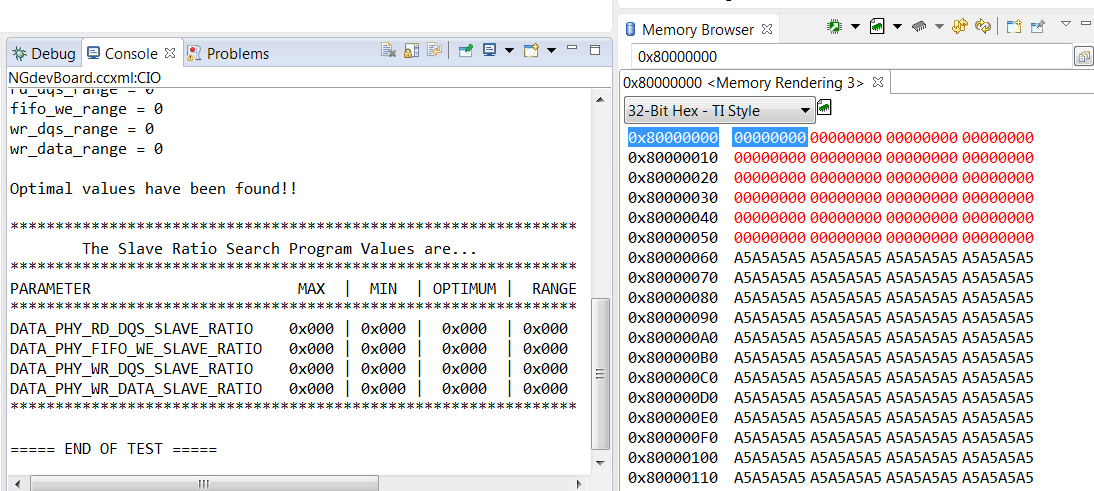
    I'm going to review the EMIF settings again, but the DDR is working - I ran the DDR test script in the GEL file and there are no errors.  The attached picture shows the "A5" pattern left by the GEL test script - the values in red have been overwritten by the slave ratio search program.

  • We are unable to share the source code of this algorithm. Could you share your GEL file on this forum (or with your TI FAE) and other relevant files that could be useful for debug?

    Regards, Siva

  • Hi
    Can you also let us know which version of CCS you are using, and when you are running this test, are you seeing the device in user mode or supervisor mode?

    regards
    Mukul
  • Mat, I think you are getting bit by an anomaly that was introduced in the more recent versions of CCS

    After loading the file, ensure that the processor is in supervisor mode by executing the script Script->default->AM335xStartState.

    The processor mode will be shown in the lower right corner of the CCS screen

    http://processors.wiki.ti.com/images/2/29/CCS_supervisor.jpg

    Regards,

    James

  • Hi, I was in supervisor mode, but I noticed in the picture above that you have the MMU off.  I had the MMU on, as my bootloader enables it.

    I turned the MMU off and the levelling program works.  Perhaps it's worth adding this to the wiki page.

    Thanks for your help.