This thread has been locked.

If you have a related question, please click the "Ask a related question" button in the top right corner. The newly created question will be automatically linked to this question.

TMS320C6748: SPI configuration using starterware sdk of tms320c6748

Part Number: TMS320C6748
Other Parts Discussed in Thread: OMAPL138, CCSTUDIO

I require to configure SPI using starterware sdk of tms320c6748 so that I can achieve SCK and MOSI timing as below image.
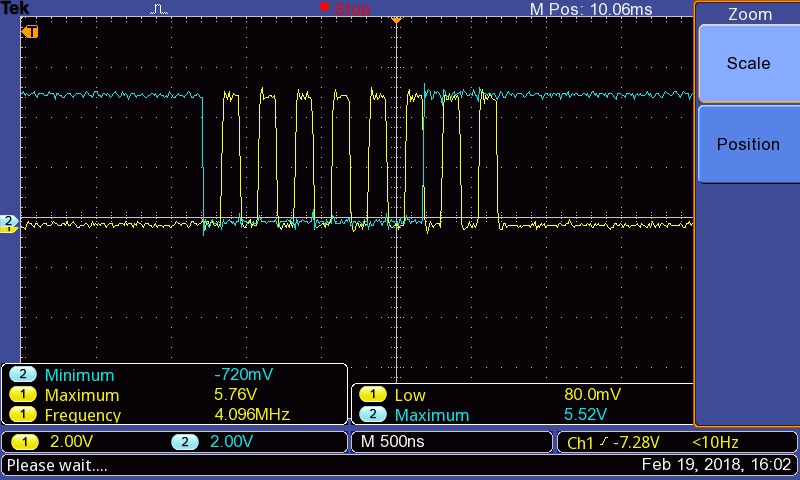
Kindly help me.

  • Hi,

    How did you generate the above scope diagram? You could use the same register settings.

    Best Regards,
    Yordan
  • Hello yordan

    This Scope diagram I generated using Atmega1281 micro controller. MCP2515 is working fine with this. But it is not working in my TMS320C6748. So only I am requesting you to guide me how to configure SPI of TMS320C6748 so that I can achieve this spi timing.
  • Hi,

    Are you using the TMS320C6748 reference board -> www.ti.com/.../tmdslcdk6748
    If yes, then follow the sequence bellow:
    1. First you should download and install CCS:
    software-dl.ti.com/.../index_FDS.html
    2. Then download and install in the same folder as CCS the Processor SDK RTOS from the same link as above.
    3. Now open CCS & let it detect & install the new SDK.
    4. Generate the SPI example using the following steps:
    - cd ~/ti/pdk_omapl138_1_0_3/packages/
    source pdksetupenv.sh
    ./pdkProjectCreate.sh OMAPL138 all little spi all dsp
    5. Import the generated project (it is located in ~/ti/pdk_omapl138_1_0_3/packages/MyExampleProjects) in CCS.
    6. Modify the clock frequency from ti/pdk_omapl138_1_0_3/packages/ti/drv/spi/soc/omapl138/SPI_soc.c
    7. Rebuild the project & test it on your board.

    If not then you first need to initialize your board and then port the McSPI test example on it.

    Find some documentation about TI RTOS & SPI driver in the links bellow:
    processors.wiki.ti.com/.../Processor_SDK_RTOS_Software_Developer_Guide
    processors.wiki.ti.com/.../Processor_SDK_RTOS_QSPI-McSPI

    Best Regards,
    Yordan
  • Dear yordan,

    It is not possible to achieve this in starterware sdk? Should I use only processor sdk for my further development?

    Thanks & Regards

    Navaneetha krishnan

  • I get following error while projectCreate.

    C:\ti\PDK_OM~1\packages>pdkProjectCreate OMAPL138 all little spi all dsp
    =========================================================================
    Configuration:
    SOC : OMAPL138
    BOARD : all
    ENDIAN : little
    MODULE : spi
    PROJECT_TYPE : all
    PROCESSOR : dsp
    PDK_SHORT_NAME : C:\ti\PDK_OM~1\packages\
    =========================================================================
    Checking Configuration...
    Complete
    =========================================================================
    PDK_PARTNO : OMAPL138
    PDK_ECLIPSE_ID : com.ti.pdk.omapl138
    RTSC_PLATFORM_NAME : ti.platforms.evmOMAPL138
    RTSC_TARGET : ti.targets.elf.C674
    CCS_DEVICE : "com.ti.ccstudio.deviceModel.C6000.GenericC674xDevice"
    *****************************************************************************
    Detecting all projects in PDK and importing them in the workspace C:\ti\PDK_OM~1
    \packages\\MyExampleProjects
    Detected Test Project: SPI_LoopbackExample_lcdkOMAPL138_c674xExampleProject
    The system cannot find the path specified.
    Copying macros.ini
    The system cannot find the path specified.
    0 file(s) copied.
    No projects detected
    Project generation complete
    *****************************************************************************

    C:\ti\PDK_OM~1\packages>
  • Hi,

    I am not familiar with starterware.

    Regarding the RTOS example project generation. You have a wrong path set:
    C:\ti\PDK_OM~1\packages\\MyExampleProjects

    You have two slashes "\\" before MyExampleProject folder. Update your environment settings.

    Best Regards,
    Yordan
  • There is only 4 possible combinations of phase and polarity. Did you try all 4? Most of the time. the closest one will work.