This thread has been locked.

If you have a related question, please click the "Ask a related question" button in the top right corner. The newly created question will be automatically linked to this question.

RTOS/TDA3XEVM: TDA3X Tuning in low light.

Part Number: TDA3XEVM

Tool/software: TI-RTOS

Hi,

We are using TDA3x EVM, running Rear view panorama usecase in VisionSDK3.1. 

There will be no IR light sources used for night vision. So IR cut filter will be present during night time and video will be in color mode only.

We are not able to control the high light from headlights. Even if we control exposure, it may affect the overall brightness in video and video will become darker. Please see the attached image.
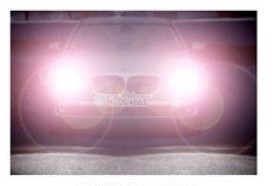
Hight light suppression control is what we need actually. What is the scope of this High Light Suppression Control in our case?

We are using dcc tool for tuning and we have tried changing various parameters including gamma curve.

How can we get a better performance in Low light regarding the headlight?

  • Hi Blessy,

    I have forwarded your question to Imaging experts.

    Regards,
    Yordan
  • Hello Blessy,

    Rear View Panorama usecase currently uses the cameras in linear (non HDR) mode. The scenario pointed by you can be handled with HDR. Currently TI has no plans to enable HDR image pipe in Rear View Panorama usecase. However, if you are interested our imaging 3rd Party, MM Solutions, will be able to help you with this.

    Regards,

    Mayank

  • Hi,

    We would like to get the help from MM solutions regarding the HDR. How can i proceed forward?
  • Hi,

    Any update on the enquiry?

    We are trying to control the exposure to handle the headlight issue. We are trying to reduce the gain when the headlight falls on the camera but we are experience some blink issues. We are getting a gain of 0 and then it is suddenly jumping to some high value like 192, so we are not able to decide a cut-off. Do you think whether there is any hope proceeding with the exposure control like this?

    We are having another idea of including the exposure metering table.
    Can we solve this issue if we have a good exposure metering technique? Currently is there any algorithm (metering matrix) that is existing in our visionSDK? Which file should we exactly look into for exposure control?

    Can you please help me with this.
  • Hi Blessy,

    I have sent you a mail with contacts from MM Solutions.
    You can continue the discussion with him offline. I will close the thread.

    Regards,
    Yordan
  • Hi Mayank,

    This headlight issue happens when the vehicle is at a distance about 5 meters away from the camera and light not directly falls on camera. So in frame the headlight will look spread as the camera exposure value is high (as no light falls directly on camera it will be exposed more).

    Is this due to missing a proper exposure table or exposure metering technique ? We hope this issue can be solved if there is a better exposure metering technique. Is there any metering algorithms or table implemented in SDK for auto-exposure ? Where we need to exactly look into for this ?

    • vision_sdk/apps/src/rtos/iss/src/alg_plugins/iss_aewb/src/ae_ti.c :- Is this the file which handle statistics of frames to do exposure control ?

  • Hello Athira,

    I am not sure why the gain oscillates between 0 and 192. Typical gain range is between 1x and 8x. If you have not modified sensor driver and AE tuning, we can look into it further. Please send us the log showing 2A results.

    Currently, there is no exposure metering in Vision SDK. However, it is easy to add one. Please look at the function GETTING_RGB_BLOCK_VALUE in algTIaewb.c. This function parses H3A statistics packet and extracts average R, G, B values for the sub-windows. RGB data is then passed to AE and AWB algorithms. To implement a metering scheme you define a weight matrix and multiply it with RGB sub-window matrix before passing to the algorithms.

    Regards,

    Mayank

  • Hi Mayank,

    Thanks for your reply !!!

    We hope the highlight in frame not suppressed with auto exposure algorithm alone; as it is missing a proper metering technique. We will try to define a weight matrix and implement a metering technique as you suggested. How can we to select the weight matrix ? Is it a 20x20 matrix or 50x8 matrix ? aew_win_hz_cnt = 20 and aew_win_vt_cnt value = 20. 

    Also another issue is like we can not exactly find out the headlight scenario. Thats why we asked about exposure metering technique.

    Blink issue we noticed when we tried to manually adjust gain to minimum value for highlight condition ie, like set gain writing to register made as zero. During this time we can notice blink in video as exposure is not settled. It is changing between min gain for headlight condition (say 0) and normal exposure values calculated from AEC algorithm.

    Now the gain values written to sensor register are  "0, 192, 213, 234, 255" for different combinations of line count. These gain values/gain table is calculated corresponding to the analog gain values like 1000, 2500, 5000, 10000, 20000 updated in "pAewbAlgOut->outPrms[0].analogGain" in vision_sdk/apps/src/rtos/iss/src/common/app_util_iss.c . Can you just detail how to change these exposure table and and gain table values to get little more smooth gain steps or a better gain table with small step size ?

  • Hi Mayank,

    Any updates regarding our queries ?

    • AE metering by adding a weight matrix ? 
    • How to change exposure table and gain table for better exposure control ? In DCC tool, there is no options to do exposure tuning.  

  • Weighting matrix size should be aew_win_hz_cnt x aew_win_vt_cnt

    To change exposure and gain table, you will need to understand sensor architecture and how it treats analog gain, conversion gain and integration time.  This is not something DCC tool can do since each sensor has a unique architecture.

  • Hi Mayank,
    Thanks for your reply.

    We are working on adding a weight matrix for AE metering. We are able to notice changes in headlight when we add same weight (say weight = 2)
    for all rbgData[0] to rgbData[399]. Can you just tell how these 400 samples are taken from a frame ? So that we can give different weight to different samples (more weight to center of frame) to handle headlight.

  • These 400 samples come from H3A. For more details, please refer to the TRM.

  • Ok. 

    Any user guides available to familiarize TI's Auto exposure algorithm on TDA3x (Use case is rear view panorama) ? 

  • No user guides for AE. However, the source is included with Processor SDK-Vision releases.

  • Hi,

    We tried to add a weight matrix (20x20) with RGB data (20x20) in GETTING_RGB_BLOCK_VALUE function (algTIaewb.c). We noticed some color banding in video and it increases with increasing weight value.  What can be the reason for this color banding issue ? Is there any limitation on this maximum value of weight that we can apply ?

    In algTIaewb.c, a function "Init2ATables()" define a weightingMatrix like assigning value of 1 to all 400 samples.

    ie; pObj->weightingMatrix[i*width + j] = 1;

    This weighting Matrix is then passed to TI's AEC algorithm inside ae_ti.c file. What is this values exactly ? Do we need to change weight matrix here? There is a comment here like "Set all weights to 1 to avoid overflows. Center and Spot Metering disabled till Overflow issue is fixed".

    Color banding looks like the below image. 

  • Hello Athira,

    AutoExposure algorithm is provided in source. Please go through this and understand what it does. If you need more support I would suggest working with an experienced imaging 3rd Party like MM Solutions.

    Regards,

    Mayank