This thread has been locked.

If you have a related question, please click the "Ask a related question" button in the top right corner. The newly created question will be automatically linked to this question.

RTOS/TDA3XEVM: 3D Surround View

Part Number: TDA3XEVM

Tool/software: TI-RTOS

Hi.

I have camera module that include ISP.

So don't need ISP in TDA3x.

I change 3d sv use-case as follows.
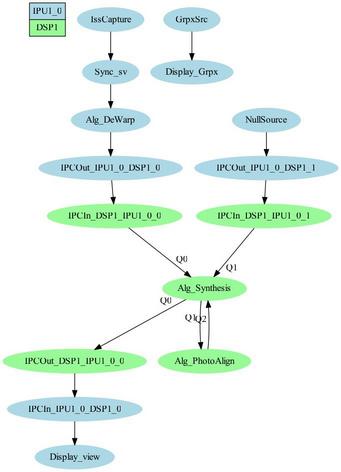
But 3D surround view don't display normally.

Especially, left and right camera.


Left Camera Examples)

Cone on left camera image looks same even though angle changed.

  • Hi Luis,

    The SRV requires calibration, please refer the user guide available in VisionSDK at <VisionSDK install Dir>\docs\VisionSDK_UserGuide_3D_SurroundView_TDA3xx_Demo.pdf

    Regards,
    Sujith
  • Hi Sujith.

    I used calibrated CALMAT.bin. But didn't install camera to jig yet.
    So, I understand misalinment.

    I think that left (and right) camera image is changed according to the view angle.
    Especialily, first and second yellow cone looks same even though view angle was changed.
  • Hi Luis,

    Please look at the third image, the cone edge is almost straight, where as in first 2 images its curved.
    Also in the first 2 images, if you closely look at the outer edge, the slope of the curve is marginally different.

    Are you using the same LENS.BIN which was provided when LDC LUT's were generated (Calibration). The LENS parameters also play significant role in 3D.

    Regards,
    Sujith
  • Hi Luis,

    I hope this is not an issue anymore, please confirm.

    regards, Sujith