This thread has been locked.

If you have a related question, please click the "Ask a related question" button in the top right corner. The newly created question will be automatically linked to this question.

TMDSICE3359: EtherNet/IP issues with Molex EIP tool

Part Number: TMDSICE3359
Other Parts Discussed in Thread: PROFIBUS

Hello,

I am use Processor SDK 4.1 and have the Ethernetip_adapter application running on my ICE board.It has EthernetIP Adapter application loaded in it via CCS. Code gets compiled and is working but i have a problem in using  i\o operation. I am trying to get information from the selected EtherNet/IP device, i.e. the  AM3359 Industrial Communication Engine. I am having difficulties in communicating between the  AM3359 and a PC with Molex EIPTool installed.Can you proved some information about what could have gone wrong? I am refering to this User guide .

Thank you!

  • The RTOS team have been notified. They will respond here.
  • Hi Bhushan, no sure what it can be the issue. Few things to check is that the IP address between your PC and Ethernet/IP running on ICEv2 board are in the same subnet, also please check your firewall is not blocking it. Just to confirm, can you get any attributes using Molex EIPTool?. Also, which can of issues do you have when running I/O operation?

    thank you,

    Paula

  • Hey Paula,
    I have disabled my firewall and Antivirus. When I issue a ‘List Identity Request’ to the Device it is not being detected because i can't see "TI/Molex EIP Adapter Sample" besides the station address.The status is showing as  "Driver Status=32"

    Also, what do you mean by IP address between PC and board and how to check the subnet? 
    The LED D1 on the board is on while D2 is blinking  with GREEN light.

  • Hey Paula,

    After contacting with Molex regarding this same problem i came to a conclusion that proper firmware was not written on my AM335x.I want to burn the EtherNet/IP firmware to my ICEAM3359 . At the moment the LCD shows "IASDK Ethercat demo".

    I tried following guide to flash Ethernet/ip firmware to my board.

    I am stuck at this point:

    • Ensure that the binary image (e.g. MLO or ethercat_SPI.bin or profibus_slave_SPI.bin) to be flashed is present in the Windows Machine

    I did not find any such files in my system.

    Also, CCS displays the message:

    Can't find a source file at "D:\x0195014\Source\Ref2_repo\ti_internal\tools\2_x_spi_flasher\Release/../main.c"
    Locate the file or edit the source lookup path to include its location.


    Thank you!


  • Hi Brushan, a question have you ran the Ehternet/IP demo from SD card?

    If not, and if you are interested, you can use prebuild binaries from PRU-ICSS Ethernet/IP adapter download page. From there you can get binary "app". You will need also MLO. You can find MLO after installing Processor SDK under <PSDK_INSTALL_PATH>\prebuilt-sdcards\evmAM335x\sd_card_files. You also need to create a bootable SD card. Below, instructions on how to create an SD card:

    Instructions for Windows here, For Linux  here.

    A reminder, PRU-ICSS EIP 1.0.2, is and add-on package to PROCESSOR-SDK-RTOS 03_03_00. So please download this version of PSDK.

    Now, if you need to flash your Ehternet/IP application, then please check this wiki link first:

    Processor SDK RTOS BOOT AM335x/AM437x. This link will navigate you on how to create the right binaries formats (*.bin or *_ti.bin) from CCS *.out. In case of AM335x you would need to convert your output CCS binary (.out) to *_ti.bin.

    In order to correctly flash Ethernet/IP please follow "Booting Via McSPI" section. Please erase flash first as you already have EtherCAT slave flashed.

    The link you shared in your previous post is for Industrial SDK, however, we are not longer supporting this ISDK package as we are moving all the industrial protocols under PSDK + PRU_ICSS adds-on packages.

    Hope this helps,

    Paula

  • Hey Paula,
    Thanks for the detailed explanation.

    Is it necessary to use an SD card for this application? No SD card was provided with the board. Can i just import the program (Ethernet/IP application) in CCS and then load it on to the board ?

    Also, you asked to erase flash first as I already have EtherCAT slave flashed on my EVM. what are the steps for that?

  • hi Bhushan, mainly there are 3 ways to run your application
    1) During development, we recommend to use CCS + JTAG for loading running your app.out
    2) For demos, or for simply test PRU-ICSS Industrial SW prebuild-binaries, you can use an SD card.
    For running your demos in an SD card, first you need a bootable SD card (links with steps were shared previously), an MLO (bootloader) and an "app" in the correct binary format. Steps for converting from *.out to *_ti.bin were also shared in my above post.
    3) For productions customers typically flash their bootloader and apps. So, if you are in development stage, you can omit flashing for now.

    About how to erase flash memory, please follow the steps from: processors.wiki.ti.com/.../AM437x --> Booting via McSPI. But instead of "Flash an Image" use "Erase Flash"

    Starting SPIWriter.
    Choose Operation:
    Enter 1 ----> To FLASH an Image
    Enter 2 ----> To ERASE Flash
    Enter 3 ----> To EXIT

    thank you,
    Paula
  • Hey Paula,

    I successfully erased the ethercat application which was flashed previously on the board. I am in the development state right now. And using CCS+JTAG for loading my application on board. I can see that the LED D1 on the board is on while D2 is blinking with GREEN light but nothing on the LCD.

    I had a conversation with Molex regarding this topic. They suggested that i should "burn the EtherNet/IP firmware to my AM335x "  gave me this link. (http://software-dl.ti.com/processor-industrial-sw/esd/PRU-ICSS-ETHERNETIP-ADAPTER/latest/index_FDS.html) and said that the screen should display this before i try to run their master application:

    At this moment i am trying to achieve this. i.e. Burn the EtherNet/IP firmware to my AM335x. What are the steps involved?

    I have already downloaded PRU-ICSS-ETHERNETIP-ADAPTER from here  (http://software-dl.ti.com/processor-industrial-sw/esd/PRU-ICSS-ETHERNETIP-ADAPTER/latest/index_FDS.html) and  PROCESSOR-SDK-RTOS 03_03_00. as you suggested.

    Thank you!

  • Hi Bhushan, honestly, I am not sure if our latest Ethernet/IP still displays information in LCD. However, if you open a UART console (ex. Teraterm, Serial port, baudrate:115200, Data:8bit, Parity:none, Stop:1bit, Flow control:none) you should be able to see something similar to this:   

    This was an snapshot I took some time back for a presentation. You can assign IP address from console by pressing 'N', and then search for this device using Molex/IP tool.

    About your question on how to  Burn the EtherNet/IP firmware to my AM335x. It is the same as flashing the application. As mentioned previously, steps for flashing can be found here: Processor SDK RTOS BOOT AM335x/AM437x. For AM335x please follow section  "Booting Via McSPI" and use offset of 0x20000. However, I don't think you need to flash yet your app.. I would use CCS+JTAG

    thank you,

    Paula

  • Hi Paula,
    Thanks for the information regarding flashing.

    As you suggested i am using CCS + JTAG.                                                                                                                                                                                                                                                                                  I followed the steps as you have mentioned and i found the device inthe Tera term Console. However, I still am not able to view the device in Molex EIP tool. 

  • Hi Brushan, no sure how is your network topology, but if not already, could you please test connecting your PC directly with your board? also, don't forget both need to be in the same subnet.

    thank you,

    Paula

  • Hi Paula,
    My PC is directly connected to the board and both are in the same subnet .
    IP address of the board is 192.168.1.21
    While that of the PC is 192.168.1.10

    Thank you!
  • Hey Paula,

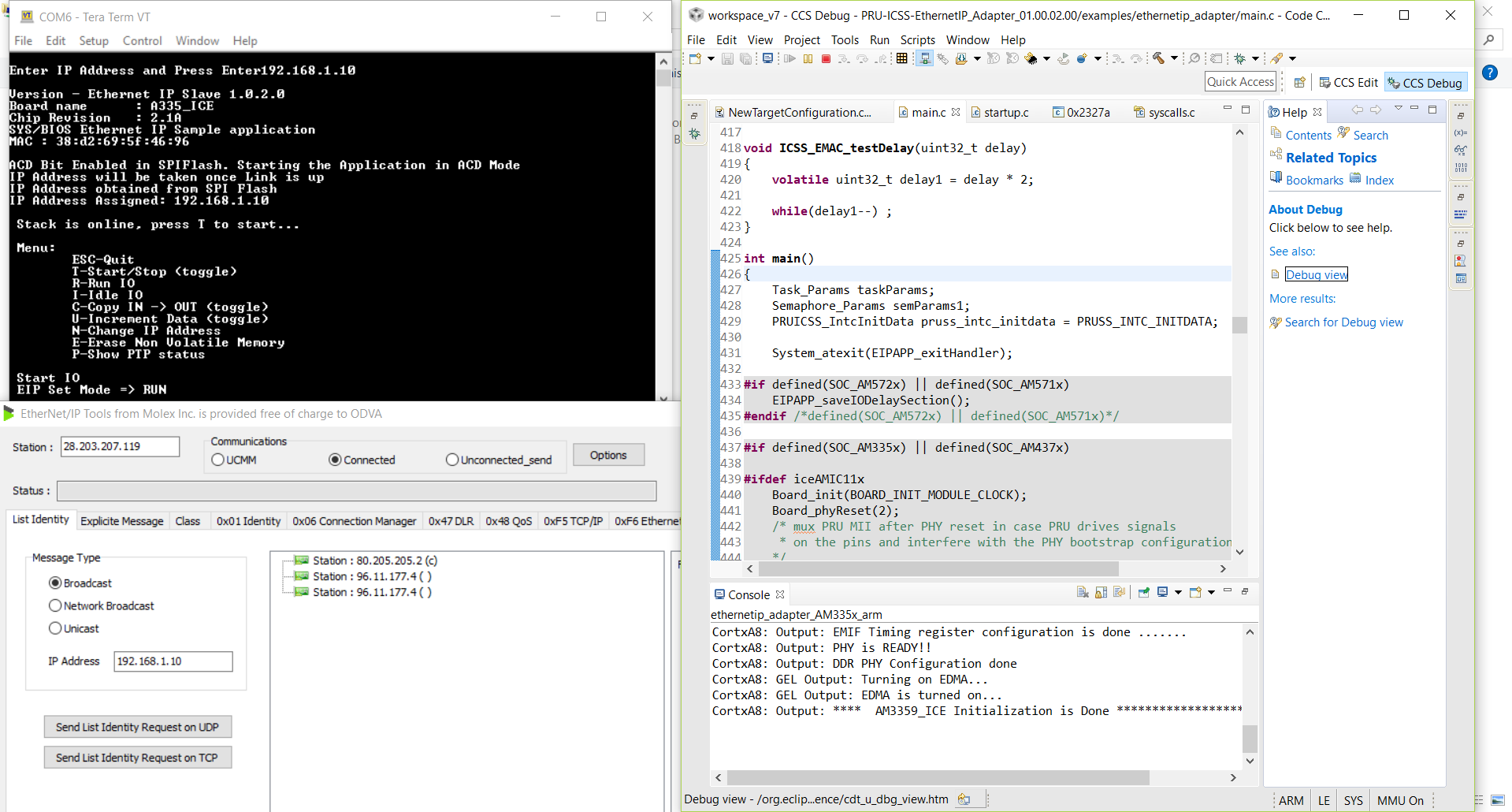
    My board is now working and is displayed in the EIPtool software.The devices were in the same subnet but the IP address which we assign in List identity request should not be same as that of board.                Thanks for your help.

    Can you suggest me some reference manual fro Ethernet/ip to understand this(pic) response from the board and other similar stuff.

    Thank you.

  • Hi Bhushan, I suggest to get in contact with Molex for tools questions. On the other hand, there is a good ODVA Ethernet/IP developers guide if you want to get more familiar with explicit messages concept and fields.

    Hope this helps,

    Paula