This thread has been locked.

If you have a related question, please click the "Ask a related question" button in the top right corner. The newly created question will be automatically linked to this question.

TDA2EG: Surround View Display Size Full Screen Issue

Part Number: TDA2EG

Hi

     I am working on the usecase "csi2_cal_sv_standalone", and the default display is like this:
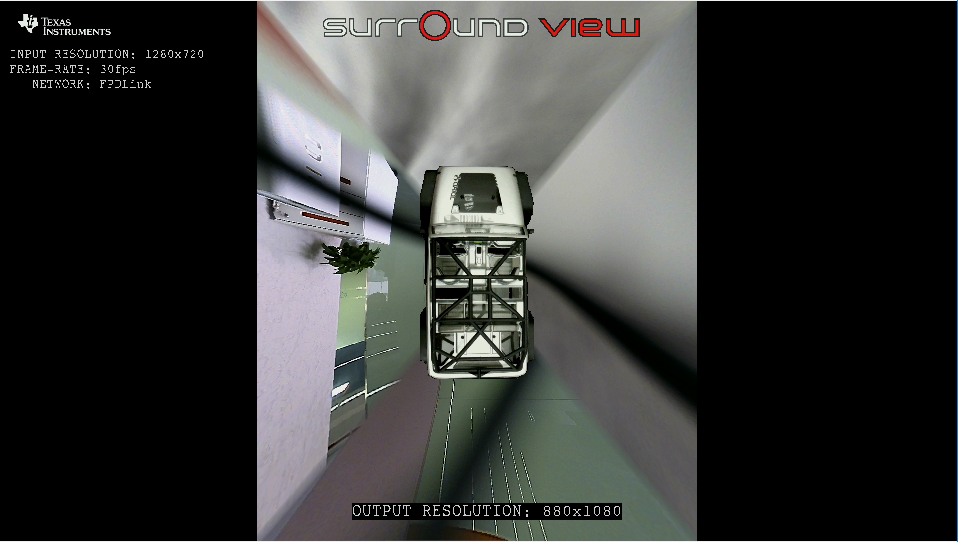
 

    For a 1080P display device, the surround view resolution is 880*1080.

    If i want to make the surround view extend to the full screen size ( 1920*1080 ), what should i do?

Thanks

xuanbo

  • Hi Xuanbo,

    You could use the scaler to scale the SV output to 1920x1080. i.e. after DSP constructs SV, use scaler link to scale it up.
    Assuming that input frame resolution is 1280x720, it might not be possible to re-configure DSP to output 1920x1080.

    Also, please note that you will have to update the screen layout to show the SV output on full screen, i.e. function GrpxSrcLink_drawSurroundViewStandaloneLayout () in file \apps\src\rtos\modules\grpxSrc\grpxSrcLink_svStandalone_layout.c

    Regards,
    Sujith
  • Hi Sujith

    The capture size is 1280*720, so the input frame for DSP should be 1280*720.
    For this usecase, i think the inWidth/Height (880*1080) of the video1 pipeline should come from DSP through system link. So could i just modify this pair of params to scale the SV output? For example, change the SV output size from 880*1080 to 1280*720? If this method works, where does the DSP define the SV output size? I tried to find the related source codes' place, but it is a little difficult to find it.

    Thanks
    xuanbo
  • Hi Xuanbo,

    Please check file \apps\src\rtos\usecases\csi2_cal_sv_standalone\chains_csi2CalSVStandalone.c and function ChainsCommon_SurroundView_GetSrvOutputResolution () is used get the SRV size required.

    This function is implemented in apps\src\rtos\common_srv\chains_common_surround_view.c

    In file apps\src\include\chains_common_surround_view.h, please update the macro SRV_OUTPUT_WIDTH_TDA2X_2D & SRV_OUTPUT_HEIGHT_TDA2X_2D

    Regards,
    Sujith
  • Hi Sujith

        I have changed the SRV_OUTPUT_WIDTH_TDA2X_2D from 880 to 1280, and got the error as:

        "[DSP1  ]     29.770481 s: DMA block size doesnot match Photo Alginmnet block size"

        VSDK just provides Surround View's algorithm's lib file, not the source code file. So it is hard to debug this error's cause.

    Thanks

    xuanbo

  • Hi Sujith

    And you have mentioned that there is a scaler link can be used to scale the SV output. So, what is the link ID of this scaler link? And where the sample codes about how to use the scaler link are?

    Thanks
    xuanbo
  • Hi Xuanbo,

    On the algorithm assert, let me check with my team members and get back to you.

    Please refer usecase "apps\src\rtos\usecases\lvds_vip_sv_standalone\chains_lvdsVipSurroundViewStandalone.c" for Vpe example.

    Regards, Sujith

  • Hi Sujith

        For the video1 pipeline, i use the follow params to realize a "full screen" display:

        inWidth/Height: 880*1080;

        tarWidth/Height: 1280*720,posX/Y: 0*0; (so the scalar of video1 pipeline will be triggered)

        displayWidth/Height: 1280*720

        The display result is as follows:


       But this kind of "full screen" is just like put a 880*1080 image to fill in a 1280*720 display container. The final surround view after synthesis will be scale again in order to realize this kind of "full screen". So I think this method may be not so good. The real "full screen" should be that we don't scale any size, the SV output width/height just match the display width/height very well.

      Does the VPE scalar's effect just like above? 

      If it is, i think the only way to realize "real" full screen is to modify the SV outWidth/Height...

    Thanks

    xuanbo

  • Hi Xuanbo,

    Yes, with Vpe it will be same/similar.
    You will have to use option 1, with that when the input frame resolution is 1280 ideally you should set the output resolution to max 1280.

    Can you please try and the change the surround view output resolution to 1280x720 and check?

    Regards,
    Sujith
  • Hi Sujith

    I have changed the SV output size from 880*1080 to 1280*720; and other params are:
    tarWidth/Height: 1280*720,posX/Y: 0*0;
    displayWidth/Height: 1280*720

    Then, i got the same error:" DMA block size doesnot match Photo Alginmnet block size"
    I think that DMA block width may be has been set to 880, so any value other than 880 will throw this error.

    By the way, what you mean option 1?

    Thanks
    xuanbo
  • Hi Xuanbo,

    It seems like this feature is not supported on this particular Algo.
    If your objective is to achieve 2D SRV and be able to control the output resolution, i would recommend you use 3D SRV (iss_mult_capture_isp_dewarp_3dsv_tda3xx).

    In this usecase, you could achieve 2D top-view by choosing 1 view-point. This usecase can be updated to change the resolution.
    Although, in VisionSDK versioned 3.2 the output resolution cannot be changed. The next release of VisionSDK will provide this ability.

    Please let us know more about your usecase/need, to help you better.

    Regards,
    Sujith
  • Hi Sujith

         Thank you for your suggestion.

         My usecase/need is to run the SRV on our custom display LCD used in vehicle "perfectly". Here, the meaning of "perfectly" is that SRV

    can adapt its size to our custom display LCD, which means it should be full screen without the current black area on either hand of the SRV view. It seems that the only way to realize it is to change the SRV output resolution.

        According to your explanation, my understanding is that:

       1) For the VSDK version <= 3.2, the 2D SRV do not support to change the output resolution; but 3D SRV supports;

       2) For the VSDK version > 3.2 (released in the furture), both 2D/3D SRV will support the ability to change the output resolution.

       Does my understanding is right or not?

    Thanks

    xuanbo

  • Hi Xuanbo,

    2D SRV can be achieved by 2 different usecases / Algo's. The 2D SRV algo that you are referring to dosen't support change of resolution.

    If you want to change the resolution, I would recommend you to use "iss_mult_capture_isp_dewarp_3dsv_tda3xx"

    In this usecase, VSDK versioned 3.2 has a defect, which prohibits change in resolution. This defect should be fixed in VSDK versioned 3.3.

    Regards, Sujith

  • Hi Sujith

    OK, the 2 different usecases/ Algo to achieve 2D SRV are:
    1) usecase "csi2_cal_sv_standalone"; this usecase has a defect that prohibits change output resolution which will be fixed at VSDK 3.3;
    2) usecase "iss_mult_capture_isp_dewarp_3dsv_tda3xx" with 2D top view; so i need to use this usecase to met my need.
    Does my understanding is right or not?

    Thanks
    xuanbo
  • Hi Xuanbo,

    "1) usecase "csi2_cal_sv_standalone"; this usecase has a defect that prohibits change output resolution which will be fixed at VSDK 3.3;"
    This will not be fixed.

    "2) usecase "iss_mult_capture_isp_dewarp_3dsv_tda3xx" with 2D top view; so i need to use this usecase to met my need"
    Yes, this should be used to meet your need. But VSDK versioned 3.2 has bug, which will be fixed in VSDK versioned 3.3. You should use VSDK versioned 3.3

    Regards,
    Sujith
  • Hi Sujith

    Thanks, i got it. I will study the details of usecase "iss_mult_capture_isp_dewarp_3dsv_tda3xx".
    By the way, when will the VSDK 3.3 be released?

    Thanks
    xuanbo
  • Hi Xuanbo,

    It's scheduled for mid-April 2018.
    If your query is addressed, please close this query and if you have more questions, you could create a new one.

    Regards,
    Sujith
  • Hi Sujith

    OK, i got it.
    I have closed this thread. Thank you for your help~

    Thanks
    xuanbo