This thread has been locked.

If you have a related question, please click the "Ask a related question" button in the top right corner. The newly created question will be automatically linked to this question.

CCS/TMS320C5545: C5545 boosterpack application

Part Number: TMS320C5545

Tool/software: Code Composer Studio

Hi,

1) I want to record dsp output digitally, like a pcm file. I'm running my adc and dac at 8000hz. easiest way to record my dsp output from i2s output pins on c5545bosterpack.

2)can you suggest a codec with lower adc, dac noise and runs on 3.3v with headphone power amp, instead aic3206 on board. 

  • Hi,

    I've notified the sw team. They will post their feedback directly here.

    Best Regards,
    Yordan

  • V Pot,

    1) You need a circular buffer to capture the raw PCM audio samples and then dump them via CCS to a file.

    This can be done like the following:

    Int16 OutFrame[AUDIO_FRAME_LEN];
    Int16 OutCircBuf[DIGGAIN_OUT_CIRCBUF_LEN];
    
    /* Write digital gain output to circular buffer */
    for (i=0; i<AUDIO_FRAME_LEN; i++)
    {
    OutCircBuf[numFrame*AUDIO_FRAME_LEN+i] = OutFrame[i];
    }

    The decimation project located at C:\ti\c55_lp\c55_csl_3.08\demos\decimation\c5515\c55x-digital-mic-decimation\src captures audio samples via CCS for testing.

    See http://www.ti.com/lit/an/sprac51/sprac51.pdf Section 5 steps 8-15 on how to capture the audio samples via CCS

     2) You will need to consult the experts in the audio converters e2e forum for help with this question.

    Lali

  • lali,

    thanks for the reply. 

    1) what is DIGGAIN_OUT_CIRCBUF_LEN? can i use same as AUDIO_FRAME_LEN? and what is purpose of numFrame?

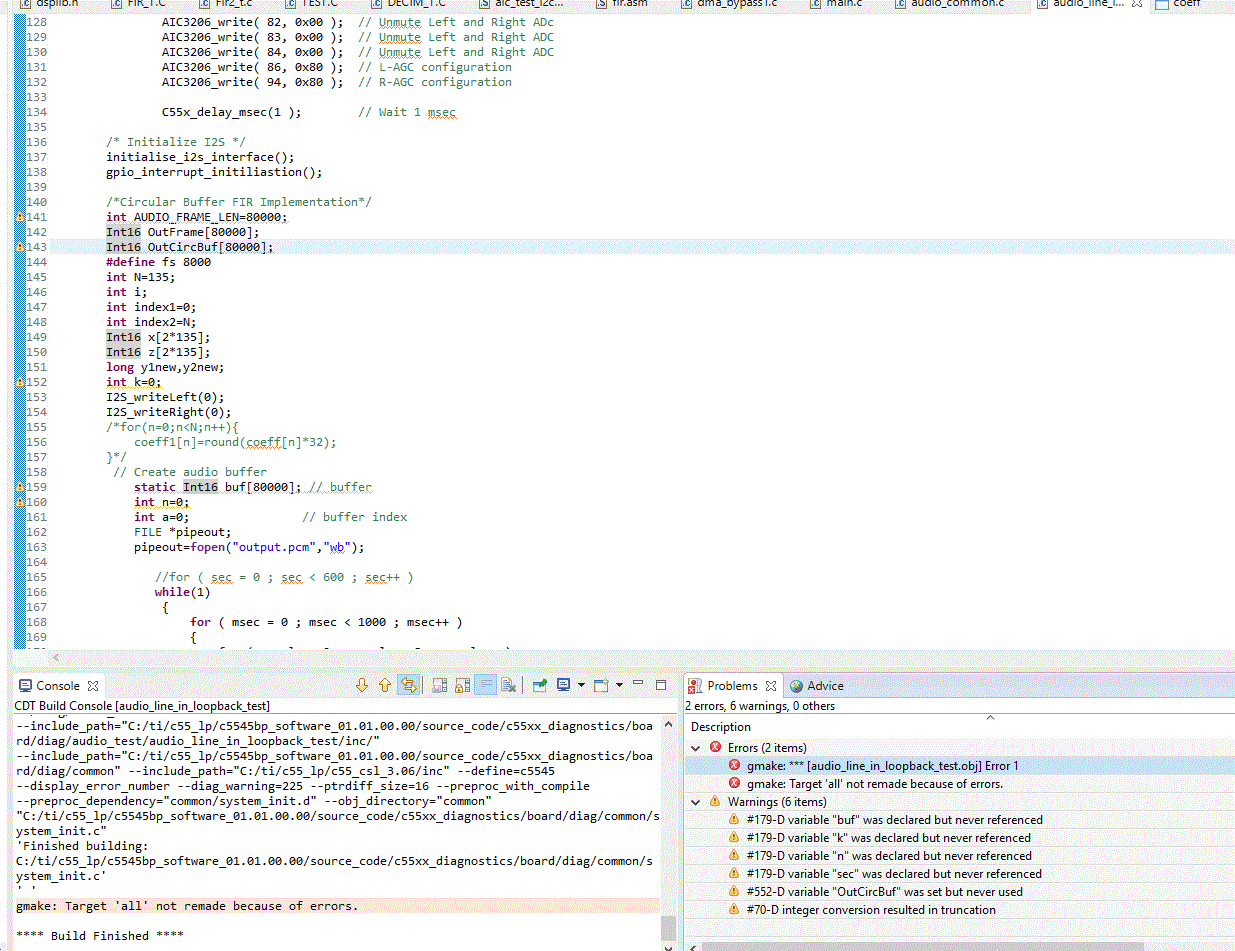
    2)I'm not able to use big buffer length. for example i defined Int16 OutFrame[80000]. I tried putting static before the def, but no use. following is the error

  • V Pot,

    The definitions for all the variables are located at top of C:\ti\c55_lp\c55_csl_3.08\demos\decimation\c5515\c55x-digital-mic-decimation\include\IdleLoop.h.
    numframe is defined in C:\ti\c55_lp\c55_csl_3.08\demos\decimation\c5515\c55x-digital-mic-decimation\src\IdleLoop.c
    You will have to make your own modifications to the code, as the implementation in the CSL is for a microphone decimation example. I pointed out this example in order for you to see an implementation where you can capture audio samples to a file.

    Did Int32 work for the outframe?

    Lali
  • lali,

    1)As per section 5, 8-15 in the document you've provided, all it does is saving a buffer or array of samples to .dat file. So why do I need these frames and stuff? Can't I just save every output sample to an array and save it as .dat file as explained in steps 8-15?

    2)No, INT32 didn't work, its throwing same build errors. only reducing the array size is working. but i want big erray to hold enough samples.

  • V Pot,

    "...record dsp output digitally, like a pcm file..."
    Sure, you can output to an array and save it as a .dat file.

    Just keep in mind that your array size is limited by on-chip memory, so you can only hold so much audio. You can take a look at the .map file to see how memory is allocated. You can also specify in the .cmd file your memory allocations.

    Lali
  • lali,

    can you tell me little in detail, as i'm kinda new to this. howto specify or increase the memory. thanks in advance,

    here is the .map file

    -stack 0x1000 /* PRIMARY STACK SIZE */
    -sysstack 0x1000 /* SECONDARY STACK SIZE */
    -heap 0x3F80 /* HEAP AREA SIZE */

    MEMORY
    {
    MMR (RW) : origin = 0000000h length = 0000C0h /* MMRs */
    VEC (RX) : origin = 00000C0h length = 000300h /* on-chip ROM vectors */
    DARAM (RW) : origin = 0000400h length = 00FBFFh /* on-chip DARAM */
    SARAM (RW) : origin = 0010000h length = 03E000h /* on-chip SARAM */
    }

    SECTIONS
    {
    vectors(NOLOAD)
    vector : > VEC ALIGN = 256
    .text : > SARAM ALIGN = 4
    .stack : > SARAM ALIGN = 4
    .sysstack : > SARAM ALIGN = 4
    .data : > SARAM
    .bss : > SARAM, fill = 0
    .cinit : > SARAM
    .const : > SARAM
    .sysmem : > SARAM
    .cio : > SARAM
    .switch : > SARAM
    .buffer1 : > SARAM
    .buffer2 : > SARAM
    }

  • V Pot,

    Here's a great linker.cmd primer that gives detail on how to allocate memory for your applicationprocessors.wiki.ti.com/.../Linker_Command_File_Primer . Please peruse this to get an understanding of how the linker command file code is used.

    A similar e2e e2e.ti.com/.../228287

    Lali