This thread has been locked.

If you have a related question, please click the "Ask a related question" button in the top right corner. The newly created question will be automatically linked to this question.

CCS/TDA3XEVM: EVE System Event Trace for TDA3x

Part Number: TDA3XEVM

Tool/software: Code Composer Studio

Hi,

Can I use system event trace for EVE of TDA3? 

I am trying EVE System Event Trace for TDA3x on CCSv8 following section 6.3.1 EVE System Event Trace of sprac17b.pdf.

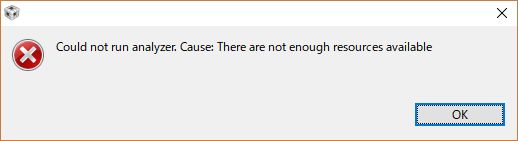
However, I could not use it, and the error was  as follows:
My emulator is XDS560v2 STM. Please advise me about EVE's system event trace.

Regards,

Kenshow

  • Hi Kenshow,

    Can you please share the version of the TI Emulators package you are using? You can even check if there is a later version of the TI Emulator package that can be upgraded.

    Also, if not tried before can you please check if ETB based SMSET information export is working for you?

    Thanks and Regards,

    Piyali

  • Hi Piyali,

    TI Emulators package is 7.0.188.0 on CCSv8.

    > Also, if not tried before can you please check if ETB based SMSET information export is working for you?
    Please tell me how to check specifically.

    Regards,
    Kenshow
  • Kenshow,

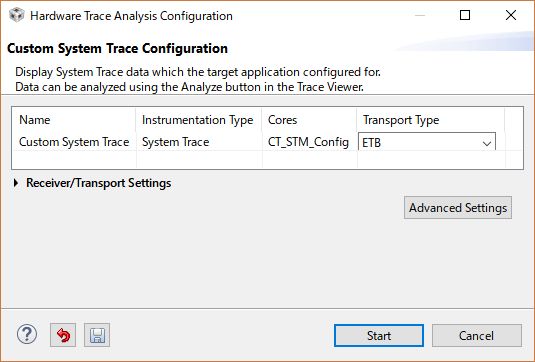
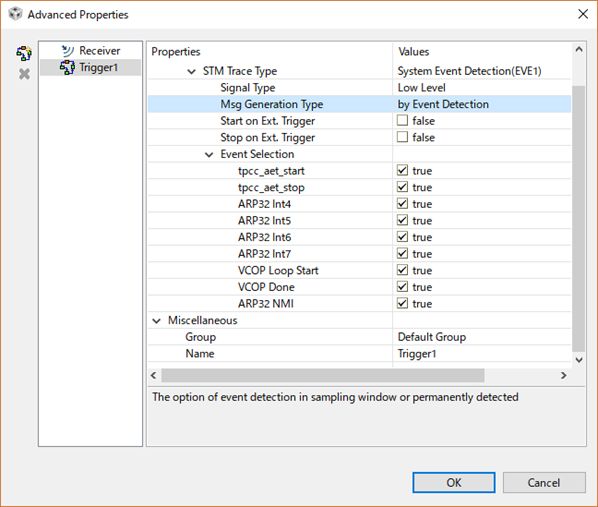
    In the application note sprac17b.pdf, if you look at the "Figure 31. EVE SMSET Hardware Trace Analysis Configuration and Advanced Properties Settings" The left hand side block has a "Transport Type" column. Here, you can try setting ETB and check if the issue occurs.

    Thanks and Regards,
    Piyali
  • Hi Piyali,

     I checked that it is no issue occurs.

    Default setting of ETB, it works.

    When I changed advanced properties following the guide, I met error message of previous post. 

    Regards,
    Kenshow

  • Hi Kenshow,

    If I understand correctly, when you are not setting anything in the advanced configuration then the SMSET is working for you?
    Or Atleast the Trace Viewer Window is showing up for you?

    Thanks and Regards,
    Piyali
  • Hi Piyali,

    Yes,
    And then, the Trace Viewer Window is showing up for me in default advanced configuration.

    Regards,
    Kenshow
  • Hi Kenshow,

    I gave a quick try with my existing installation of CCS Version: 6.0.1.00040 and upgrading the TI Emulators package to 7.0.188.0. I am seeing the EVE EMSET initialization goes through.

    I will need to install CCSv8 on the machine and get back to you if I can reproduce this issue.

    Thanks and Regards,
    Piyali
  • Hi Piyali,

    Thanks for your reply.

    I also checked it on CCS Version 6.2.0.00050 with Emulator package v6.0.407.3. However, it was the same phenomenon.

    It is the same even if I replace another emulator.

    Anyway, I am concerned about the red message when connecting EVE. Does this have an effect on this issue?

    +++++++++++++++++++++++++++++

       :

    CS_DAP_DebugSS: GEL Output: --->>> TURNING ON L3_INSTR and L3_3 clocks required for debug instrumentation <<<<<<----

    CS_DAP_DebugSS: GEL Output: ---<<< L3 instrumentation clocks are enabled >>>> ---

    ARP32_EVE_1: GEL Output: --->>> Resetting ARP32 ... <<<---

    ARP32_EVE_1: Error enabling this function: This task cannot be accomplished with the existing AET resources.

    Cortex_M4_IPU1_C0: GEL Output: --->>> A device reset occurred <<<---

    Cortex_M4_IPU1_C0: GEL Output:  ==================================================

    Cortex_M4_IPU1_C0: GEL Output:  ========= TDA3xx PG2.0 device detected   =========

    Cortex_M4_IPU1_C0: GEL Output:  ========= TDA3xx GP Device detected    ===========

    Cortex_M4_IPU1_C0: GEL Output:  ========= TDA3xx 15x15 Device detected ===========

    Cortex_M4_IPU1_C0: GEL Output:  ==================================================

       :

    +++++++++++++++++++++++++++++

    Regards,
    Kenshow

  • Hmmm.. Are you seeing the EVE ARP32 in a connected and Halted state when you are trying to run the SMSET trace?

    Thanks and Regards,
    Piyali
  • Hi Piyali

    When I configured SMSET while halting EVE ARP32, it worked.
    Thanks for your advice.

    Regards,
    Kenshow
  • Hi Kenshow,

    Glad to know this is working for you!

    Regards,

    Piyali