This thread has been locked.

If you have a related question, please click the "Ask a related question" button in the top right corner. The newly created question will be automatically linked to this question.

Linux: AM335x Gigabit network packet loss

Other Parts Discussed in Thread: AM3358

Tool/software: Linux

Dear experts,

I connected the board directly to the computer at a gigabit speed. Use the command "ping -s 65500 -c 1000 192.168.1.148". 192.168.1.148 is the computer's ip.Here are the results of the two pings.


uboot: 2014.07

kernel: 3.14.43

board:Hardware is designed by our hardware engineers

Any advice would be much appreciated.


thank you

Danny


  • Dear Biser,

    The processor is am335x
  • Hi,

    Could you please attach the results of ethtool -S eth0, ethtool eth0 ifconfig eth0? Do you see the same issue when running at 100Mbps link speed? The first ethtool request is a dump of the HW statistics registers, if you are seeing greater than 0 for RX CRC checksums or code align errors these could be indicators of a board issue. Is there any other applications running on the system?

    Also please note that this SDK and version are no longer supported. Since this is custom board is possible to move to the latest TI SDK?

    Best Regards,
    Schuyler
  • Dear Schuyler,

    When I connect the board to a 100M router, it automatically negotiates to 100Mbps and and the ping will not be lost. Phy chip is ar8035

    [ 518.100717] libphy: 4a101000.mdio:03 - Link is Up - 1000/Full

    root@am335x-evm:~# ping -s 65500 -c 1000 192.168.1.148
    PING 192.168.1.148 (192.168.1.148): 65500 data bytes
    65508 bytes from 192.168.1.148: seq=0 ttl=64 time=6.247 ms
    65508 bytes from 192.168.1.148: seq=2 ttl=64 time=4.709 ms
    65508 bytes from 192.168.1.148: seq=3 ttl=64 time=4.585 ms
    65508 bytes from 192.168.1.148: seq=4 ttl=64 time=4.824 ms
    65508 bytes from 192.168.1.148: seq=5 ttl=64 time=4.713 ms
    ......
    65508 bytes from 192.168.1.148: seq=991 ttl=64 time=5.107 ms
    65508 bytes from 192.168.1.148: seq=993 ttl=64 time=4.944 ms
    65508 bytes from 192.168.1.148: seq=994 ttl=64 time=4.711 ms
    65508 bytes from 192.168.1.148: seq=997 ttl=64 time=4.456 ms
    65508 bytes from 192.168.1.148: seq=999 ttl=64 time=4.716 ms

    --- 192.168.1.148 ping statistics ---
    1000 packets transmitted, 744 packets received, 25% packet loss
    round-trip min/avg/max = 4.381/4.828/6.403 ms
    root@am335x-evm:~# ethtool -S eth0
    NIC statistics:
    Good Rx Frames: 36760
    Broadcast Rx Frames: 1745
    Multicast Rx Frames: 839
    Pause Rx Frames: 0
    Rx CRC Errors: 0
    Rx Align/Code Errors: 0
    Oversize Rx Frames: 0
    Rx Jabbers: 0
    Undersize (Short) Rx Frames: 0
    Rx Fragments: 0
    Rx Octets: 50355455
    Good Tx Frames: 45068
    Broadcast Tx Frames: 1
    Multicast Tx Frames: 0
    Pause Tx Frames: 0
    Deferred Tx Frames: 0
    Collisions: 0
    Single Collision Tx Frames: 0
    Multiple Collision Tx Frames: 0
    Excessive Collisions: 0
    Late Collisions: 0
    Tx Underrun: 0
    Carrier Sense Errors: 0
    Tx Octets: 67222352
    Rx + Tx 64 Octet Frames: 1638
    Rx + Tx 65-127 Octet Frames: 1113
    Rx + Tx 128-255 Octet Frames: 433
    Rx + Tx 256-511 Octet Frames: 1908
    Rx + Tx 512-1023 Octet Frames: 0
    Rx + Tx 1024-Up Octet Frames: 76736
    Net Octets: 117577807
    Rx Start of Frame Overruns: 0
    Rx Middle of Frame Overruns: 0
    Rx DMA Overruns: 0
    Rx DMA chan: head_enqueue: 1
    Rx DMA chan: tail_enqueue: 35354
    Rx DMA chan: pad_enqueue: 0
    Rx DMA chan: misqueued: 0
    Rx DMA chan: desc_alloc_fail: 0
    Rx DMA chan: pad_alloc_fail: 0
    Rx DMA chan: runt_receive_buf: 0
    Rx DMA chan: runt_transmit_buf: 0
    Rx DMA chan: empty_dequeue: 0
    Rx DMA chan: busy_dequeue: 4985
    Rx DMA chan: good_dequeue: 35291
    Rx DMA chan: requeue: 0
    Rx DMA chan: teardown_dequeue: 0
    Tx DMA chan: head_enqueue: 11108
    Tx DMA chan: tail_enqueue: 33960
    Tx DMA chan: pad_enqueue: 0
    Tx DMA chan: misqueued: 8974
    Tx DMA chan: desc_alloc_fail: 0
    Tx DMA chan: pad_alloc_fail: 0
    Tx DMA chan: runt_receive_buf: 0
    Tx DMA chan: runt_transmit_buf: 68
    Tx DMA chan: empty_dequeue: 16092
    Tx DMA chan: busy_dequeue: 17661
    Tx DMA chan: good_dequeue: 45068
    Tx DMA chan: requeue: 27736
    Tx DMA chan: teardown_dequeue: 0
    root@am335x-evm:~# ethtool eth0
    Settings for eth0:
    Supported ports: [ TP AUI BNC MII FIBRE ]
    Supported link modes: 10baseT/Half 10baseT/Full
    100baseT/Half 100baseT/Full
    1000baseT/Full
    Supported pause frame use: No
    Supports auto-negotiation: Yes
    Advertised link modes: 10baseT/Half 10baseT/Full
    100baseT/Half 100baseT/Full
    1000baseT/Full
    Advertised pause frame use: No
    Advertised auto-negotiation: Yes
    Link partner advertised link modes: 10baseT/Half 10baseT/Full
    100baseT/Half 100baseT/Full
    1000baseT/Full
    Link partner advertised pause frame use: Symmetric Receive-only
    Link partner advertised auto-negotiation: Yes
    Speed: 1000Mb/s
    Duplex: Full
    Port: MII
    PHYAD: 3
    Transceiver: external
    Auto-negotiation: on
    Supports Wake-on: g
    Wake-on: d
    Current message level: 0x00000000 (0)

    Link detected: yes
    root@am335x-evm:~# ifconfig eth0
    eth0 Link encap:Ethernet HWaddr 12:34:56:78:90:00
    inet addr:192.168.1.149 Bcast:192.168.1.255 Mask:255.255.255.0
    UP BROADCAST RUNNING MULTICAST MTU:1500 Metric:1
    RX packets:35318 errors:0 dropped:0 overruns:0 frame:0
    TX packets:45068 errors:0 dropped:0 overruns:0 carrier:0
    collisions:0 txqueuelen:1000
    RX bytes:50026180 (47.7 MiB) TX bytes:67042080 (63.9 MiB)
    Interrupt:56

    Connect to 100Mbps


    root@am335x-evm:~# [ 2232.100728] libphy: 4a101000.mdio:03 - Link is Up - 100/Full

    root@am335x-evm:~# ping -s 65500 -c 1000 192.168.1.148
    PING 192.168.1.148 (192.168.1.148): 65500 data bytes
    65508 bytes from 192.168.1.148: seq=0 ttl=64 time=14.978 ms
    65508 bytes from 192.168.1.148: seq=1 ttl=64 time=14.270 ms
    65508 bytes from 192.168.1.148: seq=2 ttl=64 time=14.416 ms
    ......
    65508 bytes from 192.168.1.148: seq=997 ttl=64 time=14.282 ms
    65508 bytes from 192.168.1.148: seq=998 ttl=64 time=14.293 ms
    65508 bytes from 192.168.1.148: seq=999 ttl=64 time=14.491 ms

    --- 192.168.1.148 ping statistics ---
    1000 packets transmitted, 1000 packets received, 0% packet loss
    round-trip min/avg/max = 13.640/14.102/15.154 ms
    root@am335x-evm:~# ethtool -S eth0
    NIC statistics:
    Good Rx Frames: 100876
    Broadcast Rx Frames: 7239
    Multicast Rx Frames: 5289
    Pause Rx Frames: 0
    Rx CRC Errors: 0
    Rx Align/Code Errors: 0
    Oversize Rx Frames: 0
    Rx Jabbers: 0
    Undersize (Short) Rx Frames: 0
    Rx Fragments: 0
    Rx Octets: 120500041
    Good Tx Frames: 90144
    Broadcast Tx Frames: 1
    Multicast Tx Frames: 0
    Pause Tx Frames: 0
    Deferred Tx Frames: 0
    Collisions: 0
    Single Collision Tx Frames: 0
    Multiple Collision Tx Frames: 0
    Excessive Collisions: 0
    Late Collisions: 0
    Tx Underrun: 0
    Carrier Sense Errors: 0
    Tx Octets: 134445216
    Rx + Tx 64 Octet Frames: 9653
    Rx + Tx 65-127 Octet Frames: 5824
    Rx + Tx 128-255 Octet Frames: 2647
    Rx + Tx 256-511 Octet Frames: 7485
    Rx + Tx 512-1023 Octet Frames: 621
    Rx + Tx 1024-Up Octet Frames: 164790
    Net Octets: 254945257
    Rx Start of Frame Overruns: 0
    Rx Middle of Frame Overruns: 0
    Rx DMA Overruns: 0
    Rx DMA chan: head_enqueue: 1
    Rx DMA chan: tail_enqueue: 85937
    Rx DMA chan: pad_enqueue: 0
    Rx DMA chan: misqueued: 0
    Rx DMA chan: desc_alloc_fail: 0
    Rx DMA chan: pad_alloc_fail: 0
    Rx DMA chan: runt_receive_buf: 0
    Rx DMA chan: runt_transmit_buf: 0
    Rx DMA chan: empty_dequeue: 0
    Rx DMA chan: busy_dequeue: 102211
    Rx DMA chan: good_dequeue: 85874
    Rx DMA chan: requeue: 0
    Rx DMA chan: teardown_dequeue: 0
    Tx DMA chan: head_enqueue: 14182
    Tx DMA chan: tail_enqueue: 75962
    Tx DMA chan: pad_enqueue: 0
    Tx DMA chan: misqueued: 11018
    Tx DMA chan: desc_alloc_fail: 0
    Tx DMA chan: pad_alloc_fail: 0
    Tx DMA chan: runt_receive_buf: 0
    Tx DMA chan: runt_transmit_buf: 144
    Tx DMA chan: empty_dequeue: 116342
    Tx DMA chan: busy_dequeue: 38896
    Tx DMA chan: good_dequeue: 90144
    Tx DMA chan: requeue: 33084
    Tx DMA chan: teardown_dequeue: 0
    root@am335x-evm:~# ethtool eth0
    Settings for eth0:
    Supported ports: [ TP AUI BNC MII FIBRE ]
    Supported link modes: 10baseT/Half 10baseT/Full
    100baseT/Half 100baseT/Full
    1000baseT/Full
    Supported pause frame use: No
    Supports auto-negotiation: Yes
    Advertised link modes: 10baseT/Half 10baseT/Full
    100baseT/Half 100baseT/Full
    1000baseT/Full
    Advertised pause frame use: No
    Advertised auto-negotiation: Yes
    Link partner advertised link modes: 10baseT/Half 10baseT/Full
    100baseT/Half 100baseT/Full
    Link partner advertised pause frame use: Symmetric Receive-only
    Link partner advertised auto-negotiation: Yes
    Speed: 100Mb/s
    Duplex: Full
    Port: MII
    PHYAD: 3
    Transceiver: external
    Auto-negotiation: on
    Supports Wake-on: g
    Wake-on: d
    Current message level: 0x00000000 (0)

    Link detected: yes
    root@am335x-evm:~# ifconfig eth0
    eth0 Link encap:Ethernet HWaddr 12:34:56:78:90:00
    inet addr:192.168.1.149 Bcast:192.168.1.255 Mask:255.255.255.0
    UP BROADCAST RUNNING MULTICAST MTU:1500 Metric:1
    RX packets:86041 errors:0 dropped:635 overruns:0 frame:0
    TX packets:90144 errors:0 dropped:0 overruns:0 carrier:0
    collisions:0 txqueuelen:1000
    RX bytes:117536407 (112.0 MiB) TX bytes:134084640 (127.8 MiB)
    Interrupt:56

    I also tried to use kernel3.14.26, the problem is the same.

    We will not switch to the latest SDK,Can you help me find out whether it is a hardware problem or a software?

    thank you,

    danny

  • Hi,
    Thank you for posting the two different test runs of 1G and 100Mbps. For the moment it does not appear to be a HW issue from the AM335x MAC perspective since these values shown below are 0, these numbers come from the HW statistics block.

    Rx CRC Errors: 0
    Rx Align/Code Errors: 0
    Oversize Rx Frames: 0
    Rx Jabbers: 0
    Undersize (Short) Rx Frames: 0
    Rx Fragments: 0

    One possibility is that the PHY is having issues at 1G. There may be error codes that could be read from the PHY that might provide more information as to what the issue is. 1G capable PHYs have an extended set of registers to standard MII registers. To access these registers will require an application which TI does not supply. I would suggest contacting the PHY manufacturer and see if they provide code or an application on accessing these extended mode registers.

    Do you have a TI AM335x General Purpose EVM? If so you might first try the ping test on the EVM with the prebuilt SDK binaries of the one you are using and then try your kernel if you have changed the kernel config from the one that ships with the TI SDK. This would help isolate if it is a SW issue.

    Best Regards,
    Schuyler
  • Dear Schuyler,

    We got an official board named TMDSSK3358. the kernel is 3.2.0. Tested in the same way, found that there is also 20% packet loss。

  • Hi,

    Thank you for performing the test on the AM3358 EVM-SK. Please note that the 3.2 version kernel is older than the 3.14 kernel that is being used on the custom board. I see that you said that you are not going to switch to the latest SDK, unfortunately both of these kernel versions are no longer supported by TI.

    I would recommend continuing to experiment on the TI EVM to identify if this a kernel or something else issue. I ran your test using the latest SDK on the EVM-SK board and it worked with no packets lost connected at 1G.

    Downloading the latest SDK creating an SD card from the latest SDK would provide at least verification that the ping test performs as expected on later kernels. You can navigate back through SDK releases from the SDK download page. If there is an SDK that does not show the issue than you can develop a patch from that kernel back to the kernel you are using to see if that resolves the issue. Also note if it is a kernel issue it may not necessarily be a cpsw driver or phy driver issue, it may be something somewhere else in the kernel. TI does not maintain a patch set to follow kernel version changes.

    Best Regards,
    Schuyler
  • Hi,

    This issue has not yet been resolved. I don't have time to port the new kernel now.

  • Hi,

    As per the earlier post TI does no longer supports these kernel versions. I would recommend the step in the earlier post of downloading the latest SDK and running that test in the TI EVM to confirm the test works on a later kernel.

    Regards,
    Schuyler
  • Hi,

    I used TMDSSK3358 board and  downloaded the latest SD card image am335x-evm-linux-04.03.00.05.img.zip from the official website. Test as before. Two network ports  still lose packets.

    Log.txt is all my operations.I use iperf to test the port, the network speed is only 390Mbits/sec

    8585.log.txt

  • Tool/software: Linux

    Dear Ti expert,

    There is a problem with our Gigabit network. I posted it in the forum before.  Please help me with this problem.

    https://e2e.ti.com/support/arm/sitara_arm/f/791/p/690369/2611608 

  • Hi,

    I apologize since I thought I had responded to this thread last week. Thank you for trying the test on the TI EVM with the lastest SDK. I tried the same test and attached is the log.

    I am not seeing the error that you are experiencing.  Since you are seeing the same issue between two boards perhaps the issue is with the link partner. The hardware statistics from previous posts are not showing any errors being detected by the MAC interface. Is the same link partner used? Can it handle the ping test that you are doing?

    Best Regards,

    Schuyler

    boot_test_ping_evmsk.log

  • Hi,

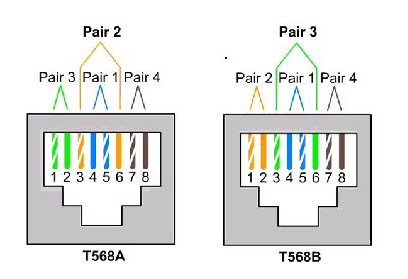
    Is there a problem with the network cable? Must use five types of network cables? The network cable we use is made by ourselves.

    The wiring at both ends is as shown。

  • Hi,

    I think you are raising a good question and possibly the answer by looking at the cable type being used in your test. In my test I used about a 1M long cat5e cable which is rated for 1Gbps traffic and I am not seeing any packet loss. With your cable you are experiencing packets loss.

    In the log I provided the Ethernet interface is up at 1Gbps per the line from the log below:

    [ 17.608289] cpsw 4a100000.ethernet eth0: Link is Up - 1Gbps/Full - flow control off

    There are factors for an Ethernet cable such as length limitations, 100M or less. I would recommend trying a different Ethernet cable such as a one that is prefabricated cat5e or cat6 with molded connectors from a different vendor as a means of problem identification. If the issue is the cable this is not something that TI will be able to assist you with solving.

    Best Regards,
    Schuyler
  • Hi,

    I tried the cat6 cable, the problem still exists, it seems that this is not the reason. I tested imx6 using the same computer and the same cable made by ourselves. No such problem. What should I do next?

    You said that you have no problems, are you directly connected to the board and computer through the network cable? I tested our own three boards and two  TMDSSK3358 boards. All have this problem.

  • Hi,

    I tried the setup of direct connection and I do not see any packets being dropped. I also tried both ports in the AM335x-EVMSK, I tried sending the packets from the computer attached and I did not have any see any packet loss. I am using a Ubuntu Linux PC. Since you have two AM335x-EVMSK boards does a direct connection between the two boards show an issue?

    You might try using wireshark to track the packets to make sure that they all made it to the line. Also by using wireshark you could analyze the time between devices to on the line. I would recommend using a second pc with a mirrored port on a switch.

    Best Regards,
    Schuyler