This thread has been locked.

If you have a related question, please click the "Ask a related question" button in the top right corner. The newly created question will be automatically linked to this question.

RTOS/PROCESSOR-SDK-AM335X: Controlling memory sections in linker

Part Number: PROCESSOR-SDK-AM335X
Other Parts Discussed in Thread: SYSBIOS

Tool/software: TI-RTOS

Hello again,

Now I wish to control placement of the code in memory.  I want to place it in SRAM, not in DDR. 

I am using CCS 7.2  SysBios 6.46.5.55, XDC 3.32.2.25

The linker cmd file says this:

/*
 * In order to put the .bass, .text, .data, .heap or .stack into a
 * different memory section, change the corresponding REGION_ALIAS.
 */
REGION_ALIAS("REGION_BSS", DDR2);
REGION_ALIAS("REGION_TEXT", DDR2);
REGION_ALIAS("REGION_DATA", DDR2);
REGION_ALIAS("REGION_STACK", DDR2);
REGION_ALIAS("REGION_HEAP", DDR2);
REGION_ALIAS("REGION_ARM_EXTAB", DDR2);
REGION_ALIAS("REGION_ARM_EXIDX", DDR2);

Which makes ZERO sense to even put that comment in there, because it also clearly says " This file was generated by linkcmd_bm_v7a.xdt ..."

 I already know it's done with the linker script.  But, as usual, I don't have control over the script. So editing the file is out of the question.  I have to control it with the CFG file...  which is difficult to find any support.  And there is nothing in the XGCONF interface that gives me any control over the linker settings.

I searched for quite a while, and landed on this:

processors.wiki.ti.com/.../BIOS_FAQs

Which doesn't work.  I tried simply:

Program.sectMap[".text : { } "] = "SRAM_HI";

Which gave an error:

ld.exe:configPkg/linker.cmd:68: syntax error

And I tried to set the entry point (_c_int00) to the SRAM location using this 

Program.sectMap[".c_int00 { C:/ti/bios_6_46_05_55/packages/gnu/targets/arm/rtsv7A/lib/boot.aa8fg (.text) }"] = new Program.SectionSpec();
Program.sectMap[".c_int00 { C:/ti/bios_6_46_05_55/packages/gnu/targets/arm/rtsv7A/lib/boot.aa8fg (.text) }"].loadAddress = 0x402F0400;

And still got the same error.  Clearly the tools ARE NOT creating proper linker cmd file syntax. The error is:

SECTIONS {

        .text : { }  : {*(.text : { } )}  AT> SRAM_HI
    .vecs : {*(.vecs)}  AT> DDR2
    ti.sysbios.family.arm.a8.mmuTableSection (NOLOAD) : {*(ti.sysbios.family.arm.a8.mmuTableSection)}  AT> DDR2
    xdc.meta (COPY) : {KEEP(*(xdc.meta))}  AT> DDR2


    .c_int00 : {
        KEEP (*(.c_int00))
    } > REGION_TEXT

    .text : {
        CREATE_OBJECT_SYMBOLS
        KEEP (*(.resetVecs))
        KEEP (*(.text))
        *(.text.*)

(Where is the "AT > ... "  coming from??  None of the other sections stuff the word "AT" between the brace and the memory name  )

Perhaps somewhere there is a better document describing how to use these Java instructions in the CFG file...?  Because I haven't found anything. I would go straight to the linker file based on this information:

processors.wiki.ti.com/.../Linker_Command_File_Primer

But it's useless here because the build tools decide they will do it "their own way".  And "their own way" isn't working in any fashion I can decipher.

On the other hand...  If I try to use my own CMD file, such as:

SECTIONS {
    .text : { * (.text) }  > SRAM_HI
}

Or one of some dozen different variants, it happily ignores it, and stuffs everything into DDR2  (0x80000000  )  (Because it sets every REGION_ALIAS to DDR2, and then sets every section to one of those region alias')

Or, if I do this to my cmd file:

SECTIONS {
    .text:_c_int00  0x402F0400 :  {
    	C:/ti/bios_6_46_05_55/packages/gnu/targets/arm/rtsv7A/lib/boot.aa8fg  (.text)
    } > SRAM_HI
}

It very loyally places the entry point at 0x402F0400, and then commences to put every other function up in DDR2

Are there any useful doc or instructions out there...?

  • The RTOS team have been notified. They will respond here.
  • Christofer,

    in such cases your best bet would be to use the Platform Wizard and create your own platform and then set up that platform to allocate text to SRAM_HI. Here is the demo 104.154.111.176/.../Demo_of_the_RTSC_Platform_Wizard_in_CCSv4

    However, in your particular case there is a shortcut that could be easier to implement.

    Add a new file config.bld to your project and add the following line to it:

    Build.platformTable["ti.platforms.evmAM3359"] = {codeMemory: "SRAM_HI"};

    I am assuming you are using ti.platforms.evmAM3359. If you are using another platform, edit that line accordingly.

    Then, go to Project Properties->CCS Build->XDCtools->Advanced Options, and type ${PROJECT_ROOT}/config.bld in the text field for Build configuration file.

    When you rebuild your project, you should see your code in SRAM_HI.

    BTW, the source of the information about RTSC platforms and targets is 104.154.111.176/.../Using_Targets_and_Platforms and http://104.154.111.176/docs-tip/Memory_Management. These two were supposed to be located on http://rtsc.eclipse.org, and they will be in the future, but because of a recent crash that server is offline.

  • Hi Christopher,

    Did this get resolved?

    Todd
  • ToddMullanix said:
    Hi Christopher,

    Did this get resolved?

    Todd

    Todd, Sasha,

    No, it isn't resolved.
    The instructions are for CCS 4, and took a while to figure out where stuff had been moved. (wonder why I don't blindly update to newer versions??  it takes me days to find where the changes are from documented older versions to this one...  I'm not masochistic enough to inflict that pain on myself repeatedly...  and of course, such documented settings are rarely updated to reflect the new releases)
    Also, I'll wait for the server to be fixed, so there is a DNS.  I do not want to just blindly connect to an IP Address on the web, based on a blog posting from someone I don't know
     
    I did change the "platform" from evmAM3359 to beaglebone.   It tries to correctly put the hex code in SRAM, but gives me the following error ( which I expected, and fully understand):
    makefile:147: recipe for target 'SimpleMMC.out' failed
    c:/ti/ccsv7/tools/compiler/gcc-arm-none-eabi-6-2017-q1-update/bin/../lib/gcc/arm-none-eabi/6.3.1/../../../../arm-none-eabi/bin/ld.exe: SimpleMMC.out section `.text' will not fit in region `SRAM_HI'
    c:/ti/ccsv7/tools/compiler/gcc-arm-none-eabi-6-2017-q1-update/bin/../lib/gcc/arm-none-eabi/6.3.1/../../../../arm-none-eabi/bin/ld.exe: region `SRAM_HI' overflowed by 49360 bytes

    I have managed to find two places that define the stack size and heap size, and I changed them to significantly smaller values.  But the error reports the same overflow value no matter what I change it to, or which place I change it. So obviously, there is yet ANOTHER PLACE that this is environment is hiding the settings, besides the linker settings in the properties, or in the CFG file.  And I am unable to find it.

    What I did was scrap using Sys/BIOS and just created an empty project.  I don't need RTOS for this project anyway... I only wanted MMCSD. Then I can use MY OWN linker script, where I KNOW where the settings are, I have direct control over them, and that they actually DO SOMETHING...

    Except after a week, this is also yet again, another trip down a long rat hole into an epic failure trying to use the PDK for anything but the narrow minded examples. I have not yet posted the long ranting version of my week dealing with these issues, but in short...

    1. I can't build the PDK from the command line. The build fails. My (years ago) post for help was never resolved...  So I have no choice but to use the pre-compiled libs.

    2. The long winding threads of inter-dependencies in the PDK means I eventuality just had to link to EVERYTHING

    3. I make a minuscule change and project crashes, deep in a call into the PDK...  I have no idea why or where.  Of course there is NO USEFUL doc on any of this.  And I can't debug it because it's in PDK libs which I can't build...

    4. I try importing parts of the PDK into the workspace, so I can build traceable versions of CSL, Board, etc...  (I did this with Starterware 2.0.1.1 and was massively successful - so why not try it with this???)

    5. Having TWO folders named ti/csl or any other package (one is mine locally, one in the PDK) is a nightmare to figure out which header and source is being used, so I renamed mine to "ti_local/csl"...  And CCS decided, without verifying with me, to barrel through my entire project changing the #includes...   except IT CORRUPTED HALF THE FILES...  It REMOVED includes...  it REARRANGED include orders...  Effectively, CCS just decided to destroy several days work.

    6. After a lot of time trying to recover, I can't get "CSL" to build inside my CCS, as it had hundreds of undefined symbols...  why?  I dig into the code, and I find that the symbols are defined in header files....  and those header files are in a list of half a dozen includes and are protected with #ifdefs     ( C:\ti\pdk_am335x_1_0_7\packages\ti\csl\csl_mdio.h) 

    #if defined(SOC_K2K)
    #include <ti/csl/src/ip/mdio/V0/csl_mdio.h>
    #elif defined(SOC_K2H) || defined(SOC_C6678)
    #include <ti/csl/src/ip/mdio/V0/csl_mdio.h>
    #elif defined(SOC_K2E)
    #include <ti/csl/src/ip/mdio/V1/csl_mdio.h>
    ...  yada yada yada...
    

    But there is NO DEFINED VALUE FOR the am335x...  In other words, this file can't build for an am335x because it never includes a required header!!  C:\ti\pdk_am335x_1_0_7\packages\ti\csl\csl_mdio.h is supposed to #include  V0, V1, V2...  some version of the csl_mdio.h.  I don't even know what MDIO is, but I'm betting that I don't even need the functionality...  In other words, I bet I am spending days trying to resolve some build issue for a collection of functions I don't even need...

    If the build script defines one of these other #define symbols, I have no idea what it is supposed to be, because I've never heard of any of them. And the make system does an even better job of completely hiding these settings than CCS/XDC did of hiding the stack size...  (unlike starterware 2.0.1.1 which was rather simple to trace the make file process and import it into a CCS lib project. )

    All this nightmare because deep down in there, "GPIOModuleEnable(uint32_t baseAdd)"  crashes with a DataAbort interrupt, and there is no support for figuring out what is going on...

    Yes...   days wasted because GPIOModuleEnable(SOC_GPIO_1_REGS)  is blowing up in my face.

  • Todd,
    As I said, I tossed aside the idea of using XDC and SysBios... But I have a problem: I can't write to DDR when running this program in SRAM.
    Here is the progress:
    e2e.ti.com/.../700314
  • Christopher Weber said:

    Todd, Sasha,

    No, it isn't resolved.
    I did change the "platform" from evmAM3359 to beaglebone.   It tries to correctly put the hex code in SRAM, but gives me the following error ( which I expected, and fully understand):
    makefile:147: recipe for target 'SimpleMMC.out' failed
    c:/ti/ccsv7/tools/compiler/gcc-arm-none-eabi-6-2017-q1-update/bin/../lib/gcc/arm-none-eabi/6.3.1/../../../../arm-none-eabi/bin/ld.exe: SimpleMMC.out section `.text' will not fit in region `SRAM_HI'
    c:/ti/ccsv7/tools/compiler/gcc-arm-none-eabi-6-2017-q1-update/bin/../lib/gcc/arm-none-eabi/6.3.1/../../../../arm-none-eabi/bin/ld.exe: region `SRAM_HI' overflowed by 49360 bytes

    I have managed to find two places that define the stack size and heap size, and I changed them to significantly smaller values.  But the error reports the same overflow value no matter what I change it to, or which place I change it. So obviously, there is yet ANOTHER PLACE that this is environment is hiding the settings, besides the linker settings in the properties, or in the CFG file.  And I am unable to find it.

    So, three weeks later, no one has replied.  Even though I scrappusing using RTOS because of the lack of support here, it would be nice to have an actual answer to this, as it may be useful knowledge.  Or is this just another hole in the TI-RTOS/XDC/ CFG file eco system that there is no way around.
    As I said, I scrapped using the Cfg file SysBios RTOS, and just built it as a raw C program.  Is that the reputation that TI wants?  Try to do something a little "outside the (very narrow) box, and you can't use the SysBios  RTOS" ?
    And by the way, when NOT USING THE CFG file RTOS SysBios stuff, I can change the stack and heap sizes in the properties to:
    1. Make the overflow smaller and then
    2. Reduce it again to actually fit. 
    So when you use SysBios, you can't control it???  But when you don't, you can control it??
    Just asking. Because I haven't yet found a reason to stop telling my boss "that other division made a mistake going with TI /Sitara because help is so bad".  Even our sales rep says go to the E2E forums for help, that is the only avenue offered.
  • Scott,

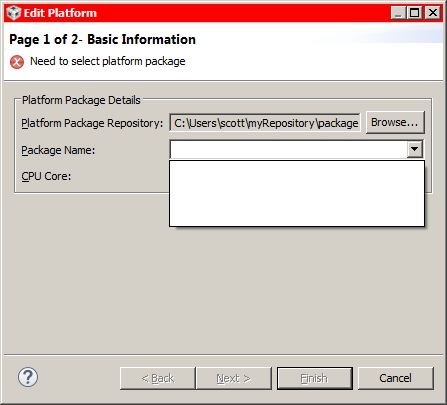
    I wanted to reply your original question how to "Controlling memory sections in linker".  By default, the memory placement is controlled by the platform in the SYSBIOS you used for compilation, e.g., you can open it from CCS---->Projects---->RTSC Tools---->platform---->Edit/View, for you it is most likely:

    You can edit this platform for your desired memory placement. But once edited and saved, this platform will also apply to your other CCS projects.

    To overcome this, one way is you create a new platform by referring to this default platform, customize it and use only for this particular project.

    A more convenient way is what Shasa/Todd suggested, using a .bld file. As you reported issue some time back, I want to walk you through this to see what cause the problem: 

    I used a typical AM335x driver example I2C_Example_icev2AM335x_armExampleProject from PDK 1.0.10, same should apply to your 1.0.7 release. After project built by CCS, you can find an auto-generated linker command file Debug\configPkg\linker.cmd:

    REGION_ALIAS("REGION_BSS", DDR3);
    REGION_ALIAS("REGION_TEXT", DDR3);
    REGION_ALIAS("REGION_DATA", DDR3);
    REGION_ALIAS("REGION_STACK", DDR3);
    REGION_ALIAS("REGION_HEAP", DDR3);
    REGION_ALIAS("REGION_ARM_EXTAB", DDR3);
    REGION_ALIAS("REGION_ARM_EXIDX", DDR3);

    So everything is put into DDR3 by default.

    To customize the code/data placement, I created a config.bld file with one line: Build.platformTable["ti.platforms.evmAM3359"] = {dataMemory: "SRAM_HI"};

     Then add into my CCS project:

    and build, I can see now in the auto-generated linker.cmd:

    REGION_ALIAS("REGION_BSS", SRAM_HI);
    REGION_ALIAS("REGION_TEXT", DDR3);
    REGION_ALIAS("REGION_DATA", SRAM_HI);
    REGION_ALIAS("REGION_STACK", DDR3);
    REGION_ALIAS("REGION_HEAP", SRAM_HI);
    REGION_ALIAS("REGION_ARM_EXTAB", SRAM_HI);
    REGION_ALIAS("REGION_ARM_EXIDX", SRAM_HI);

    Similarly if I have a .bld with: Build.platformTable["ti.platforms.evmAM3359"] = {codeMemory: "SRAM_HI"}; Then I have the linker.cmd with:

    REGION_ALIAS("REGION_BSS", DDR3);
    REGION_ALIAS("REGION_TEXT", SRAM_HI);
    REGION_ALIAS("REGION_DATA", DDR3);
    REGION_ALIAS("REGION_STACK", DDR3);
    REGION_ALIAS("REGION_HEAP", DDR3);
    REGION_ALIAS("REGION_ARM_EXTAB", DDR3);
    REGION_ALIAS("REGION_ARM_EXIDX", DDR3);

    Of course, I had data/code placement error as the SRAM_HI is not big enough to hold the data or code. But this .bld approach shows how you customize the code replacement keeping the platform untouched. Hope this can be used as a starting point for you.

    Regards, Eric

  • Eric,

    First of all, the dialog you showed me is empty...

    Second, I did use the "bld" file, and it also overflows, just as your does.  There is no setting I can find to reduce the heap or stack size.  Every place I found it (and there were several) had no effect. Am I the only person who finds it ridiculous that these setting are in multiple places...  and even worse, they doesn't seem to have any effect??  (I set it in every place I can find to 0x100 for both STACK and HEAP.  It claims it overflows by 16MEG!! )

    Third,  Apparently I can use one, but not both.  Whichever was the LAST ONE in the file, is the ONLY ONE that has any effect on the "linker.cmd" file.

    Build.platformTable["ti.platforms.beaglebone"] = {dataMemory: "SRAM_HI"};
    Build.platformTable["ti.platforms.beaglebone"] = {codeMemory: "SRAM_HI"};
    

    In this case, TEXT won't fit...  When I swap the lines top to bottom, BSS won't fit.  And I can see in the linker file, the OTHER line is still going to DDR2

    So, as I might have indicated previously, I bailed on using SysBios (as I have had to do often) because all that "cool, hidden" functionality buried in there only prevents me from controlling what I need.

  • Scott,

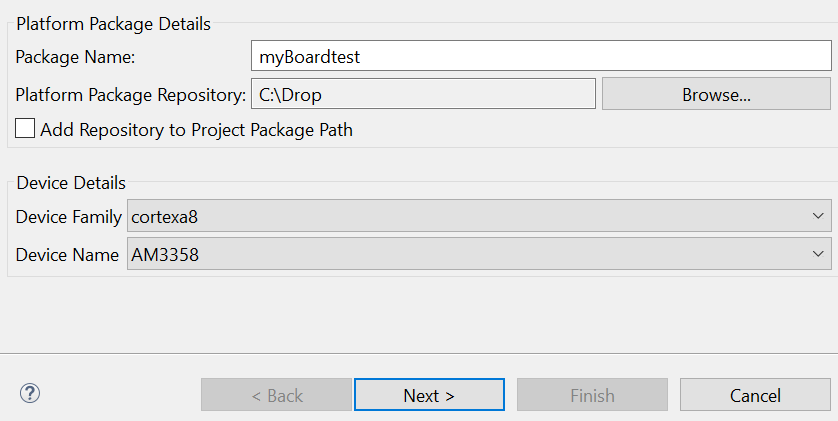
    For issue 1,  I tried to create a platform myself by:

    1. platform---->new, then type in the package name, location, device family, device name

    Then, import what evmAM3359 had for simplicity (or your can fill in yourself)

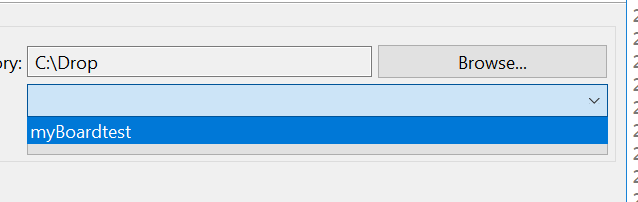
    I have no issue to save it and open later:

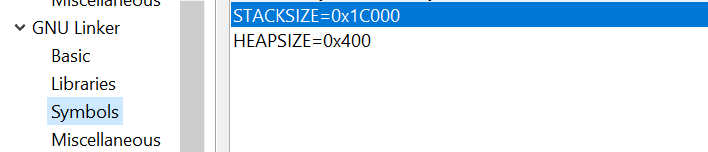
    For issue 2, the heap and stack size are defined:

    For issue 3, I asked my RTOS team colleague to comment. 

    Regards, Eric

  • Eric,
    For issue 2, that is exactly what I am changing, and it is having no effect. I am also changing the entries in the CFG file, and that is also having no effect. Please pass that onto the RTOS team as well.
  • Hi,

    If you change the heap/stack size but didn't get what you expected, can you double check the build log, in the linking stage, you can typically see:

    'Invoking: GNU Linker'

    "C:/ti/ccs_7_4_0/ccsv7/tools/compiler/gcc-arm-none-eabi-6-2017-q1-update/bin/arm-none-eabi-gcc.exe" -mtune=cortex-a8 -marm -Dam3359 -DSOC_AM335X -Dicev2AM335x -g -gdwarf-3 -gstrict-dwarf -Wall -mfloat-abi=hard -Wl,-Map,"I2C_Example_icev2AM335x_armExampleProject.map" -nostartfiles -static -Wl,--gc-sections -L"C:/ti/bios_6_52_00_12/packages/gnu/targets/arm/libs/install-native/arm-none-eabi/lib/hard" -Wl,--defsym,STACKSIZE=0x1C000 -Wl,--defsym,HEAPSIZE=0x400 --specs=nano.specs -o"I2C_Example_icev2AM335x_armExampleProject.out" "./I2C_log.o" "./UART_soc.o" "./main_eeprom_read.o" -Wl,-T"configPkg/linker.cmd" -Wl,--start-group -lrdimon -lgcc -lm -lnosys -lc -Wl,--end-group

    If I changed above inside my CCS project, I saw that reflected in my build log. 

    Regards, Eric