This thread has been locked.

If you have a related question, please click the "Ask a related question" button in the top right corner. The newly created question will be automatically linked to this question.

TDA2PXEVM: QT Cross Build Environment for TDA2Px

Part Number: TDA2PXEVM

Hi :

  We're poring an QT application to TDA2PX SOC, we found the document here  http://processors.wiki.ti.com/index.php/Sitara_Linux_Training:_Hands_on_with_QT      

 Following the link, we can't find the qmake under <path>/targetfs/usr/bin.

So, is there specific guide for TDA2PX to setup the QT5 cross build environment by the script as above link .

Thanks.

  • Hi,

    The linux devkit is included as part of the PSDKLA installer.

    When you run the setup.sh from the installer as documented in the Software Developers Guide, you will be asked a question regarding the linux-devkit. Please choose the answer as Yes and you will then find the required environment for the qmake.

    Regards
    Karthik
  • Hello Karthik:

      It's really difficult to download the all PDSKLA as the internet speed. 

     why not include such in TI VisionSDK? and is there another way that  can get such qmake only for QT emvironment?

     Thanks.

  • Hi:

      We can connect to http://commondatastorage.googleapis.com/git-repo-downloads/repo


    Resolving commondatastorage.googleapis.com (commondatastorage.googleapis.com)... 243.185.187.39
    Connecting to commondatastorage.googleapis.com (commondatastorage.googleapis.com)|243.185.187.39|:80...

    failed: Connection timed out.
    Retrying.

    --2018-06-07 19:28:56-- (try: 2) commondatastorage.googleapis.com/.../repo
    Connecting to commondatastorage.googleapis.com (commondatastorage.googleapis.com)|243.185.187.39|:80... failed: Connection timed out.
    Retrying.

    --2018-06-07 19:31:06-- (try: 3) commondatastorage.googleapis.com/.../repo
    Connecting to commondatastorage.googleapis.com (commondatastorage.googleapis.com)|243.185.187.39|:80...

  • Hi,

    The easiest way for you to get started is by using the PSDKLA 3.04, here is the link to the release installers.
    downloads.ti.com/.../index_FDS.html

    The Software Developers Guide link is here and it should help you get the Qt environment.
    processors.wiki.ti.com/index.php

    However, as you know that the Qt environment by itself has a lot of dependencies for a full fledged environment and it is very difficult to enable you in parts. It is highly recommended that you adopt a hybrid approach like what is recommended and get your Qt environment running.

    And for the errors that you have posted, it may be due to certain proxy and firewall configuration on your end and please follow the guidelines that are posted in this section: processors.wiki.ti.com/index.php to overcome the errors.

    Regards
    Karthik
  • Hello:
    Luck that I copy the whole from the Ti local support . and when do select the qmake , got and error:
    please have a look at the output of the "strace qmake"

    openat(AT_FDCWD, "/root/.config/qtchooser/", O_RDONLY|O_NONBLOCK|O_DIRECTORY|O_CLOEXEC) = -1 ENOENT (No such file or directory)
    openat(AT_FDCWD, "/etc/xdg/xdg-ubuntu/qtchooser/", O_RDONLY|O_NONBLOCK|O_DIRECTORY|O_CLOEXEC) = -1 ENOENT (No such file or directory)
    openat(AT_FDCWD, "/usr/share/upstart/xdg/qtchooser/", O_RDONLY|O_NONBLOCK|O_DIRECTORY|O_CLOEXEC) = -1 ENOENT (No such file or directory)
    openat(AT_FDCWD, "/etc/xdg/qtchooser/", O_RDONLY|O_NONBLOCK|O_DIRECTORY|O_CLOEXEC) = -1 ENOENT (No such file or directory)
    openat(AT_FDCWD, "/usr/share/qtchooser/", O_RDONLY|O_NONBLOCK|O_DIRECTORY|O_CLOEXEC) = 3
    getdents(3, /* 4 entries */, 32768) = 144
    getdents(3, /* 0 entries */, 32768) = 0
    close(3) = 0
    openat(AT_FDCWD, "/usr/lib/x86_64-linux-gnu/qtchooser/", O_RDONLY|O_NONBLOCK|O_DIRECTORY|O_CLOEXEC) = 3
    getdents(3, /* 6 entries */, 32768) = 176
    getdents(3, /* 0 entries */, 32768) = 0
    close(3) = 0
    openat(AT_FDCWD, "/usr/lib/x86_64-linux-gnu/qt-default/qtchooser/", O_RDONLY|O_NONBLOCK|O_DIRECTORY|O_CLOEXEC) = 3
    getdents(3, /* 3 entries */, 32768) = 80
    open("/usr/lib/x86_64-linux-gnu/qt-default/qtchooser//default.conf", O_RDONLY) = 4
    fstat(4, {st_mode=S_IFREG|0644, st_size=60, ...}) = 0
    mmap(NULL, 4096, PROT_READ|PROT_WRITE, MAP_PRIVATE|MAP_ANONYMOUS, -1, 0) = 0x7f151f499000
    read(4, "/usr/lib/x86_64-linux-gnu/qt4/bi"..., 4096) = 60
    close(4) = 0
    munmap(0x7f151f499000, 4096) = 0
    readlink("/usr/lib/x86_64-linux-gnu/qt4/bin/qmake", 0x7ffc1f6bba20, 512) = -1 ENOENT (No such file or directory)
    execve("/usr/lib/x86_64-linux-gnu/qt4/bin/qmake", ["/usr/lib/x86_64-linux-gnu/qt4/bi"...], [/* 59 vars */]) = -1 ENOENT (No such file or directory)
    write(2, "qmake: could not exec '/usr/lib/"..., 91qmake: could not exec '/usr/lib/x86_64-linux-gnu/qt4/bin/qmake': No such file or directory
    ) = 91
    exit_group(1) = ?
    +++ exited with 1 +++
  • Hi,

    Could you please let me know what you have copied and the procedure that you have followed to get to this error?
    Some additional details will help in finding out the problem.

    Why is the Qt version 4, it should be Qt5?

    And please refer to a similar question and solution suggested here: e2e.ti.com/.../2475650

    Regards
    Karthik
  • Hello Kathik:

     By replacing the command in script, i succeed to download the linux-devit.

    1. As you know, we'are working based on vision SDK not the PSDKLA, how much difference between them?
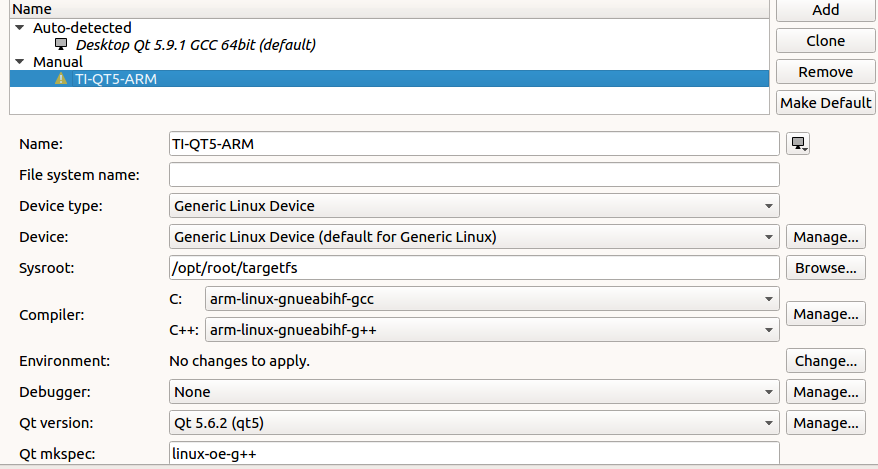
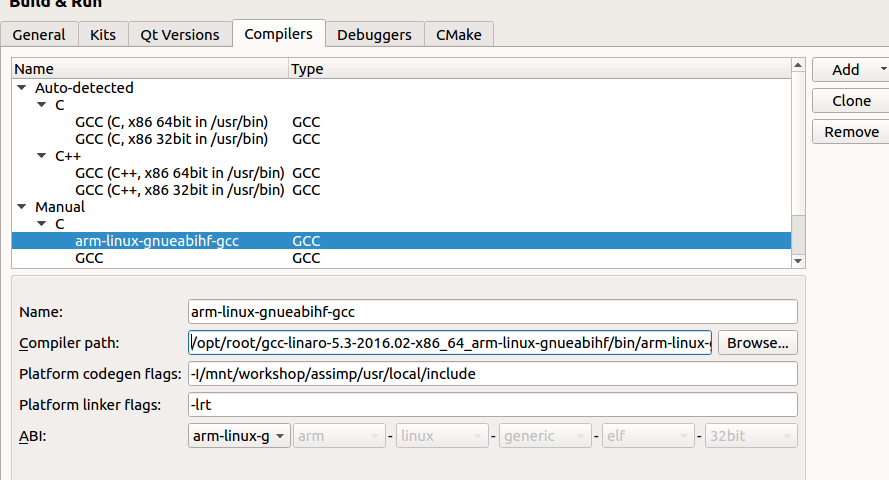
    2. In QtCreator, I set the sysroot and cross-compiler to vision SDK, but it still use the linux-devkit.

    • QTCreator UI

    • and the compiler output is:

    arm-linux-gnueabihf-gcc -c -pipe  -march=armv7-a -marm -mfpu=neon  -mfloat-abi=hard --sysroot=/opt/ti-processor-sdk-linux-automotive-dra7xx-evm-03_04_00_03/linux-devkit/sysroots/armv7ahf-neon-linux-gnueabi -g -Wall -W -D_REENTRANT -fPIC -DAPP_RUN_ON_PC -DQT_QML_DEBUG -DQT_WIDGETS_LIB -DQT_GUI_LIB -DQT_CORE_LIB -I../avm_qt_app -I. -I/opt/ti-processor-sdk-linux-automotive-dra7xx-evm-03_04_00_03/linux-devkit/sysroots/armv7ahf-neon-linux-gnueabi/usr/include/qt5 -I/opt/ti-processor-sdk-linux-automotive-dra7xx-evm-03_04_00_03/linux-devkit/sysroots/armv7ahf-neon-linux-gnueabi/usr/include/qt5/QtWidgets -I/opt/ti-processor-sdk-linux-automotive-dra7xx-evm-03_04_00_03/linux-devkit/sysroots/armv7ahf-neon-linux-gnueabi/usr/include/qt5/QtGui -I/opt/ti-processor-sdk-linux-automotive-dra7xx-evm-03_04_00_03/linux-devkit/sysroots/armv7ahf-neon-linux-gnueabi/usr/include/qt5/QtCore -I. -I/opt/ti-processor-sdk-linux-automotive-dra7xx-evm-03_04_00_03/linux-devkit/sysroots/x86_64-arago-linux/mkspecs/linux-oe-g++ -o video_sync.o ../avm_qt_app/video_sync.c

  • Hi,

    > As you know, we'are working based on vision SDK not the PSDKLA, how much difference between them?
    If your intention is to develop on Qt then you have only one option that is to use the PSDKLA 3.04. So there is no need to compare the two.

    Vision SDK and PSDKLA are catering to different products and market segments, please refer to the respective User Guides to understand the differences. The answer to this question is beyond the scope of this post.

    If there are any other follow up questions, please do reply back. For now, I think you are enabled and I'm marking this as closed.

    Regards
    Karthik