This thread has been locked.

If you have a related question, please click the "Ask a related question" button in the top right corner. The newly created question will be automatically linked to this question.

Linux/AM3354: Resistive touchscreen issue

Part Number: AM3354

Tool/software: Linux

Hello,

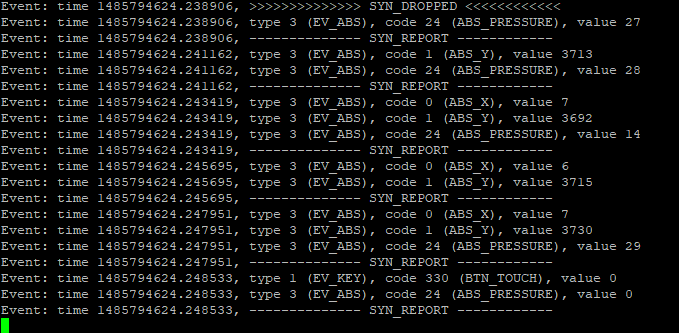
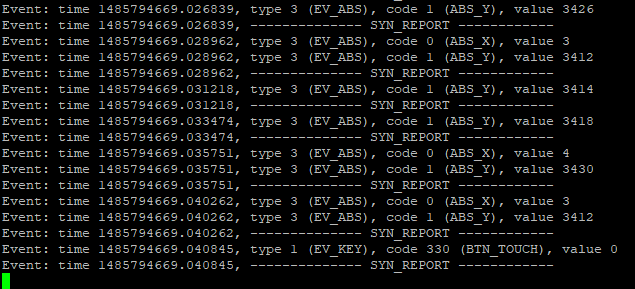
We have a custom design board running kernel 4.4.19 on the AM3354. We use 7 "and 10" resistive touch screens on this card. The touch is working. However, it is not stable, you have to press the same button several times on the screen for working. When we tried to find the problem, we listened to the touchscreen0 input device (cat/dev/input/touchscreen0). As a result, without touching the touch screen, we saw that many push events occurred. When we remove the resistive touch cable from the card, the event stops. Below you can see the schematic design and the definition of tsc in the device tree. We tried to change the ti, x-plate-resistance parameter in the device tree, but we could not get a result. What do you recommend?

Thank you.

Best regards.

&tscadc {
	status = "okay";
	tsc {
		ti,wires = <4>;
		ti,x-plate-resistance = <200>;
		ti,coordinate-readouts = <5>;
		ti,wire-config = <0x20 0x01 0x32 0x13>;
		ti,charge-delay = <0x700>;
		ti,alt_pins_conf;
	};

	adc {
		ti,adc-channels = <4 5 6 7>;
	};
};

evtest result: (While untouch,  ti,x-plate-resistance = <300>;  ti,charge-delay = <0x900>)

evtest result: (While untouch,  ti,x-plate-resistance = <200>;  ti,charge-delay = <0x700>)

  • Hello Ahmet,

    Will dig into this and get back to you.

    Regards,
    Nick
  • Ahmet,

    I suspect the pin mapping might be causing you issues. Is it possible for you to wire it up like this:

    * AIN0 = XL
    * AIN1 = XR
    * AIN2 = YT
    * AIN3 = YB

    I don't understand why the mapping was ever made configurable in this driver. The hardware itself is not orthogonal. Have a look at Figure 12-2 "Functional Block Diagram" in the TRM. You'll see that:

    1. AIN0 can be driven high, but it cannot be driven low.
    2. AIN3 can be driven low, but it cannot be driven high.
    3. PENIRQ is connected to AIN0.

    While I suspect there are some mappings that could work, I don't think your specific mapping works which is likely why you always see the touches.

    Brad

  • Hi Brad,

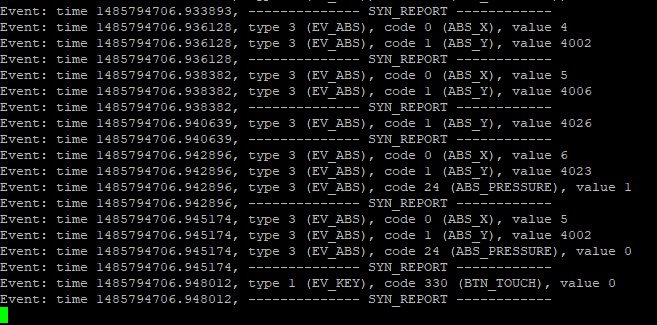
    You are right. I fixed the pin mapping as you suggested. And only the touch events are when I touch. However, I am having a different problem when fixing pin mapping. I can't calibrate the touch screen. When I look at the X and Y coordinates using Evtest, I think the X and Y values are wrong. The values do not change much. I've tried some things to fix it, but I haven't been successful.

    As an example, when I touch the left side of the screen:

    When I touch the right:

    When I touch top:

    When I touch bottom:

  • Can you show your updated dts entry? Did you correspondingly update wire-config? Also, I don't find ti,alt_pins_conf anywhere in the Linux kernel, so I wasn't sure what you were trying to do there.

    Please make sure you have proper grounding between your AM335x and the touchscreen. That can cause a lot of issue (not sure about this specific issue, but it's a fairly common problem).
  • Hi Brad,

    Thanks for help. When I was experimenting with my first problem, I made changes in the TI tsc driver. For this reason, the X and Y values were incorrect. My problem was solved with your first suggestion.

    Thank you.
  • Ahmet,

    That's great news. Thanks for the update and I'm glad to hear things are working now.

    Best regards,
    Brad