This thread has been locked.

If you have a related question, please click the "Ask a related question" button in the top right corner. The newly created question will be automatically linked to this question.

RTOS/66AK2H14: EMAC example is not working in non loopback mode

Part Number: 66AK2H14
Other Parts Discussed in Thread: TCI6638K2K

Tool/software: TI-RTOS

Hi,

I want to test PA EMAC example with PC. I referred this document  http://processors.wiki.ti.com/index.php/Processor_SDK_RTOS_PA.

I tried to run C:\ti\pdk_keystone2_3_01_04_07\packages\ti\drv\pa\example\emacExample in external loop-back OR No loop-back on EVMK2H so as to connect with PC to test the example.

but it is getting stuck in

/* Wait for SGMII Link */
if (!cpswSimTest)
{
do
{
CSL_SGMII_getStatus(macPortNum, &sgmiiStatus);
}while (sgmiiStatus.bIsLinkUp != 1);

I have referred this link

I am facing similar problem . I didn't get any solution from that link.

while on both Ethernet jack I see the link LED is UP and showing 1Gbps Link status.

I have two RJ-45 connector and I have connected Ethernet cable from one RJ-45 to PC.I changed the  RJ-45 port and tried but result is same.

Please help me to solve this.

Regards,

Mahima Shanbag

  • The team is notified. They will post their feedback directly here.

    BR
    Tsvetolin Shulev
  • Hi Tsvetolin Shulev,
    Thank you.

    I tried NIMU_emacExample_EVMK2HC66BiosExampleProject , but there aslo same issue. it will be waiting for link up.
    Is there any PHY configuration we have to do like in C:\ti\ccsv7\ccs_base\emulation\boards\evmk2e\gel .

    Please help me to solve this as soon as possible

    Regards,
    Mahima Shanbag
  • Hi,
    Any updates?
    Regards,
    Mahima Shanbag
  • Hi,

    That C:\ti\pdk_keystone2_3_01_04_07\packages\ti\drv\pa\example\emacExample is from MCSDK and not supported. Please move to latest processor SDK RTOS 4.3 release and you should not have such problem. Another thing to check is do you TI K2H EVM in no-boot mode, do you run the GEL to initialize the board?

    Regards, Eric
  • Hi Eric,
    I tried with C:\ti\pdk_k2hk_4_0_9\packages\ti\drv\pa\example\emacExample but I got same results.
    I kept EVM in no boot mode and used GEL file to initialize.

    Regards,
    Mahima Shanbag
  • Hi,

    I don't see any issue. Attached is my binary (it was build from PDK 4.0.7, the K2H is in maintenance and the driver is not changed for a long time, so 4.0.7 or the latest 4.0.9 should be the same).

    When connection ARM core, the GEL ran to initialize the K2H EVM:

    =======================

    arm_A15_0: GEL Output: Disabling MMU

    arm_A15_0: GEL Output: Disabling Caches

    arm_A15_0: GEL Output: Invalidate Instruction Caches

    arm_A15_0: GEL Output: Enabling non-secure access to cp10 and cp11

    arm_A15_0: GEL Output: Enabled non-secure access to cp10 and cp11

    arm_A15_0: GEL Output: Enabling SMP bit in ACTLR

    arm_A15_0: GEL Output: Enabled SMP bit in ACTLR

    arm_A15_0: GEL Output: Entering NonSecure Mode

    arm_A15_0: GEL Output: Entered NonSecure Mode

    arm_A15_0: GEL Output: Disabling MMU

    arm_A15_0: GEL Output: Disabling Caches

    arm_A15_0: GEL Output: Invalidate Instruction Caches

    arm_A15_0: GEL Output:

    Connecting Target...

    arm_A15_0: GEL Output: Disabling MMU

    arm_A15_0: GEL Output: Disabling Caches

    arm_A15_0: GEL Output: Invalidate Instruction Caches

    arm_A15_0: GEL Output: Enabling non-secure access to cp10 and cp11

    arm_A15_0: GEL Output: Enabled non-secure access to cp10 and cp11

    arm_A15_0: GEL Output: Enabling SMP bit in ACTLR

    arm_A15_0: GEL Output: Enabled SMP bit in ACTLR

    arm_A15_0: GEL Output: Entering NonSecure Mode

    arm_A15_0: GEL Output: Entered NonSecure Mode

    arm_A15_0: GEL Output: Disabling MMU

    arm_A15_0: GEL Output: Disabling Caches

    arm_A15_0: GEL Output: Invalidate Instruction Caches

    arm_A15_0: GEL Output: TCI6638K2K GEL file Ver is 1.79999995

    arm_A15_0: GEL Output: Disabling MMU

    arm_A15_0: GEL Output: Disabling Caches

    arm_A15_0: GEL Output: Invalidate Instruction Caches

    arm_A15_0: GEL Output: Enabling non-secure access to cp10 and cp11

    arm_A15_0: GEL Output: Enabled non-secure access to cp10 and cp11

    arm_A15_0: GEL Output: Enabling SMP bit in ACTLR

    arm_A15_0: GEL Output: Enabled SMP bit in ACTLR

    arm_A15_0: GEL Output: Entering NonSecure Mode

    arm_A15_0: GEL Output: Entered NonSecure Mode

    arm_A15_0: GEL Output: Disabling MMU

    arm_A15_0: GEL Output: Disabling Caches

    arm_A15_0: GEL Output: Invalidate Instruction Caches

    arm_A15_0: GEL Output: Detected PLL bypass enabled: SECCTL[BYPASS] = 0x00800000

    arm_A15_0: GEL Output: (2a) MAINPLLCTL1 = 0x00000040

    arm_A15_0: GEL Output: (2b) PLLCTL = 0x00000048

    arm_A15_0: GEL Output: (2c) PLLCTL = 0x00000048

    arm_A15_0: GEL Output: (2d) Delay...

    arm_A15_0: GEL Output: (2e) SECCTL = 0x00810000

    arm_A15_0: GEL Output: (2f) PLLCTL = 0x0000004A

    arm_A15_0: GEL Output: (2g) Delay...

    arm_A15_0: GEL Output: (2h) PLLCTL = 0x00000048

    arm_A15_0: GEL Output: (4)PLLM[PLLM] = 0x0000000F

    arm_A15_0: GEL Output: MAINPLLCTL0 = 0x05000000

    arm_A15_0: GEL Output: (5) MAINPLLCTL0 = 0x07000000

    arm_A15_0: GEL Output: (5) MAINPLLCTL1 = 0x00000040

    arm_A15_0: GEL Output: (6) MAINPLLCTL0 = 0x07000000

    arm_A15_0: GEL Output: (7) SECCTL = 0x00890000

    arm_A15_0: GEL Output: (8a) Delay...

    arm_A15_0: GEL Output: PLL1_DIV3 = 0x00008002

    arm_A15_0: GEL Output: PLL1_DIV4 = 0x00008004

    arm_A15_0: GEL Output: PLL1_DIV7 = 0x00000000

    arm_A15_0: GEL Output: (8d/e) Delay...

    arm_A15_0: GEL Output: (10) Delay...

    arm_A15_0: GEL Output: (12) Delay...

    arm_A15_0: GEL Output: (13) SECCTL = 0x00090000

    arm_A15_0: GEL Output: (Delay...

    arm_A15_0: GEL Output: (Delay...

    arm_A15_0: GEL Output: (14) PLLCTL = 0x00000041

    arm_A15_0: GEL Output: PLL has been configured (CLKIN * PLLM / PLLD / PLLOD = PLLOUT):

    arm_A15_0: GEL Output: PLL has been configured (122.879997 MHz * 16 / 1 / 2 = 983.039978 MHz)

    arm_A15_0: GEL Output: Switching on ARM Core 0

    arm_A15_0: GEL Output: Switching on ARM Core 1

    arm_A15_0: GEL Output: Switching on ARM Core 2

    arm_A15_0: GEL Output: Switching on ARM Core 3

    arm_A15_0: GEL Output: ARM PLL has been configured (125.0 MHz * 16 / 2 = 1000.0 MHz)

    arm_A15_0: GEL Output: Power on all PSC modules and DSP domains...

    arm_A15_0: GEL Output: Set_PSC_State... Timeout Error #03 pd=27, md=48!

    arm_A15_0: GEL Output: Power on all PSC modules and DSP domains... Done.

    arm_A15_0: GEL Output: WARNING: SYSCLK is the input to the PA PLL.

    arm_A15_0: GEL Output: Completed PA PLL Setup

    arm_A15_0: GEL Output: PAPLLCTL0 - before: 0x0x098804C0 after: 0x0x09080500

    arm_A15_0: GEL Output: PAPLLCTL1 - before: 0x0x00000040 after: 0x0x00002040

    arm_A15_0: GEL Output: DDR begin

    arm_A15_0: GEL Output: XMC setup complete.

    arm_A15_0: GEL Output: DDR3 PLL (PLL2) Setup ...

    arm_A15_0: GEL Output: DDR3 PLL Setup complete, DDR3A clock now running at 666 MHz.

    arm_A15_0: GEL Output: DDR3A initialization complete

    arm_A15_0: GEL Output: DDR3 PLL Setup ...

    arm_A15_0: GEL Output: DDR3 PLL Setup complete, DDR3B clock now running at 800MHz.

    arm_A15_0: GEL Output: DDR3B initialization complete

    arm_A15_0: GEL Output: DDR done

    arm_A15_0: GEL Output: Entering A15 non secure mode ..

    arm_A15_0: GEL Output: Disabling MMU

    arm_A15_0: GEL Output: Disabling Caches

    arm_A15_0: GEL Output: Invalidate Instruction Caches

    arm_A15_0: GEL Output: Enabling non-secure access to cp10 and cp11

    arm_A15_0: GEL Output: Enabled non-secure access to cp10 and cp11

    arm_A15_0: GEL Output: Enabling SMP bit in ACTLR

    arm_A15_0: GEL Output: Enabled SMP bit in ACTLR

    arm_A15_0: GEL Output: Entering NonSecure Mode

    arm_A15_0: GEL Output: Entered NonSecure Mode

    arm_A15_0: GEL Output: Disabling MMU

    arm_A15_0: GEL Output: Disabling Caches

    arm_A15_0: GEL Output: Invalidate Instruction Caches

    arm_A15_0: GEL Output: A15 non secure mode entered

    =====================

    Then load the binary and ran:

    =================================

    [arm_A15_0] **************************************************

    ******* Ethernet Single Core Example Start *******

    **************************************************

    QMSS successfully initialized

    CPPI successfully initialized

    PASS successfully initialized

    SGMII Serdes Common Init Complete

    SGMII Serdes Lanes Init Complete

    Ethernet subsystem successfully initialized

    Tx setup successfully done

    Rx setup successfully done

    PASS setup successfully done

    Following is the ALE table before transmits.

    Frames Received                0

    Rx Frame Fragments Received               0

    Total Received Bytes in Good Frames       0

    Good Frames Sent                          0

    Good Broadcast Frames Sent                0

    Good Multicast Frames Sent                0

    PauseTx Frames Sent                       0

    Frames Where Transmission was Deferred    0

    Total Frames Sent With Collision          0

    Frames Sent with Exactly One Collision    0

    Frames Sent with Multiple Colisions       0

    Tx Frames Lost Due to Excessive Collisions0

    Tx Frames Lost Due to a Late Collision    0

    Tx Frames Lost Due to Carrier Sense Loss  0

    Total Transmitted Bytes in Good Frames    0

    Total Tx&Rx with Octet Size of 64         0

    Total Tx&Rx with Octet Size of 65 to 127  0

    Total Tx&Rx with Octet Size of 128 to 255 0

    Total Tx&Rx with Octet Size of 256 to 511 0

    Total Tx&Rx with Octet Size of 512 to 1023 0

    Total Tx&Rx with Octet Size of >=1024     0

    Sum of all Octets Tx or Rx on the Network 0

    ********************************************

    Frames Received                0

    Rx Frame Fragments Received               0

    Total Received Bytes in Good Frames       0

    Good Frames Sent                          0

    Good Broadcast Frames Sent                0

    Good Multicast Frames Sent                0

    PauseTx Frames Sent                       0

    Frames Where Transmission was Deferred    0

    Total Frames Sent With Collision          0

    Frames Sent with Exactly One Collision    0

    Frames Sent with Multiple Colisions       0

    Tx Frames Lost Due to Excessive Collisions0

    Tx Frames Lost Due to a Late Collision    0

    Tx Frames Lost Due to Carrier Sense Loss  0

    Total Transmitted Bytes in Good Frames    0

    Total Tx&Rx with Octet Size of 64         0

    Total Tx&Rx with Octet Size of 65 to 127  0

    Total Tx&Rx with Octet Size of 128 to 255 0

    Total Tx&Rx with Octet Size of 256 to 511 0

    Total Tx&Rx with Octet Size of 512 to 1023 0

    Total Tx&Rx with Octet Size of >=1024     0

    Sum of all Octets Tx or Rx on the Network 0

    ********************************************

    Packet Transmission Start ...

    Following is the ALE table after transmits.

    Packet Transmission Done.

    Wait for all packets to be Received from EMAC port 0...

    Packets Sent = 10

    Packets Received = 10

    Following is the ALE table after transmits.

    Packet Transmission Done.

    Wait for all packets to be Received from EMAC port 1...

    Packets Sent = 10

    Packets Received = 10

    Following is the ALE table after transmits.

    Packet Transmission Done.

    Wait for all packets to be Received from EMAC port 2...

    Packets Sent = 10

    Packets Received = 10

    Following is the ALE table after transmits.

    Packet Transmission Done.

    Wait for all packets to be Received from EMAC port 3...

    Packets Sent = 10

    Packets Received = 10

    Example Done!

    PA Stats After Packet Transmission BEGIN ********* ...

    --- PA STATS ---

    C1 number of packets:           82

    C1 number IPv4 packets:         40

    C1 number IPv6 packets:         0

    C1 number custom packets:       0

    C1 number SRIO packets:         0

    C1 number llc/snap fail:        0

    C1 number table matched:        80

    C1 number failed table matched: 0

    C1 number Ingress IP frags:     0

    C1 number IP depth overflow:    0

    C1 number vlan depth overflow:  0

    C1 number gre depth overflow:   0

    C1 number mpls packets:         0

    C1 number of parse fail:        0

    C1 number invalid IPv6 opts:    0

    C1 number of Egress IP frags:   0

    C1 number of silent discard:    0

    C1 number of invalid control:   0

    C1 number of invalid states:    0

    C1 number of system fails:      0

    C2 number of packets:           41

    C2 number of UDP packets:       40

    C2 number of TCP packets:       0

    C2 number of custom packets:    0

    C2 number of silent discard:    0

    C2 number of invalid control:   0

    Modify number of command file:  0

    ived                0

    Rx Frame Fragments Received               0

    Total Received Bytes in Good Frames       5040

    Good Frames Sent                          20

    Good Broadcast Frames Sent                0

    Good Multicast Frames Sent                0

    PauseTx Frames Sent                       0

    Frames Where Transmission was Deferred    0

    Total Frames Sent With Collision          0

    Frames Sent with Exactly One Collision    0

    Frames Sent with Multiple Colisions       0

    Tx Frames Lost Due to Excessive Collisions0

    Tx Frames Lost Due to a Late Collision    0

    Tx Frames Lost Due to Carrier Sense Loss  0

    Total Transmitted Bytes in Good Frames    2520

    Total Tx&Rx with Octet Size of 64         0

    Total Tx&Rx with Octet Size of 65 to 127  60

    Total Tx&Rx with Octet Size of 128 to 255 0

    Total Tx&Rx with Octet Size of 256 to 511 0

    Total Tx&Rx with Octet Size of 512 to 1023 0

    Total Tx&Rx with Octet Size of >=1024     0

    Sum of all Octets Tx or Rx on the Network 7560

    ********************************************

    ived                0

    Rx Frame Fragments Received               0

    Total Received Bytes in Good Frames       2520

    Good Frames Sent                          20

    Good Broadcast Frames Sent                0

    Good Multicast Frames Sent                0

    PauseTx Frames Sent                       0

    Frames Where Transmission was Deferred    0

    Total Frames Sent With Collision          0

    Frames Sent with Exactly One Collision    0

    Frames Sent with Multiple Colisions       0

    Tx Frames Lost Due to Excessive Collisions0

    Tx Frames Lost Due to a Late Collision    0

    Tx Frames Lost Due to Carrier Sense Loss  0

    Total Transmitted Bytes in Good Frames    2520

    Total Tx&Rx with Octet Size of 64         0

    Total Tx&Rx with Octet Size of 65 to 127  40

    Total Tx&Rx with Octet Size of 128 to 255 0

    Total Tx&Rx with Octet Size of 256 to 511 0

    Total Tx&Rx with Octet Size of 512 to 1023 0

    Total Tx&Rx with Octet Size of >=1024     0

    Sum of all Octets Tx or Rx on the Network 5040

    ********************************************

    All tests have passed!

    **************************************************

    ******** Ethernet Single Core Example End ********

    **************************************************

    Core 0 : CPPI CPDMA closed successfully

    Core 0 : CPPI exit successful

    Instance name: RM_Server

    Handle: 0x8009a5f8

    Type:   Server

    Resource Status:

    All resources freed successfully

    =========================

    Since this is the internal loopback (int cpswLpbkMode = CPSW_LOOPBACK_INTERNAL;), you don't need any cable connected to RJ-45 port.

    If you change this to: int cpswLpbkMode = CPSW_LOOPBACK_NONE and rebuild. Then you can connect the Ethernet port to a PC and capture the packets sent out from EVM.

    https://e2e.ti.com/cfs-file/__key/communityserver-discussions-components-files/791/PA_5F00_emacExample_5F00_K2HArmBiosExampleProject_5F00_int_5F00_loopback.out

    Regards, Eric

  • Also, attached the no_loopback out file for your reference.

    Regards, Erichttps://e2e.ti.com/cfs-file/__key/communityserver-discussions-components-files/791/PA_5F00_emacExample_5F00_K2HArmBiosExampleProject_5F00_no_5F00_loopback.out

  • Hi Eric ,

    Thank you .

    I tried with attached .out file of  non loop back mode , It worked for me.

    But same example which I built is still hangs at

    do

    {

    CSL_SGMII_getStatus(macPortNum, &sgmiiStatus);

    }while (sgmiiStatus.bIsLinkUp != 1);

    Have you made any changes other than cpswLpbkMode = CPSW_LOOPBACK_NONE?

    I have attached my .out file. Please check it once.https://e2e.ti.com/cfs-file/__key/communityserver-discussions-components-files/791/PA_5F00_emacExample_5F00_K2HArmBiosExampleProject.7z

    Thanks and Regards,

    Mahima Shanbag

  • Hi Eric,
    Any updates?

    Regards,
    Mahima Shanbag
  • Hi,

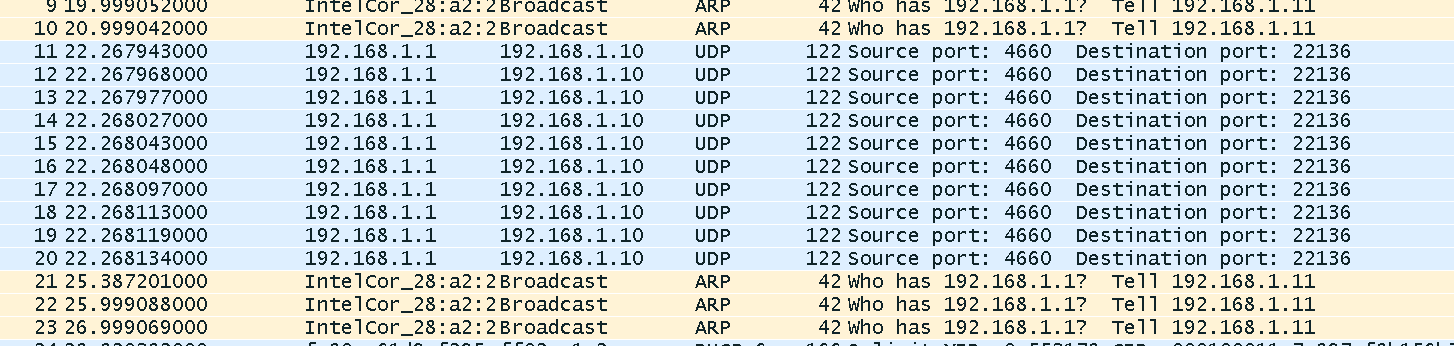
    I tried your binary, it worked on my setup. This is the only change: "cpswLpbkMode = CPSW_LOOPBACK_NONE". And I saw 10 packets captured by Wireshark.

    [arm_A15_0] **************************************************
    ******* Ethernet Single Core Example Start *******
    **************************************************
    QMSS successfully initialized
    CPPI successfully initialized
    PASS successfully initialized
    SGMII Serdes Common Init Complete
    SGMII Serdes Lanes Init Complete
    Ethernet subsystem successfully initialized
    Tx setup successfully done
    Rx setup successfully done
    PASS setup successfully done
    Following is the ALE table before transmits.
    Frames Received 0
    Rx Frame Fragments Received 0
    Total Received Bytes in Good Frames 0
    Good Frames Sent 0
    Good Broadcast Frames Sent 0
    Good Multicast Frames Sent 0
    PauseTx Frames Sent 0
    Frames Where Transmission was Deferred 0
    Total Frames Sent With Collision 0
    Frames Sent with Exactly One Collision 0
    Frames Sent with Multiple Colisions 0
    Tx Frames Lost Due to Excessive Collisions0
    Tx Frames Lost Due to a Late Collision 0
    Tx Frames Lost Due to Carrier Sense Loss 0
    Total Transmitted Bytes in Good Frames 0
    Total Tx&Rx with Octet Size of 64 0
    Total Tx&Rx with Octet Size of 65 to 127 0
    Total Tx&Rx with Octet Size of 128 to 255 0
    Total Tx&Rx with Octet Size of 256 to 511 0
    Total Tx&Rx with Octet Size of 512 to 1023 0
    Total Tx&Rx with Octet Size of >=1024 0
    Sum of all Octets Tx or Rx on the Network 0
    ********************************************
    Frames Received 0
    Rx Frame Fragments Received 0
    Total Received Bytes in Good Frames 0
    Good Frames Sent 0
    Good Broadcast Frames Sent 0
    Good Multicast Frames Sent 0
    PauseTx Frames Sent 0
    Frames Where Transmission was Deferred 0
    Total Frames Sent With Collision 0
    Frames Sent with Exactly One Collision 0
    Frames Sent with Multiple Colisions 0
    Tx Frames Lost Due to Excessive Collisions0
    Tx Frames Lost Due to a Late Collision 0
    Tx Frames Lost Due to Carrier Sense Loss 0
    Total Transmitted Bytes in Good Frames 0
    Total Tx&Rx with Octet Size of 64 0
    Total Tx&Rx with Octet Size of 65 to 127 0
    Total Tx&Rx with Octet Size of 128 to 255 0
    Total Tx&Rx with Octet Size of 256 to 511 0
    Total Tx&Rx with Octet Size of 512 to 1023 0
    Total Tx&Rx with Octet Size of >=1024 0
    Sum of all Octets Tx or Rx on the Network 0
    ********************************************
    Packet Transmission Start ...
    Following is the ALE table after transmits.
    Packet Transmission Done.
    Wait for all packets to be Received from EMAC port 0...
    Received 0 packets so far...
    Received 0 packets so far...
    Received 0 packets so far...
    Received 0 packets so far...
    Received 0 packets so far...
    Received 0 packets so far...
    Received 0 packets so far...
    Received 0 packets so far...
    Received 0 packets so far...
    Port = 2, MAC address = 68:05:ca:28:a2:20, unicast_type = 3
    Received 0 packets so far...
    Received 0 packets so far...
    Received 0 packets so far...
    Received 0 packets so far...
    Received 0 packets so far...
    Received 0 packets so far...
    Received 0 packets so far...
    Received 0 packets so far...
    Received 0 packets so far...
    Received 0 packets so far...
    Port = 2, MAC address = 68:05:ca:28:a2:20, unicast_type = 3
    Received 0 packets so far...
    Packets Sent = 10
    Packets Received = 0
    Following is the ALE table after transmits.
    Port = 2, MAC address = 68:05:ca:28:a2:20, unicast_type = 3
    Packet Transmission Done.
    Wait for all packets to be Received from EMAC port 1...
    Received 0 packets so far...
    Received 0 packets so far...
    Received 0 packets so far...
    Received 0 packets so far...
    Received 0 packets so far...
    Received 0 packets so far...
    Received 0 packets so far...
    Received 0 packets so far...
    Received 0 packets so far...
    Port = 2, MAC address = 68:05:ca:28:a2:20, unicast_type = 3
    Received 0 packets so far...
    Received 0 packets so far...
    Received 0 packets so far...
    Received 0 packets so far...
    Received 0 packets so far...
    Received 0 packets so far...
    Received 0 packets so far...
    Received 0 packets so far...
    Received 0 packets so far...
    Received 0 packets so far...
    Port = 2, MAC address = 68:05:ca:28:a2:20, unicast_type = 3
    Received 0 packets so far...
    Packets Sent = 10
    Packets Received = 0

    Example Done!
    PA Stats After Packet Transmission BEGIN ********* ...
    --- PA STATS ---
    C1 number of packets: 3
    C1 number IPv4 packets: 0
    C1 number IPv6 packets: 0
    C1 number custom packets: 0
    C1 number SRIO packets: 0
    C1 number llc/snap fail: 0
    C1 number table matched: 0
    C1 number failed table matched: 1
    C1 number Ingress IP frags: 0
    C1 number IP depth overflow: 0
    C1 number vlan depth overflow: 0
    C1 number gre depth overflow: 0
    C1 number mpls packets: 0
    C1 number of parse fail: 0
    C1 number invalid IPv6 opts: 0
    C1 number of Egress IP frags: 0
    C1 number of silent discard: 1
    C1 number of invalid control: 0
    C1 number of invalid states: 0
    C1 number of system fails: 0

    C2 number of packets: 1
    C2 number of UDP packets: 0
    C2 number of TCP packets: 0
    C2 number of custom packets: 0
    C2 number of silent discard: 0
    C2 number of invalid control: 0

    Modify number of command file: 0

    ceived 0
    Rx Frame Fragments Received 0
    Total Received Bytes in Good Frames 2520
    Good Frames Sent 1
    Good Broadcast Frames Sent 0
    Good Multicast Frames Sent 1
    PauseTx Frames Sent 0
    Frames Where Transmission was Deferred 0
    Total Frames Sent With Collision 0
    Frames Sent with Exactly One Collision 0
    Frames Sent with Multiple Colisions 0
    Tx Frames Lost Due to Excessive Collisions0
    Tx Frames Lost Due to a Late Collision 0
    Tx Frames Lost Due to Carrier Sense Loss 0
    Total Transmitted Bytes in Good Frames 170
    Total Tx&Rx with Octet Size of 64 0
    Total Tx&Rx with Octet Size of 65 to 127 20
    Total Tx&Rx with Octet Size of 128 to 255 1
    Total Tx&Rx with Octet Size of 256 to 511 0
    Total Tx&Rx with Octet Size of 512 to 1023 0
    Total Tx&Rx with Octet Size of >=1024 0
    Sum of all Octets Tx or Rx on the Network 2690
    ********************************************
    eived 0
    Rx Frame Fragments Received 0
    Total Received Bytes in Good Frames 170
    Good Frames Sent 21
    Good Broadcast Frames Sent 0
    Good Multicast Frames Sent 1
    PauseTx Frames Sent 0
    Frames Where Transmission was Deferred 0
    Total Frames Sent With Collision 0
    Frames Sent with Exactly One Collision 0
    Frames Sent with Multiple Colisions 0
    Tx Frames Lost Due to Excessive Collisions0
    Tx Frames Lost Due to a Late Collision 0
    Tx Frames Lost Due to Carrier Sense Loss 0
    Total Transmitted Bytes in Good Frames 2690
    Total Tx&Rx with Octet Size of 64 0
    Total Tx&Rx with Octet Size of 65 to 127 20
    Total Tx&Rx with Octet Size of 128 to 255 2
    Total Tx&Rx with Octet Size of 256 to 511 0
    Total Tx&Rx with Octet Size of 512 to 1023 0
    Total Tx&Rx with Octet Size of >=1024 0
    Sum of all Octets Tx or Rx on the Network 2860
    ********************************************
    **************************************************
    ******** Ethernet Single Core Example End ********
    **************************************************
    Core 0 : CPPI CPDMA closed successfully
    Core 0 : CPPI exit successful
    Instance name: RM_Server
    Handle: 0x80095558
    Type: Server

    Resource Status:

    All resources freed successfully


    Regards, Eric