This thread has been locked.

If you have a related question, please click the "Ask a related question" button in the top right corner. The newly created question will be automatically linked to this question.

Linux/AM5728: CMEM error

Part Number: AM5728
Other Parts Discussed in Thread: BEAGLEBOARD-X15,

Tool/software: Linux

When running the Big Data IPC example, I get this CMEM error:

After a little troubleshooting, it looks as though my /proc/cmem file is empty even though the cmemk module appears to have loaded OK.

So I'm trying to figure out what is the root cause.   This is just using the prebuilt binaries from version 4.3 of the Processor Linux SDK.

Any thoughts or recommendations would be much appreciated.

Thanks,

Dermot

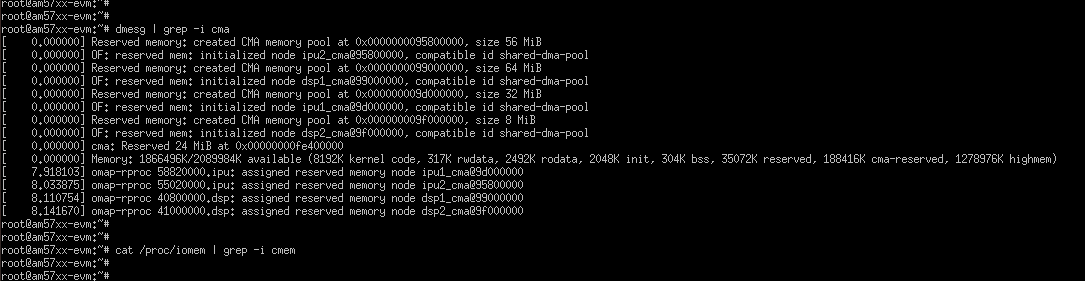
  • I should also note that dmesg reports CMA pools being created for different cores but /proc/iomem doesn't show any CMEM allocation:

    Thanks for your help,

    Dermot

  • Hi, Dermot,

    I tried running big data using SDK 4.3 prebuilt images and big data binaries but not seeing any issue. My modified cmem dts file not for running big data example, but for other application which requires adding an extra cmem block at 0xb000 0000. which you can see in my log when dump the /proc/cmem file. Hope this change does not confuse you from running the big data example.

    Did you use the prebuilt big data binaries or you rebuilt it? Did you download the big data DSP image by changing the soft link to big data DSP image? Below is my logs

    am57xx-evm login: root
    root@am57xx-evm:~# [ 19.054186] omap_hwmod: mmu1_dsp2: _wait_target_disable failed
    [ 19.066693] omap_hwmod: mmu0_dsp2: _wait_target_disable failed

    root@am57xx-evm:~# uname -a
    Linux am57xx-evm 4.9.69-g9ce43c71ae #2 SMP PREEMPT Tue May 22 11:09:56 EDT 2018 armv7l GNU/Linux
    root@am57xx-evm:~#
    root@am57xx-evm:~#
    root@am57xx-evm:~#
    root@am57xx-evm:~# cat /proc/cmem

    Block 0: Pool 0: 1 bufs size 0xc000000 (0xc000000 requested)

    Pool 0 busy bufs:

    Pool 0 free bufs:
    id 0: phys addr 0xa0000000

    Block 1: Pool 0: 1 bufs size 0xc000000 (0xc000000 requested)

    Pool 0 busy bufs:

    Pool 0 free bufs:
    id 0: phys addr 0xb0000000
    root@am57xx-evm:~# lsmod | grep cmem
    cmemk 35419 0
    root@am57xx-evm:~# dmesg | grep cmem
    [ 3.984692] cmemk: loading out-of-tree module taints kernel.
    [ 4.003672] cmemk initialized
    root@am57xx-evm:~# ls -l /lib/firmware/dra7-dsp1-fw.xe66
    lrwxrwxrwx 1 root root 54 Mar 26 15:34 /lib/firmware/dra7-dsp1-fw.xe66 -> /usr/bin/simple_buffer_example/release/server_dsp.xe66
    root@am57xx-evm:~# /usr/bin/simple_buffer_example/release/app_host DSP1
    --> main:
    [ 101.303934] omap_hwmod: mmu0_dsp2: _wait_target_disable failed
    [ 101.309829] omap-iommu 41501000.mmu: 41501000.mmu: version 3.0
    [ 101.317843] omap-iommu 41502000.mmu: 41502000.mmu: version 3.0
    --> Main_main:
    --> App_create:
    App_create: Host is ready
    <-- App_create:
    --> App_exec:
    CMEM_init success
    CMEM_getPool success
    CMEM_allocPool success: Allocated buffer 0xaa550000
    SharedRegion_setup success
    App_taskFxn: SR_1, base 0xaa550000, len=1000000
    HeapMem_setup success
    HeapMem_create success
    App_taskFxn: SR_1 heap, totalSize=16777216,totalFreeSize=16777216,largestFreeSize=16777216
    App_taskFxn: SR_1 heap, buf=0x0xaa550080,size=16777216
    App_exec: sending message 1
    Shared memory phys Addr ffffffffa0000000
    App_exec: sending message 2
    App_exec: sending message 3
    App_exec: message received 1
    App_exec: Preparing message 4
    App_exec: Sending message 4
    App_exec: message received 2
    App_exec: Preparing message 5
    App_exec: Sending message 5
    App_exec: message received 3
    App_exec: Preparing message 6
    App_exec: Sending message 6
    App_exec: message received 4
    App_exec: Preparing message 7
    App_exec: Sending message 7
    App_exec: message received 5
    App_exec: Preparing message 8
    App_exec: Sending message 8
    App_exec: message received 6
    App_exec: Preparing message 9
    App_exec: Sending message 9
    App_exec: message received 7
    App_exec: Preparing message 10
    App_exec: Sending message 10
    App_exec: message received 8
    App_exec: Preparing message 11
    App_exec: Sending message 11
    App_exec: message received 9
    App_exec: Preparing message 12
    App_exec: Sending message 12
    App_exec: message received 10
    App_exec: Preparing message 13
    App_exec: Sending message 13
    App_exec: message received 11
    App_exec: Preparing message 14
    App_exec: Sending message 14
    App_exec: message received 12
    App_exec: Preparing message 15
    App_exec: Sending message 15
    App_exec: message received 13
    App_exec: Preparing message 16
    App_exec: Sending message 16
    App_exec: message received: 14
    App_exec: message received: 15
    App_exec: message received: 16
    App_exec: Data check clean
    <-- App_exec: 0
    --> App_delete:
    <-- App_delete:
    <-- Main_main:

    Host: Test Passed
    <-- main:
    root@am57xx-evm:~# [ 112.487408] omap_hwmod: mmu1_dsp2: _wait_target_disable failed
    [ 112.501275] omap_hwmod: mmu0_dsp2: _wait_target_disable failed

    root@am57xx-evm:~#
  • Hi Rex,

    Thanks for your reply. I'm using the SDK 4.3 pre-built images only. I create an SD card using the create-sdcard.sh script with two partitions, one for boot (containing MLO, uEnv.txt and u-boot.img) and one for root (containing the rootfs).

    Even without attempting to run the Big Data IPC demo, I think my problem is the empty /proc/cmem. Does this get populated by the cmemk module when it loads? I tried unloading and reloading with insmod but I just used the sample parameters provided at processors.wiki.ti.com/.../CMEM_Overview however phys_start and phys_end get reported as unknown parameters. Where might I find the parameters used to load it from the rootfs? I presume it gets loaded somewhere but I'm having trouble finding where.

    Thanks,
    Dermot
  • Hi, Dermot,

    Using command line to configure CMEM was from much older release (MCSDK or may be Proc SDK 1.x or 2.x) though it should still work in the current release. The configuration has benn moved to using device tree and is in am57xx-evm-cmem.dtsi file. It's done during kernel boot using prebuilt images without any changes. Let me scratch my SD card and retry it so we are on the same page.

    Rex
  • Hi Rex,

    Yes - I just realised that it seems to get loaded without parameters from looking at the /etc/modules-load.d/cmemk.conf file.

    The cmem configuration in my am57xx-evm-cmem.dtsi file is:

    cmem {
    compatible = "ti,cmem";
    #address-cells = <1>;
    #size-cells = <0>;

    #pool-size-cells = <2>;

    status = "okay";

    cmem_block_0: cmem_block@0 {
    reg = <0>;
    memory-region = <&cmem_block_mem_0>;
    cmem-buf-pools = <1 0x0 0x0c000000>;
    };

    cmem_block_1: cmem_block@1 {
    reg = <1>;
    memory-region = <&cmem_block_mem_1_ocmc3>;
    };
    };


    Is there anyway that I can confirm that this dts include has made it into my actual booted system? I'm guessing because it's .dtsi and not .dts, there's not point in my looking for a corresponding .dtb file?

    Thanks,
    Dermot
  • Hi, Dermot,

    The dtsi file is included by the dts file. Check your u-boot logs to find out what board type it is and find the corresponding dts file.

    CPU : DRA752-GP ES2.0
    Model: TI AM572x EVM Rev A3
    Board: AM572x EVM REV A.30

    In my case, it is am57xx-evm-reva3.dts

    You can also find them in /proc/device-tree/reserved-memory.

    Rex
  • Hi Rex,

    Yes I think I can confirm that the dts file is am57xx-beagle-x15-revb1.dts.  It has a corresponding .dtb file in /boot on my device.

    It contains a model string : model = "TI AM5728 BeagleBoard-X15 rev B1";

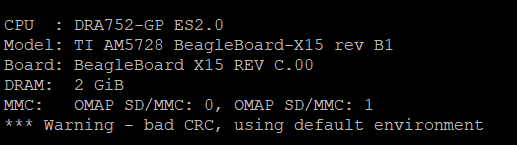
    which matches what gets posted during boot (presumably by u-boot):

    Presumably this matching string is how the correct .dtb file gets selected during the boot process?

    The last line of this dts file includes this cmem dtsi file:

    #include "am57xx-evm-cmem.dtsi"

    I'm still a newbie when it comes to u-boot and device tree but I think this looks OK?

    Thanks & I really appreciate your help!

    Dermot

  • Hi, Dermot,

    I think the issue is not CMEM, but OpenCL is running in the background. By default, OpenCL ti-mctd daemon is running when system boots up. Please follow the instruction in processors.wiki.ti.com/.../Processor_SDK_Big_Data_IPC_Examples to disable the ti-mctd. You will need to start lad server. It should work for you.

    I re-created the SD card using 4.3 release and here are the logs from running the example.

    am57xx-evm login: root
    root@am57xx-evm:~# ps aux | grep mctd
    root 462 0.0 0.0 201192 704 ? Ss 15:23 0:00 /usr/bin/ti-mctd
    root 1113 0.0 0.0 1960 1184 ttyS2 S+ 15:24 0:00 grep mctd
    root@am57xx-evm:~# systemctl stop ti-mct-daemon.service
    root@am57xx-evm:~# lad_dra7xx

    numProcessors = 5 id = 0 baseId = 0

    Spawned daemon: lad_dra7xx

    root@am57xx-evm:~# ls -l /lib/firmware/dra7-dsp1-fw.xe66
    lrwxrwxrwx 1 root root 54 Mar 26 2018 /lib/firmware/dra7-dsp1-fw.xe66 -> /usr/bin/simple_buffer_example/release/server_dsp.xe66
    root@am57xx-evm:~# /usr/bin/simple_buffer_example/release/app_host DSP1
    --> main:
    --> Main_main:
    --> App_create:
    App_create: Host is ready
    <-- App_create:
    --> App_exec:
    CMEM_init success
    CMEM_getPool success
    CMEM_allocPool success: Allocated buffer 0xaa648000
    SharedRegion_setup success
    App_taskFxn: SR_1, base 0xaa648000, len=1000000
    HeapMem_setup success
    HeapMem_create success
    App_taskFxn: SR_1 heap, totalSize=16777216,totalFreeSize=16777216,largestFreeSize=16777216
    App_taskFxn: SR_1 heap, buf=0x0xaa648080,size=16777216
    App_exec: sending message 1
    Shared memory phys Addr ffffffffa0000000
    App_exec: sending message 2
    App_exec: sending message 3
    App_exec: message received 1
    App_exec: Preparing message 4
    App_exec: Sending message 4
    App_exec: message received 2
    App_exec: Preparing message 5
    App_exec: Sending message 5
    App_exec: message received 3
    App_exec: Preparing message 6
    App_exec: Sending message 6
    App_exec: message received 4
    App_exec: Preparing message 7
    App_exec: Sending message 7
    App_exec: message received 5
    App_exec: Preparing message 8
    App_exec: Sending message 8
    App_exec: message received 6
    App_exec: Preparing message 9
    App_exec: Sending message 9
    App_exec: message received 7
    App_exec: Preparing message 10
    App_exec: Sending message 10
    App_exec: message received 8
    App_exec: Preparing message 11
    App_exec: Sending message 11
    App_exec: message received 9
    App_exec: Preparing message 12
    App_exec: Sending message 12
    App_exec: message received 10
    App_exec: Preparing message 13
    App_exec: Sending message 13
    App_exec: message received 11
    App_exec: Preparing message 14
    App_exec: Sending message 14
    App_exec: message received 12
    App_exec: Preparing message 15
    App_exec: Sending message 15
    App_exec: message received 13
    App_exec: Preparing message 16
    App_exec: Sending message 16
    App_exec: message received: 14
    App_exec: message received: 15
    App_exec: message received: 16
    App_exec: Data check clean
    <-- App_exec: 0
    --> App_delete:
    <-- App_delete:
    <-- Main_main:

    Host: Test Passed
    <-- main:
    root@am57xx-evm:~#
  • Hey Rex,

    I'll try building out an image again from the pre-built components. I had been stopping (and disabling) the ti-mct-daemon.service as per the "Running IPC Examples" link.

    Could you do me a favour and check that if you reboot your system, you can see content in /proc/cmem regardless of the state of the mct daemon?

    Thanks,
    Dermot
  • Hi, Dermot,

    Just noticed that my post this morning isn't shown in the thread for some reason. Let me recollect them.

    You don't need to rebuild the images. All binaries are included in the filesystem under /usr/bin/simple_buffer_example. Check my logs to see exact where they are located.

    Yes, I see content in /proc/cmem without killing ti-mctd daemon.

    Rex
  • Hi Rex,

    Yeah - same thing happened to my post yesterday - after spending some time writing detail, collecting screenshots, etc. the post seemed to get submitted OK but when I refreshed the page it was nowhere to be seen.  So, I ended up posting a more concise version  2nd time!

    Anyway, I decided to rebuild the kernel, modules and device tree binary just to see if that made a difference.

    Unfortunately, the "sudo make ARCH=arm INSTALL_MOD_PATH=/media/rootfs modules_install" command from the link below doesn't actually install the modules in the INSTALL_MOD_PATH.

    http://software-dl.ti.com/processor-sdk-linux/esd/docs/latest/linux/Foundational_Components.html#kernel 

    In fact, even to run with sudo, I had to change the command to avoid gcc being used instead of the arm cross compiler:

    sudo bash -c ' export CROSS_COMPILE=../../linux-devkit/sysroots/x86_64-arago-linux/usr/bin/arm-linux-gnueabihf- ; make ARCH=arm INSTALL_MOD_PATH=/home/dmurphy/my_build/modules/ modules_install'

    Regardless of whether I use sudo or not to make modules_install, nothing ends up in the INSTALL_MOD_PATH directory.  The Make just ends with the following output:

    ...

    CC sound/soc/generic/snd-soc-simple-card-utils.mod.o
    LD [M] sound/soc/generic/snd-soc-simple-card-utils.ko
    CC sound/soc/generic/snd-soc-simple-card.mod.o
    LD [M] sound/soc/generic/snd-soc-simple-card.ko
    CC sound/soc/omap/snd-soc-omap-hdmi-audio.mod.o
    LD [M] sound/soc/omap/snd-soc-omap-hdmi-audio.ko
    CC sound/usb/snd-usb-audio.mod.o
    LD [M] sound/usb/snd-usb-audio.ko
    CC sound/usb/snd-usbmidi-lib.mod.o
    LD [M] sound/usb/snd-usbmidi-lib.ko
    dmurphy@tibuilder:~/ti-processor-sdk-linux-am57xx-evm-04.03.00.05/board-support/linux-4.9.69+gitAUTOINC+9ce43c71ae-g9ce43c71ae$

    I may have to raise this issue under another E2E support request.


  • Dermot,

    If gcc is called instead of the cross-compiler, it means your PATH isn't set to point to the cross-compiler. Be sure it points to the directory containing arm-linux-gnueabihf-gcc.

    I didn't have issue when I did the installation. Do you see contents in /media/rootfs or where the mount point is? Be sure the mount point is correct.

    Rex
  • Thanks Rex,

    I got the module build issue resolved; apparently the install path has to be the root of an actual file system to work. The issue with adding the compiler path to $PATH is that the non-relocatable PERL issue manifests itself so I was advised (from another E2E thread) that the best way to deal with this issue is to include the full path in the make command (CROSS_COMPILE=../../linux-devkit/sysroots/x86_64-arago-linux/usr/bin/arm-linux-gnueabihf-). This works fine for me.

    Anyway, I installed the newly built kernel, modules and device tree binary straight to the target rootfs on the microSD card.

    It all went fine and I can boot without issue. Unfortunately, I'm still seeing an empty /proc/cmem even though the cmemk module is loaded successfully.

    By deleting all of the DTB files from /boot, I was able to determine that it's actually the X15 rev C binary and not the rev B1 binary that gets looked for during boot up:

    ** File not found /boot/am57xx-beagle-x15-revc.dtb **

    So, I copied that over to /boot and tried booting again which was successful.

    Now that I know this, I guess the root cause of my issue is that while the X15 rev B1 dts has this include statement at the very end of the file:
    #include "am57xx-evm-cmem.dtsi" the rev C dts does not.

    I'm hoping that I can add this line to the rev C dts, re-compile and that will finally resolve the issue. If it does, I'm guessing this is an actual bug that should get logged somewhere? Unless it's by design for some reason that I'm not aware of.

    Thanks for your continued help,
    Dermot

  • Well some good news at last!

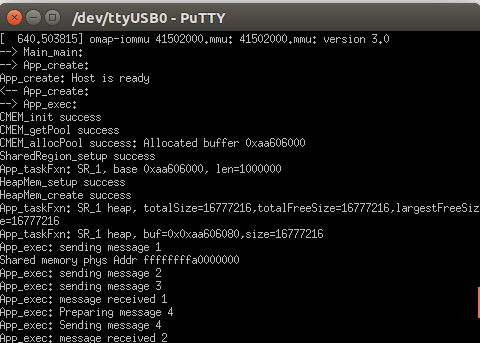
    And consequently, the Big Data IPC application runs OK too:

    So I guess this is a bug with the X15 rev C device tree file.

    I'm going to go ahead and mark this thread as resolved.

    Best regards,

    Dermot